Browse by category

Introduction: Why Document Control Matters on the Manufacturing Floor
A single outdated work instruction on the shop floor can trigger scrap, rework, or an audit finding in minutes. That risk is not theoretical: poor quality costs manufacturers 15% to 20% of sales revenue in many operations, according to industry estimates from ASQ. In that context, document control is not just an admin task. It is the discipline of making sure the right quality document is reviewed, approved, current, traceable, and available at the point of use.
That is different from general document management, which focuses mainly on storing and organizing files. In manufacturing, controlled documents include SOPs, work instructions, specifications, inspection standards, and forms that directly affect product quality and compliance. Quality Managers and Document Controllers care because auditors will ask who approved a change, when it was released, and how obsolete versions were prevented from reaching operators.
The problem is especially visible in plants with frequent engineering changes, multi-shift production, or mixed paper-and-digital systems. This article explains how to manage document control in manufacturing with practical steps, common failure points, and system design guidance relevant to general manufacturing.
What Controlled Documents Need to Include for Quality and ISO 9001 Compliance
Document Identification and Revision Control
For quality teams, the first requirement of document control is simple: every controlled document must be uniquely identifiable. That usually means a document title, document number, owner, department, effective date, and revision level. If two files are both called “Packing SOP Final,” you do not have control; you have ambiguity. Clear identification is the foundation of how to manage document control in manufacturing because it lets anyone confirm exactly which instruction, procedure, or specification is valid.
Revision status must be just as visible as the document name. Operators, supervisors, auditors, and engineers should be able to see whether they are looking at Rev. B or Rev. C without opening three folders or checking email history. Good practice also includes a brief revision summary so users know what changed and why.
Review, Approval, and Release
ISO 9001 document control requirements are often described in technical language, but the practical expectation is straightforward: documents must be reviewed and approved before use, then reviewed again when they change. A draft work instruction is not controlled just because it exists in a shared folder. It becomes controlled only after the right people verify technical accuracy, quality impact, and operational usability. In most plants, that means document control is tied directly to review authority, not only file storage.
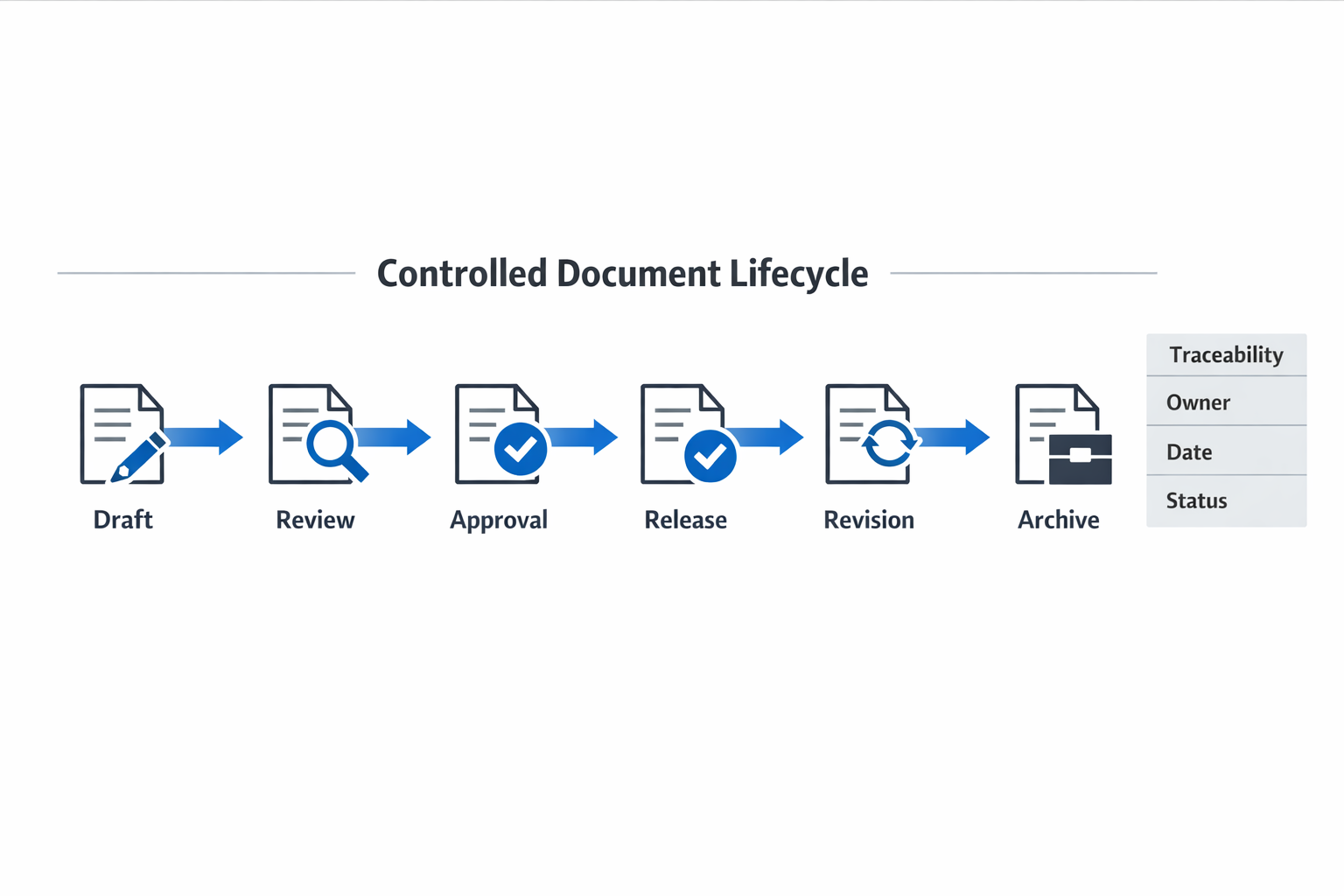
A controlled document typically moves through a defined lifecycle: draft, review, approval, release, revision, and archive. Each stage should have a status, responsible role, and decision record so there is no uncertainty about whether the document is ready for use.
Access, Distribution, and Obsolete Document Prevention
Control also means limiting access appropriately. Not everyone should be able to edit a master SOP, approve a test method, or delete a released specification. At the same time, the people who need to follow a document on the shop floor must be able to access the current approved version quickly, whether digitally or at a controlled print point.
ISO 9001 also expects organizations to prevent unintended use of obsolete documents. In practice, this means old revisions should be removed from active folders, clearly marked if retained for reference, and blocked from production use. For example, an archived welding parameter sheet may need to be kept for traceability, but it should never sit beside the live version without obvious status labeling. That distinction protects both compliance and day-to-day execution.
Different Rules for Different Document Types
Not all controlled documents behave the same way. SOPs and work instructions need strict revision visibility because they guide tasks directly, while technical specifications require tighter engineering approval because product requirements are at stake. Forms must be controlled before use, so teams collect the right data, but once completed, they become records and should not be edited casually. Records such as inspection reports, training logs, and calibration certificates are controlled mainly through retention, traceability, and retrieval rules rather than repeated content revision.
How to Manage Document Control in Manufacturing Step by Step
If you want to know how to manage document control in manufacturing, the key is to turn policy into a repeatable workflow. In practice, that means deciding who can request a change, who must review it, how revisions are identified, when documents are released, and what happens to the old version. For this section, follow one electronics manufacturer updating an assembly work instruction for a PCB soldering station after a process change.
Audit the Existing Document and Trigger the Change
The process starts with a document audit, not with editing. The Quality Manager checks whether the current work instruction, WI-ASM-014, is still aligned with the released process, tooling, inspection criteria, and operator method. In this case, engineering has changed solder temperature limits, so the existing instruction is no longer fully accurate, and a document change request is opened.
At this stage, you should also confirm whether related files need updating, such as inspection checklists, training records, control plans, or visual aids posted at the line. This prevents partial updates that create gaps between departments. It also supports ISO 9001 document control requirements by making sure changes are reviewed in context, not as isolated file edits.
Define Ownership, Naming Rules, and Metadata
Once the change is justified, assign one owner for the revision. In the electronics plant example, manufacturing engineering drafts the update, quality reviews technical accuracy, and the Document Controller manages numbering, status, and release. Clear ownership reduces the common problem of multiple people circulating “final” copies.
Standardize the document structure before routing it for approval. The revised instruction should keep a consistent naming convention, document number, revision code, effective date, department, product family, and reason for change. With that metadata in place, anyone searching later can distinguish Rev. 06 from Rev. 05 without opening several similar files.
Map the Approval Workflow and Review Cycle
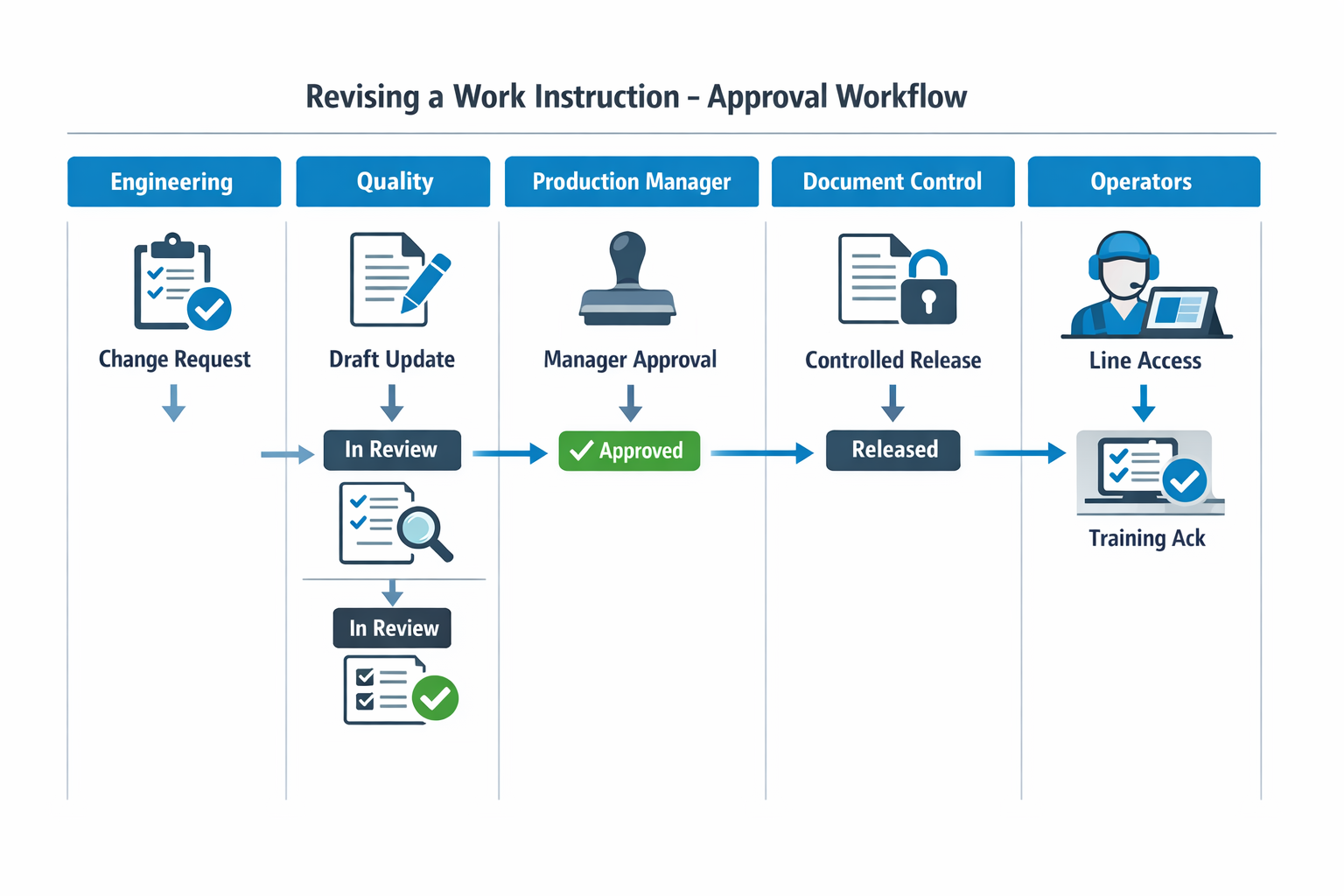
Next, map the actual workflow from request to release. For WI-ASM-014, the route may be: change request submitted, draft prepared by engineering, reviewed by quality, approved by production manager, released by document control department, then distributed to the SMT line supervisors and operators. Each handoff should have a status, due date, and decision record so the document does not stall in inboxes.
Review frequency should also be defined at release, not left for later. A high-change instruction like a soldering work instruction may need scheduled review every 12 months, or sooner if there is an engineering change, customer complaint trend, or process deviation. That is how document control stays active instead of becoming a filing exercise.
Release, Acknowledge Training, and Retire the Old Version
After approval, publish the new version through controlled access only. Operators should see Rev. 06 at the point of use, while Rev. 05 is removed from shared folders, printed binders, and local desktops and moved to archive status. That release rule is one of the most practical benefits of a document control system because it reduces ambiguity immediately.
The last step is confirmation, not assumption. Supervisors collect operator training acknowledgment for the revised solder limits, and the Document Controller closes the change only after the new instruction is active and the obsolete version is retired.
Common Failure Points in Manual Document Control Systems
Shared Drives Create Version Confusion
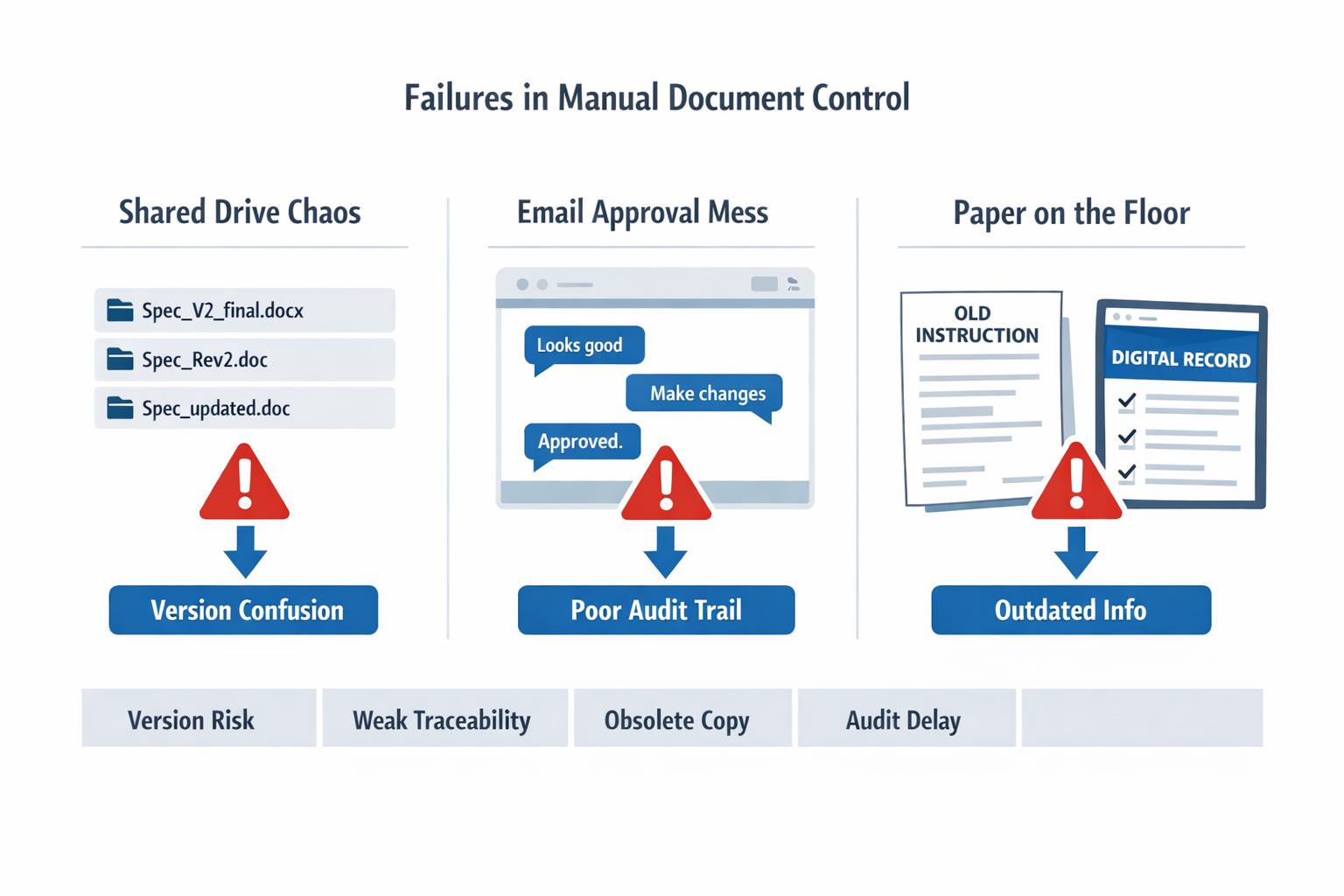
In many plants, the first breakdown in document control happens in the shared drive. Files are copied into local folders, renamed with inconsistent suffixes such as “final,” “final v2,” or “latest approved,” and then circulated again by email. The result is simple but costly: nobody can confirm the current released version without checking several places. That directly undermines how to manage document control in manufacturing, because control depends on one trusted source rather than multiple unofficial copies.
A general job shop feels this problem quickly because routers, setup sheets, and inspection instructions change often across short production runs. If the machinist on second shift opens a file from an old desktop folder, the shop may run the right part with the wrong tolerance note or sampling requirement. The error may not surface until final inspection, scrap review, or a customer complaint. Manual storage looks cheap, but the operational cost shows up later in rework, delays, and investigation time.
Email Approvals Leave Weak Audit Trails
Email-based approval looks workable until someone needs proof. A quality manager may have the revised procedure, while engineering has a separate email chain with comments, and production has only the PDF attachment that was printed last week. During an audit, reconstructing who reviewed what, when it was approved, and whether release happened before use can take hours.
This risk is sharper in automotive supply chains, where engineering changes can move fast, and traceability expectations are high. A tier supplier may receive a customer specification update on Monday, revise the control plan on Tuesday, and push new work instructions by Thursday. If approvals sit across inboxes, there is no reliable sequence of review, approval, release, and withdrawal of the old version. In an IATF-linked environment, that gap is not minor administration; it can become a finding tied to change control discipline.
Paper Copies Drift Out of Control on the Shop Floor
Uncontrolled printouts create a different failure mode: the system of record may be correct, but the point of use is not. In electronics assembly, operators need the current visual work instruction at the line, not a binder page printed before the last component substitution. When supervisors print extra copies for convenience, old pages often remain at benches, reappear in shift handovers, or get reused during line balancing.
Shared drives hide versions, paper binders slow updates, and email approvals fragment traceability. A workflow-based digital setup makes failure modes visible by tying status, approver, release date, and obsolete versions to one record.
The Benefits of a Document Control System
Better Control Delivers Measurable Operational Gains
Once your document control process is standardized, the payoff is not just cleaner paperwork. Manufacturers typically see fewer process deviations, faster engineering-to-production updates, and less time lost searching for the right file during audits or line support. In regulated sectors, poor document practices are a common contributor to nonconformities. The real benefits of a document control system show up in daily execution: fewer errors at the workstation and fewer approval bottlenecks upstream.
In the electronics manufacturer from the earlier example, the revised assembly work instruction for a PCB soldering step used to take several days to move from engineering to quality approval to line release. After digitization, the same change follows a routed workflow with required reviewers, automatic reminders, and release rules tied to approval status. That shortens approval cycle time and reduces the risk that production starts before the updated instruction is formally released. It also gives the Quality Manager a clear record of who approved what, when, and why.
What a Better Setup Should Include
A stronger setup starts with a central repository, but storage alone is not enough. You need one controlled source for SOPs, work instructions, specifications, forms, and related records, with metadata such as document type, owner, revision, effective date, and production area. This is what makes document control in manufacturing practical rather than theoretical, because retrieval, filtering, and review become operational tasks instead of manual detective work. It also supports ISO 9001 document control requirements by making current status visible and obsolete versions easy to segregate.
Role-based permissions are equally important. Engineers may draft revisions, quality may approve them, supervisors may release them to production, and operators may only view the latest effective version. That permission structure protects against unauthorized edits while still keeping documents accessible to the people who need them. In practice, this is a major part of how to manage document control in manufacturing without slowing the plant down.
Point-of-use access matters most on the shop floor. In the electronics example, operators scan a QR code at the SMT line to open the current approved work instruction on a tablet, rather than relying on an old printed copy in a binder. If the instruction changes again, the QR code still points to the latest effective revision, not a static file.
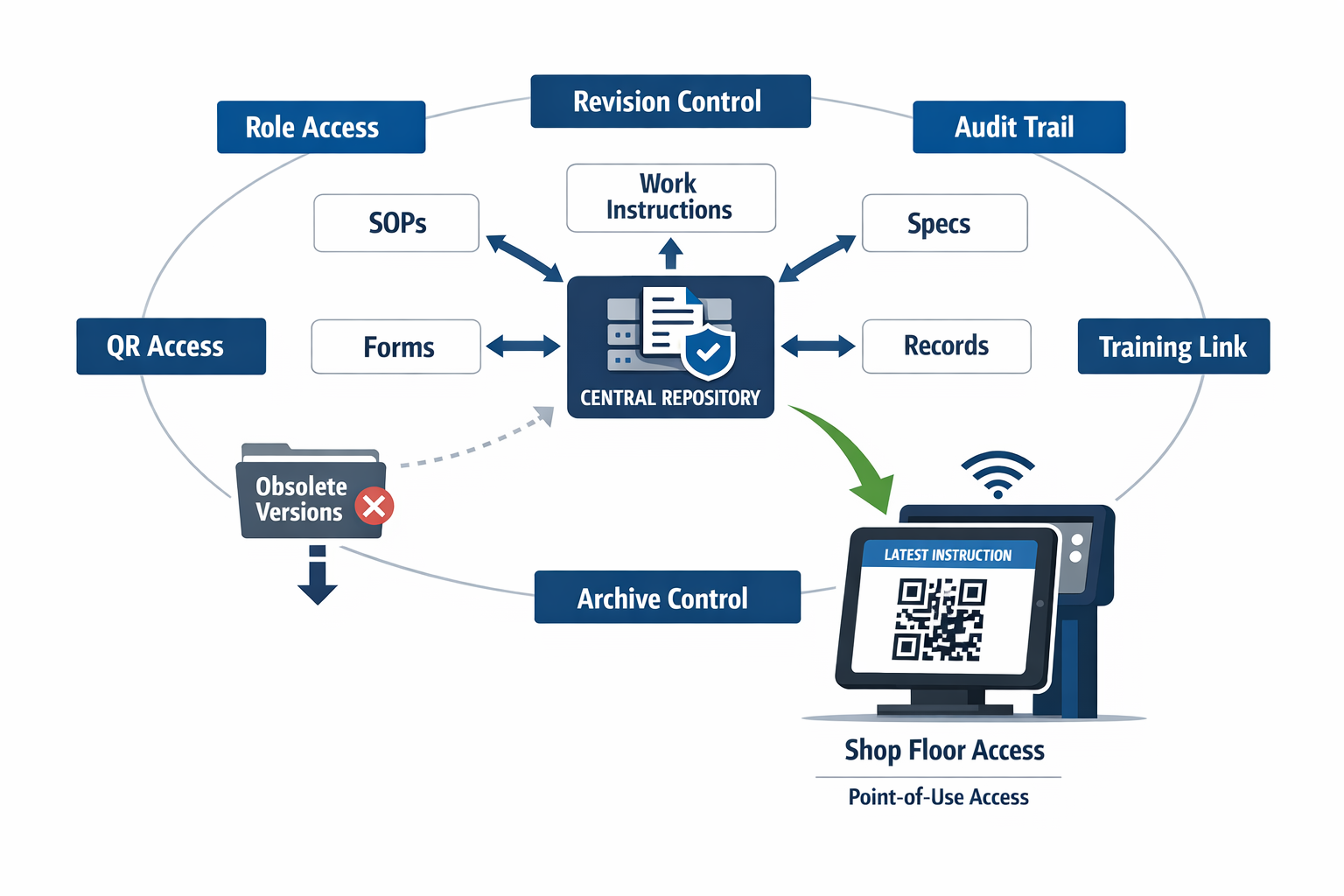
A modern setup should also maintain a complete audit trail, showing revision history, approver comments, release dates, and archive status. That gives you cleaner change control and much faster evidence retrieval during customer or certification audits. Just as important, document changes should link to training acknowledgments, deviation handling, or CAPA workflows when needed. Platforms such as Jodoo help manufacturers build these connected approval and training flows without custom development, so document control becomes part of execution, not a separate admin task.
Conclusion: Build a Practical Document Control System with Jodoo
Effective document control in manufacturing is not just about storing files in a shared folder. It depends on clear ownership, disciplined version control, approved review workflows, role-based access, and a reliable audit trail that shows who changed what, when, and why. When those controls are weak, plants face predictable risks: outdated work instructions at the line, slow audit response, and avoidable quality deviations.
The practical goal is simple: make sure the right people can access the right approved document at the right time, while obsolete versions are removed from use. That is what supports ISO 9001 compliance in day-to-day operations, whether you are managing SOPs, specifications, forms, or operator instructions. A strong setup also reduces approval delays and makes engineering or quality changes easier to release consistently across shifts and sites.
If you want to move beyond shared drives and manual approval chains, Jodoo can help. As a no-code lean manufacturing platform, Jodoo lets you build document approval workflows, control access by role, and deliver current digital work instructions to the shop floor without a heavy IT project. You can start a free trial or book a demo to see how it fits your document control process.