Browse by category

Introduction: Why QMS Software Matters More Than Ever for Manufacturers in 2026
A single quality escape can now trigger far more than a customer complaint. In manufacturing, the cost of poor quality is often estimated at 15% to 20% of sales, and for regulated or high-mix sectors, one missing record can delay shipments, trigger audits, or expand a recall scope. That is why QMS software has moved from a compliance tool to an operational priority for both quality managers and IT managers.
In 2026, the buying problem is tougher than it was a few years ago. Customers want faster response times, tighter traceability, and clearer proof of control across suppliers, plants, and production lines. At the same time, many manufacturers still run CAPA, nonconformance tracking, audit follow-up, and document approvals through spreadsheets, email, and disconnected systems that are hard to scale.
This article is designed to help you evaluate modern quality management options with less guesswork. We will compare what today’s electronic quality management software should actually do, explain which features matter most, and show how to choose a system that fits general manufacturing, automotive, and electronics environments without overbuying or underbuilding.
What Modern QMS Software Should Do for Manufacturing Teams
Modern QMS software should help quality teams run work, not just store records for audits. In manufacturing, that means connecting deviations, approvals, containment actions, operator checks, supplier issues, and training records in one system that people actually use on the shop floor. The real benefits of using electronic quality management software appear when quality events move faster, evidence is easier to retrieve, and recurring issues are less likely to return. That is also why buyers asking how to choose QMS software should start with operational fit before they compare vendor claims.
CAPA and Nonconformance Management
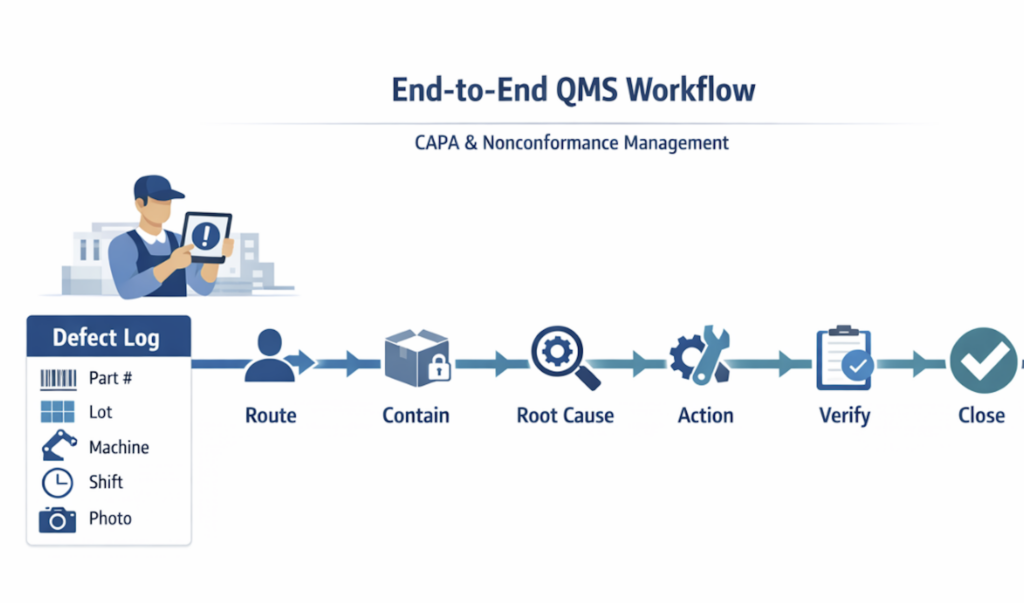
A manufacturing-focused quality management system should make nonconformance handling structured from the first report. Operators, inspectors, or engineers need to log defects with part number, lot, shift, machine, photos, and disposition status without relying on email or paper tags. The system should then route the issue to the right owner, trigger containment, and preserve a clear audit trail of who made each decision. In a machining plant, for example, a bore tolerance issue should move from detection to quarantine and review in minutes, not after the next production meeting.
CAPA should sit on top of that nonconformance process, not outside it in a separate module nobody updates. A good system links root cause analysis, corrective actions, preventive actions, due dates, effectiveness checks, and closure approval to the original quality event. That gives teams one traceable path from issue capture to verified resolution, which is essential for customer complaints, repeat defects, and internal escapes. When people evaluate key features to look for in a QMS platform, this end-to-end workflow matters more than a long generic feature list.
Document Control That Supports Daily Execution
Document control in manufacturing is not just version storage. Work instructions, control plans, inspection standards, and corrective action procedures must be accessible at the point of use, with revision history, approval routing, and role-based access. If operators still print old SOPs or supervisors circulate uncontrolled PDFs on chat apps, the document system is not doing its job. In electronics assembly, a single outdated torque or soldering standard can create scrap across multiple workstations before anyone notices.
Modern electronic quality management software should also connect documents to the process that uses them. A training record should show which revision an employee was trained on, and an audit finding should link directly to the applicable procedure. Legacy systems often handle document approval well but become rigid when teams want to add acknowledgments, retraining triggers, or plant-specific exceptions. That gap is where compliance exists on paper, but execution breaks down in production.
Audits, Inspections, and Training
Audits and inspections should be treated as recurring operational workflows, not isolated checklists. Good QMS software lets teams schedule internal audits, process audits, layered audits, and in-process inspections, then capture evidence with mobile forms, timestamps, signatures, and photo attachments. If an auditor finds an issue, the finding should convert into a nonconformance or CAPA without re-entry. That saves time and reduces the data loss that happens when plants manage audits in one tool and corrective actions in another.
Training management should work the same way: tied to change, risk, and accountability. When a revised work instruction affects incoming inspection or final test, the system should identify impacted roles, assign training, track completion, and block uncontrolled sign-off. Manufacturers in regulated or customer-audited environments especially need that link between document changes and workforce readiness. It is a practical requirement, not an administrative extra.
Supplier Quality and Adaptability
Supplier quality is another core workflow buyers should expect. A capable platform tracks supplier nonconformances, incoming inspection results, corrective action requests, approval status, and recurring defect trends by supplier, commodity, or site. In automotive and mixed-mode manufacturing, this helps purchasing, quality, and operations act on the same data instead of trading spreadsheets before every supplier review. Strong traceability here shortens response time when a bad batch affects multiple orders.
What separates modern QMS software from legacy systems is adaptability. Quality processes change with customers, product lines, and site maturity, so the system should support configurable workflows, forms, fields, and notifications without months of rework.
Key Features to Look for in a QMS Platform in 2026
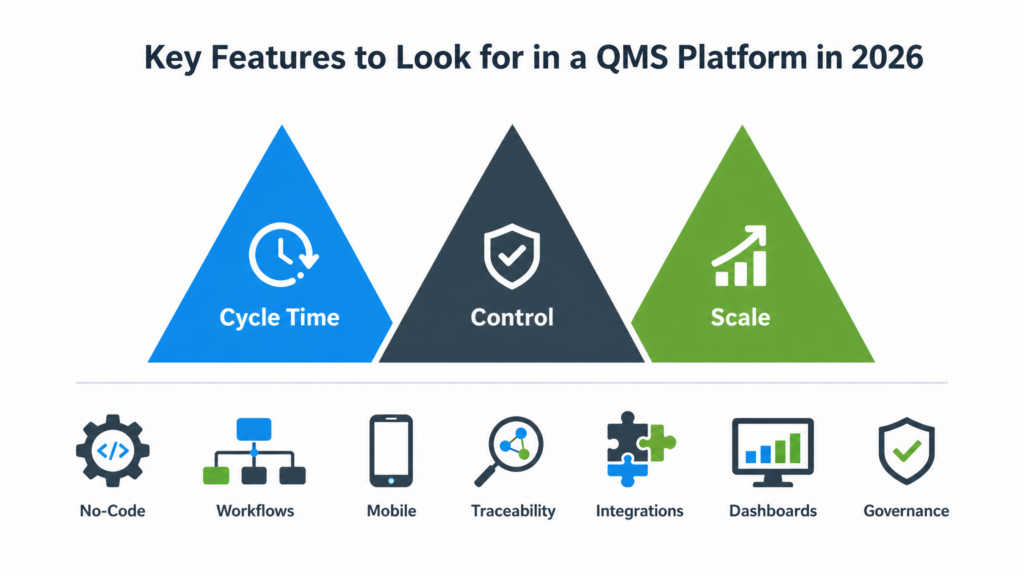
A useful way to evaluate suitable QMS software in 2026 is to score each feature against three questions: does it reduce quality cycle time, does it improve control, and does it scale across plants or suppliers? That approach keeps the discussion focused on operational value instead of long feature lists. It also helps both Quality and IT teams align on what matters most before they decide how to choose QMS software.
No-Code Configurability
Many platforms claim to cover every quality process, but the real test is how quickly your team can adapt forms, routing rules, and approval logic when customer or plant requirements change. In automotive, a containment workflow may need extra review steps for safety-related defects, while an electronics plant may need stricter lot-level data capture for component traceability. If every change requires vendor services or internal coding, the system becomes a bottleneck instead of a control layer.
This is why no-code or low-code configurability has moved into the top tier of key features to look for in a QMS platform. Quality managers need to adjust inspection plans, CAPA fields, and escalation paths without waiting months for a release cycle. IT managers, meanwhile, need guardrails, version control, and maintainability so local flexibility does not create system sprawl.
Role-Based Workflows and Permissions
A modern quality system should not treat every user the same. Operators, line leaders, supplier quality engineers, document controllers, and plant managers all need different actions, visibility, and approval authority. Strong role-based workflows reduce the risk of skipped reviews, unapproved document edits, or informal closure of nonconformance records.
Granular permissions matter just as much as workflow routing. In a mixed-mode manufacturer that runs both make-to-stock and engineer-to-order products, one plant may need broad access to shop-floor inspection records. At the same time, corporate quality should control master procedures and audit templates. The benefits of using electronic quality management software are highest when access is precise enough to support compliance without slowing normal work.
Mobile Data Capture and Traceability
If quality data still depends on delayed desktop entry, response time suffers. Mobile forms, barcode scanning, photo capture, and on-site signoff allow teams to log defects where they occur, attach evidence immediately, and trigger follow-up actions without transcription delays. That matters in electronics assembly, where a mislabeled reel or solder defect can affect multiple work orders within hours.
Traceability should connect records across the full chain: issue, part or lot, machine, operator, supplier, action, and closure. For automotive suppliers, that linkage is critical during customer complaints or layered audits because teams must quickly and defensibly reconstruct what happened. A platform that stores disconnected records may look complete on paper but still fail under real investigation pressure.
Integrations and Dashboards Turn Quality Data Into Action
A QMS platform should not operate as an isolated repository. It needs practical integration with ERP, MES, maintenance, and supplier systems so part masters, production orders, calibration status, and supplier data do not have to be re-entered manually. For IT teams, API availability and integration options often determine whether the system becomes part of the operating stack or another silo.
Dashboards are equally important, but only if they support decisions. Useful quality dashboards show open CAPAs by aging, repeat defects by line, supplier PPM trends, audit closure rate, and training completion by role. In a multi-site environment, standardized dashboards help corporate teams compare plants consistently while still letting local leaders act on their own data.
Multi-Site Governance Should Be Built In, Not Added Later
For companies with several plants, governance becomes a feature, not an afterthought. The platform should support shared templates, site-level variations, centralized document control, audit trails, and policy changes that can be rolled out without breaking local workflows. That balance is often what separates a pilot-friendly tool from one that can support enterprise-quality operations.
How to Choose QMS Software Without Overbuying or Underbuilding
Start With Your Operating Reality, Not the Vendor Demo
If you are deciding how to choose QMS software, begin with the shape of your quality operation rather than a long feature checklist. A mid-sized electronics manufacturer with one main plant, two contract suppliers, and spreadsheet-based CAPA tracking needs a very different system from a global automotive group managing PPAP, APQP, and customer-specific requirements across ten sites. The fastest way to overbuy is to select for future complexity that may never arrive. The fastest way to underbuild is to ignore current audit pressure, traceability demands, and the number of teams that must work in one process.
In our example, the manufacturer has 450 employees, one assembly plant, and recurring issues with nonconformance logging, document revision control, and supplier corrective actions. Quality owns the process, but IT has limited bandwidth and cannot support a long custom development project. That starting point matters because the right decision is not just about the key features to look for in a QMS platform. It is about how much structure, speed, and governance the business can realistically absorb in the first 12 months.
Map Complexity Before You Compare Products
A practical buying process starts with five filters: plant complexity, regulatory pressure, internal IT capacity, rollout speed, and total cost of ownership. Plant complexity includes the number of sites, product variants, routing changes, and supplier dependencies. Regulatory pressure covers whether you need basic ISO alignment, customer audit readiness, or strict sector controls such as IATF 16949 or FDA-oriented documentation. These factors will quickly narrow which category of system makes sense.
For the electronics manufacturer, plant complexity is moderate, regulatory pressure is meaningful but not extreme, and rollout speed is urgent because customers are asking for cleaner traceability during audits. IT capacity is low, which rules out any option requiring months of data modeling and custom interfaces before frontline users can log issues. This is where the benefits of using electronic quality management software become a buying criterion, not just an outcome. If the system cannot replace spreadsheet chasing quickly, the project loses support.
Compare the Three Main Implementation Paths
Traditional legacy QMS systems usually fit companies that want proven module depth and can tolerate slower change cycles. They often come with rigid structures, heavier configuration support, and interfaces that feel disconnected from daily shop-floor work. Heavyweight enterprise suites fit large multi-site manufacturers that need broad governance, formal validation, and deep connections to ERP, PLM, and supplier systems, but implementation often takes 6 to 18 months and carries higher services costs. Flexible workflow platforms fit manufacturers that need structured quality processes faster, especially when teams must digitize CAPA, audits, document approvals, and supplier actions without waiting for major IT development.
In the running example, a legacy system would likely formalize the process but slow adoption because operators and supervisors are moving from email and Excel, not from an existing enterprise workflow stack. A full enterprise suite may solve future needs, yet it would introduce more controls, consulting hours, and data migration effort than the plant currently needs. A flexible platform is more likely to match the company’s immediate target: standardize core quality workflows in one plant, prove usage, then expand.
Prioritize Adoption Risk and Change Effort
Most QMS projects fail less on missing features than on low daily usage. Ask who will create records, who must approve them, how many exceptions occur, and how often forms or routing rules change. If every change request needs vendor services or scarce developer time, the process will drift back to offline workarounds. For a mid-sized manufacturer, adaptability often matters more than maximum module breadth.
Build a Phased Decision
For the electronics plant, phase one should cover nonconformance, CAPA, document control, and supplier corrective action with clear ownership and dashboards. Phase two can extend into training records, audit scheduling, and broader traceability links. This phased approach keeps software selection tied to business value, which is the most reliable way to choose QMS software without paying for complexity you will not use or accepting limitations you will outgrow too soon.
Where Jodoo Fits for Manufacturing Quality Teams
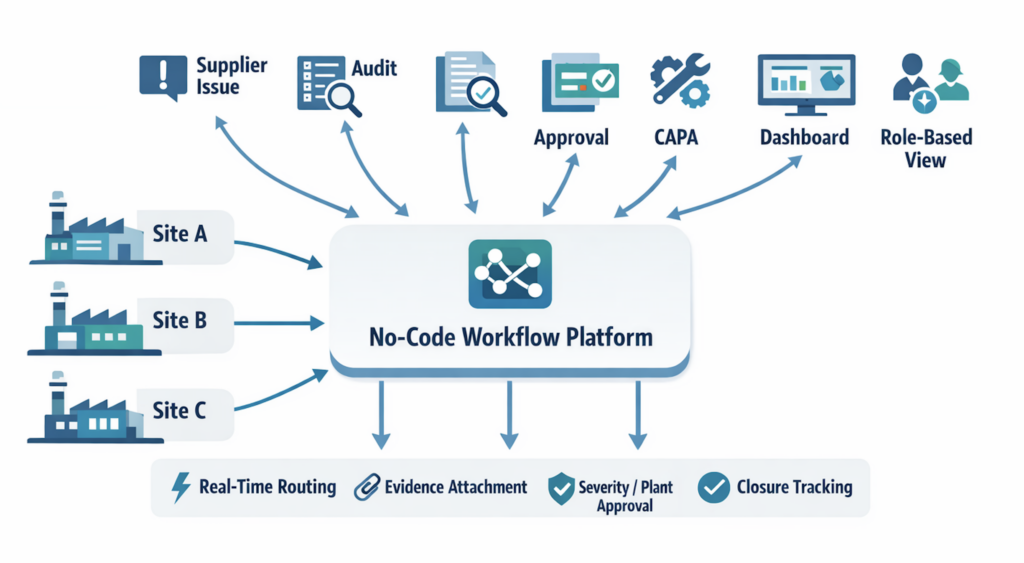
Jodoo fits best when a manufacturer needs to digitize quality workflows fast but does not want to wait for a long custom software cycle. Instead of forcing teams into rigid modules, Jodoo lets operations and quality teams build structured apps for Layered Process Audits, document control requests, supplier incident tracking, deviation approvals, and follow-up actions using no-code forms, workflows, and dashboards. That makes it especially relevant for plants where quality processes evolve with customer requirements, product changes, or supplier risk.
Jodoo’s no-code app builder also supports fast iteration of quality workflows. Teams can add fields, change approval logic, create role-based views, and connect records across audits, documents, and supplier cases while preserving traceability and access control. For IT managers, that reduces dependency on one-off internal builds; for quality managers, it shortens the gap between identifying a control weakness and deploying a better process.
Conclusion: Choose QMS Software That Fits How Your Quality Team Actually Works
The right quality management software is not automatically the biggest suite or the most feature-heavy platform. For most manufacturers, the better choice is the system that fits daily quality work: handling CAPAs, nonconformance reviews, audits, document control, training records, and supplier follow-up without creating unnecessary IT burden. Quality managers need usability on the shop floor, while IT managers need security, integration, traceability, and maintainable governance across sites.
That is why your evaluation should come back to a few practical questions. How complex are your workflows today, how fast do they change, how many teams need to participate, and how much internal IT capacity do you really have for implementation and support? A good fit should improve response speed, standardize execution, and strengthen audit readiness without locking your team into a slow change cycle.
If you want a more flexible approach, Jodoo is worth evaluating as a no-code lean manufacturing platform for digitizing quality processes faster. You can build and adapt workflows for inspections, corrective actions, document approvals, and supplier quality with less dependence on custom development. If that matches your priorities, you can start a free trial or book a demo to see how it fits your manufacturing environment.