Introduction: Why Quality Inspection Software Matters for Modern Manufacturing
A single missed defect can trigger scrap, rework, customer complaints, or even a line stop that costs thousands of dollars per hour. Yet many factories still rely on paper check sheets, Excel files, and delayed manual reporting to manage quality. That is why quality inspection software is becoming a priority for manufacturers that need faster decisions on the shop floor, not after the shift has ended. In practical terms, it is a digital system that helps teams capture inspection results, standardize checks, attach photos, flag nonconformances, and monitor quality data in real time.
Imagine a production manager at an automotive parts plant who discovers a dimensional issue only after several pallets have already moved downstream. Or a QC supervisor in an electronics factory who has to chase paper records across multiple lines before deciding whether to stop production. These delays are expensive: poor quality is estimated to consume 10% to 20% of sales revenue in many manufacturing businesses through scrap, rework, returns, and warranty costs.
This article explains how going paperless improves inspection speed, defect response, traceability, and live quality visibility. You will also learn what features to look for, how digital inspections work in real factory settings, and how platforms like Jodoo help manufacturers build quality processes that match their operations.
The Hidden Costs of Paper-Based Inspections and Disconnected QC Processes
Paper Does Not Just Slow Inspections — It Distorts Quality Response
Paper-based QC often looks inexpensive on the surface, but the real cost shows up in delayed decisions, missed trends, and weak follow-through. When inspection records sit in binders, clipboards, or Excel files saved on individual laptops, quality teams lose the ability to act while production is still running. In practice, that means a defect found at 9:00 a.m. may not reach the line leader, process engineer, or supplier quality team until hours later. By then, the plant may have already produced another batch of suspect material.
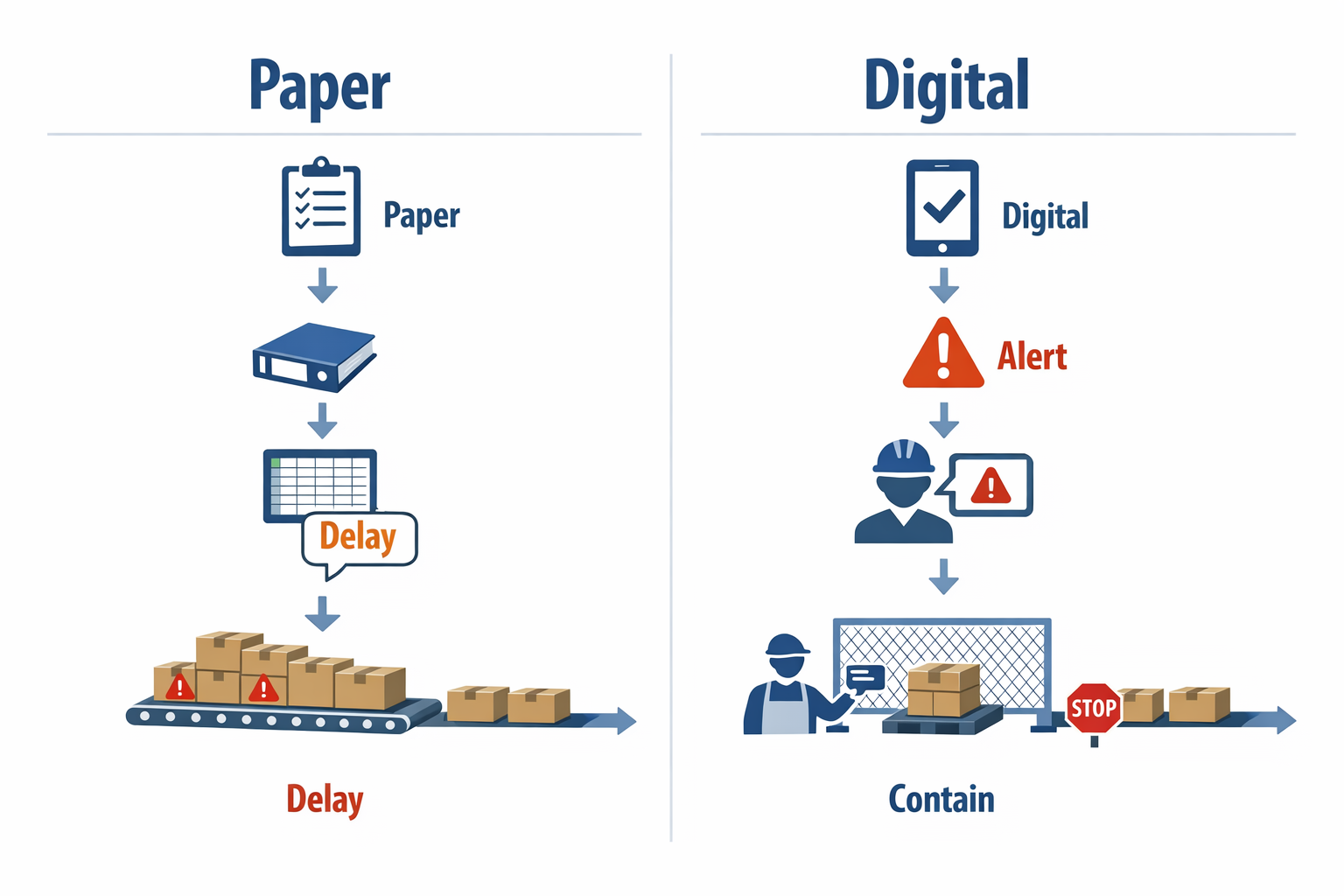
This is where the gap between manual checks and digital quality inspection becomes expensive. Manufacturers with mature digital quality systems can flag recurring defects immediately, route alerts automatically, and tie inspection findings back to line, operator, shift, lot, and machine conditions. A disconnected process cannot do that reliably. Instead of controlling quality in real time, the team is reviewing quality after the damage is done.
Lost Context Across Shifts, Lines, and Suppliers
The bigger issue is not only missing forms, but missing context. A paper form might show that a dimension was out of spec, but it often does not connect that result to the exact production order, supplier batch, tool change, or previous shift history. Without that link, supervisors spend valuable time asking basic questions that a connected inspection management software system should answer in seconds.
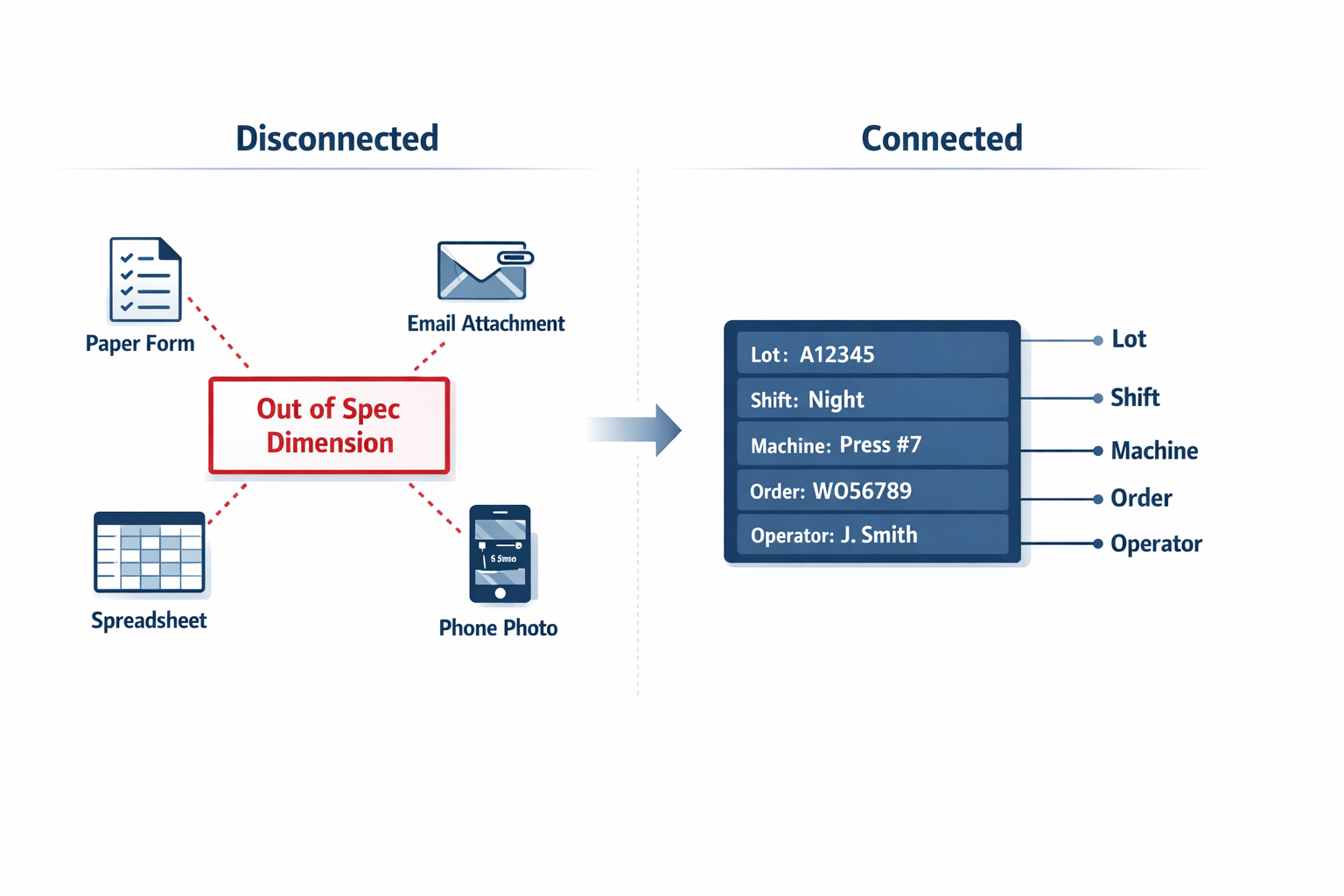
Imagine a production manager at an electronics assembly plant who sees a rise in solder joint failures during final inspection. The day shift recorded defects on paper, the night shift used a spreadsheet template with different fields, and supplier incoming checks were stored in email attachments. Because the records are fragmented, the team cannot quickly see whether the issue came from one supplier lot, one SMT line, or one operator team. What should have been a two-hour root-cause review becomes a two-day data chase.
Inconsistent Checklists Create Inconsistent Quality
Manual environments also struggle with checklist control. Different inspectors often use different versions of the same form, especially across multiple lines or plants, and that leads to uneven inspection coverage. One team may check seal integrity and label print clarity, while another skips one of those points because their printed checklist is outdated. This is a common reason plants start looking for inspection checklist software instead of relying on static forms.
In a food packaging facility, for example, QA may update allergen label verification steps after a customer complaint, but paper forms on the floor may not reflect that change until the next print cycle. That small lag creates compliance risk and product risk at the same time. With a quality inspection app, the latest checklist version is pushed instantly, and required fields, photos, and sign-offs can be enforced before the record is submitted.
Slow Reporting Hides Quality Trends
Another hidden cost is reporting latency. Many QC supervisors still spend the end of each shift re-entering handwritten inspection data into spreadsheets just to generate a basic defect summary. That is administrative work, not quality improvement, and it delays visibility for the people who need to respond fastest. If your first-pass yield, defect pareto, or supplier rejection trend is only available the next morning, you are already operating one shift behind.
This is why plants increasingly move toward a mobile inspection app that teams can use directly on the line. Instead of transcribing paper records later, inspectors log results once, at the point of inspection, with timestamps, photos, and lot references attached automatically. The value is not only speed; it is cleaner data, faster escalation, and much stronger traceability for audits and corrective actions.
Disconnected Tools Break Traceability
Traceability becomes especially fragile when paper, spreadsheets, email, and messaging apps all play a role in quality control. A nonconformance may be logged in Excel, photos may sit in a supervisor’s phone gallery, and supplier communication may happen through email with no direct link to the original inspection record. When a customer complaint arrives, quality teams must reconstruct the history manually, often under time pressure. That increases the risk of incomplete CAPA records and weak audit readiness.
A connected inspection management software setup closes that gap by keeping inspection records, defect evidence, approvals, and follow-up actions in one system. For plants managing multiple suppliers, shifts, and production lines, that structure matters. It gives plant managers real-time quality visibility instead of fragmented snapshots, which is exactly why more manufacturers are replacing paper-based QC with quality inspection software built for live factory operations.
What to Look for in Quality Inspection Software: Must-Have Features for Buyers
When you evaluate quality inspection software, the goal is not just to replace paper forms. You need a system that helps inspectors capture accurate data faster, standardize checks across shifts and plants, and give supervisors immediate visibility into what is happening on the line. For most manufacturers, the best shortlist starts with a practical buyer’s checklist: mobile usability, configurable forms, evidence capture, decision logic, offline capability, automated reporting, traceability, and live dashboards. If a platform is weak in any of these areas, it will be hard to scale digital quality inspection beyond a pilot.
Mobile Data Capture That Works on the Shop Floor
A modern quality inspection app should let operators, line leaders, and QC technicians complete inspections directly on a phone or tablet without returning to a desk. In a food packaging plant, for example, a quality technician checking seal integrity, label accuracy, and metal detector verification should be able to log results at the line, attach readings, and submit the record in seconds. That reduces delays between inspection and action, which matters when production runs are measured in thousands of units per hour. This is why many buyers now prioritize a true mobile inspection app that teams can use in real operating conditions, not just a desktop tool with a mobile view.
Mobile capture also matters for multi-point inspections that happen across receiving, in-process, and final quality checks. A strong system should support barcode or QR scanning, timestamps, user identification, and simple navigation for gloved or fast-moving teams. In practice, this improves compliance with inspection frequency because the tool fits the work instead of interrupting it. For plants running multiple shifts, ease of use often has as much impact on adoption as feature depth.
Configurable Forms and Inspection Logic
No two factories inspect the same way, so buyers should look for highly configurable digital forms. Your software should allow different templates for incoming material inspection, first article inspection, patrol inspection, and final release, with fields that match your SOPs and customer requirements. An electronics assembler, for instance, may need torque checks, solder joint verification, ESD compliance confirmation, and serial-number traceability in one form. If the system cannot adapt to those workflows, teams end up creating workarounds outside the software.
Good inspection checklist software should also support pass/fail logic, conditional fields, and automatic branching. If an inspector marks “fail” on a PCB visual inspection, the form should immediately require defect category, severity, containment action, and photo evidence before submission. That prevents incomplete records and makes follow-up faster for quality engineers. It also turns the form into an active control point rather than a passive record.
Photo Evidence and Rich Data Capture
Photo capture is now a basic requirement, especially for defect verification and customer-facing documentation. In garment manufacturing, imagine a final inspection supervisor identifying stitching defects, shade variation, or incorrect labeling before shipment. With a capable quality inspection software platform, the supervisor can attach close-up photos, tag the defect type, and link the issue to the lot or order number in the same record. That creates a far more reliable inspection history than handwritten notes alone.
Beyond photos, buyers should consider whether the software supports signatures, attachments, measurements, and comments in structured fields. Rich data capture is important because quality decisions rarely depend on one checkbox. In many plants, the difference between a quick disposition and a long investigation is whether the inspection record includes enough usable evidence from the start. This is one reason inspection management software is increasingly replacing static checklist tools.
Offline Use and Reliable Sync
Offline capability is essential for factories with patchy Wi-Fi coverage, large warehouse areas, or inspection points in loading bays and external storage zones. If the software stops working when connectivity drops, inspectors may delay entries or return to manual notes, which defeats the purpose of digitization. A strong quality inspection app should allow offline data entry and sync automatically once the connection is restored. This is especially important for plants with older buildings or mixed indoor-outdoor operations.
Consider a beverage manufacturer conducting incoming packaging inspections near a warehouse dock where signal strength varies throughout the day. Inspectors still need to record bottle dimensions, cap fit, and packaging damage without interruption. Offline-first usability ensures records stay complete and time-stamped at the moment of inspection, not reconstructed later. For buyers, this is a practical test point that should be validated during any pilot.
Auto-Generated Reports and Faster Follow-Up
The best systems do more than store inspection data; they turn it into usable outputs automatically. Buyers should look for software that can generate inspection reports, nonconformance summaries, or shift-level quality summaries without manual formatting. In supplier quality workflows, for example, an incoming inspection result should be easy to convert into a report that can be shared with purchasing, suppliers, or production leaders. That saves time and reduces inconsistencies in how findings are communicated.
Automated reporting also helps standardize responses across sites. If every plant uses the same report structure for defects, acceptance rates, and rework decisions, management can compare results more confidently. According to industry studies on quality costs, poor quality can consume 15% to 20% of sales revenue in many businesses, so speed and consistency in reporting are not minor administrative gains. They directly affect containment, corrective action, and customer performance.
Audit Trails and Inspection Traceability
A buyer should always ask: Can we prove who inspected what, when, and what changed afterward? Strong audit trails are a core requirement in regulated and customer-audited manufacturing environments. Every inspection record should show timestamps, user actions, edits, approvals, and status history so that quality teams can trace the full decision path. This level of traceability is what separates basic forms from enterprise-ready inspection management software.
For example, in an aerospace components supplier, even a routine dimensional inspection may need clear evidence of revision control, inspector identity, and approval history. If a result is later questioned by a customer or auditor, the plant must retrieve the exact record quickly. Auditability also supports internal discipline because exceptions, overrides, and delayed approvals become visible. For buyers, this is a compliance feature, but it is also an operations feature.
Dashboards and Real-Time Quality Visibility
Dashboards are where digital quality inspection delivers management value. Supervisors and plant managers should be able to see defect trends, first-pass yield impact, inspection completion rates, supplier rejection rates, and open nonconformances in real time. Instead of waiting for end-of-shift summaries, teams can identify abnormal patterns while production is still running. That makes dashboards an essential part of any modern quality inspection software evaluation.
Imagine a production manager at a consumer electronics plant who sees on a dashboard that cosmetic defects on one assembly line have doubled in the last three hours. With live visibility, the team can isolate the station, review operator changes, and check tooling before the issue spreads to more batches. This is where a mobile inspection app teams use on the floor connects with management decision-making. Data capture alone is not enough; buyers need software that converts inspection activity into action-ready visibility.
A Practical Buyer Checklist
When comparing vendors, use a simple checklist and score each platform against real inspection scenarios in your plant. At a minimum, your shortlisted quality inspection software should include:
- Mobile-first inspection entry for shop-floor use
- Configurable forms for different inspection types
- Pass/fail logic with conditional required fields
- Photo evidence and attachment support
- Offline inspection capability with sync
- Auto-generated reports and shareable summaries
- Full audit trails and record history
- Dashboards for live quality KPIs
- Role-based access for operators, inspectors, and managers
- Scalability beyond one line, shift, or plant
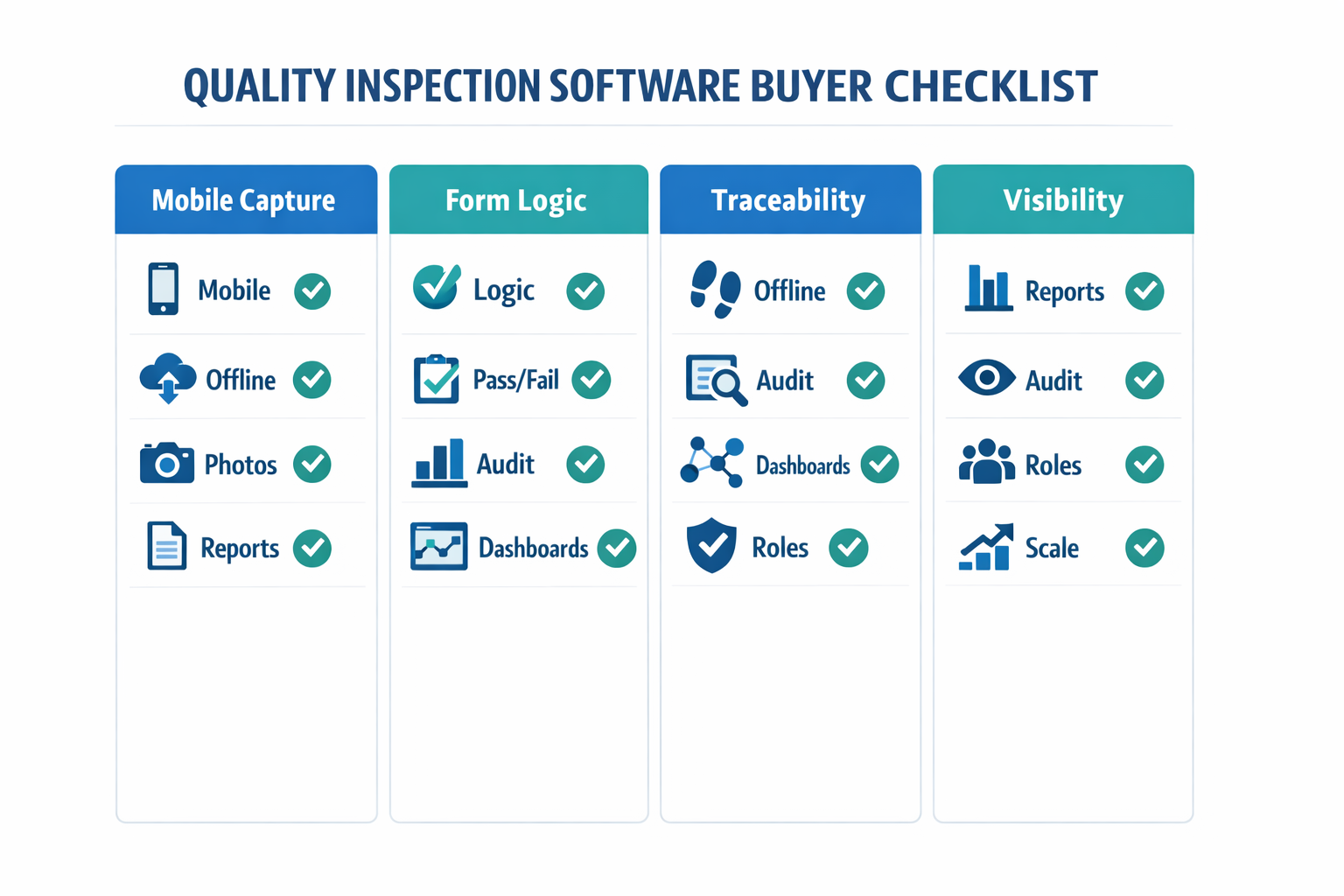
If you evaluate software this way, you move beyond feature marketing and focus on operational fit. The right inspection checklist software should support your actual inspection process, your compliance needs, and your reporting cadence from day one. That is what makes a quality inspection app useful not only for inspectors, but for the entire quality and operations team.
How to Compare Inspection Management Software Options Without Choosing the Wrong Tool
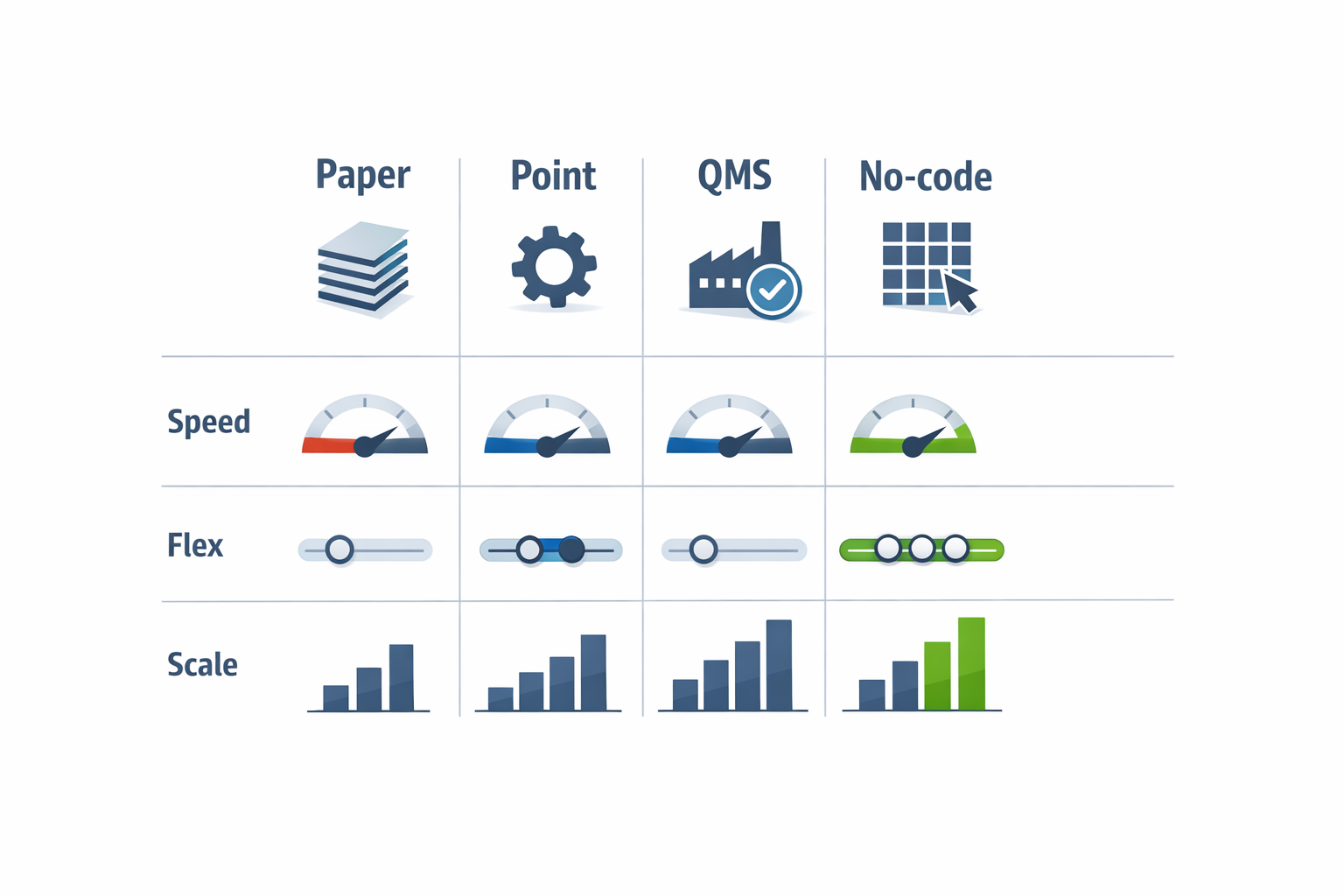
When you compare quality inspection software, the biggest mistake is evaluating every option as if it solves the same problem. In practice, buyers are usually choosing between four very different categories: paper-and-Excel replacements, rigid point tools, enterprise QMS platforms, and flexible no-code systems. Each category can support inspections, but they differ sharply in deployment speed, configurability, workflow depth, and long-term fit across plants. If you want the right inspection management software, you need to compare how the system will work in your factory six months after go-live, not just during the demo.
Paper and Excel Replacements: Fast to Start, Limited to Scale
Basic form digitization tools are often the quickest way to move from clipboards to digital quality inspection. They usually handle checklists, photo capture, signatures, and mobile data entry well, which makes them attractive for a first rollout. For a plant that only needs to replace handwritten incoming inspection sheets, this can be enough in the short term. The trade-off is that these tools often stop at data capture and offer limited workflow automation, cross-site standardization, or deep traceability.
Imagine a QC supervisor at an electronics assembly plant who wants operators to complete first article inspection on tablets instead of paper. A lightweight inspection checklist software can digitize the form in days and reduce transcription time immediately. But if the same plant later wants automatic nonconformance routing, supplier defect analysis, and real-time dashboards by line, that simple tool may start creating new silos. In other words, fast deployment is valuable, but only if the software can grow with your inspection process.
Rigid Point Solutions: Good for One Use Case, Harder to Adapt
Some inspection tools are built specifically for a narrow quality process, such as in-process checks, layered process audits, or final inspection. These products can be strong if your workflow already matches the software’s built-in logic. They often include industry-specific templates and reporting, which can reduce setup time for a standard use case. However, if your inspection rules vary by product family, customer requirement, or plant, a rigid structure can become a constraint.
A food packaging manufacturer is a good example here. One site may need metal detection verification, seal integrity checks, and hourly hygiene inspections, while another site adds allergen changeover verification and retailer-specific audit forms. A fixed quality inspection app may handle the first site well, but struggle when each plant needs different decision logic, escalation rules, and approval paths. That is why plant-level flexibility matters as much as feature count.
Enterprise QMS Platforms: Powerful, but Often Heavy to Deploy
Enterprise QMS platforms are designed for broad quality management, not just inspections. They may include CAPA, document control, complaints, supplier quality, audits, training, and compliance tracking in one environment. For highly regulated operations or multi-country manufacturers with mature quality governance, this can be the right long-term architecture. But many plants underestimate the time, budget, and internal change effort required to deploy these platforms effectively.
Industry data consistently shows that software implementation delays are common in enterprise projects, especially when workflows need IT or consultants for every change. For inspection teams, this matters because inspection criteria, sampling plans, and approval rules change frequently based on customer feedback, process changes, and new product introductions. If it takes weeks to update a form or route, the system will lag behind production reality. A strong platform on paper is not automatically the best inspection management software for day-to-day plant operations.
Flexible No-Code Systems: Strong Fit for Evolving Factory Processes
Flexible no-code platforms sit between simple form tools and heavyweight enterprise suites. They let manufacturers build a mobile inspection app that teams can actually use on the shop floor, while also supporting workflows, dashboards, permissions, and integrations. This makes them especially useful when inspection processes differ by line, product, or plant, but the business still wants a standardized digital foundation. Instead of forcing the factory to adapt to software limits, the software can be configured around actual SOPs.
For example, imagine a production manager at a garments factory who runs incoming fabric inspection, inline sewing quality checks, and final AQL inspection across multiple subcontractors. Each stage needs different pass/fail rules, defect codes, attachments, and escalation logic. A flexible quality inspection software setup can support those differences without requiring a custom-coded project each time the process changes. That is a major advantage when quality teams need to improve workflows continuously rather than freeze them at go-live.
What to Evaluate Beyond the Feature List
The most useful comparison framework starts with seven factors: deployment speed, ease of configuration, workflow depth, user adoption, plant-level flexibility, integration potential, and total cost of ownership. Deployment speed matters because quality teams usually need wins in weeks, not quarters. Ease of configuration matters because inspection forms, defect libraries, and approval rules change often. Workflow depth matters because capturing data is only one part of the process; routing, review, action tracking, and closure are what turn inspection records into control.
User adoption is equally important. If inspectors need too many clicks, cannot work smoothly on mobile, or find the interface too rigid, usage drops fast on the shop floor. A practical quality inspection app should support photos, barcode or QR scanning, signatures, timestamps, and offline-friendly mobile use where needed. According to industry studies on digital transformation in manufacturing, failed software initiatives are often linked less to missing features than to low frontline adoption and poor process fit.
Ask How the Software Handles Real Factory Variation
During vendor evaluation, ask for a live walkthrough using your own process, not a generic demo template. For example, can the system handle different inspection checklists by SKU, customer, shift, or supplier? Can it trigger different workflows when a defect is critical versus minor? Can a plant in Thailand use one inspection sequence while a sister plant in Malaysia uses another, while both still roll up to a common dashboard?
These questions reveal whether the software is truly adaptable or just looks polished in a sales environment. Good inspection checklist software should let you maintain common standards without making every plant operate identically. That balance is critical for regional manufacturers that need central visibility and local execution at the same time. If a vendor cannot show this clearly, the limitation will appear later during rollout.
Compare Total Cost of Ownership, Not Just License Price
A lower subscription price does not always mean lower cost. You also need to estimate implementation support, internal admin effort, change request costs, training time, integration work, and the cost of adding new plants or inspection types later. A cheap tool that requires manual exports, duplicate data entry, and consultant-led changes can become more expensive than a configurable platform with a higher monthly fee. This is where many buyers misjudge the economics of inspection management software.
For most manufacturers, the best choice is not the tool with the most modules or the lowest entry price. It is the system that your quality and operations teams can deploy quickly, adapt safely, and scale across real factory variation without rebuilding from scratch. Platforms like Jodoo are worth considering here because they combine digital quality inspection, workflow automation, dashboards, and integration in one no-code environment. That gives teams a clearer path from paperless inspections to real-time quality visibility without locking themselves into a rigid process model.
How Jodoo Supports Paperless Quality Workflows With a Mobile Inspection App
Jodoo helps manufacturers turn inspection steps into a connected quality inspection software workflow instead of a standalone digital form. Using its no-code platform, your team can build a quality inspection app that captures inspection data on mobile devices, routes exceptions automatically, and updates dashboards in real time. That means QC supervisors, line leaders, and plant managers all work from the same live record rather than separate sheets, spreadsheets, and email trails. For plants that need flexibility without a long software project, this is a practical way to deploy digital quality inspection quickly.
Build Inspection Forms That Match Your Actual Process
With Jodoo, you can create inspection forms around your own SOPs, part categories, sampling plans, and acceptance rules. A food packaging plant, for example, may need different fields for seal integrity, print alignment, and batch traceability than an electronics assembly site inspecting solder quality and connector fit. Instead of forcing teams into a generic template, Jodoo lets you configure checkboxes, numeric limits, barcode scans, signatures, and photo uploads in one app. This makes it useful not just as inspection checklist software, but as a full inspection management software layer for factory quality workflows.
Because the app is mobile-friendly, inspectors can complete checks directly at receiving, on the line, or in the warehouse using phones or tablets. They can attach photos of dents, contamination, labeling errors, or dimensional issues at the point of inspection, which improves evidence quality and shortens review time. In many factories, visual evidence is what helps engineering and suppliers act faster, especially when a defect needs containment within the same shift. Jodoo’s mobile setup supports that shop-floor speed without requiring a custom-coded app.
Automate NCR Creation and Quality Escalation
Jodoo becomes more valuable when the inspection record does more than collect data. You can set rules so that when a measured value falls outside tolerance, the system automatically creates a nonconformance record, assigns follow-up actions, and notifies the right people. For example, if an inspector enters a shaft diameter outside the upper control limit, the workflow can generate an NCR, tag the supplier lot, and route the case to quality engineering and purchasing immediately. This turns a mobile inspection app manufacturing team can actually act on into a closed-loop quality process.
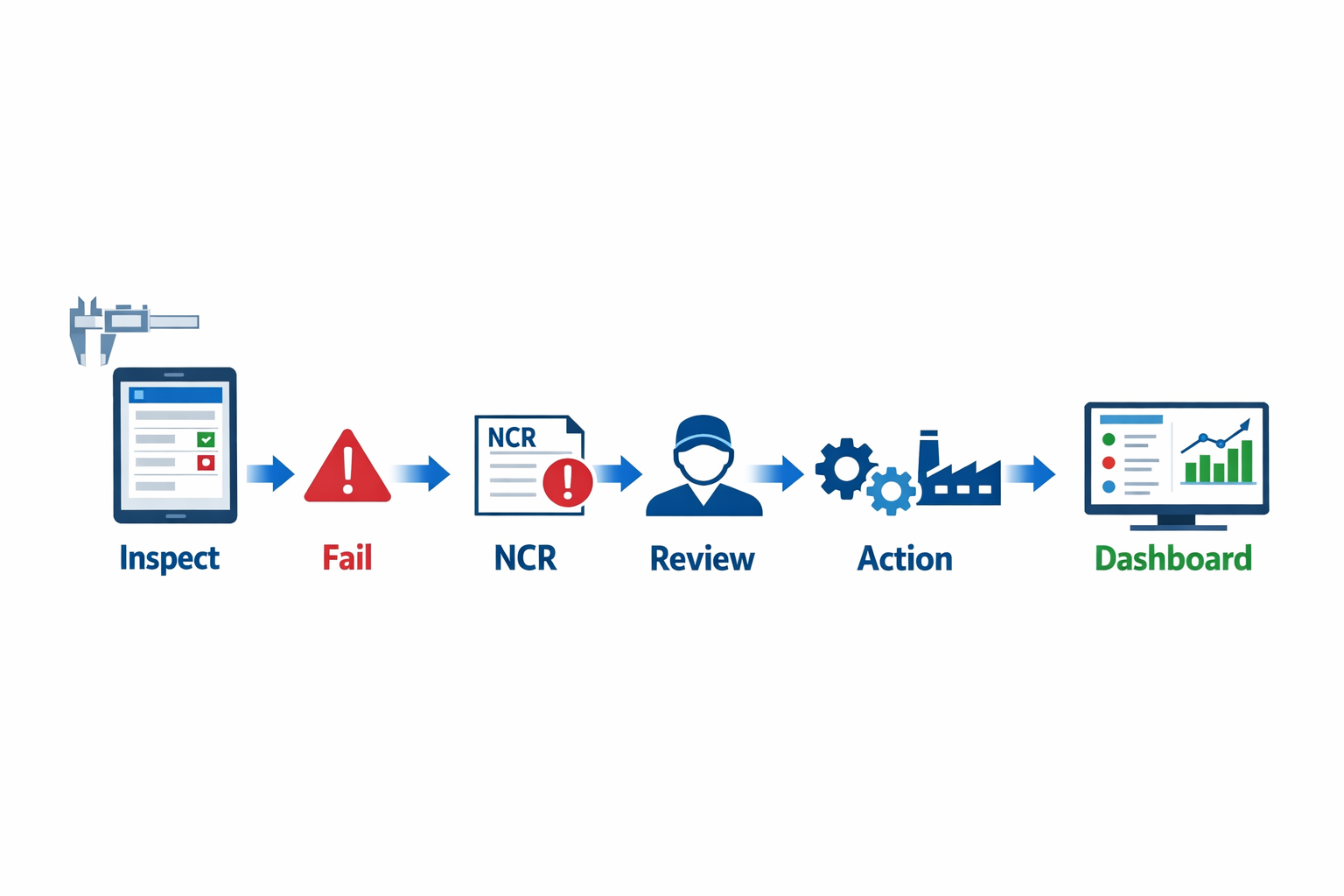
Role-based workflows are especially useful in plants where quality decisions follow strict approval paths. An inspector may be allowed to submit results, but only a QC supervisor can approve disposition, while a plant manager sees status and trend data without editing records. Jodoo supports that structure with permission controls and workflow routing, so the same system can handle frontline data capture, supervisor review, and management oversight. That helps standardize response times while keeping audit trails intact.
Give Plant Managers Same-Day Quality Visibility
One of the biggest operational gains from connected quality inspection software is visibility at the management level. Because inspection data, NCRs, and disposition updates sit in the same platform, Jodoo can feed live dashboards showing defect rates, supplier performance, recurring failure modes, and open quality actions. A plant manager does not need to wait for end-of-day spreadsheet consolidation to see whether incoming quality is drifting. Instead, they can review the dashboard during the same shift and decide whether to tighten incoming checks, hold material, or escalate to the supplier.
This matters because faster visibility improves response speed. According to industry studies on poor quality costs, manufacturers can lose 15% to 20% of sales revenue to quality-related issues when defects, rework, scrap, and warranty costs are not controlled tightly. Real-time dashboarding does not eliminate defects on its own, but it gives operations leaders earlier signals to contain them before they spread across production batches. In practice, that is where paperless inspection systems deliver measurable value.
Example: Auto Parts Supplier Using Jodoo for Incoming Inspection
Imagine a production manager at an auto parts supplier receiving daily shipments of machined brackets from multiple vendors. The QC team uses Jodoo as a mobile inspection app workflow to log incoming inspection results at the dock, including dimensions, appearance checks, supplier lot number, and photos of any visible defects. If a critical measurement falls out of spec, Jodoo automatically creates an NCR, notifies the responsible quality engineer, and starts a disposition workflow for containment and supplier follow-up. By the afternoon, the plant manager can already see on a live dashboard which supplier lots failed, how many parts are on hold, and whether the issue risks affecting the next production run.
That same structure can be adapted beyond automotive. In an electronics plant, an inspector could log PCB defects with annotated images and trigger review when solder bridge counts exceed the defined threshold. In a beverage facility, a quality technician could record fill-volume checks and launch corrective action when a batch fails tolerance or label verification. The point is that Jodoo is flexible enough to function as inspection management software for different manufacturing environments while still keeping the workflow simple for frontline teams.
Why Jodoo Fits Manufacturers That Need Speed Without Heavy IT
Many manufacturers do not need another rigid point solution; they need a configurable system that reflects how their plant already works. Jodoo gives operations and quality teams the ability to build and refine a quality inspection app without waiting on a large development cycle, while still supporting workflow automation, mobile use, dashboards, and role-based control. That is especially useful when inspection criteria, customer requirements, or escalation paths change often. In short, Jodoo helps manufacturers move from paper-based inspections to a practical, scalable digital quality inspection system with faster execution and better visibility.
Conclusion: Choosing the Right Quality Inspection Software for Long-Term Quality Visibility
The right quality inspection software should do far more than replace clipboards with tablets. It should help you inspect faster, standardize checks across shifts and lines, and give supervisors immediate visibility into recurring defects, missed checkpoints, and open corrective actions. In practice, that means better traceability from incoming inspection to final QA, stronger accountability at each handoff, and faster decisions when quality issues start affecting throughput, scrap, or customer delivery.
If you imagine a QC supervisor at an electronics plant reviewing solder defect trends in real time, or a production manager at an automotive parts factory tracing a dimensional issue back to one machine and one shift, the value becomes clear. Paperless inspection data is only useful when it is connected to workflows, alerts, dashboards, and follow-up actions. That is what turns inspection records into operational quality visibility.
If you want a flexible way to replace paper forms, streamline inspection checklist software workflows, and build real-time quality control processes without heavy custom development, Jodoo is worth evaluating. As a no-code lean manufacturing platform, Jodoo helps manufacturers digitize inspections, automate responses, and track quality performance across the plant. Начните бесплатную пробную версию или заказать демонстрацию to see how it can fit your factory workflows.