Introduction: What a CMMS Means for Modern Manufacturing Maintenance
Unplanned downtime costs manufacturers far more than repair labor alone. In some industrial settings, downtime can cost thousands of dollars per hour, especially when it disrupts production schedules, labor allocation, and on-time delivery. That is why many maintenance teams start looking at a computerized maintenance management system (CMMS) when paper logs, WhatsApp updates, and spreadsheet trackers can no longer keep maintenance work under control. In this guide, you will see what a computerized maintenance management system is, what it does on the plant floor, which features matter most, and how to decide whether your factory needs one.
In plain terms, CMMS is a kind of software that helps you organize maintenance operations in one system. It brings together asset records, work orders, preventive maintenance schedules, spare-parts information, and maintenance history so your team can see what needs to be done, who is doing it, and what happened last time. Instead of chasing updates across notebooks, whiteboards, and disconnected files, you get a structured record of maintenance activity.
For maintenance managers, plant managers, reliability engineers, and IT leaders, this matters because uptime, traceability, and coordination are daily operational requirements. When maintenance data is fragmented, PMs get missed, repeat failures go unresolved, and audits become harder than they should be. A well-used maintenance management system gives the factory a clearer operating backbone for daily execution and long-term improvement.
What a Computerized Maintenance Management System Does on the Plant Floor
Building the Asset Record First
On the plant floor, a computerized maintenance management system starts with a structured asset record. For a packaging line, that usually means each machine, subassembly, and critical component has its own profile, including asset ID, location, model, serial number, supplier details, service intervals, and standard procedures. This gives maintenance and operations one reference point instead of scattered files, whiteboards, and technicians’ memories.
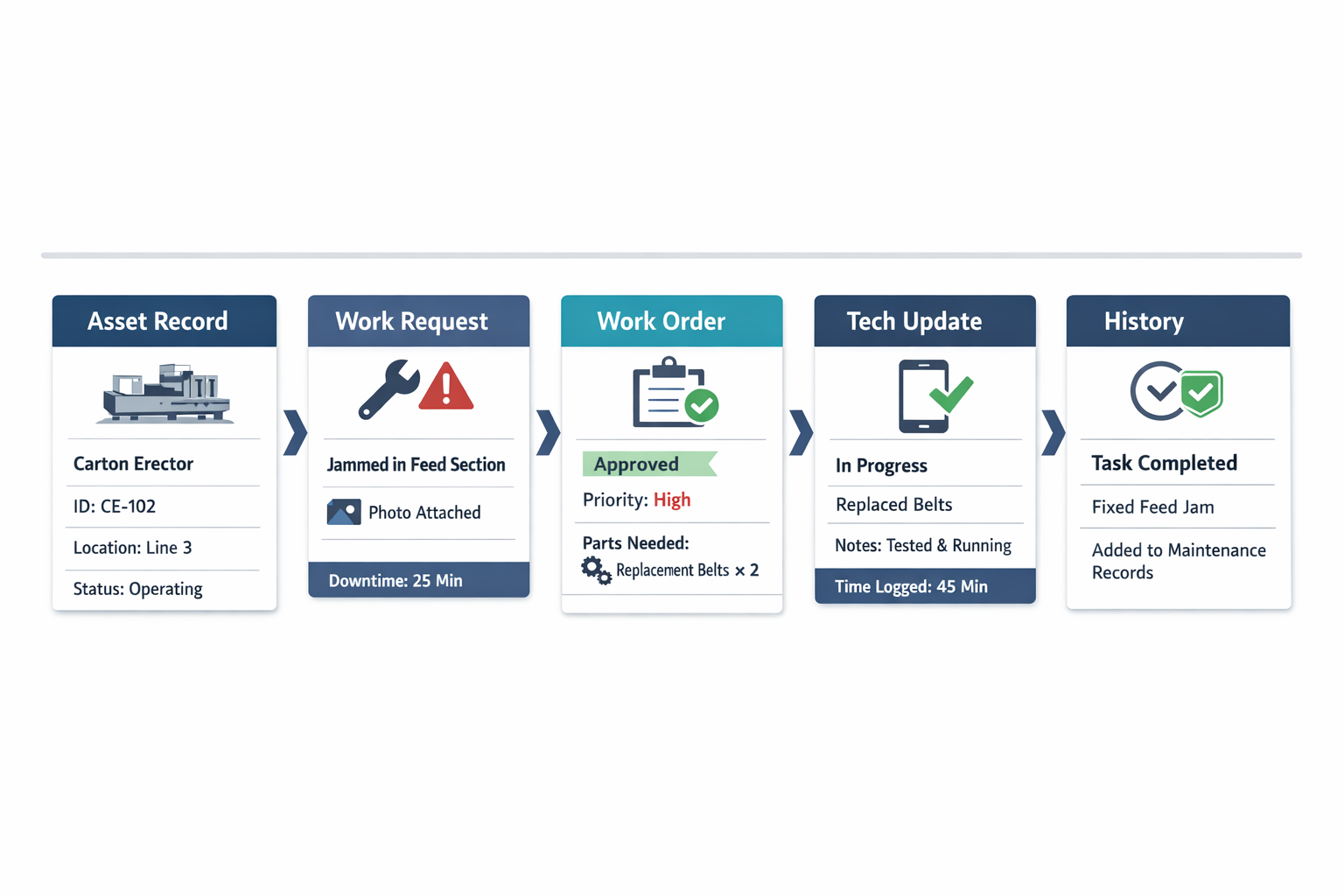
Take a carton erector on the line in a food processing plant as an example to illustrate. In CMMS software, the machine record can link to motor details, sensor specifications, lubrication points, previous breakdowns, and recurring fault codes. Once that asset record is in place, every maintenance activity tied to the machine becomes easier to track and act on.
Capturing Work Requests in a Controlled Way
When the carton erector starts jamming during the night shift, the operator or line supervisor submits a work request through the maintenance work order system. Instead of a phone call or handwritten note, the request includes the exact asset, symptom, time of failure, production impact, and sometimes a photo or short video. That structured intake helps the maintenance planner or supervisor assess urgency faster and assign the right technician.
This is where a CMMS turns raw shop-floor issues into manageable work. A request is no longer just “machine down,” but a traceable event connected to a specific asset and operating context. That distinction matters because poor request quality is one of the main reasons maintenance teams lose time in triage and dispatch.
Turning Requests Into Work Orders
After review, the request becomes a formal work order with instructions, priority, labor assignment, estimated hours, required spare parts, and safety steps. The system can also distinguish between emergency corrective work and planned work, which helps supervisors protect preventive maintenance management time instead of letting urgent calls consume the whole day. For larger plants, this workflow creates consistency across shifts and technicians.
The important point is that asset maintenance records, work orders, and maintenance history are not separate documents in a well-run system. They operate as one connected workflow: the asset record identifies what is being maintained, the work order defines what must be done, and the completion record updates the machine’s history for the next decision. That is the practical CMMS application on the plant floor: one system connecting maintenance decisions to actual equipment performance.
Executing the Job With Real-Time Technician Updates
Once the work order is assigned, the technician uses the same CMMS software to review the fault, confirm lockout steps, record findings, and log parts used. Returning to the carton erector example, the technician may find a worn belt and a misaligned photoelectric sensor, then update the task status from in progress to completed on a mobile device. That real-time update reduces the back-and-forth between the workshop, supervisor, and production team.
A good maintenance management software flow also captures what actually happened, not just that the job was finished. The technician can record downtime minutes, root cause notes, photos of the failed part, and whether follow-up action is needed. That level of detail is what turns daily execution into usable maintenance data rather than administrative closure.
Closing Out the Record for Future Decisions
The final step is closeout documentation. When the work is completed, the system stores the labor hours, materials consumed, failure details, and completion notes directly against the asset’s history. Over time, history shows whether the carton erector has a one-off issue, a chronic component failure, or a maintenance interval that needs to be adjusted.
This is why CMMS software matters beyond daily task control. Every completed job improves the quality of future planning, whether the team is deciding when to inspect a component, which spare parts to stock, or whether a machine is becoming too costly to keep repairing. On the plant floor, the value of a computerized maintenance management system is not just digitizing work orders, but creating a reliable operating record that supports better maintenance decisions shift after shift.
Core CMMS Software Features
Asset Hierarchies That Reflect How Equipment Is Actually Managed
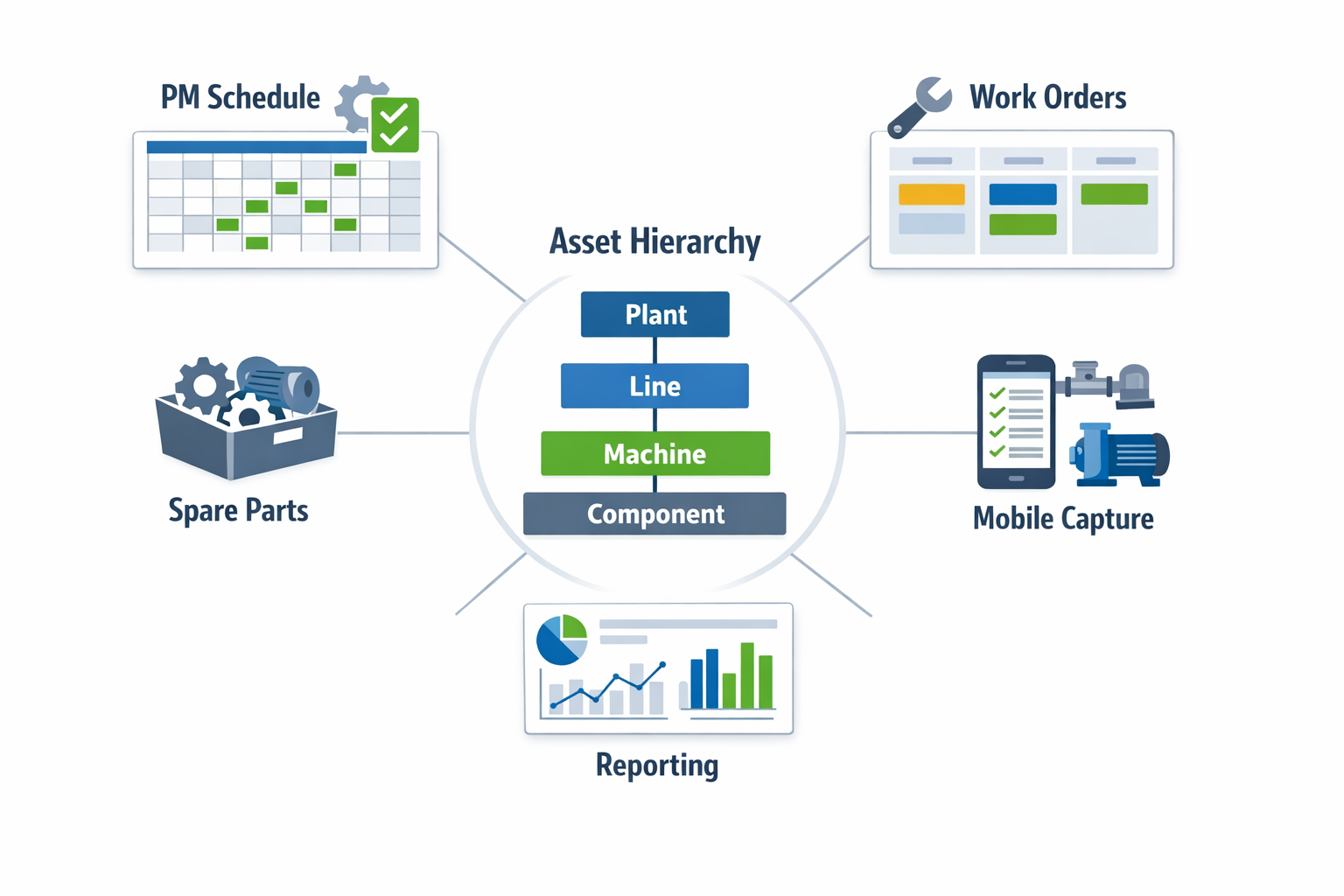
有用的 CMMS software setup starts with asset hierarchies, not just a flat list of machines. Maintenance teams need to see the relationship between plant, line, machine, and component so they can trace recurring failures, assign ownership, and understand where downtime is really coming from. In practice, that means a packaging line can be broken down into filler, capper, labeler, conveyor, and critical subassemblies rather than being treated as one generic asset. This structure makes asset maintenance records far more useful for planning, troubleshooting, and audit follow-up.
Good asset records also hold the operational context around each piece of equipment. That includes model numbers, service manuals, installed date, criticality, warranty status, standard checklists, and maintenance history linked to the right asset level. For a reliability engineer, this makes it easier to compare failure frequency across similar pumps or motors. For a plant manager, it creates a cleaner basis for repair-versus-replace decisions.
Preventive Maintenance Scheduling That Turns Time Into Action
Preventive maintenance management becomes practical when schedules are tied to real triggers such as calendar intervals, runtime hours, output counts, or condition thresholds. A computerized maintenance management system should let teams define those triggers clearly so PMs are generated on time without relying on memory or whiteboards. In an electronics plant, for example, reflow oven inspections may be scheduled by operating hours, while HVAC filter changes follow a fixed monthly cycle. The feature matters because it standardizes execution before missed maintenance becomes unplanned downtime.
The value increases when preventive schedules connect directly to the maintenance work order system and expected parts usage. Once a weekly lubrication task or quarterly inspection comes due, the system should create a work order, assign the checklist, and flag any required grease, belts, seals, or filters before the technician starts. That link reduces last-minute store runs and helps planners align labor and spare parts with the PM calendar. In other words, preventive maintenance scheduling is most effective when it drives both execution and materials readiness from one workflow.
Work Order Tracking That Improves Control, Not Just Documentation
Work order tracking is one of the most visible CMMS features because it controls how maintenance work moves through the plant. Teams need to know what has been requested, what is approved, what is in progress, what is waiting for parts, and what has been completed. Without that status control, supervisors end up managing work through calls, chat messages, and personal follow-up instead of through a reliable system. A good maintenance management software setup gives every job a clear owner, due date, priority, and completion record.
This also improves coordination with production and quality. If a food processing line has a temperature control fault, the work order can include lockout requirements, sanitation notes, technician comments, and the final corrective action in one place. That makes handoffs cleaner during shift changes and gives engineering a usable record when similar failures return. Over time, the work order history becomes a decision tool, not just an archive.
Spare Parts Visibility That Supports Faster Maintenance Decisions
Many maintenance delays are not caused by the repair itself but by uncertainty over parts availability. CMMS helps by showing whether a part is in stock, where it is stored, which assets use it, and when a reorder action is needed. For a maintenance planner, that visibility reduces the risk of scheduling a shutdown task only to discover the bearing or sensor is unavailable. For stores and procurement teams, it improves coordination around critical spares rather than treating maintenance demand as ad hoc.
The most useful systems also connect spare parts to specific assets and recurring jobs. In an automotive stamping plant, for instance, die-change support parts and hydraulic seals can be linked to the press assets that consume them most often. That helps maintenance and inventory teams identify fast-moving items, avoid duplicate stock, and reduce emergency purchases. It also gives finance better control over maintenance spend by tying parts usage back to actual equipment history.
Mobile Data Capture That Keeps Records Current on the Shop Floor
A CMMS only stays accurate if technicians can update it while the work is happening. Mobile access allows them to open work orders, scan asset codes, attach photos, record meter readings, and complete checklists at the machine instead of rewriting notes later. This reduces missing data and shortens the delay between execution and record completion. In high-mix manufacturing environments, speed matters because equipment status can change several times in one shift.
Mobile data capture is especially useful for inspections and verification steps. A technician checking compressed air leaks or recording vibration readings can enter results immediately, which keeps asset maintenance records current and easier to trust. If the system supports offline entry, it remains usable in utility rooms, basements, or remote plant areas with weak connectivity. That practicality often determines whether a maintenance system is adopted consistently or bypassed in daily work.
Reporting That Helps Teams Manage Backlog, Reliability, and Compliance
Reporting is where raw maintenance data becomes operational control. Manufacturing teams typically need visibility into PM compliance, response time, mean time to repair, repeat failures, backlog age, and parts consumption by asset or line. These are not just maintenance KPIs for monthly review; they help supervisors rebalance labor, escalate chronic issues, and spot where preventive plans are not working. A CMMS report that shows 20 percent of overdue work orders coming from one utilities area is far more actionable than a general statement that backlog is rising.
The best reporting also supports different users with different questions. Maintenance managers may focus on wrench time and overdue work, reliability engineers on failure patterns, and plant leaders on downtime impact by production area. That is why reporting in a computerized maintenance management system should be flexible enough to move from a summary view to asset-level detail. If the data structure is clean, reports become a practical tool for daily decisions rather than a static monthly export.
How a CMMS Improves Preventive Maintenance Management and Daily Execution
Fewer Missed PMs and More Consistent Scheduling
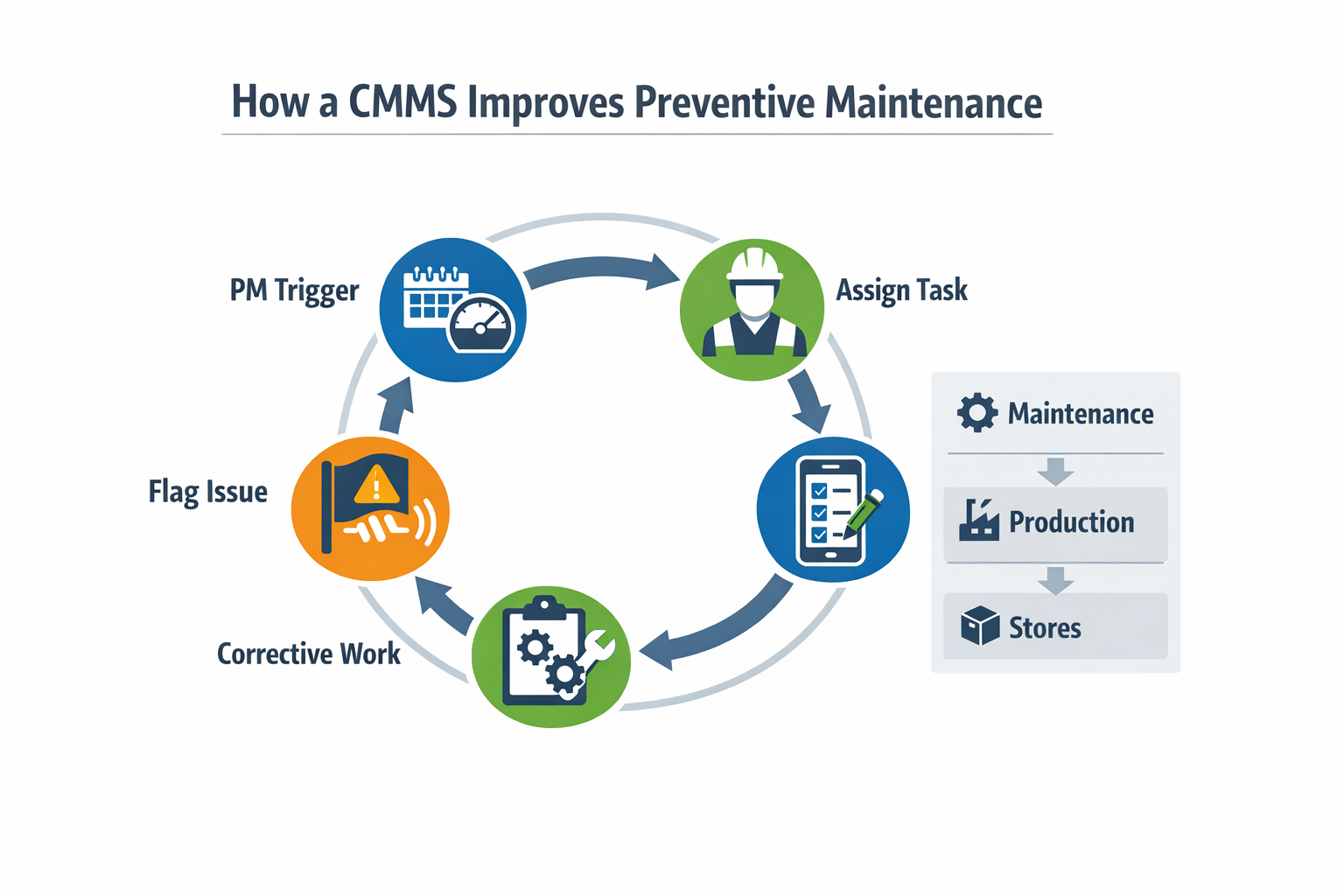
A CMMS improves preventive maintenance management by turning recurring tasks into a controlled schedule instead of a memory-based routine. Rather than relying on whiteboards, Excel files, or supervisor follow-up, maintenance teams can trigger work by calendar date, runtime hours, cycle count, or meter reading. That matters in plants where one missed lubrication task or inspection can shorten bearing life, increase scrap, or cause an unplanned stop. In practice, CMMS software helps teams move from reactive repair toward planned execution without changing every maintenance strategy at once.
In an automotive parts plant, for example, press lubrication, safety interlock checks, and air system inspections often involve different frequencies and different technicians. A computerized maintenance management system keeps those tasks visible in one schedule, so weekly work does not disappear behind urgent breakdowns. Many studies on industrial maintenance programs show that planned maintenance costs are substantially less than emergency repair, with unplanned work often costing 3 to 5 times more once overtime, production loss, and expedited parts are included. The operational gain is simple: fewer missed PMs mean fewer avoidable failures competing for the same labor hours.
Clearer Technician Accountability From Trigger to Closeout
A scheduled PM only adds value if someone owns it, performs it correctly, and closes the record completely. With a maintenance work order system inside a CMMS, each task can be assigned to a named technician or team, linked to a due date, and tracked by status from open to in progress to completed. That creates accountability without adding paperwork, especially in multi-shift environments where work is handed over between day and night crews. For maintenance managers, this makes it easier to see whether delays come from labor capacity, parts availability, access to equipment, or poor scheduling logic.
The lifecycle is typically straightforward: the PM trigger creates a work order, the assigned technician receives the task, completes the checklist on the line, records readings or findings, notes any abnormal condition, and closes the job with time, parts used, and comments. If the inspection finds a developing issue such as abnormal vibration or oil leakage, the technician can escalate it into follow-up corrective work before the asset fails. That linkage between scheduled PM, execution record, and follow-up action is where CMMS’s meaning becomes practical for the plant floor. It is not just digital storage; it is a repeatable execution loop supported by asset maintenance records.
Faster Handoffs Between Maintenance, Production, and Stores
Daily execution improves when maintenance information moves faster across departments. In an electronics factory, a technician may complete an ESD control inspection and flag a cooling fan that is drawing excess current, but the next step still depends on coordination with production for line access and stores for replacement parts. A CMMS shortens that handoff by keeping the PM result, follow-up work order, and parts requirement connected. Instead of separate calls, paper forms, and delayed updates, each team works from the same maintenance history and task status.
This also reduces the common gap between inspection and action. Many factories complete PM rounds but lose time because abnormal findings sit in notebooks or chat threads before someone converts them into planned corrective work. When the CMMS software routes findings directly into the work queue, supervisors can prioritize based on risk, production schedule, and technician availability. That is how a PM program starts improving execution, not just compliance.
Better Audit Readiness and Maintenance Traceability
Audit readiness is another practical benefit, especially in food and beverage plants where equipment condition, sanitation-related checks, and traceable maintenance records can affect compliance. If a filler, chiller, or conveyor requires scheduled inspection, calibration, or part replacement, the system should show what was due, who completed it, what was found, and whether any exception was left open. A CMMS makes that evidence easier to retrieve because completion data, timestamps, attachments, and approval history stay attached to the asset and work order. For regulated plants, this can save hours during internal reviews and external audits.
Better records also improve management decisions after the audit is over. When maintenance history is complete, teams can identify assets with repeated PM failures, overdue tasks by line, or technicians overloaded with low-value routine work. Industry benchmarks often show that world-class plants keep planned maintenance above 80% of total maintenance hours, while reactive environments remain much lower. A computerized maintenance management system will not deliver that ratio on its own, but it gives leaders the visibility needed to manage toward it.
How to Evaluate CMMS Against Spreadsheets, Rigid Systems, and Flexible Workflow Tools
The key to choosing the right maintenance system is whether the tool fits the way your plant plans work, captures field data, routes approvals, and reports performance. For some factories, a full CMMS is the right step. For others, spreadsheets have already hit their limit, but a heavy traditional platform may still be more than they need.
When Spreadsheets Stop Being Enough
Spreadsheets can handle basic asset maintenance records and simple task lists when the plant is small, the asset base is stable, and one supervisor controls most maintenance activity. The problem starts when updates come from multiple technicians, shifts, or production lines at the same time. Version conflicts, missing closeout notes, and weak traceability quickly turn maintenance tracking into manual reconciliation.
A good rule is this: if your team is spending more time chasing status than executing work, spreadsheets are no longer a control system. This usually shows up when preventive maintenance management is missed because planners cannot see the backlog clearly, or when spare parts usage and maintenance history sit in separate files. At that point, the issue is not just efficiency; it is decision quality.
A Practical Comparison Framework
A spreadsheet-based setup works best for low workflow complexity, low technician count, and limited reporting needs. Traditional CMMS software fits plants that need deep asset structures, mature maintenance planning, strong work order control, and formal reliability reporting. Flexible no-code maintenance management software sits in the middle for teams that need structured maintenance workflows, mobile forms, approvals, and dashboards without a long enterprise rollout.
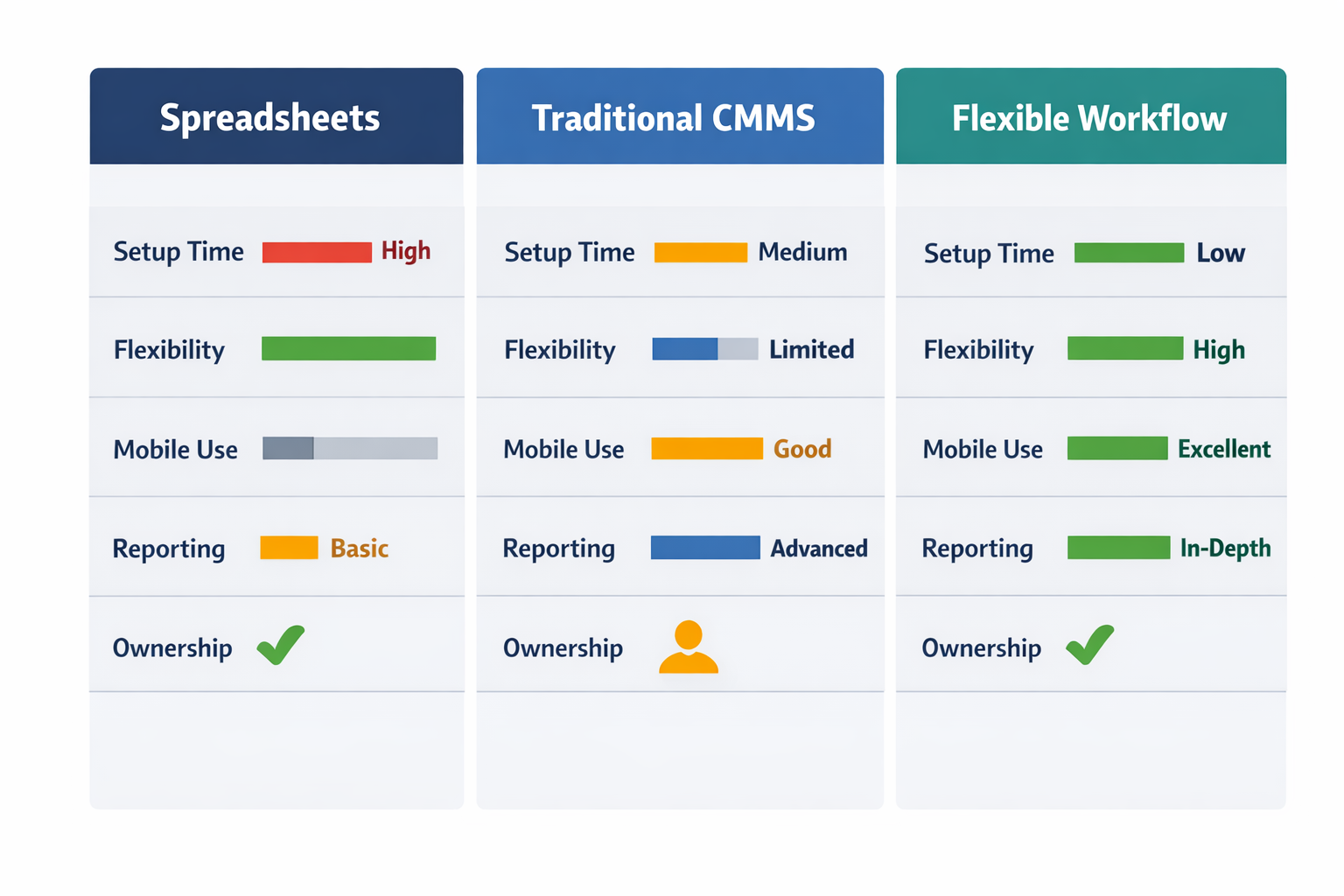
The key difference is not simply feature count. It is how much process variation your factory has and who needs to manage that variation. If your maintenance work order system must connect with production requests, safety permits, contractor sign-off, and purchasing approvals, workflow flexibility matters as much as standard maintenance functions.
Evaluation Criteria That Matter on the Plant Floor
Implementation Effort and Time to Value
一些 CMMS software deployments take months because asset data, user roles, preventive maintenance schedules, and process rules all need to be configured upfront. That can be justified in large, multi-site operations with dedicated reliability and IT resources. In a mid-sized plant, however, a long setup often delays adoption and pushes teams back to paper or messaging apps.
A lighter maintenance management software approach can be better when your immediate goal is to digitize requests, inspections, and PM execution quickly. For example, an electronics plant that already has asset lists in ERP may not need a full rebuild of every maintenance process on day one. It may need fast mobile execution and better work order visibility first.
Workflow Flexibility Across Departments
Many traditional systems are strong at maintenance control but weaker when maintenance work depends on non-maintenance steps. Think of a machine shutdown request that needs production confirmation, EHS approval, and storeroom issue tracking before work begins. If your software cannot adapt to that sequence, teams start using side channels again.
This is where configurable workflow tools can be more practical than a rigid system. No-code platforms like Jodoo are appropriate when the real requirement is not only storing asset maintenance records but also tailoring requests, approvals, escalation, and completion flows to the plant’s actual SOPs. That matters especially in factories where maintenance, production, warehouse, and quality teams all touch the same process.
Mobile Usability and Shop-Floor Data Capture
If technicians still write notes on paper and update the system later, your data quality will always lag behind execution. Mobile usability should cover more than opening a work order on a phone. It should support photos, timestamps, signatures, checklist completion, meter readings, and quick status changes at the point of work.
This requirement is especially important in large facilities where technicians move between utilities, packaging, and process areas. A maintenance platform that works well only on desktop often creates reporting delays and incomplete closeout records. In practice, that weakens both preventive maintenance management and audit readiness.
Reporting Depth and Decision Support
Not every plant needs advanced reliability analytics from the start, but every plant needs trustworthy operational reporting. You should be able to see overdue PMs, open backlog by asset or line, repeat failures, response time, and technician completion trends without manual consolidation. If reporting depends on someone cleaning spreadsheet data every week, the system is not scalable.
Plants with mature reliability teams may need deeper CMMS capabilities such as failure-code analysis, asset criticality views, and long-term maintenance cost tracking. Plants earlier in their digital journey may only need live dashboards and exception alerts. The right choice depends on the decisions you need to make, not on whether the vendor offers the longest feature list.
Ownership by Maintenance Versus IT
One overlooked selection factor is who will maintain the system after go-live. A traditional CMMS often gives strong control, but changes to forms, fields, or workflows may depend on IT, consultants, or vendor support. That model works when maintenance processes are stable, and governance is centralized.
If your plant changes approval paths, inspection forms, or PM checklists frequently, business-side ownership becomes more important. In those cases, configurable tools can reduce the gap between process change and system change. That is one reason some manufacturers choose no-code platforms like Jodoo for maintenance workflows that need to evolve without a full redevelopment cycle.
When a Full CMMS Makes Sense
A full CMMS is usually the better fit when you have a large asset population, multiple maintenance planners, formal preventive maintenance management programs, and strong requirements for reliability analysis. It also makes sense when corporate standards require one maintenance data model across several sites. In that environment, the structure of a traditional maintenance work order system can create consistency that spreadsheets and lighter tools cannot.
When a Flexible Maintenance System Is the Better Fit
A flexible system is often the smarter choice when the plant’s biggest gap is process coordination rather than asset complexity. That includes cases where maintenance requests, approvals, inspections, and spare-parts workflows are fragmented across paper, chat, and spreadsheets. You may still need the discipline of CMMS software, but not the implementation weight of a traditional enterprise platform.
For growing manufacturers, the best answer is sometimes not “spreadsheet or full CMMS,” but a configurable middle path. That is especially true when maintenance needs to work closely with production, warehouse, purchasing, and quality in one connected workflow.
Conclusion: Choosing the Right Maintenance Management Software
A CMMS is a system for managing maintenance work, asset records, preventive schedules, parts usage, and service history in one place. For manufacturing teams, the most important capabilities are usually straightforward: reliable work order control, clear preventive maintenance workflows, accurate asset data, mobile-friendly updates from technicians, and reporting that helps supervisors act before downtime grows. The right choice depends less on feature volume and more on how well the system matches your plant’s process complexity, rollout timeline, and need for flexibility.
If your team has already outgrown spreadsheets but does not want a long, rigid CMMS implementation, a configurable no-code option can be the better fit. Jodoo helps manufacturers build a maintenance work order system, preventive maintenance checklists, asset maintenance records, and approval workflows without heavy custom development. You can 開始免費試用 或者 預約演示 to see how it fits your maintenance process.