Nach Kategorien durchsuchen

To build a custom CRM, project management, or inventory-tracking system, the traditional method involves hiring expensive developers and waiting months for coding. But now, you can use Jodoo to create these management apps in just one day. With Jodoo’s ease of use and intuitive no-code interface, you can build any app tailored to your business’s unique needs effortlessly.
Keep reading to learn how to use Jodoo and discover how Jodoo, the best app builder, allows you to create business management apps. After learning the guide, you can also build any project management tools, automated workflow systems, and real-time data analysis apps instantly!
Jodoo: Best Tool for Workflow Automation & Data Analysis
Before diving into the guide, let’s get to know what Jodoo is and why it is the ideal tool to create workflows and management apps.
Jodoo is a versatile, cloud-based app builder that creates efficient business management systems, including project management apps, automated workflow systems, and real-time data reports. Specifically, the Jodoo app builder offers forms and dashboards for data collection and visualization. This means you can create shareable forms to gather data and create visual reports to analyze data and gain insights.
To simplify recurring tasks and processes, Jodoo transforms complex business logic into streamlined digital processes. Therefore, it enables organizations to automate business processes like purchasing, approval, and onboarding, saving great time and effort. Best of all, the best workflow automation tool gives you the flexibility to design these business workflows, including the common and complex ones. All are perfectly tailored to your business’s specific needs.
With Jodoo, you can collect data easily, automate repetitive tasks without code, and create professional-quality data reports, which makes your business processes faster and more efficient.
Jodoo Detailed Review: Why Choose Jodoo to Build Business Applications
How to Build an App in 5 Steps [Detailed Guide]
In the following guide, we’ll walk you through building a custom CRM to show how you can create any business system using the Jodoo app builder. Before diving into the guide, please sign up and log in to Jodoo first.
Step 1. Start an App from Scratch
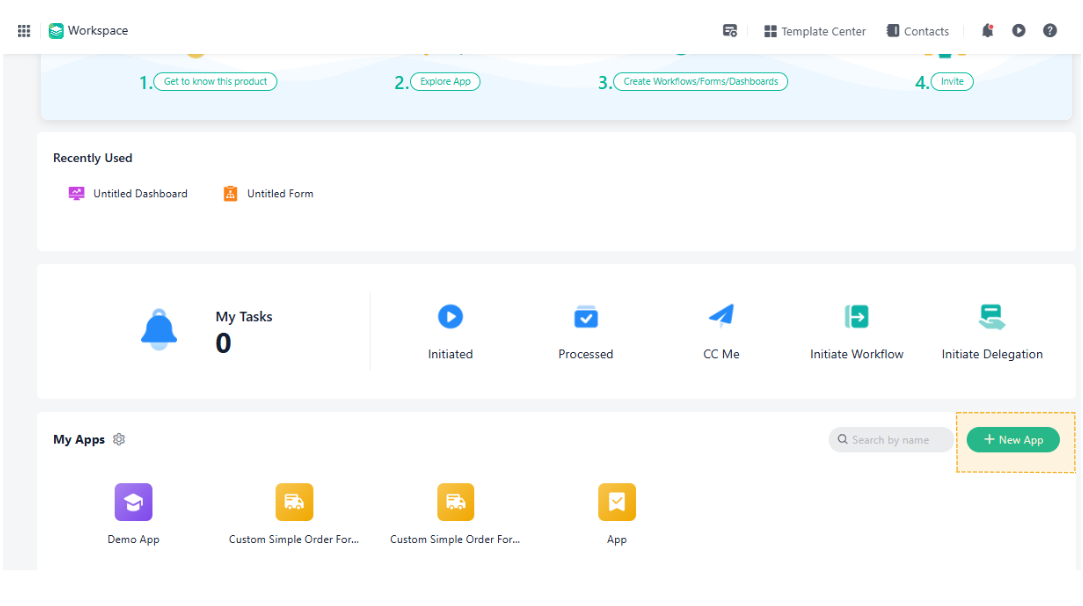
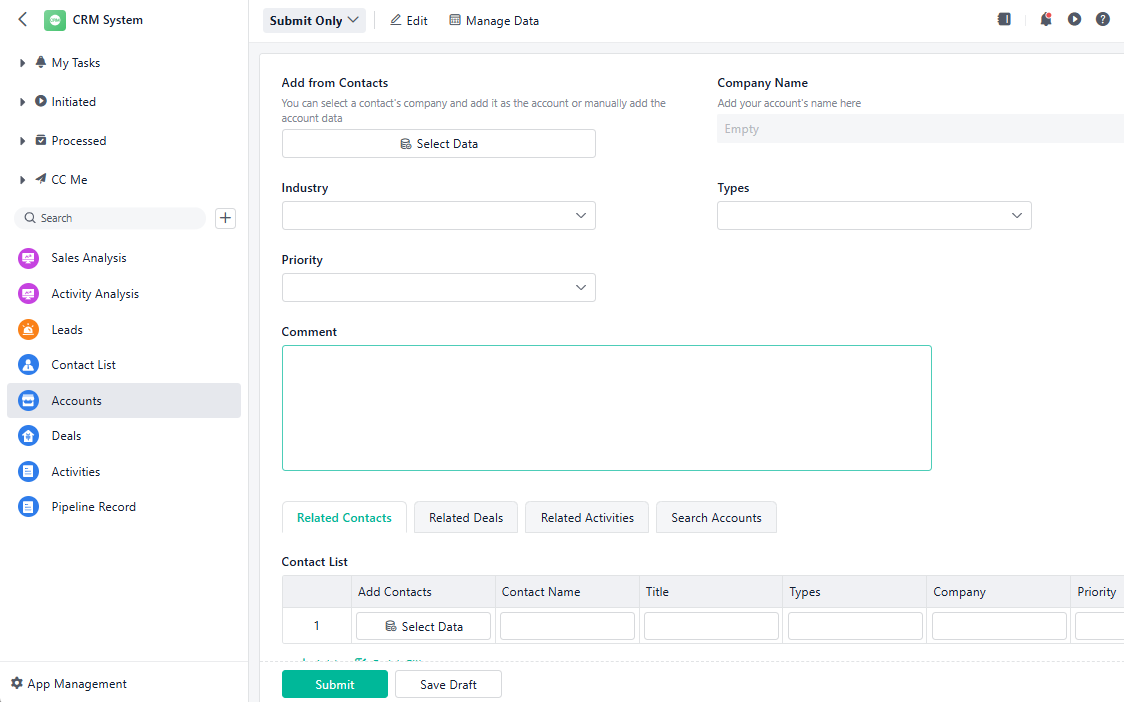
Head to the workspace and click the green “+ New App” button. Think of this “App” as the central hub for your entire CRM project. It will store all the specific business systems you are about to build, such as Forms for collecting client data, Workflows for approving deals, and Dashboards for tracking sales performance. This keeps all your CRM systems organized and interconnected in one place.
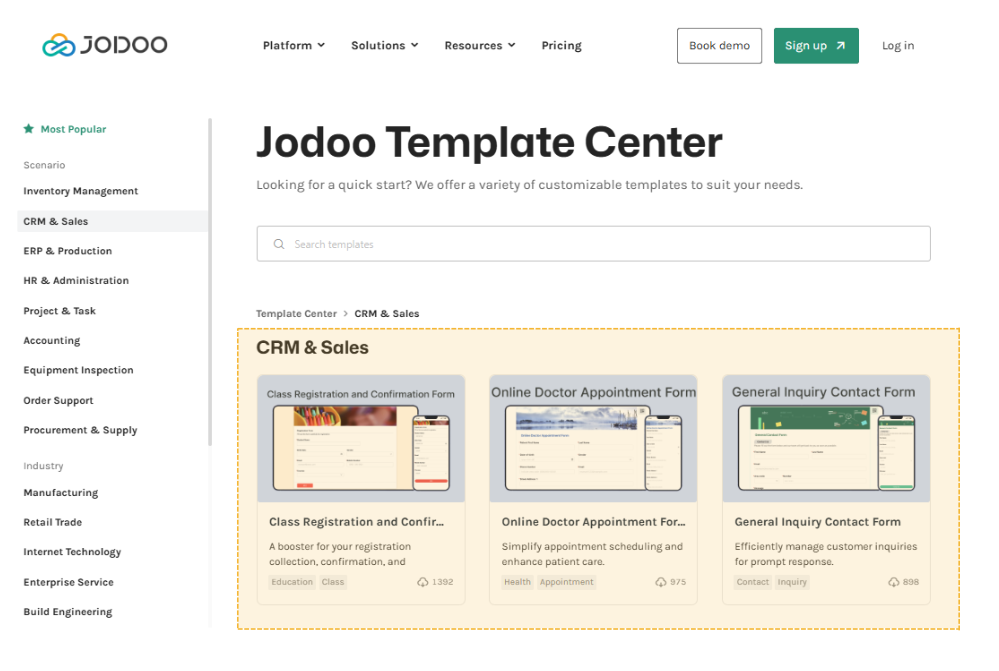
Can’t wait to use a CRM system? Try Our Ready Templates!
Jodoo also offers templates for CRM, including General Inquiry Contact Form, Feedback Form, and CRM system. If any meet your needs, you can use them for free and them create a system immediately!
Step 2. Drag and Drop Fields to Build Custom CRM
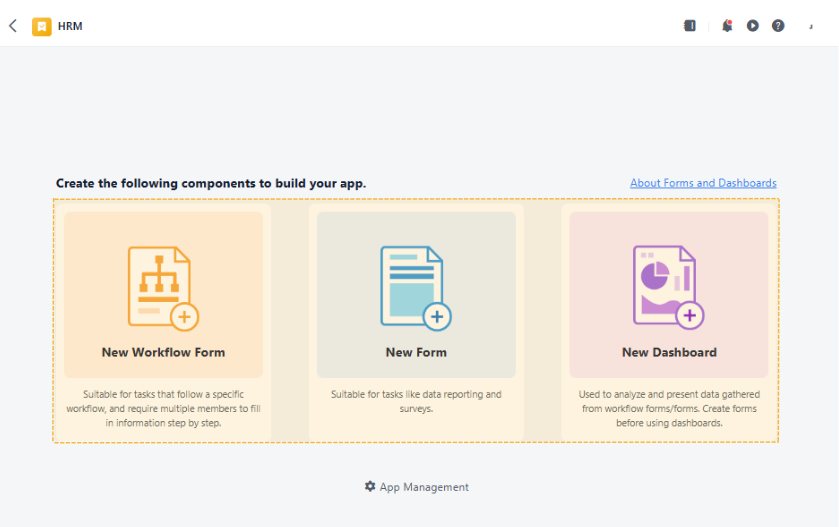
To build a standard CRM system, you essentially need Forms to store customer details and Dashboards to visualize data. Here, we will take the Lead Capture Workflow Automation as an example. Therefore, click “New Form”.
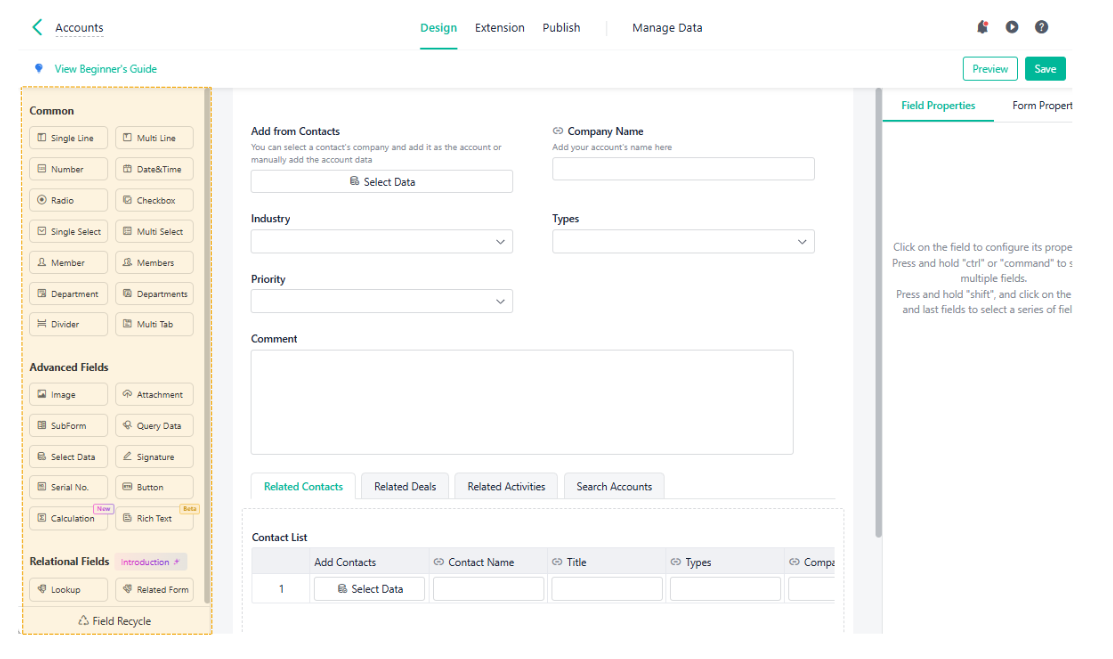
Browse the extensive widget library on the left sidebar, then drag and drop your desired fields, like “Single Line” for client names or “Number” for budget, into the center workspace. You can also rename it.
Once done, click “Save” in the upper right corner to save the Lead Capture form.
Step 3. Publish and Share Your CRM System
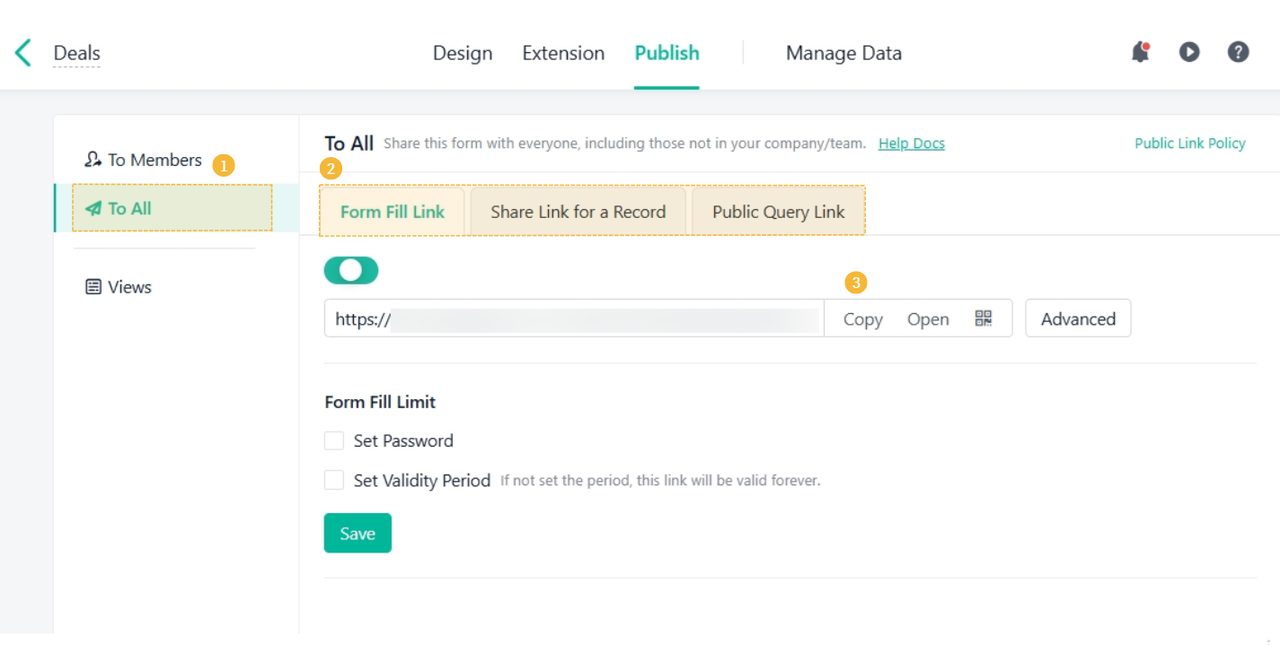
Once your Lead Capture System is ready, navigate to the “Publish” tab and select “To All”. Enable the “Form Fill Link” to generate a public URL. Simply copy and share this link with potential clients, allowing them to access the form and input their contact details directly into your CRM without needing a login.
Why Jodoo is the Best Choice to Build Any App
All-in-one Platform for Project Management & Workflow Automation
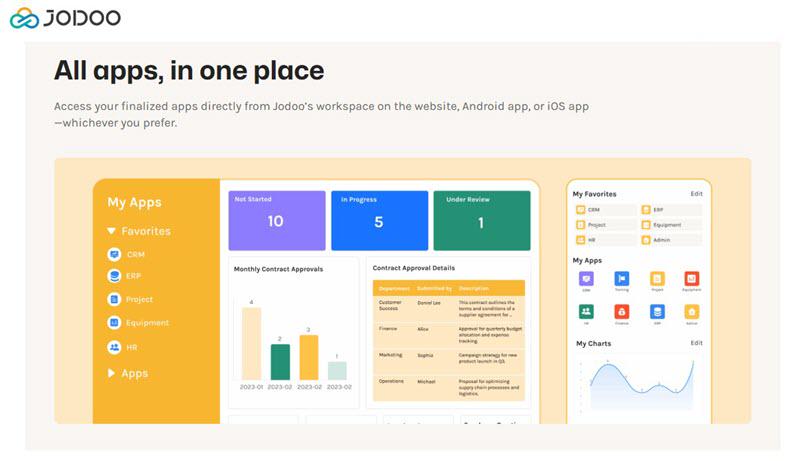
Jodoo is a comprehensive, all-in-one platform designed to centralize project management, workflow automation, and data analysis. It enables businesses to build interconnected systems, such as CRM, HRM, and Order & Inventory management, by integrating 3 core components: Forms, Workflows, and Dashboards.
- Forms serve as the data entry point, allowing you to collect massive data and information effortlessly.
- Workflows automate business logic, handling repetitive task assignments and approvals to streamline project management.
- Dashboards visualize this data, transforming raw numbers into real-time charts for better decision-making.
This versatility allows your departments to collaborate in one workspace. For example, sales teams track leads through automated pipelines, HR departments manage leave requests and recruitment flows, and warehouses monitor real-time stock levels.
Large Cloud Storage & 200k Data Volume
Jodoo supports a generous 200,000 data entry capacity, significantly outperforming competitors like Knack and Zoho Creator, which often impose stricter record limits on comparable plans. This high volume is vital for growing businesses, ensuring you never hit a “data wall” as your operations scale. Instead of forcing costly upgrades just to store more information, Jodoo allows you to confidently maintain extensive historical logs and inventory records, making it a far more sustainable long-term solution.
Customize Systems by Drag-and-Drop
To increase efficiency and productivity, Jodoo eliminates the steep learning curve of software development with its intuitive, zero-code interface. You can build easy workflow automations and systems simply by dragging and dropping fields. Whether you need text boxes, dates, or calculation formulas, the process is completely visual and easy, requiring no coding experience.
This beginner-friendly design ensures that anyone can create a custom application. If you prefer not to start from scratch, Jodoo offers over 100 pre-built templates covering various industries. You can instantly install and customize ready-made solutions for CRM, Inventory Management, or Employee Onboarding, allowing you to deploy professional-grade tools immediately.
Generous Free Plan and Feature-rich Premium Plan
Jodoo offers a generous forever-free plan, distinguishing it from competitors like Kintone and Knack, which lack free tiers entirely. For medium-and-large businesses, the Feature-rich Premium Plan is a better choice, as it provides more features with less cost.
While rivals, like Knack Starter or Kintone, often restrict users to a small 20k–50k records, limit app counts, and require coding for advanced analytics, Jodoo remains 100% No-Code. Its Assistant Pro easily manages complex logic chains that competitors’ simple workflow rules cannot handle. Financially, Jodoo starts at $12, but its competitor charges higher, making it the superior choice for cost-effective scaling.
Abschluss
Building a custom CRM or management system no longer requires coding skills or a massive budget. As we have demonstrated, Jodoo lets you design custom applications effortlessly, combining powerful data collection, workflow automation, and real-time analytics into one simple platform.
With its superior data capacity, generous free tier, and unbeatable premium value, Jodoo clearly outshines expensive competitors like Knack and Kintone. Don’t let rigid software or chaotic spreadsheets hold your business back. Ready to streamline your operations? Sign up for Jodoo’s free plan today and start building your custom solution instantly.