Browse by category

Introduction: How Equipment Maintenance Software for Manufacturing Has Evolved Beyond Basic CMMS
Unplanned downtime still costs manufacturers heavily. In some sectors, studies estimate it can consume 5% to 20% of productive capacity, and for high-volume plants, even one hour of stoppage can mean thousands of dollars in lost output, overtime, and delayed shipments. That is why equipment maintenance software manufacturing teams use today is no longer judged only by whether it can log work orders or store asset records. Maintenance Managers and Plant Managers are now asking a bigger question: does the system actually help reduce breakdowns, improve OEE, and support operator-driven care on the shop floor?
A traditional CMMS is still useful for scheduling preventive maintenance, tracking spare parts, and managing technicians. But many factories now need more than that. Imagine a production manager at an electronics plant who can see recurring stoppages on one SMT line, trigger a maintenance workflow, assign corrective actions, and track follow-up audits from the same system. That is where TPM software and flexible digital workflow platforms start to matter.
In this article, you will see how CMMS manufacturing tools compare with TPM-focused systems, where each fits best, and when a more customizable platform like Jodoo makes sense for complex factory processes.
The Maintenance Challenges Manufacturing Plants Need Software to Solve First
Before you compare CMMS manufacturing tools with TPM software, it helps to look at the operational problems driving the search in the first place. In many plants, the issue is not just that maintenance takes too long. It is that execution is inconsistent across shifts, records are incomplete, and supervisors cannot see risk building until a stoppage affects output, delivery, or compliance. That is why equipment maintenance software for manufacturing teams needs to solve process discipline first, not just create digital work orders.
When Maintenance Depends on Individual Memory
Many factories still rely on technician experience, printed checklists, WhatsApp messages, and spreadsheet trackers that are updated after the job is done. This works until a senior technician is on leave, a line is handed to a new shift, or a recurring fault appears on multiple assets with no common history. In practice, that means the plant is not running a repeatable maintenance process; it is depending on who remembers what.
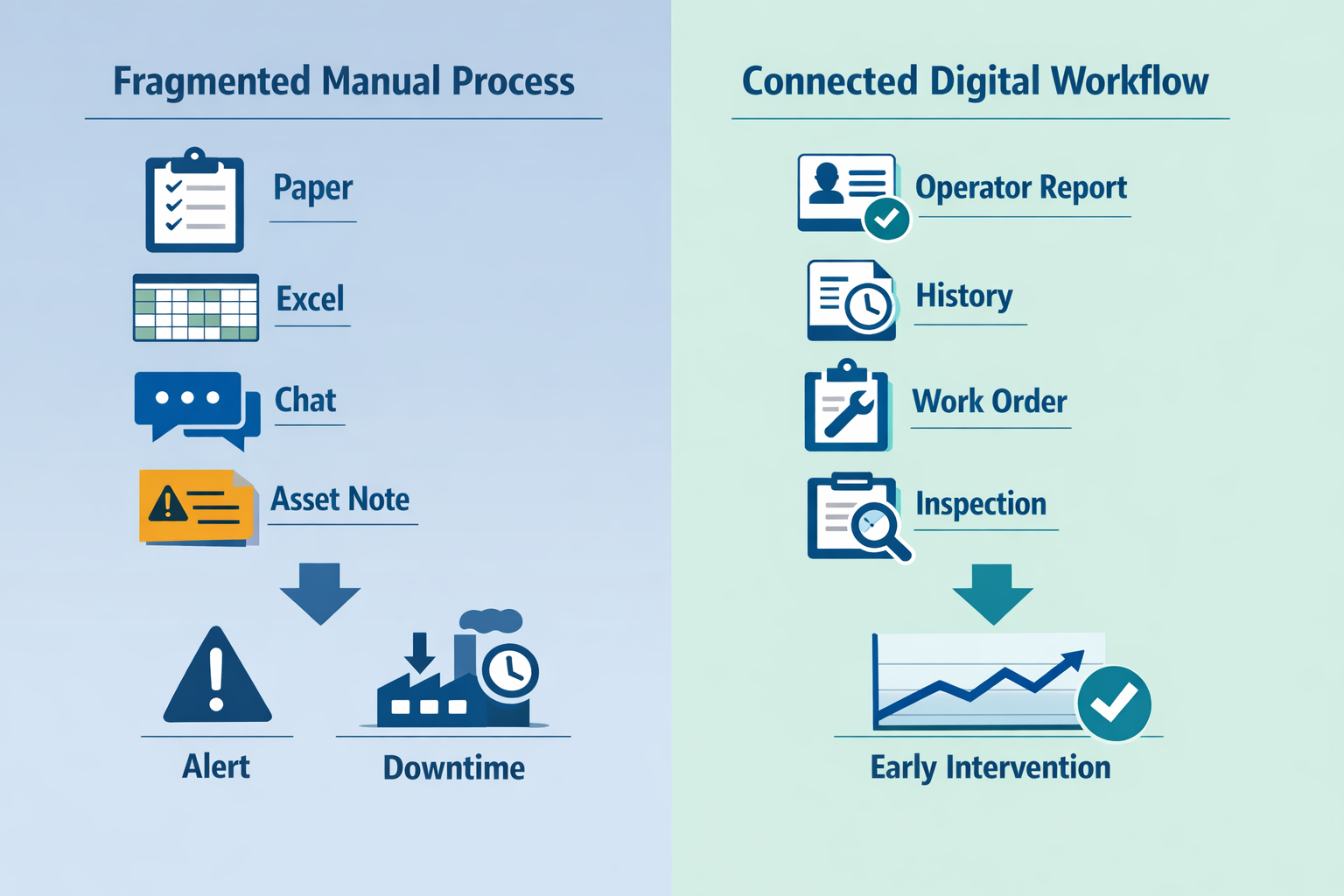
At a food and beverage packaging plant, one filler may keep losing 20 to 30 minutes every few days without a clear root cause.The machine is repaired each time, but lubrication checks, seal replacements, and sanitation-related adjustments are recorded in three different places. Without a connected maintenance management system factory teams can trust, the plant cannot tell whether the issue is wear, cleaning damage, operator handling, or a missed preventive task.
Inspection Gaps Create Delayed Failures
A common blind spot is inspection execution, not planning. A plant may have standard operating procedures for daily checks, but if those checks are paper-based, missing readings and skipped points are easy to overlook. This is where equipment inspection software matters: it turns inspection from a filing exercise into a controlled process with timestamps, photo evidence, alerts, and escalation rules.
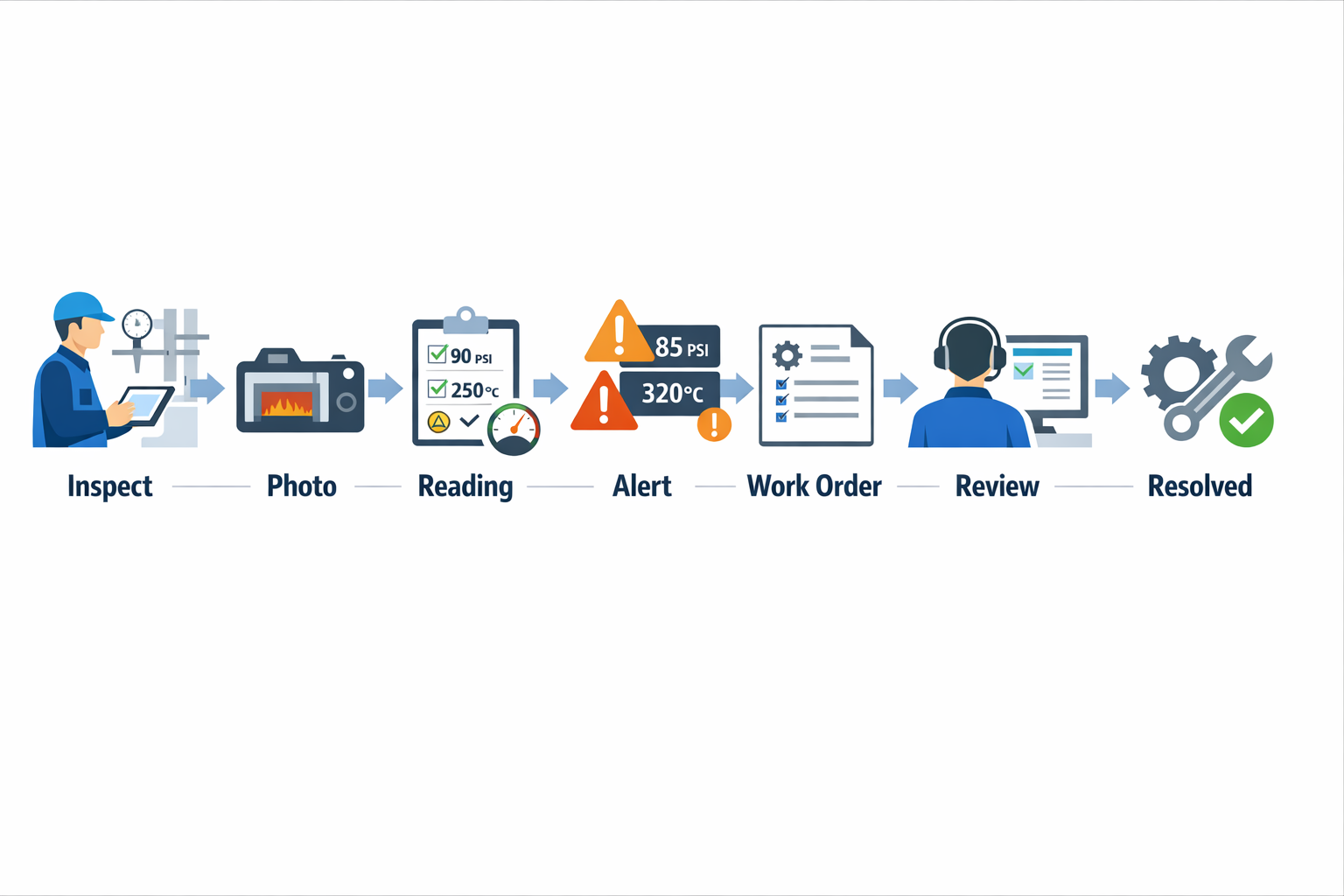
In an electronics assembly plant, for example, compressed air pressure, reflow oven temperature stability, and ESD control checks can all affect yield before anyone calls maintenance. If those inspection results sit in clipboards at the line, maintenance sees the problem only after defects rise or equipment trips. A digital inspection flow gives maintenance and production the same live view, so abnormal readings can trigger action before scrap increases.
Spare Parts Delays Turn Small Issues Into Long Stops
Another challenge plants need software to solve is the disconnect between maintenance activity and spare-parts availability. A technician may identify a failing sensor, bearing, or belt early, but if the storeroom, purchasing team, and maintenance planner are working from separate files, the response slows down. What should have been a scheduled replacement becomes an urgent repair with line downtime attached to it.
This is especially costly in high-mix production environments such as garment manufacturing, where sewing, cutting, and finishing equipment may not be highly automated individually but still create bottlenecks when one asset goes down. If a replacement motor or needle assembly is unavailable, supervisors start shifting work manually between lines, which affects takt, labor balance, and shipment dates. A strong preventive maintenance software factory approach links planned maintenance, parts consumption, reorder triggers, and approval workflows in one system.
Poor Shift-to-Shift Visibility Weakens Response Time
Maintenance performance often breaks down at shift handover. One team hears a vibration issue, another sees a temporary fix, and the morning team assumes the problem was closed. Over time, repeated minor interventions create a false sense of control while the underlying failure mode keeps developing.
This is where both TPM software and structured CMMS manufacturing workflows can help. Operators, technicians, and supervisors need a shared system showing open abnormalities, pending follow-ups, inspection trends, and repeat breakdowns by line or asset. Research from industrial reliability studies frequently shows that planned maintenance can cost three to five times less than emergency repairs, and the difference becomes even larger when lost production and expedited parts are included.
Why Preventive Strategy Matters Before Tool Selection
The real value of software is not just digitizing maintenance records. It is creating a reliable execution model: inspections happen on time, abnormalities are visible immediately, work orders are traceable, and recurring failures can be analyzed across shifts and lines. For plants working toward ISO 9001 or stronger audit readiness, that traceability also matters for proving that maintenance controls are being followed consistently.
That is why the best equipment maintenance software manufacturing teams choose supports a preventive operating model first. Whether you later lean toward a dedicated CMMS, broader TPM software, or a flexible platform like Jodoo to build maintenance, inspection, workflow, and dashboard apps around your actual process, the first question is the same: can the system help your plant execute maintenance consistently, visibly, and fast enough to prevent disruption?
What to Look for in a Maintenance Management System Factory Buyers Can Actually Use
Choosing a maintenance management system factory teams will actually use is not just about feature count. For plant managers and maintenance managers, the real test is whether technicians, supervisors, and production leaders can complete daily maintenance work faster, with fewer missed steps and better traceability. In practice, the best equipment maintenance software manufacturing teams adopt combines strong maintenance controls with simple execution on the shop floor.
Start With Core Maintenance Execution
A practical system should handle the basics exceptionally well: work order creation, preventive maintenance scheduling, spare parts linkage, downtime tagging, and complete asset history. If a technician needs six screens to close a lubrication task or cannot attach a photo of a worn conveyor bearing, adoption will drop quickly. In a food processing plant, for example, a maintenance supervisor should be able to generate recurring PM tasks for mixers, assign them by shift, record sanitation-related checks, and see the full history of failures and repairs on one asset record.
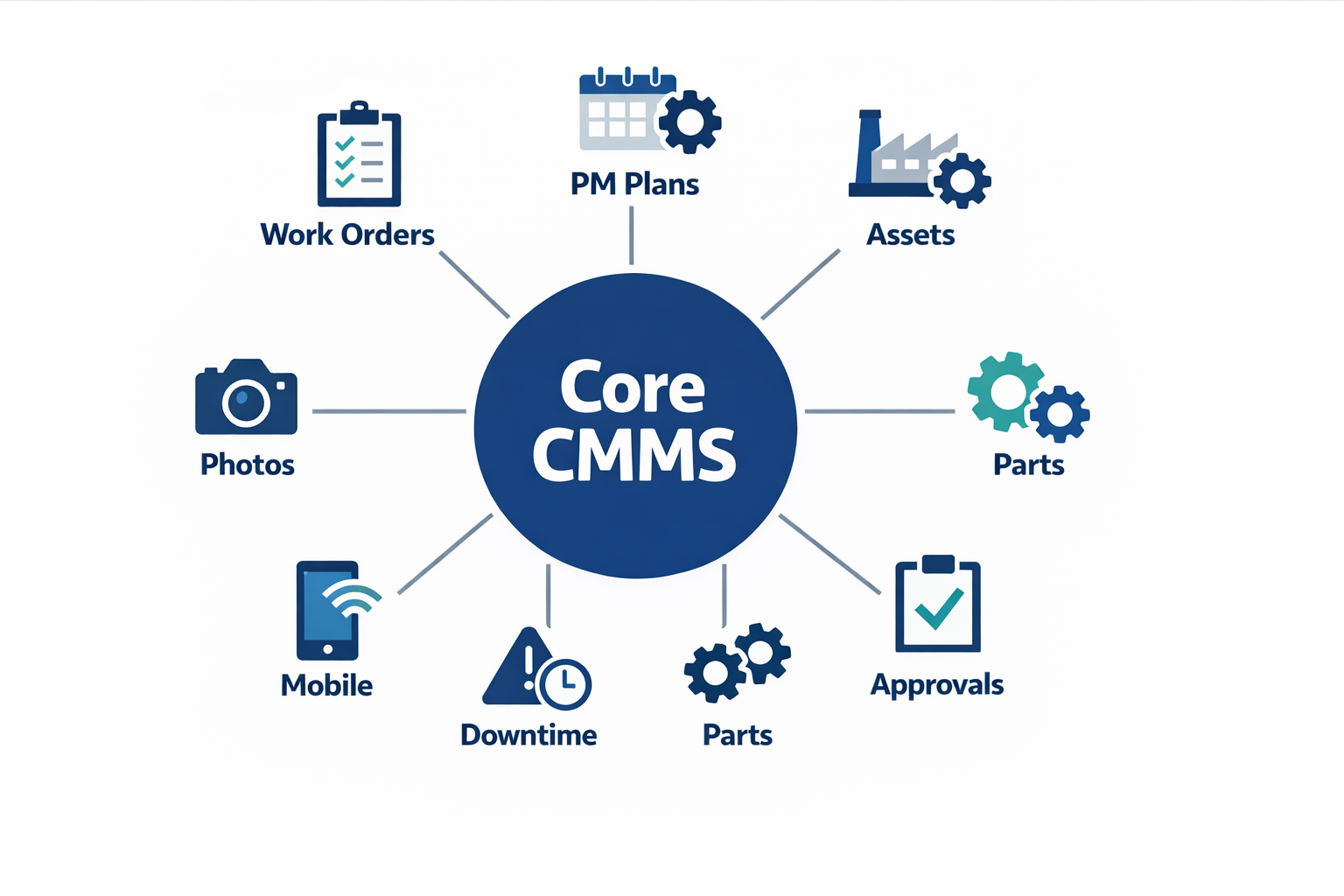
For buyers comparing CMMS manufacturing tools, check whether work orders can be triggered manually, by time, by meter reading, or by condition. Good preventive maintenance software factory teams rely on should support weekly, monthly, runtime-based, and usage-based PM plans without complicated setup. It should also allow planned task lists, standard labor time, required parts, safety instructions, and sign-off fields so PM execution is consistent across lines and sites.
Evaluate Equipment Inspection Software Separately
Many buyers treat equipment inspection software as a checkbox inside a CMMS, but it deserves separate evaluation. Inspection workflows often involve mobile forms, photos, barcode or QR scans, pass/fail logic, escalation rules, and digital signatures, which are different from classic work order management. In an electronics assembly plant, imagine a line maintenance leader running daily checks on reflow ovens and air compressors; the inspection app should let the team capture temperature deviation, upload thermal images, flag abnormalities, and automatically trigger follow-up work orders when limits are exceeded.
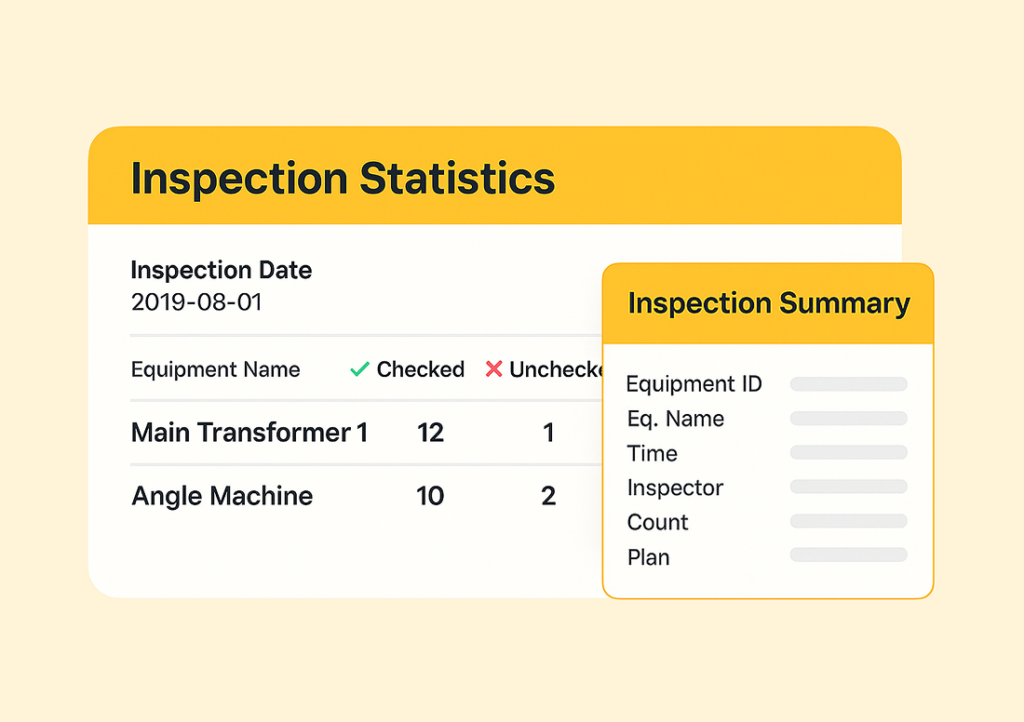
When reviewing inspection capability, ask whether the system supports offline mobile use, checklist version control, and role-based approval for critical findings. This matters in larger factories where inspections are performed by operators, verified by supervisors, and reviewed by engineering or EHS teams. According to industry studies, unplanned downtime can cost manufacturers $10,000 to $50,000+ per hour depending on the process, so inspection data only becomes valuable when it moves quickly into corrective action.
Assess TPM Software Beyond Checklists
If you are also evaluating TPM software, do not limit the review to autonomous maintenance checklists. TPM execution should support operator care tasks, abnormality tagging, focused improvement follow-up, and visibility into recurring losses by machine, line, or area. A useful TPM layer helps connect frontline activities to maintenance outcomes, instead of storing cleaning and inspection records in a separate silo.
In a garments factory, for example, sewing line leaders may perform daily autonomous maintenance on needle systems, thread paths, and compressed air points, while the maintenance team handles deeper corrective tasks. The right TPM software should let operators log abnormalities in seconds, route them to the right maintainer, and track closure time by category. That is how TPM supports reliability improvement instead of becoming a digital filing cabinet.
Look at Implementation Effort and Configurability
A strong feature list means little if implementation takes nine months and still does not fit your actual workflow. Factory buyers should separate product capability from deployment effort: how quickly can you configure asset hierarchies, PM templates, inspection forms, escalation rules, and approval paths without heavy custom coding? This is where flexible platforms such as Jodoo can be valuable, because operations teams can tailor forms, workflows, and dashboards to how their plant already runs.
Configurability is especially important when one company has different maintenance practices across sites. One plant may require vibration checks and lubrication rounds, while another needs sanitation verification, calibration approval, and contractor permit sign-off. A system that can adapt without expensive redevelopment is usually more sustainable over a three- to five-year horizon than rigid software with fixed workflows.
Confirm Mobile Usability, Dashboards, and Access Control
Shop-floor adoption depends heavily on mobile usability. Technicians should be able to receive work orders, scan assets, upload photos, log meter readings, complete inspections, and request parts from a phone or tablet without returning to a desktop terminal. If your maintenance team works across utilities rooms, rooftop HVAC units, or multiple production halls, mobile-first design is no longer optional.
Dashboards also matter, but only if they help supervisors act. Look for real-time views of PM compliance, overdue work orders, MTTR, repeat failures, downtime by asset class, and open abnormalities from TPM or inspections. Role-based access is equally important: operators should see autonomous maintenance tasks, technicians should access equipment records and work orders, and managers should review approvals, trends, and audit history without exposing unnecessary data.
Check Integrations and Long-Term Usability
Finally, review how well the software connects to the rest of your operation. A modern maintenance management system factory environment may need links to ERP for spare parts, HR for technician assignment, production systems for runtime data, and quality systems for deviation handling. Integration reduces duplicate entry and helps maintenance decisions reflect what is happening across the plant.
CMMS Manufacturing vs TPM Software: Which Approach Fits Your Plant Best?
Choosing between CMMS manufacturing tools and TPM software is less about which category is “better” and more about what your plant is trying to control. A CMMS is primarily built to manage maintenance work: assets, work orders, spare parts, PM schedules, and technician activity. TPM software goes wider, connecting maintenance with operators, supervisors, production teams, and continuous improvement efforts on the shop floor. If you are evaluating equipment maintenance software manufacturing teams will actually use every day, the right answer depends on your plant’s maturity, process complexity, and how broadly you want maintenance ownership to spread.
Purpose: Work Order Control vs Total Equipment Ownership
A maintenance management system factory teams use as a CMMS is designed to answer questions like: What assets do we have, what work is due, what broke, what parts were used, and how long did repair take? It is strong when your main goal is to organize maintenance execution and create a reliable record for audits, budgeting, and uptime reporting. For many plants, that alone delivers fast value, especially when moving away from paper logs and Excel trackers.
TPM software, by contrast, is designed to support Total Productive Maintenance as an operating model. That means it does not stop at technician scheduling; it also supports autonomous maintenance, daily checks by operators, abnormality tagging, layered follow-up, root cause workflows, and improvement actions tied to OEE. In practice, a TPM platform often overlaps with equipment inspection software because inspections are not just maintenance events; they become part of daily production discipline.
Who Uses It Day to Day?
In most factories, a CMMS is used heavily by maintenance planners, technicians, reliability engineers, and storekeepers. Plant managers may review reports, but the daily activity stays inside the maintenance department. That makes CMMS a good fit when maintenance is still centrally managed and production teams are not yet expected to own basic care routines.
TPM software is more cross-functional by design. Imagine a production manager at an electronics assembly plant who wants SMT line operators to complete startup checks, lubrication confirmations, and abnormality reporting before the first shift release. In that case, technicians still handle corrective work, but operators, line leaders, and CI teams all contribute data, which is where TPM software creates more value than a maintenance-only tool.
Workflow Depth: Scheduled Maintenance vs Daily Shop Floor Loops
A good preventive maintenance software factory setup inside a CMMS can handle recurring PM schedules, meter-based triggers, calibration tasks, breakdown tickets, and spare parts reservations. That is usually enough for plants focused on compliance, asset history, and reducing missed PMs. According to industry benchmarks from Aberdeen and other maintenance studies, planned maintenance programs can reduce equipment downtime by 30% to 50% compared with reactive maintenance environments, which is why a solid CMMS often pays back quickly.
TPM workflows are deeper in a different way. They connect routine checks, visual standards, defect tagging, short-interval response, and improvement closure across departments. For example, in a food and beverage packaging plant, operators may log filler leaks, unusual vibration, and changeover-related abnormalities during sanitation and startup checks, while supervisors route these issues to maintenance or engineering based on severity. That creates a closed loop between daily operation, equipment care, and continuous improvement rather than a simple work-order queue.
Collaboration: Department Tool or Plantwide System?
If your plant wants maintenance visibility but not a major behavior change, CMMS manufacturing software is often the cleaner rollout. It gives maintenance teams structure without forcing every operator and supervisor into a new routine on day one. This is especially useful in multi-site groups where standardizing asset naming, PM intervals, and spare parts data is the first priority.
If your plant is already tracking OEE, conducting focused improvement, or running operator-led care routines, TPM software becomes more relevant. It supports shared accountability for equipment losses, not just shared visibility of maintenance data. In mature plants, that distinction matters because many minor stops, speed losses, and basic condition issues never enter a traditional CMMS unless someone turns them into a formal work order.
Rollout Speed and Change Effort
A CMMS usually rolls out faster because the user group is narrower and the process is more defined. You can start with assets, PM plans, maintenance requests, and inventory, then expand into mobile work orders and dashboards. For many mid-sized plants, this makes CMMS the practical first step in digitalizing equipment maintenance software manufacturing workflows.
TPM software typically requires more process design because it touches operations, maintenance, engineering, and CI. You need clear checklists, escalation rules, ownership logic, and dashboard views by role. That extra effort is worthwhile when the plant wants one system for inspections, abnormalities, action tracking, and frontline equipment care, but it is usually not the quickest “switch on” project.
Which Approach Fits Different Plant Maturity Levels?
If your plant is still formalizing asset registers, PM compliance, and breakdown response, a traditional CMMS is often enough. It gives you discipline in the core maintenance workflow and creates the data foundation needed for better planning. In this stage, a focused maintenance management system factory implementation often delivers more value than launching a full TPM program too early.
If your plant already has stable maintenance basics and wants to improve operator ownership, defect elimination, and cross-functional follow-up, TPM software is the better fit. A garment factory, for example, may already schedule machine servicing well but still struggle to connect sewing-line operator checks, mechanic response, and recurring loss analysis in one system. TPM software closes that gap by linking frontline routines with maintenance and CI execution.
When Combining Both Makes the Most Sense
In many real plants, the best answer is not CMMS or TPM software, but both capabilities in one connected system. You may want CMMS-grade asset history, spare parts, and PM scheduling, while also enabling operator checklists, equipment inspection software workflows, abnormality tagging, and action tracking. That is especially useful in plants where maintenance and production are measured together on uptime, quality, and throughput.
This is where a flexible platform like Jodoo can make sense. Instead of forcing your plant into a rigid tool category, you can build a maintenance workflow that starts with CMMS essentials and then extend it into TPM processes as your maturity grows. For example, a plant could begin with technician work orders and preventive schedules, then add operator inspections, escalation workflows, and dashboards without replacing the original system.
Where Jodoo Fits: A Flexible Alternative for Custom Equipment Maintenance Software Manufacturing Workflows
When Standard Maintenance Tools Are Too Rigid
Many plants do not need just another fixed CMMS manufacturing package with preset screens for work orders and PM schedules. They need equipment maintenance software manufacturing teams can shape around how their plant actually runs, including approval layers, shift handovers, abnormality reporting, spare-parts requests, and cross-functional follow-up. That is where Jodoo fits differently: instead of forcing your process into a standard template, it lets you build a maintenance workflow that reflects your SOPs, team structure, and escalation rules.
This matters in factories where maintenance does not work in isolation. A breakdown can involve production for line stoppage confirmation, quality for product hold decisions, and EHS for lockout-tagout or incident documentation. With Jodoo, you can connect these steps in one no-code workflow, so the maintenance team is not switching between paper forms, WhatsApp messages, spreadsheets, and separate systems just to close one issue.
What You Can Build With Jodoo
Jodoo is not positioned as a narrow point solution. It is a flexible platform for plants that want to create a connected maintenance management system factory teams can adapt over time, without waiting for long IT development cycles. You can digitize maintenance requests, operator checklists, lubrication rounds, abnormality tags, PM schedules, spare-parts approvals, contractor permits, and escalation workflows in one environment.
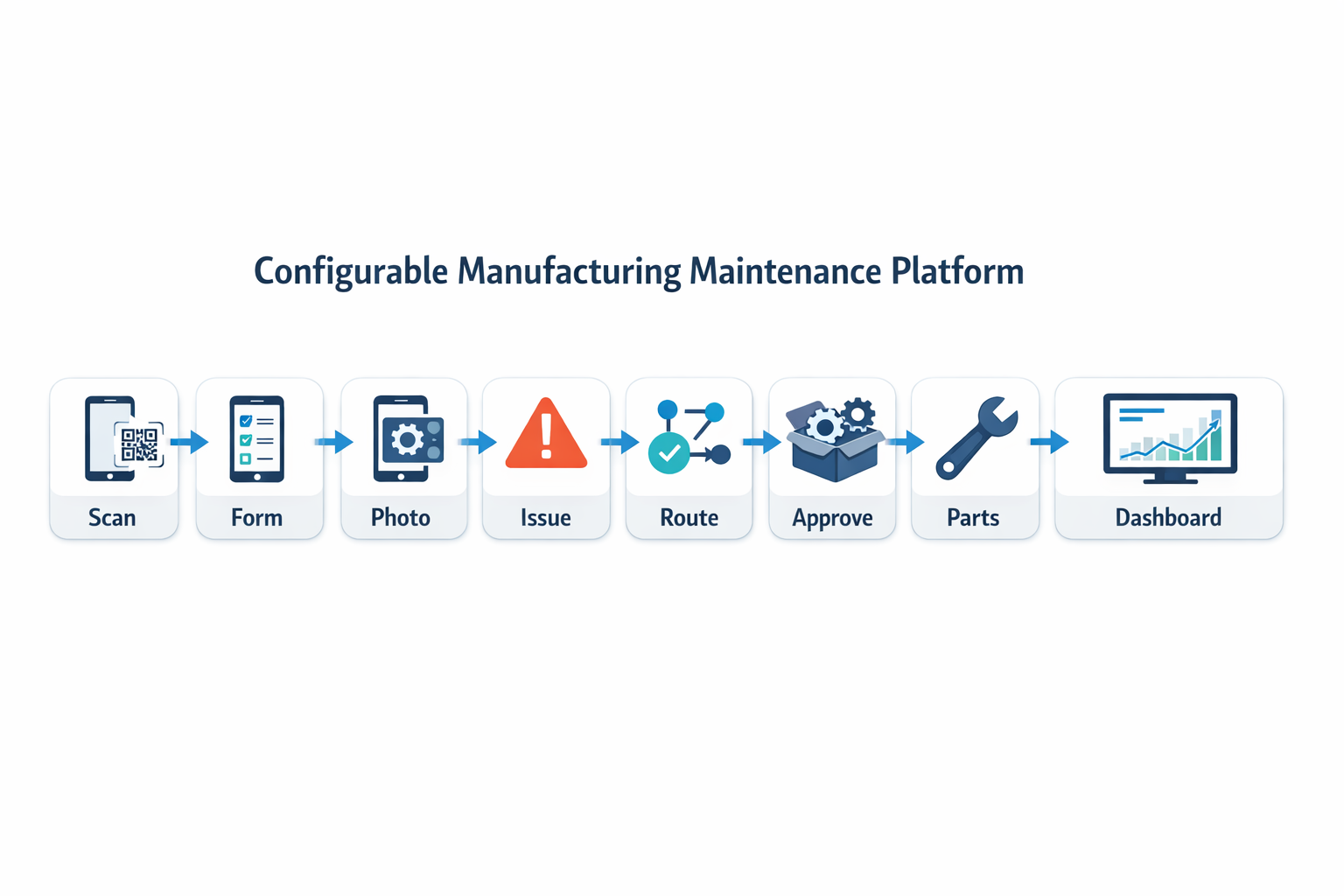
For example, a plant can build mobile forms for frontline technicians to capture photos, meter readings, and signatures during inspection rounds. Those forms can feed directly into an equipment inspection software workflow that routes failed items to the right technician, triggers supervisor review for critical assets, and updates dashboards automatically. Instead of buying separate tools for inspection, approval, and reporting, the plant runs them as connected processes.
A Better Fit for TPM and Cross-Functional Execution
Plants running TPM initiatives often discover that software adoption fails when the tool only supports maintenance department tasks. In practice, operators, line leaders, quality engineers, and warehouse staff all play a role in keeping assets available. Jodoo supports this broader model by helping teams build workflows that match how TPM software should work on the shop floor, not just in the maintenance office.
Imagine a production manager at an electronics assembly plant who wants operators to log first-level machine abnormalities during startup checks. In Jodoo, that operator can scan a QR code on the SMT machine, submit an abnormality form with a photo and severity rating, and automatically notify maintenance if the issue exceeds defined limits. If a spare part is needed, the workflow can send an approval request to the maintenance supervisor and update a live dashboard showing open abnormalities, response time, and repeat issues by line.
Practical Example: Replacing Paper Inspections and Excel PM Tracking
A mid-sized food packaging manufacturer may already have PM plans documented in Excel and daily inspection sheets clipped to machine panels. With Jodoo, the plant can replace that setup with a mobile preventive maintenance software factory teams actually use on the floor. Operators complete digital equipment checks, abnormal findings create maintenance tasks automatically, supervisors approve high-priority interventions, and plant managers view real-time status across fillers, conveyors, and sealing machines.
In one connected app, the same manufacturer can track inspection completion, overdue PMs, downtime events, and spare-parts consumption without waiting for IT-heavy customization. A failed temperature reading on a packaging line can trigger an abnormality report, route it to maintenance, require supervisor approval before restart, and appear instantly on a dashboard for the plant manager. That gives the site a practical alternative to rigid off-the-shelf software: a system that combines the structure of CMMS manufacturing with the flexibility to support real factory workflows across maintenance, production, quality, and EHS.
Conclusion: How to Choose the Right Equipment Maintenance Software for Manufacturing
The right equipment maintenance software manufacturing decision depends less on feature checklists and more on how your plant actually runs. If you manage a stable operation with clear asset hierarchies, fixed PM schedules, and a dedicated maintenance team, a traditional CMMS may be enough. But if your factory also needs operator-led care, layered approvals, spare parts coordination, audit trails, and real-time visibility across production, quality, and engineering, you need a more flexible system.
Think about your factory’s day-to-day reality. In some plants, a production manager may need to track autonomous maintenance checks, escalate breakdowns from mobile devices, and link recurring failures to CI actions in one workflow. Or a food manufacturing site that needs preventive maintenance records, sanitation verification, and ISO 9001 audit evidence in the same process. In these cases, the best fit is often software that adapts to changing workflows instead of forcing teams into rigid templates.
That is where Jodoo can help. As a no-code lean manufacturing platform, Jodoo can complement or even replace parts of a traditional maintenance system by helping you digitize preventive maintenance software factory workflows faster and with more flexibility. If you want to evaluate a practical path forward, start a free trial or book a demo to see whether Jodoo fits your maintenance operation.