Browse by category

Introduction: Why Quality Management Software Manufacturing Teams Need Now
A single missed defect can cost far more than a rejected batch. In automotive, the average cost of a product recall can run into millions of USD, while in food manufacturing, one labeling or contamination issue can trigger waste, rework, shipment delays, and regulatory risk across multiple SKUs. That is why more plants are replacing paper checklists, Excel logs, and disconnected systems with quality management software manufacturing teams can trust on the shop floor.
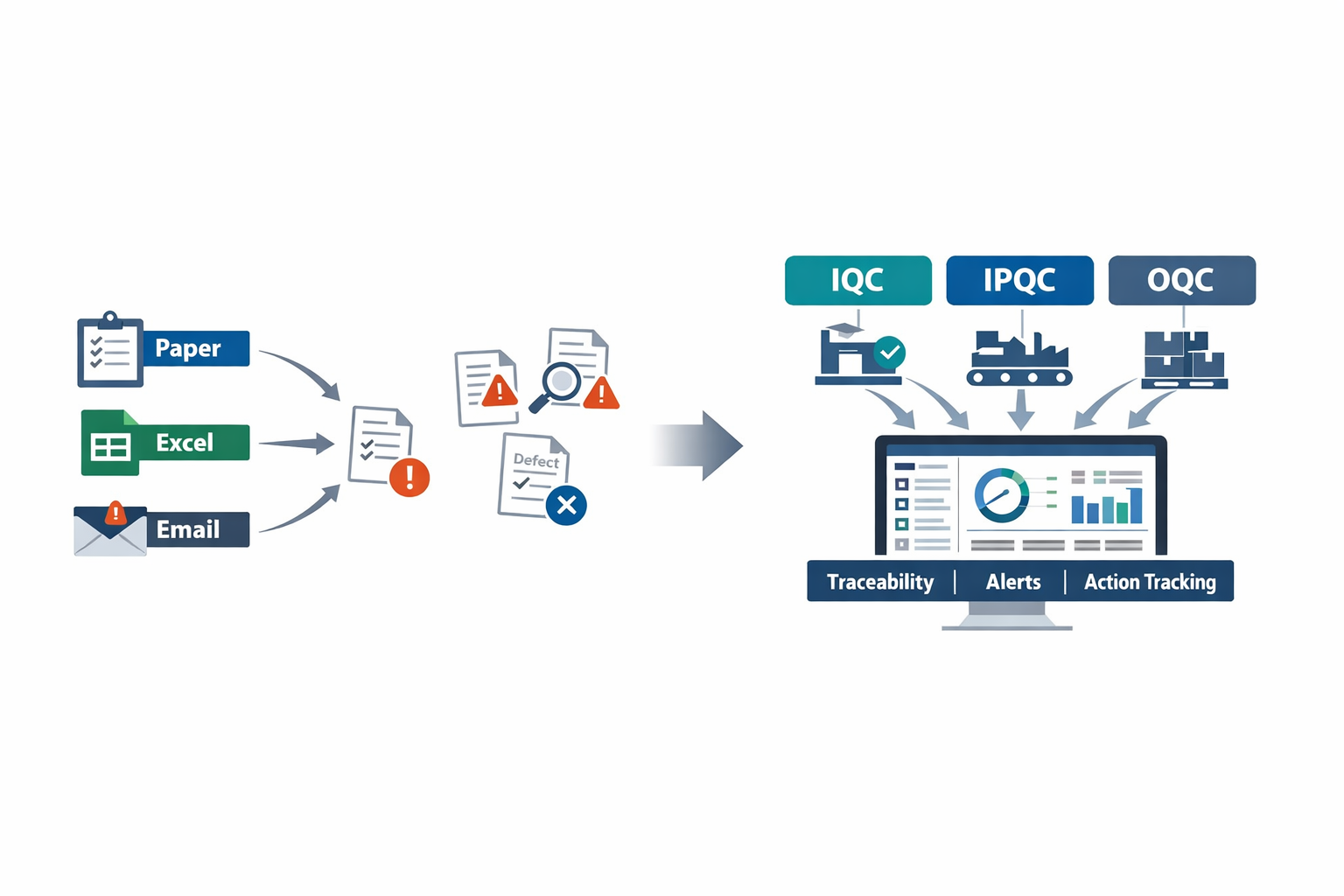
At an electronics plant, the same soldering defect may end up being reported in three different places: an incoming inspection sheet, a line QC spreadsheet, and an email from final inspection. The problem is not only the defect itself, but also the delay in tracing root cause and assigning action. In many factories, quality data still sits in silos, making it harder to control scrap, reduce customer complaints, and respond quickly to nonconformance.
This is where digital quality control becomes practical.A strong system connects IQC, IPQC, and OQC into one workflow: checking incoming materials, controlling quality during production, and verifying outgoing goods before shipment. In this guide, you will learn what each checkpoint means, how they work together, and what to look for when choosing software that fits real manufacturing operations.
What IQC, IPQC, and OQC Mean in QMS Software Manufacturing
In manufacturing, quality does not happen at the final inspection table. It starts when raw materials arrive, continues through every key production step, and ends only when finished goods are verified for shipment. That is why quality management software manufacturing teams use is usually built around three core control points: IQC, IPQC, and OQC.
In plain terms, IQC means checking incoming materials before they enter production, IPQC means controlling quality during production, and OQC means verifying finished goods before delivery. These are not just inspection labels. In a modern QMS software manufacturing environment, each stage becomes part of a connected workflow that captures data, triggers actions, and creates traceability from supplier receipt to customer shipment.
IQC: Incoming Quality Control
Incoming Quality Control focuses on raw materials, components, packaging, and purchased parts before they are released to the line. Imagine a quality engineer at an electronics plant receiving reels of resistors, plastic housings, and PCB boards from three different suppliers. If one lot is out of tolerance and gets issued to production, the problem can quickly spread across thousands of units.
With quality inspection software, IQC teams can standardize receiving inspections using digital checklists, sampling plans, tolerance fields, barcode scans, and photo evidence. Instead of relying on paper forms or Excel files, inspectors record lot number, supplier name, defect type, quantity rejected, and disposition status in one place. This matters because supplier-related defects are a major source of production disruption, especially in industries with tight part specifications such as automotive and electronics.
A strong quality control software factory setup also helps enforce release rules. For example, material can remain on hold until inspection is passed, engineering review is completed, or a supervisor approves deviation use. In ISO 9001 environments, this kind of documented control is critical because it links incoming inspection results to supplier performance, nonconformance handling, and material traceability.
IPQC: In-Process Quality Control
In-Process Quality Control covers the checks performed during production to prevent defects from moving downstream. This can include first-piece approval, patrol inspection, setup verification, process parameter checks, torque validation, visual inspection, or inline test results. The goal is simple: detect variation early, before scrap, rework, or customer complaints increase.
On a stamping and assembly line in an automotive parts plant, burr defects may appear gradually as a die begins to wear out. If a die starts wearing out, burr defects may appear gradually rather than all at once. With IQC IPQC OQC software, operators or line inspectors can log process defects immediately, attach photos, record the machine number, and trigger alerts when defect counts pass a threshold.
This is where digital quality management becomes far more useful than standalone inspection records. IPQC data can be linked to work orders, machines, shifts, operators, and specific process stages, making root cause analysis much faster. Manufacturers that digitize in-process checks often reduce response time to quality abnormalities because supervisors no longer wait for end-of-shift paperwork to discover that a line has been drifting out of spec.
OQC: Outgoing Quality Control
Outgoing Quality Control is the final verification before products are packed, released, and shipped to customers. At this stage, the factory checks whether the finished goods meet customer specifications, labeling requirements, packaging standards, and shipment criteria. In food manufacturing, this may include seal integrity, date coding, carton count, and finished product appearance; in electronics, it could include functional testing, cosmetic checks, and packaging validation.
Without a controlled OQC process, factories risk shipping defects that lead directly to returns, chargebacks, warranty claims, or line stoppages at the customer site. Research across manufacturing sectors consistently shows that the cost of finding defects after shipment is many times higher than catching them inside the plant. That makes OQC less of a paperwork step and more of a risk control point.
With quality inspection software, OQC teams can follow digital release workflows tied to shipment lots, production orders, and customer requirements. If a batch fails final inspection, the system can automatically block shipment, notify production and quality leaders, and create a nonconformance case for follow-up. This is especially important for export manufacturers and Tier 1 or Tier 2 suppliers that need clear evidence of final quality checks.
How IQC, IPQC, and OQC Work Together in QMS Software
The real value of QMS software manufacturing teams adopt is not just digitizing three separate inspections. It is connecting those inspections into one quality loop. When IQC, IPQC, and OQC data sit in the same system, you can trace a finished defect back to a raw material lot, a machine condition, a process parameter, or a supplier issue much faster.
For example, imagine a food packaging plant that receives laminated film from multiple suppliers. IQC records show one supplier lot had borderline thickness variation, IPQC logs show sealing defects increased on Line 3 during the night shift, and OQC shows a spike in rejected finished pouches before shipment. In a disconnected system, these facts may stay buried in three departments. In a connected quality management software manufacturing workflow, they are tied together as one traceable quality event.
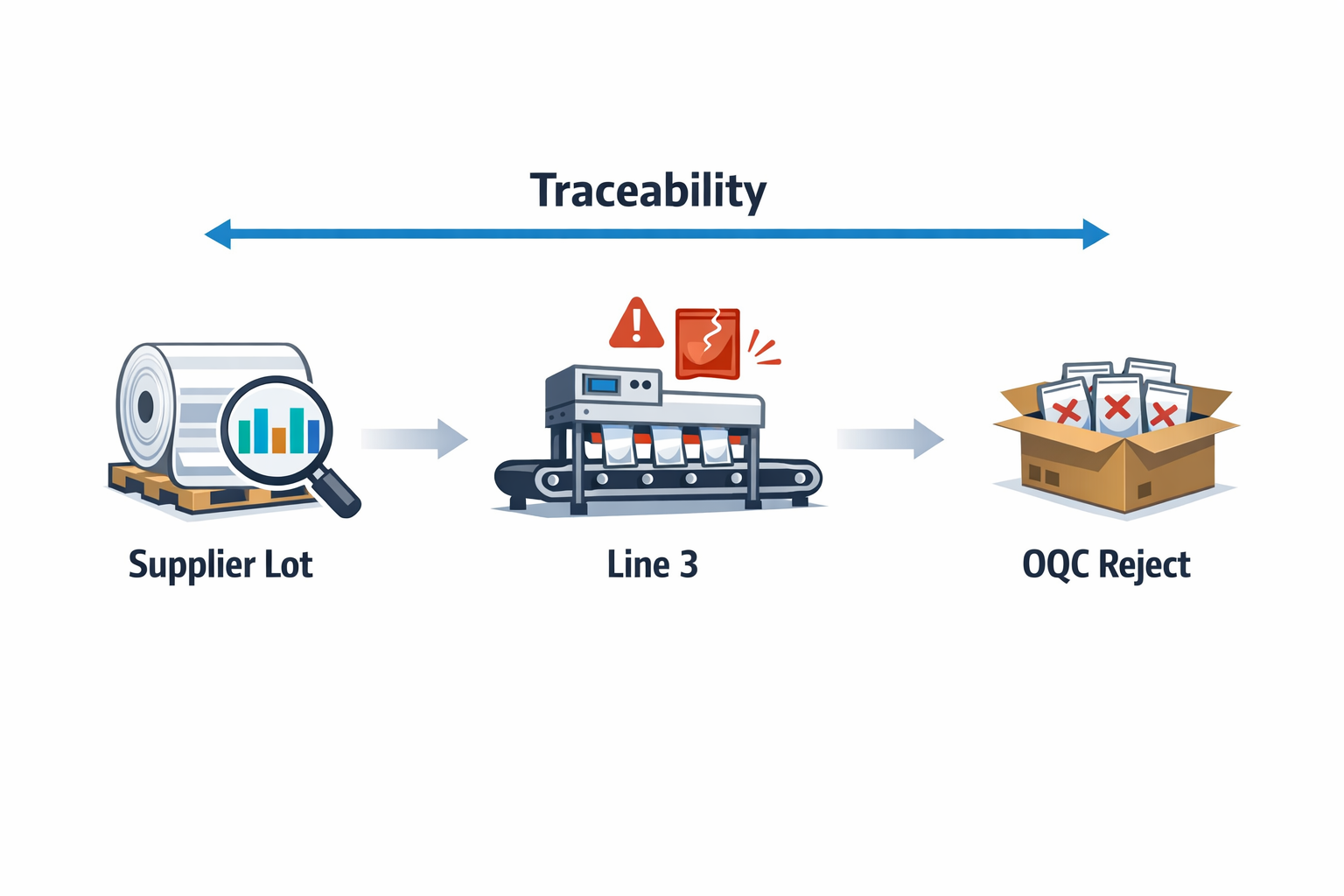
This connected approach also supports better decision-making. A quality manager can see whether repeated OQC failures are actually caused by weak incoming controls, unstable process settings, or inconsistent operator checks. Instead of reacting only to customer complaints, the factory can use quality data upstream to prevent recurrence.
What Quality Inspection Software Should Control at Each Stage
Inspection Standards and Sampling Rules
Every quality stage needs consistent standards. Quality inspection software should store inspection criteria, sampling plans, defect categories, acceptance limits, and work instructions by product, part number, process, or supplier. This reduces variation between inspectors and makes audits easier because the latest standard is built directly into the workflow.
Defect Logging and Nonconformance Recording
When inspectors find problems, the system should capture more than a pass or fail result. Good digital quality management tools log defect code, defect quantity, severity, location, suspected cause, containment action, and supporting evidence such as photos or documents. This creates usable data for Pareto analysis, supplier reviews, and continuous improvement work.
Approvals, Holds, and Release Decisions
Factories need control over what happens after a failed inspection. A practical quality control software factory workflow should support hold status, MRB review, deviation approval, reinspection, and final disposition. That prevents unapproved material or finished goods from moving forward simply because someone missed an email or paper tag.
Traceability Across Materials, Processes, and Shipments
Traceability is one of the biggest advantages of IQC IPQC OQC software. Inspection records should link to supplier lot, internal batch, work order, machine, operator, time stamp, and shipment record. When a customer reports a defect, the quality team can quickly identify which lots were affected and what controls were applied at each stage.
Closed-Loop Corrective Action
Inspection alone does not improve quality unless the factory acts on what it finds. Modern QMS software manufacturing workflows should turn recurring defects into corrective actions, assign owners, set deadlines, and track verification of effectiveness. This closed-loop follow-up is essential for reducing repeat issues, especially in plants where the same defects tend to reappear after temporary containment.
A Practical Factory Example
Take a manufacturer of plastic interior parts for the automotive sector. During IQC, the team detects color variation in resin from one supplier and places that lot on hold. Later, IPQC on the molding line shows an increase in short-shot defects during startup, and OQC finds cosmetic rejects on final packed parts for one customer program.
In a paper-based process, these may look like separate issues. In a connected quality management software manufacturing system, the quality team can trace all three events to the same supplier lot, review approvals, confirm whether hold material was mistakenly released, and launch an 8D or corrective action workflow. That is the difference between recording quality events and actually controlling them.
For plant managers, this visibility is operationally important. Scrap, rework, expedited replacement shipments, and customer complaints all have a direct cost. Some industry estimates place the cost of poor quality at 5% to 20% of sales, depending on process maturity, making connected inspection and follow-up workflows a high-impact investment rather than just a compliance project.
Common Pain Points That Push Factories Toward Digital Quality Management
Many manufacturers do not start looking for quality management software manufacturing because they want another system. They start because their current quality process is slowing production, weakening traceability, and creating too much fire-fighting. In plants still relying on paper forms, Excel files, and WhatsApp updates, quality teams spend more time chasing information than preventing defects. That is where digital quality management becomes less of an IT project and more of an operational necessity.
Delayed Inspections Create Hidden Production Risk
In manual environments, inspections often happen later than planned because forms are not available, inspectors are tied up with data entry, or supervisors do not see pending checks in time. A missed incoming inspection can allow nonconforming raw material onto the line, while a delayed in-process check can let defects run for hours before anyone reacts. In high-volume sectors like electronics or automotive components, even a 30-minute delay in detecting a process drift can translate into hundreds or thousands of suspect parts.
Imagine a production manager at an automotive parts plant who receives stamped metal brackets from three suppliers every morning. If IQC results are recorded on paper and only keyed into Excel at the end of the shift, the line may already have consumed a questionable lot before the defect trend is visible. IQC IPQC OQC software helps prevent this by assigning inspections in real time, validating required fields, and alerting teams immediately when results fall outside tolerance.
Inconsistent Records Make Quality Data Hard to Trust
Manual quality systems almost always produce inconsistent records. Different inspectors may use different defect codes, skip fields, write vague comments, or file reports in separate folders that no one else can find later. When records are inconsistent, managers lose confidence in the data and struggle to compare suppliers, lines, shifts, or plants accurately.
This is a common problem in food manufacturing, where checks for packaging seal integrity, label accuracy, metal detection, and temperature control may be logged by different people across different formats. One team writes “seal leak,” another writes “pack not closed,” and a third simply notes “NG.” A structured quality inspection software setup standardizes checklists, defect categories, sampling plans, and escalation rules so the data coming from IQC, IPQC, and OQC is usable for trend analysis instead of just archive storage.
Poor Traceability Slows Containment and Root Cause Analysis
When a complaint, audit finding, or internal defect appears, the first question is usually simple: which lot, which machine, which operator, and which inspection record is affected? In a paper-based process, finding that answer can take hours or days. Teams may need to pull files from QA, ask production for shift records, check warehouse receiving logs, and then manually match timestamps.
That delay matters. According to industry studies, the cost of poor quality can range from 10% to 20% of sales in many manufacturing businesses, and poor traceability makes that cost worse by expanding the size of quarantines, rework, and customer exposure. A connected QMS software manufacturing approach links material receipts, inspection results, nonconformance records, CAPA, and shipment status so teams can trace problems faster and contain them before they spread.
CAPA Follow-Up Is Often Too Slow and Too Manual
Most factories already know how to run corrective and preventive action on paper. The real problem is follow-up. Actions are assigned in meetings, recorded in spreadsheets, and then buried in email threads until the next customer complaint or management review forces the topic back to the surface.
Imagine an electronics assembly plant where IPQC finds repeated solder bridging on one SMT line. The quality engineer opens a nonconformance report, maintenance is asked to check stencil wear, production is told to review setup, and training is assigned to operators. Without digital ownership, deadlines, reminders, and status visibility, those actions move slowly, and the same defect can return within days. This is where quality control software factory teams use to manage CAPA can make a measurable difference by tracking every action item, due date, approval, and verification step in one place.
Audit Preparation Becomes a Fire Drill
For many plants, the weeks before an ISO 9001 audit, customer audit, or internal layered process audit are chaotic. Quality teams chase missing records, update revision-controlled forms, and try to prove that checks were completed on time and that deviations were properly closed. The issue is not that the factory lacks effort; it is that the evidence is scattered.
A digital system reduces audit stress because records are captured in a consistent format and stored with timestamps, user history, attachments, and approval trails. Instead of manually assembling IQC logs, IPQC check sheets, OQC release forms, and CAPA files from different departments, the team can pull them directly from one system. That is one reason more manufacturers are moving toward digital quality management platforms that support both daily operations and compliance readiness.
Quality Data Is Siloed Between Departments
Quality rarely fails because QA alone made a mistake. Problems usually involve multiple functions: purchasing approved a supplier issue, warehouse accepted material without full inspection, production ran with unstable settings, maintenance delayed a machine fix, and shipping released product under pressure. When each department works from its own spreadsheet or standalone tool, no one sees the full picture.
This is especially common in mid-sized factories where ERP, maintenance, and quality records do not connect cleanly. Supplier performance sits in procurement files, scrap data sits in production reports, and customer complaints sit in email. With quality management software manufacturing teams can use across departments, incoming defects, process deviations, final inspection failures, and CAPA actions can flow through a shared workflow instead of remaining trapped in silos.
Administrative Burden Keeps Teams Stuck in Reactive Mode
One of the biggest objections plant leaders have is understandable: they do not want software that adds more data entry to an already busy shop floor. If inspectors need to duplicate the same information across paper forms, Excel sheets, and email reports, the system will fail quickly. The goal of a modern quality inspection software setup is not to digitize paperwork for its own sake, but to reduce manual handling and make quality work faster.
That means mobile forms for line-side checks, auto-filled lot and supplier data, barcode or QR-based traceability, automatic nonconformance triggers, and dashboards that show open issues without manual consolidation. In practice, the best IQC IPQC OQC software helps quality teams spend less time preparing reports and more time acting on defects. For factories managing multiple lines or suppliers, that shift from admin work to operational control is often the real reason digital adoption succeeds.
What to Look for in Quality Management Software for Manufacturing
When you evaluate quality management software manufacturing teams can actually use, the key question is not just “Does it have quality features?” It is “Can it support the way our plant runs today, and can it adapt when our process changes next quarter?” In many factories, quality control still depends on paper check sheets, Excel files, and email follow-ups, which creates delays between detection, escalation, and corrective action. The right platform should bring digital quality management into one system without making operators, inspectors, and supervisors fight with complicated software.
A good shortlist should balance four things: compliance, usability, speed of deployment, and flexibility. Compliance matters because you need traceability for ISO 9001, customer audits, and internal accountability. Usability matters because if line inspectors avoid the system, your data quality collapses. Speed and flexibility matter because manufacturing processes change often, especially in automotive, electronics, and food plants where customer requirements, control plans, and inspection frequencies are constantly updated.
Configurable Forms for IQC, IPQC, and OQC
The first capability to look for is configurable inspection forms that match your actual process, not a generic template. Your IQC IPQC OQC software should let you build different checklists for incoming raw materials, in-process patrol inspection, first article checks, final inspection, and shipment release. That includes support for numeric tolerances, pass/fail criteria, defect categories, attachments, barcode or QR scanning, and mandatory photo evidence when defects are found. If your current team uses separate paper forms for supplier incoming checks and final packaging audits, your software should replicate those workflows digitally without forcing a full IT project.
Imagine a production manager at an automotive parts plant who receives brake component batches from five suppliers. The incoming quality team needs one form for dimensional checks, another for coating thickness, and a third for appearance defects tied to supplier lot numbers. Later, the in-process team needs a different form for hourly line checks, and OQC needs a final inspection form linked to production order, pallet ID, and customer part number. Strong quality inspection software makes these forms easy to configure and revise as specifications change.
Workflow Automation for Nonconformance and Corrective Action
Many plants do not fail because they miss inspections; they fail because follow-up is slow and inconsistent. That is why workflow automation is essential in QMS software manufacturing environments. When an inspector records a failed measurement or defect, the system should automatically trigger the next step, such as quarantine, supervisor review, re-inspection, MRB decision, supplier claim, or CAPA assignment. This reduces the common gap between “defect found” and “action taken,” which is where scrap, rework, and customer complaints usually grow.
For example, in an electronics assembly plant, if solder joint defects exceed the control limit during IPQC, the system should notify the line leader and quality engineer immediately. It should also create an action record, assign root cause investigation, and block lot release until disposition is approved. Without automation, that same process often relies on phone calls, printed tags, and manual updates in spreadsheets. A capable quality control software factory system turns that response into a controlled digital workflow with timestamps and ownership.
Audit Trails and Full Traceability
Traceability is one of the biggest reasons manufacturers invest in quality management software manufacturing solutions. Every inspection result, approval, edit, exception, and closure should be recorded automatically in an audit trail. When a customer complaint arrives, you should be able to trace the issue back to the supplier batch, machine, operator, shift, inspection record, and corrective action history without digging through folders. This is especially important in regulated or high-liability sectors such as automotive electronics and food processing.
Industry studies consistently show that poor quality costs manufacturers between 5% and 20% of annual sales, depending on process maturity and sector. A large share of that cost comes from weak traceability, delayed containment, and repeated defects rather than the original defect itself. Good digital quality management software helps reduce those hidden costs by making every quality event searchable and connected. During audits, that also means your team can pull records in minutes instead of losing half a day collecting signatures and scanned documents.
Mobile Data Capture on the Shop Floor
If inspectors and supervisors cannot use the system easily on the shop floor, adoption will stall. Look for mobile-friendly quality inspection software that works on tablets and phones, supports image capture, and allows quick data entry at receiving, line-side, warehouse, and outgoing inspection points. In many factories, quality problems happen away from desks: on a stamping line, beside a packaging machine, in cold storage, or at the incoming dock. Mobile access shortens the time from observation to action.
Imagine a food manufacturing plant where QA technicians perform packaging seal checks every 30 minutes across multiple lines. If they must return to a desktop terminal each round, they lose time and often enter data later from memory. A mobile app lets them scan the line code, record seal strength results, attach a photo of any damaged pack, and trigger an alert immediately if readings fall outside limits. That is a practical difference between software that looks good in demos and software that works in a real plant.
Real-Time Dashboards for Faster Decisions
Data collection alone is not enough; managers need visibility. A useful QMS software manufacturing platform should provide dashboards for defect trends, first-pass yield, supplier quality performance, CAPA aging, audit findings, and inspection pass rates by line, shift, or product family. When these metrics update in real time, quality managers can spot recurring issues before they become customer complaints. Plant managers also get a clearer picture of where quality losses are hurting throughput and margin.
For instance, a dashboard might show that one injection molding line has a rising rejection rate during the night shift, while supplier incoming defects for a resin grade have doubled over the past two weeks. With that view, the team can separate process variation from supplier issues much faster. In many factories, this level of insight is delayed because reports are compiled weekly from multiple spreadsheets. Strong digital quality management software turns quality data into operational visibility, not just record keeping.
Role-Based Permissions and Controlled Access
Quality data is sensitive, and not everyone should see or edit everything. Your software should support role-based permissions so operators, inspectors, production supervisors, quality engineers, and plant leadership each have the right level of access. For example, operators may be allowed to submit defect findings but not close CAPA records, while only QA managers can approve deviation requests or change master inspection criteria. This is important for governance, accountability, and data integrity.
Role-based control also matters in multi-site operations or supplier-facing workflows. A regional quality director may need to compare plants, while a local team should only access its own records. If you share supplier nonconformance forms externally, suppliers should see only their own cases and attachments. This is a basic requirement in modern quality control software factory deployments, especially where audit readiness and customer confidentiality matter.
Document Control and Revision Management
Inspection data loses value if the underlying standards are uncontrolled. The software should help you manage SOPs, control plans, work instructions, defect catalogs, sampling plans, and specification revisions in one structured environment. If an OQC team is still inspecting against an old packaging standard because the updated document sits in someone’s email, the software is not doing its job. Good IQC IPQC OQC software should ensure users always see the current version tied to the right process step.
This is especially important in electronics and automotive supply chains, where customer requirements can change quickly. A revised control plan may require an extra torque check, a stricter visual criterion, or a new sampling frequency after a customer complaint. Your system should make that update visible immediately in the relevant inspection form and workflow. That reduces the risk of operators following outdated instructions, which is a common source of repeat defects.
ERP and MES Integration
Quality should not operate as a disconnected island. The best quality management software manufacturing platforms integrate with ERP or MES systems so inspection records connect to purchase orders, supplier lots, production orders, machine data, inventory status, and shipment information. Without integration, teams end up retyping part numbers, lot IDs, and order references, which creates errors and wastes time. Integration also supports faster containment because failed lots can be linked directly to stock status or production traceability.
Consider an electronics manufacturer running ERP for purchasing and inventory, plus MES for line tracking. When incoming inspection fails a capacitor lot, the quality system should pull supplier and PO data automatically, then push the rejected status back to inventory so the lot cannot be issued to production. When OQC passes a shipment, that approval can be linked to the delivery release record. This is where quality inspection software stops being a standalone tool and becomes part of plant-wide control.
Fast Deployment Without Losing Flexibility
Many manufacturers hesitate to replace spreadsheets because traditional quality systems can take months to configure. That is why deployment speed matters. The right platform should let you launch forms, workflows, and dashboards quickly, then refine them as your process matures. In practice, plants often start with incoming inspection and nonconformance tracking, then expand into CAPA, supplier quality, layered audits, and broader digital quality management workflows.
This flexibility is especially useful in factories with frequent customer-specific requirements. A Tier 1 automotive supplier may need one inspection flow for OEM A, another for OEM B, and a different escalation path for export programs. A rigid system creates workarounds, while a configurable one supports standardization without blocking necessary variation. That is the difference between software that simply stores records and software that helps you improve plant performance.
A Practical Buyer Checklist
When comparing vendors, use a checklist rather than relying on feature demos alone. Ask whether the platform supports configurable forms, automated workflows, audit trails, mobile inspections, live dashboards, role-based permissions, document control, and ERP or MES integration. Also ask how quickly your team can modify an inspection form, add a new defect code, or update an approval rule without waiting for a developer. In manufacturing, change is constant, so adaptability is not optional.
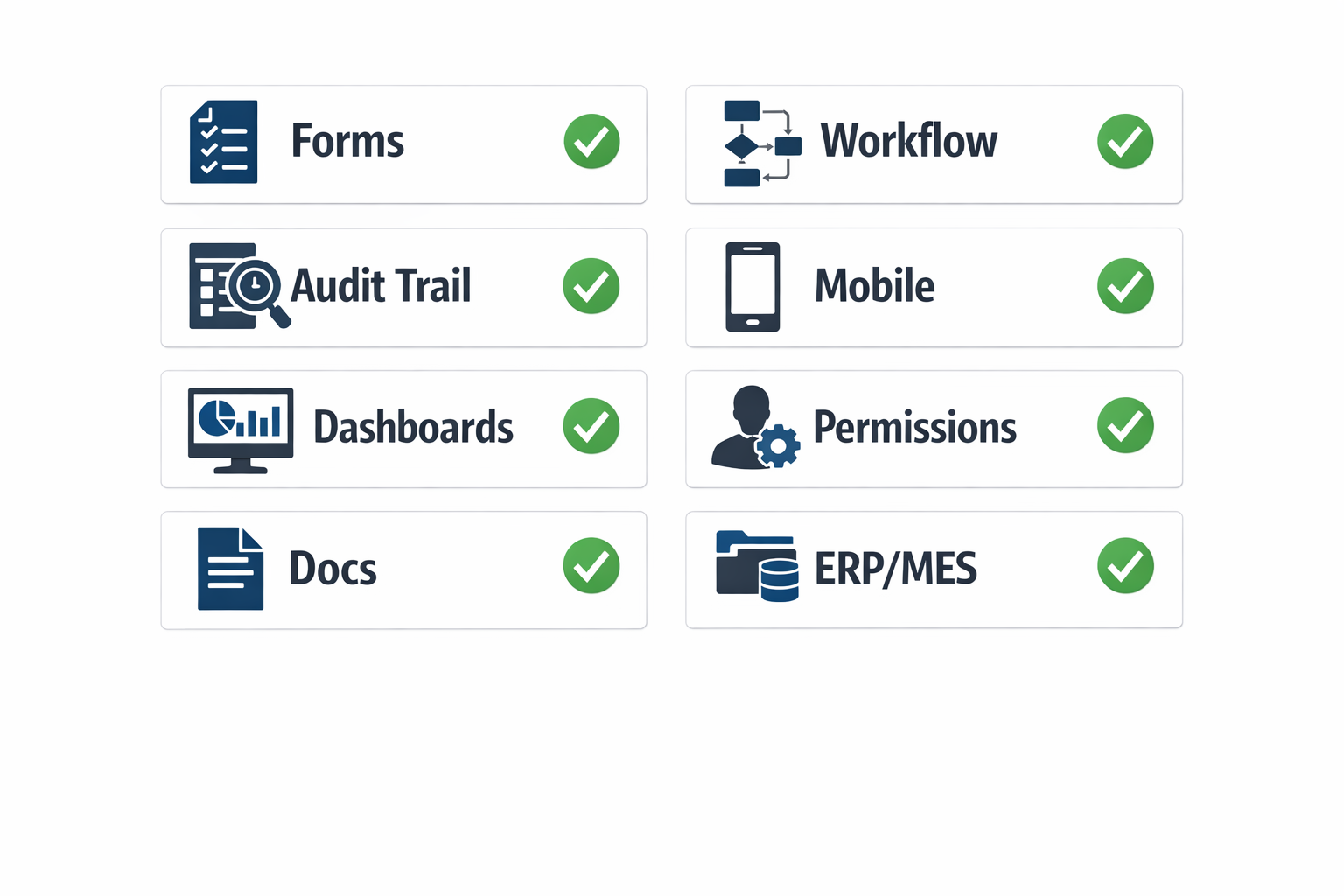
If you want a practical rule of thumb, choose QMS software manufacturing teams can deploy fast, use daily, and trust during audits. The best system is not the one with the longest feature list; it is the one that helps your plant execute IQC, IPQC, and OQC with fewer delays, better visibility, and stronger control. Platforms like Jodoo are increasingly attractive because they let manufacturers build and adjust quality workflows without heavy custom development, which is critical when plant processes evolve faster than traditional software projects can keep up.
Core Manufacturing Workflows the Best Quality Inspection Software Should Support
If you are evaluating quality management software manufacturing teams can actually use on the shop floor, the key question is not just “Does it have inspection forms?” It is whether the system supports the full daily quality loop, from supplier receipt to final shipment, with traceability, approvals, and corrective action built in. In real factories, quality issues rarely stay in one department, so the right QMS software manufacturing environment should connect quality, production, warehouse, engineering, and supplier teams in one workflow.
A strong quality control software factory solution should also reflect how manufacturing really works under pressure. Imagine a production manager at an automotive parts plant who finds a dimensional defect during in-process inspection on Line 3. The team does not just need to record the defect; they need to contain stock, alert supervisors, trace the raw material lot, trigger reinspection, and assign corrective actions before more parts move downstream. That is the difference between standalone forms and true digital quality management.
Incoming Quality Control (IQC)
Incoming inspection is the first workflow any serious quality inspection software should support. When raw materials, electronic components, packaging, or outsourced parts arrive, the system should let inspectors log supplier details, PO numbers, batch or lot numbers, sampling plans, specification checks, photos, and pass/fail results in one place. In many plants, this step is still handled with paper check sheets and Excel logs, which makes supplier traceability slow when a defect appears weeks later.
The best IQC IPQC OQC software should make incoming inspection fast and standardized. For example, in an electronics assembly factory, an IQC inspector receiving capacitors should be able to scan the supplier batch label, pull up the correct inspection standard, record AQL sampling results, attach photos of labeling or packaging issues, and route rejected lots automatically to quarantine. That reduces delays at receiving and gives procurement and supplier quality teams immediate visibility into supplier performance.
In-Process Quality Control (IPQC)
In-process inspection is where quality software has the biggest impact on scrap, rework, and line stoppages. A capable quality management software manufacturing teams choose should support patrol inspections, first-piece checks, setup verification, hourly quality checks, and process parameter confirmation during production. Instead of writing measurements on paper and filing them after the shift, operators and quality technicians should be able to enter readings directly at the line through tablets or mobile devices.
This matters because process drift is common in high-volume environments. In a food manufacturing plant, for example, an operator may need to verify fill weight, seal integrity, label alignment, and temperature control every hour. If one parameter goes out of limit, the software should trigger an immediate alert, lock the batch status for review if needed, and create a record of what was checked, when, and by whom. That kind of response supports both quality control and audit readiness.
Outgoing Quality Control (OQC)
Final inspection is the last gate before defective product reaches the customer, so OQC workflows need to be structured and traceable. Good quality control software factory systems should support final visual inspection, functional testing, packaging verification, labeling confirmation, and shipment release approval. They should also connect finished goods inspection to production order, batch, and customer shipment data so that release decisions are not made in isolation.
Imagine a manufacturer shipping molded automotive interior components to a Tier 1 customer. Before dispatch, the OQC team needs to verify cosmetic appearance, critical dimensions, packaging quantity, and barcode labeling against customer-specific requirements. With the right quality inspection software, inspectors can complete the checklist digitally, attach evidence, flag issues instantly, and prevent shipment release until the nonconformance is resolved. That protects customer scorecards and reduces the risk of returns or chargebacks.
Nonconformance Handling and Containment
Inspection alone is not enough if the software cannot manage what happens after a defect is found. Strong QMS software manufacturing platforms should support nonconformance reports, defect categorization, risk grading, containment actions, quarantine status, and disposition decisions such as rework, use-as-is, return to supplier, or scrap. These workflows are essential because unresolved nonconforming material can easily flow back into production or reach customers if status control is weak.
In practice, this means the system should help teams move fast when defects appear. If an IPQC inspector finds burr defects on stamped metal parts, the software should allow immediate segregation of affected lots, assignment of sorting tasks, and visibility for production, warehouse, and quality leaders. Instead of relying on emails and verbal updates, everyone sees the same real-time status, which shortens reaction time and reduces the cost of poor quality.
CAPA and Root Cause Follow-Up
Corrective and preventive action is where many factories struggle, especially when actions are tracked in disconnected spreadsheets. The best digital quality management tools should link nonconformance records directly to root cause analysis, containment verification, corrective action owners, due dates, evidence uploads, and effectiveness checks. This is especially important for ISO 9001 environments, where auditors will look beyond the defect log and ask how your team prevents recurrence.
A useful example is a recurring solder defect in an electronics plant. The quality engineer may open a CAPA tied to multiple IPQC failures, assign maintenance to inspect the reflow profile, assign production to retrain operators, and require engineering to revise the work instruction. If the software tracks deadlines, sends reminders, and shows overdue actions on a dashboard, the plant is far more likely to close the loop instead of repeating the same issue next month.
Supplier Quality Management
Supplier quality should not sit outside your inspection process. Effective quality management software manufacturing operations need should connect supplier defects, incoming rejection rates, SCARs, response tracking, and supplier performance trends. Supplier issues can account for a large share of internal disruptions, and some studies estimate that poor supplier quality can contribute significantly to total cost of quality through delays, sorting, rework, and premium freight.
In a food packaging operation, for example, repeated seal film variation from one supplier can cause filling machine jams and inconsistent sealing performance. A good quality inspection software platform lets the IQC team log each issue against the supplier, generate a supplier corrective action request, and trend defect rates over time by material type or supplier site. That gives procurement and supplier quality teams hard data for review meetings instead of anecdotal complaints.
Deviation Approvals and Controlled Exceptions
Factories also need a controlled way to manage exceptions. There are times when material, process settings, or documentation temporarily deviate from standard requirements, but those decisions must be reviewed, approved, time-bound, and documented. This is where a complete quality control software factory solution should support deviation requests, risk assessment, approval routing, temporary validity periods, and linked follow-up actions.
For example, imagine a plant waiting for revised packaging labels but still needing to ship approved product under temporary concession. Without digital control, this often happens through informal messages and verbal signoff, which creates audit risk. With digital quality management, the plant can route the deviation to quality, production, and customer-facing teams, document the justification, define expiration rules, and maintain a full approval trail.
Audit Preparation and Evidence Readiness
One of the clearest signs of mature QMS software manufacturing is how well it supports audit preparation. During ISO 9001 audits, customer audits, or internal layered process audits, teams should be able to retrieve inspection records, calibration links, nonconformance history, CAPA status, and approval trails quickly. If the plant still spends hours searching through binders, shared drives, and old spreadsheets, the system is not doing enough.
The best IQC IPQC OQC software helps quality teams stay audit-ready every day, not just the week before an audit. Records should be searchable by part number, lot, supplier, date, line, or inspector, and dashboards should highlight overdue CAPAs, repeat defects, and open deviations. For lean and CI leaders, this also makes it easier to prove improvement results with actual data, such as lower defect rates, faster closure times, or reduced repeat nonconformances.
What a Complete Workflow Should Look Like
When you evaluate quality management software manufacturing teams can scale across lines and plants, look for workflow continuity rather than isolated modules. A defect found in IQC should be able to trigger supplier action; a defect found in IPQC should trigger containment and CAPA; a failed OQC result should stop shipment release until disposition is complete. That end-to-end flow is what turns inspection data into operational control.
Platforms like Jodoo are useful in this context because manufacturers can build these workflows around their own SOPs instead of forcing the plant to fit a rigid template. That means you can configure custom inspection forms, approval routes, nonconformance tracking, CAPA follow-up, and real-time dashboards in one no-code environment. For plants trying to replace paper, Excel, and disconnected tools, that is often the most practical path to a more responsive quality inspection software system.
How Jodoo Supports IQC, IPQC, and OQC With Flexible Digital Quality Management
Manufacturers often know exactly how their quality process should work, but their software does not match the reality on the shop floor. One plant may need incoming inspection by supplier lot, another may require in-process checks every two hours by cavity number, and another may need final inspection linked to customer-specific packaging standards. That is where quality management software manufacturing needs to be flexible, not rigid. Jodoo supports this need by letting manufacturers build and adapt digital quality management workflows without heavy custom development or long IT projects.
Instead of forcing quality, production, warehouse, and engineering teams to work across paper forms, spreadsheets, and disconnected systems, Jodoo gives them one no-code platform to capture data, route issues, track actions, and monitor trends. This makes it a practical option for companies that need QMS software manufacturing processes tailored to their plant, product, and customer requirements. For factories running mixed-model production or serving multiple OEMs, that flexibility matters because inspection criteria, approval steps, and escalation rules often change faster than traditional software can keep up.
Build IQC, IPQC, and OQC Workflows Around Your Actual Process
Jodoo can be configured to support IQC IPQC OQC software workflows from end to end. For IQC, teams can create incoming material inspection forms with fields for supplier name, PO number, batch code, sampling plan, dimensional checks, visual defects, photos, and disposition status such as accept, reject, or conditional release. For IPQC, production teams can log first-piece inspections, patrol checks, line clearance verification, and process parameter confirmations directly from tablets or mobile devices on the line. For OQC, final inspectors can record packaging checks, functional test results, labeling verification, and shipment release approvals before goods move to dispatch.
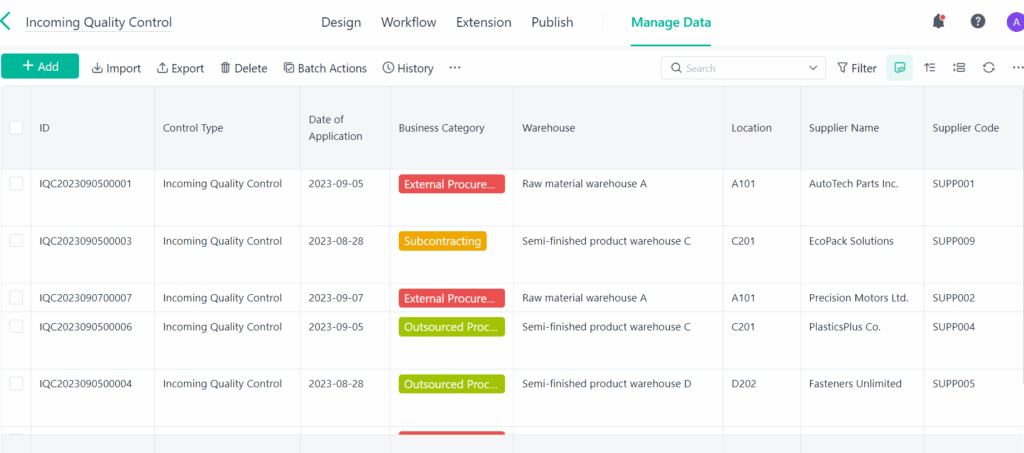
Because Jodoo is no-code, quality teams can adjust forms and logic as requirements evolve. If a food manufacturer adds allergen label verification to OQC, or an electronics plant needs ESD compliance checks added to IPQC, those changes can be configured without waiting for a full software redevelopment cycle. That makes Jodoo useful as quality inspection software for plants where standards, products, and customer demands are constantly changing. It also helps standardize inspection execution across shifts, lines, and sites.
Digitize Defect Reporting and Nonconformance Handling
A good quality control software factory setup should not stop at recording inspection results. It should also trigger action when something goes wrong. With Jodoo, failed inspection results can automatically create nonconformance records, defect reports, or containment tasks, ensuring issues are not buried in email chains or paper folders. This is especially important because poor quality typically costs manufacturers far more than the direct scrap value once rework, delays, complaints, and warranty exposure are included.
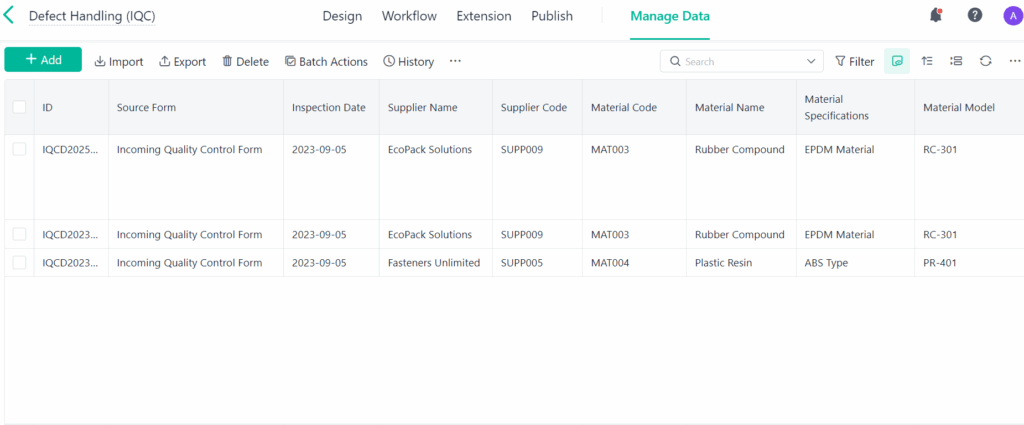
Imagine a production manager at an automotive parts plant who discovers repeated burr defects during IPQC on a stamping line. In Jodoo, the inspector can log the defect, attach photos, identify the machine and die number, and submit the case immediately. The system can then notify the line supervisor, quality engineer, and toolroom team, while assigning a containment action and due date. Instead of losing hours chasing updates manually, the plant gets a traceable digital workflow with clear ownership.
Route Escalations and Approvals Automatically
Quality issues usually involve more than one department, which is why approval routing matters in QMS software manufacturing. Jodoo can automate escalation workflows based on severity, defect type, customer impact, or supplier source. A minor visual defect may only require supervisor review, while a critical dimension failure can trigger QA manager approval, production hold, and MRB review. This keeps the response proportional to the risk and reduces delays caused by unclear decision paths.
For example, an electronics assembler may want any solder joint defect above a defined threshold to trigger engineering review and temporary line hold. A food packaging plant may require QA sign-off before releasing any batch with a conditional inspection result. These rules can be built directly into the workflow, along with reminders, overdue alerts, and status tracking. As a result, Jodoo works not just as quality inspection software, but as a broader digital quality management system connecting inspection to action.
Track Supplier Quality Issues More Effectively
IQC is only effective if supplier issues are visible and acted on over time. Jodoo can help manufacturers capture supplier-related defects, link them to incoming lots, assign corrective actions, and monitor repeat occurrences by supplier, part number, or defect category. This is useful for plants that rely on external component consistency, such as electronics, automotive, and food processing operations. Supplier quality becomes much easier to manage when inspection records and corrective actions sit in one connected system.
Imagine an electronics manufacturer receiving connectors from three approved suppliers. One supplier starts showing a higher rate of bent pins across several lots, causing line stoppages during assembly. With Jodoo, the IQC team can trend the issue on a dashboard, generate a supplier complaint workflow, and route it to purchasing and supplier quality for follow-up. Over time, the business can compare PPM, rejection rates, and corrective action closure by supplier, making supplier reviews more fact-based.
Use Dashboards for Real-Time Quality Visibility
One of the biggest advantages of a modern quality management software manufacturing platform is visibility. Jodoo dashboards can show rejection rates, defect Pareto charts, supplier performance, open NCRs, CAPA aging, first-pass yield, and inspection completion status in real time. This helps plant managers and quality managers spot patterns early instead of waiting for weekly Excel reports. In many factories, faster visibility can mean faster containment and lower quality cost.
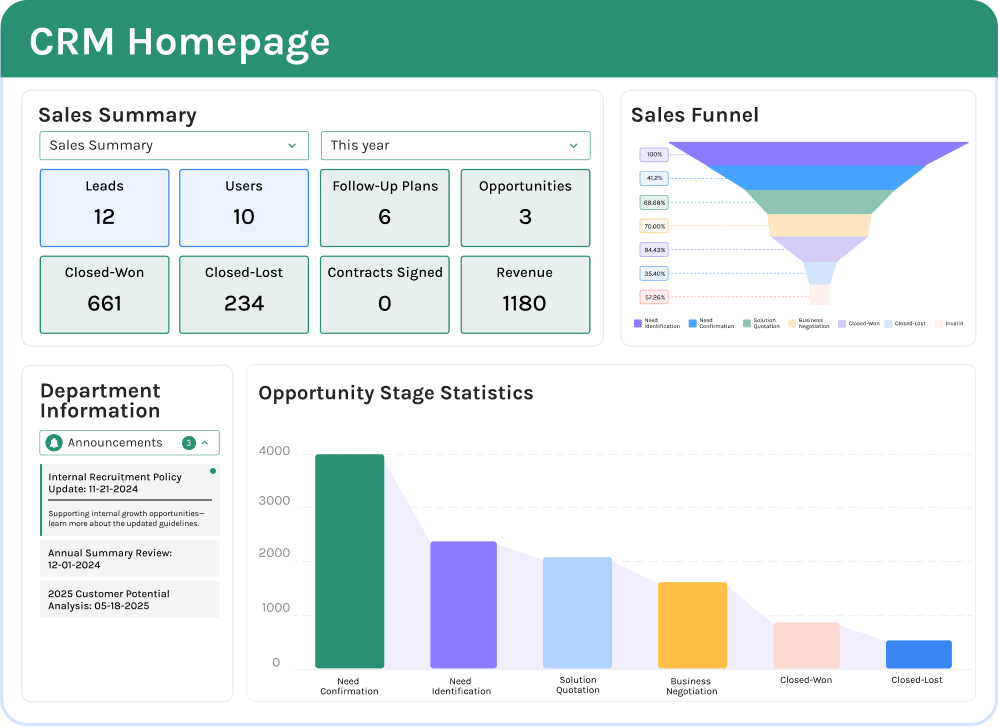
A dashboard can also be role-specific. Supervisors may only need to see line-level IPQC misses and open escalations, while the plant manager may want a site-wide view of scrap trends, top defect categories, and supplier claims. For multi-site manufacturers, standardized dashboards make it easier to compare performance across factories using the same KPI definitions. That is a key reason many teams look for quality control software factory tools that do more than store records.
Improve Cross-Department Collaboration Without Heavy IT Work
Quality problems rarely belong to one function alone. A defect may start with a supplier, appear during production, get detected by QA, and require action from maintenance, engineering, warehouse, and purchasing. Jodoo helps connect these teams through shared records, role-based permissions, automated notifications, and task tracking in one platform. That reduces the common problem of fragmented quality data across spreadsheets, messaging apps, and separate departmental files.
This is especially valuable for lean and continuous improvement teams trying to sustain corrective actions. A plant can link defect records to 8D, A3, or CAPA workflows, track overdue actions, and report closure performance on dashboards. Some manufacturers find that digitizing action tracking alone significantly reduces open quality cases because accountability becomes visible. In that sense, Jodoo supports not only IQC IPQC OQC software workflows, but the broader discipline needed to keep improvements from fading after the initial response.
Example Use Case: Replacing Paper and Spreadsheets With Quality Control Software in a Factory
Imagine a quality manager at an automotive parts plant supplying stamped brackets and welded assemblies to Tier 1 customers. The factory runs incoming inspections on steel coils and purchased fasteners, in-process checks at press and welding lines, and outgoing inspections before palletized shipments leave the warehouse. On paper, the process looks controlled, but in reality, inspection records sit in clipboards, defect photos stay in personal phones, and response tracking happens in Excel that only one engineer updates. This is where quality management software manufacturing teams can use to connect IQC, IPQC, and OQC in one system instead of relying on disconnected files.
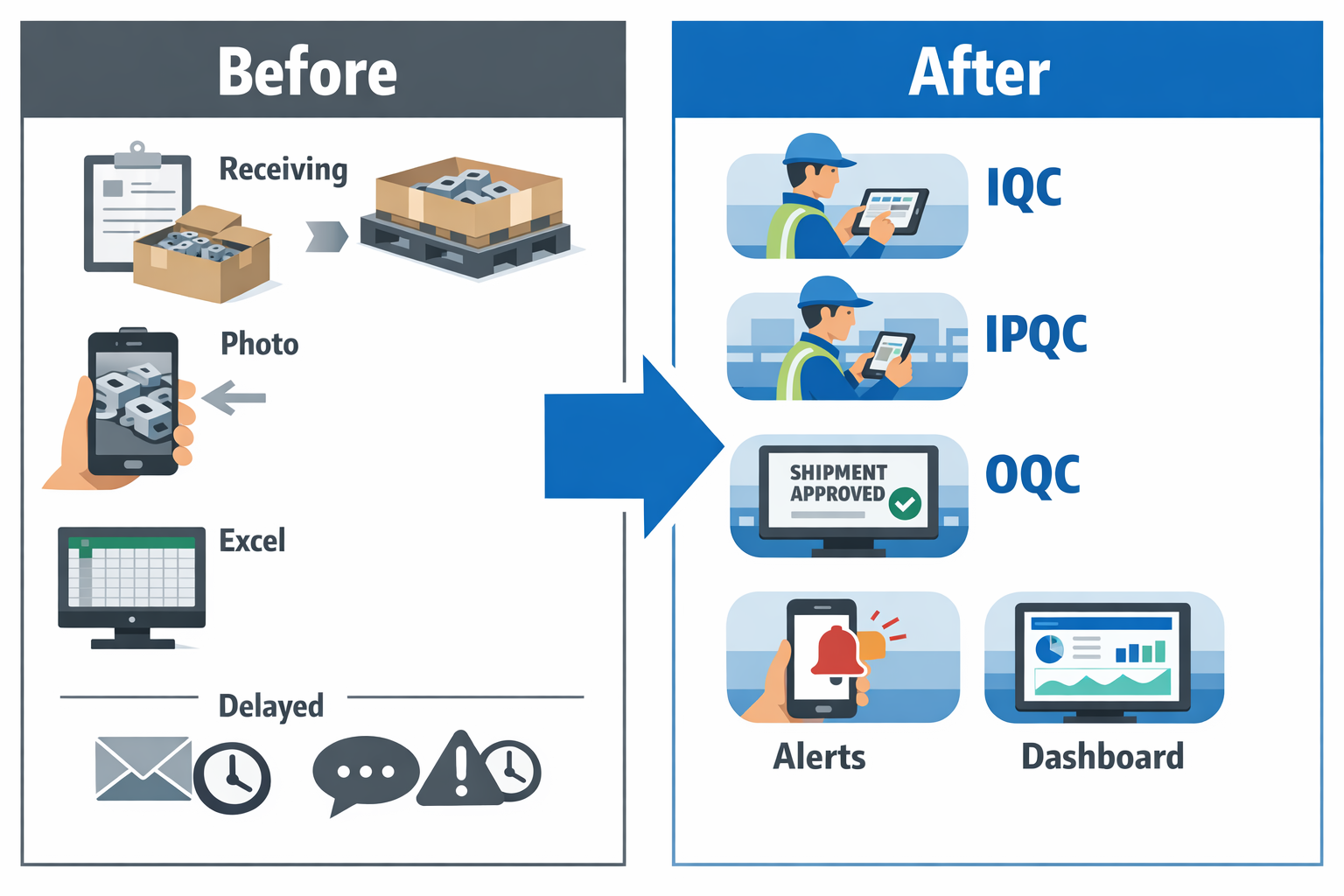
In this scenario, the plant uses Jodoo to build a tailored QMS software manufacturing workflow without waiting for a long custom software project. The team creates digital forms for receiving inspection, in-process patrol checks, first-piece approval, final inspection, and nonconformance handling. Each form uses role-based access, mandatory fields, photo capture, and timestamped records, so supervisors can see exactly what was checked, by whom, and when. Instead of chasing paper trails before an ISO 9001 audit, the plant has a searchable, real-time record of quality activity across the factory.
Digitizing IQC at Receiving
At receiving, every inbound lot is logged with supplier name, PO number, material code, batch number, and inspection plan. Imagine a production manager at the plant receiving 12 lots of fasteners and 4 steel deliveries before 10 a.m.; with paper forms, it is easy for one lot to bypass full verification during a busy shift. Using quality inspection software, incoming inspectors scan a barcode, pull up the correct checklist, record dimensional and visual results, and attach photos of any rust, thread damage, or label mismatch. If a lot fails, Jodoo automatically routes a hold notification to warehouse, purchasing, and quality, preventing unapproved material from reaching production.
This matters because supplier quality problems are a major source of downstream disruption. Studies across manufacturing sectors often show that poor quality can consume 15% to 20% of sales revenue when scrap, rework, warranty, and productivity losses are included. In a paper-based process, even when defects are found, response is slow because containment depends on calls, emails, and manual updates. With a connected quality control software factory workflow, the plant can trigger supplier NCRs immediately and track closure times by supplier, commodity, or defect type.
Connecting IPQC to Real Production Conditions
On the shop floor, the same plant digitizes IPQC checks at first-off, hourly patrol, and changeover points. Operators and line leaders complete checks on tablets or mobile devices at the press line, welding cells, and coating area, with separate criteria for dimensions, torque, weld appearance, and coating thickness. If a reading falls outside tolerance, the form can require the user to enter containment action, quarantine quantity, and suspected cause before submission is complete. That turns digital quality management into an active control method, not just a recordkeeping tool.
A common problem in factories is missed inspection frequency during peak output. If one inspector covers three lines and production accelerates to recover schedule losses, hourly checks can easily slip to every two or three hours without anyone noticing until defects accumulate. With IQC IPQC OQC software, Jodoo can send automatic reminders for due inspections and escalate overdue checks to the quality supervisor. In practice, this helps reduce missed inspections and shortens defect response time because abnormal results are visible immediately instead of being discovered at end of shift.
Imagine one welding station starts producing underfilled welds after a fixture wears out. In a paper system, the issue may only surface after the quality engineer reviews forms later in the day, by which time several pallets may need sorting. In Jodoo, the failed IPQC entry can instantly trigger a workflow for line stop review, maintenance notification, and material segregation. That kind of response can reduce containment time from hours to minutes, which is critical in high-volume environments such as automotive and electronics assembly.
Improving OQC Before Shipment
For OQC, the plant builds final inspection and shipment release forms linked to production orders and customer part numbers. Before dispatch, inspectors verify appearance, packaging method, label accuracy, quantity, and any customer-specific requirements such as barcode placement or certificate attachment. If the lot passes, Jodoo can generate a digital release record and notify warehouse that shipment is cleared. If it fails, the system blocks release and opens a follow-up task for re-inspection or rework confirmation.
This is especially useful in export-oriented manufacturing, where one wrong label or mixed carton can turn into a customer complaint, chargeback, or urgent airfreight cost. In food manufacturing, for example, a final check may include seal integrity, date code verification, allergen label confirmation, and pallet traceability. In electronics, it may cover cosmetic inspection, ESD packaging compliance, and serial number traceability. A flexible quality inspection software setup matters because OQC requirements differ significantly by product and customer.
What Changes Operationally After Go-Live
Once the plant moves away from paper and spreadsheets, the quality team no longer spends hours consolidating inspection data for meetings. Dashboards show incoming defect trends by supplier, in-process defects by line and shift, and outgoing rejection rates by product family. Managers can also track practical KPIs such as first-pass yield, response time to quality alerts, open NCR aging, and repeat defects. This is the point where quality management software manufacturing becomes a decision tool, not just an electronic filing cabinet.
Audit readiness also improves. Instead of pulling files from cabinets and asking supervisors to resend old Excel reports, the plant can filter inspection history by batch, date range, customer, or defect category within minutes. For factories supporting ISO 9001 or customer audits, this reduces preparation time and lowers the risk of incomplete records. In many operations, that alone removes a major burden from quality engineers who are already stretched between production support and compliance work.
Why Jodoo Fits This Type of Factory Workflow
What makes Jodoo practical in this use case is that the factory does not need to force its process into rigid off-the-shelf forms. The team can build separate apps for IQC, patrol inspection, first article checks, OQC, CAPA, and supplier corrective action, then connect them with workflows and dashboards. That means a manufacturer can start with one line or one plant, prove the value, and then expand the system across departments. For companies evaluating QMS software manufacturing options, that flexibility is important because quality workflows often change by customer, product type, and audit requirement.
In a real factory environment, adoption succeeds when the software matches day-to-day operations. Inspectors need fast mobile entry, supervisors need clear escalation, and plant managers need trend visibility without waiting for someone to update a spreadsheet. A no-code platform like Jodoo supports that by letting teams adjust checklists, approval rules, and dashboards as processes evolve. For manufacturers trying to strengthen digital quality management across receiving, production, and final shipment, this kind of connected setup is what turns IQC, IPQC, and OQC from isolated activities into one controlled system.
Conclusion: Choosing the Right Quality Management Software Manufacturing Teams Can Grow With
For most factories, quality problems do not come from a lack of forms. They come from disconnected processes between incoming inspection, in-process checks, and outgoing quality control. If your team is still managing IQC, IPQC, and OQC with paper, Excel, and separate systems, you will struggle with slow response times, weak traceability, and inconsistent execution across shifts or plants. That is why quality management software manufacturing teams choose should do more than store records.
The right system should connect inspection data, approval workflows, nonconformance handling, CAPA, and real-time reporting in one place. At an electronics plant, a production manager should be able to spot a rising solder defect trend during IPQC, trigger containment immediately, assign action owners, and track closure before shipment risk increases. That kind of visibility matters, especially when poor quality can consume 10% to 20% of sales revenue in many businesses through scrap, rework, returns, and warranty costs.
If you need a flexible way to digitize quality without waiting for heavy custom development, Jodoo is worth exploring. As a no-code lean manufacturing platform, Jodoo helps you build inspection forms, approval flows, dashboards, and continuous improvement workflows tailored to your plant. Start a free trial or book a demo to see how your quality process can work in one connected system.