Introduction: Why Every Factory Needs a Smarter Maintenance Management System
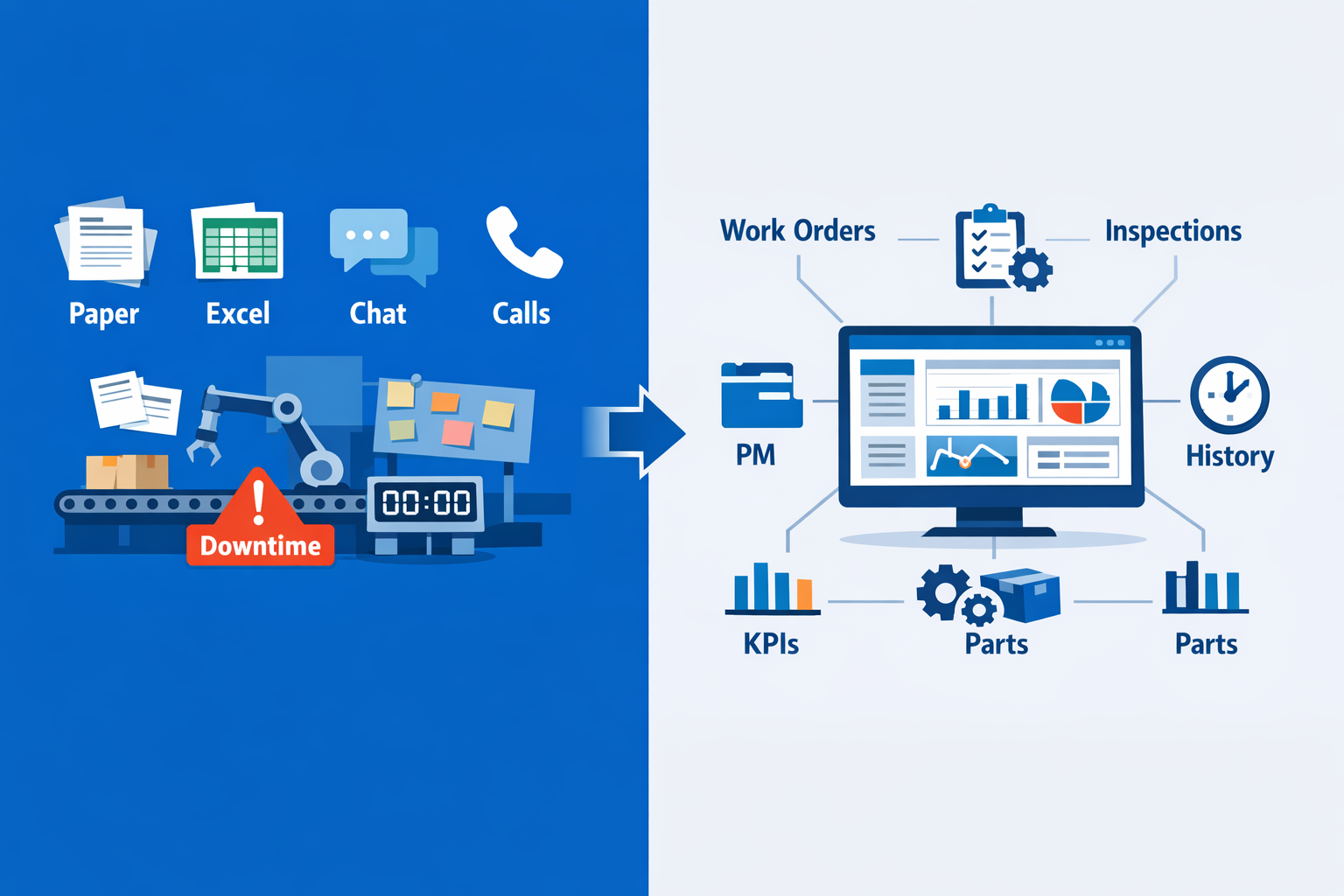
A single hour of unplanned downtime can cost manufacturers thousands of dollars, and in high-volume sectors like automotive and food processing, the losses can climb much higher once missed output, scrap, overtime, and delayed shipments are included. That is why a maintenance management system is no longer just an IT upgrade—it is an operations priority. If you are still managing preventive maintenance on paper, tracking spare parts in spreadsheets, or relying on technicians to report issues through chat messages and phone calls, small failures can quickly turn into line stoppages.
Imagine a production manager at an electronics plant who cannot see which SMT machine is overdue for inspection, while the maintenance team is working from outdated Excel files. Or think about an automotive parts factory where recurring breakdown data is scattered across notebooks, whiteboards, and shift handover sheets. In both cases, reactive repairs become the default, labor is wasted, and root causes stay hidden.
A smarter system gives you one place to manage work orders, preventive maintenance schedules, inspections, asset history, and maintenance KPIs. In this article, you will learn how to evaluate your options, understand the difference between full CMMS platforms and lighter maintenance management software, and choose a solution that fits your factory’s scale, processes, and digital maturity.
What a Maintenance Management System Should Actually Do in a Manufacturing Plant
A maintenance management system should help your factory run maintenance work in a controlled, repeatable, and visible way. In practical terms, it should not just store equipment records or generate a few reminders. It should manage the full daily cycle of maintenance activity: who reported the issue, what work was assigned, what parts were used, how long the repair took, and what condition the asset is in after the job is closed. That is the difference between basic recordkeeping and a maintenance system that operations teams can actually use on the shop floor.
In a manufacturing environment, the system should connect technicians, supervisors, planners, and store personnel around the same live data. A good plant maintenance system gives maintenance leaders a single place to control work orders, plan preventive tasks, monitor completion status, review equipment history, and check spare parts availability before downtime extends. According to industry estimates, unplanned downtime can cost manufacturers thousands to hundreds of thousands of dollars per hour, depending on the production environment, so execution speed and data accuracy matter.
Work Order Control Should Be the Operational Core
At the center of any effective maintenance management software is work order control. Every maintenance task—whether it is an emergency repair, inspection, lubrication round, calibration, or planned shutdown activity—should be created, assigned, prioritized, tracked, and closed in one structured workflow. This gives maintenance managers visibility into backlog, technician workload, response time, and completion quality instead of relying on WhatsApp messages, whiteboards, or disconnected spreadsheets.
Imagine a production manager at an electronics assembly plant who notices repeated stoppages on a surface-mount line due to feeder alignment issues. In a proper CMMS system, the operator or line leader can raise a request immediately, a supervisor can assign the task to the right technician, and the technician can log root cause, replaced components, labor time, and follow-up actions from a mobile device. That means the next time the same asset shows abnormal behavior, the team can act based on real maintenance history rather than memory.
Preventive Scheduling Should Be Built Around Equipment Reality
A maintenance system should also automate preventive maintenance in a way that matches how equipment is actually used. Some assets need servicing by calendar date, others by runtime hours, batch count, or cycle count. A capable maintenance management system should support all of these trigger types so PM schedules reflect production conditions, not generic monthly checklists.
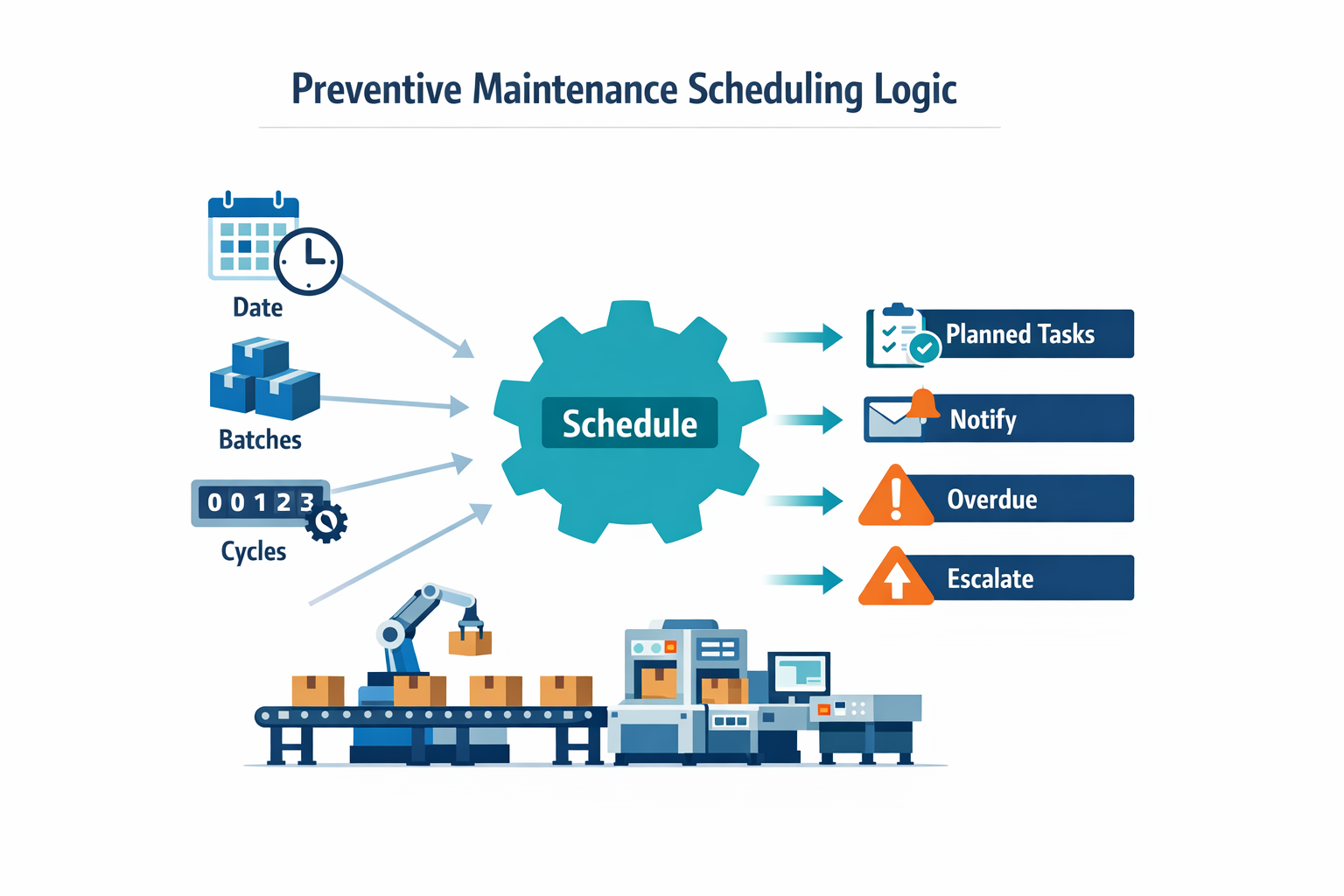
For example, in a food processing plant, a packaging line may require lubrication every 250 operating hours, seal inspection every week, and a deeper sanitation-related equipment check after a defined number of production runs. The system should schedule those tasks automatically, notify the responsible team, and escalate missed jobs when necessary. This is where maintenance tracking becomes operationally useful: managers can see not only what was planned, but what was completed on time, deferred, or repeatedly missed.
Equipment History Should Support Faster Decisions
One of the most valuable jobs of a plant maintenance system is building a usable equipment history. For each machine, line, or utility asset, your team should be able to see breakdown records, recurring faults, preventive tasks completed, spare parts consumption, technician notes, downtime duration, and inspection results in one timeline. That history helps supervisors spot whether a machine needs another repair, a design change, a spare strategy update, or replacement planning.
This is also where a CMMS system starts to overlap with an asset management system that teams can rely on daily. A CMMS focuses on maintenance execution and control, while broader asset management looks at lifecycle decisions across purchase, operation, maintenance cost, reliability, and eventual replacement. On the factory floor, however, the two should connect naturally, because maintenance teams need both immediate work execution and long-term asset visibility.
Spare Parts Coordination Should Be Part of the Workflow
Maintenance work is rarely just labor. It usually depends on bearings, sensors, belts, filters, seals, motors, or consumables being available at the right time. A useful maintenance management software platform should link work orders with spare parts records so technicians and planners can reserve, issue, and record part usage against each job. This prevents a common execution gap where a task is approved but cannot be completed because the required part is not in the stores.
Take a garment manufacturing plant with multiple sewing, cutting, and finishing machines across shifts. If one critical cutter motor fails, the maintenance supervisor should be able to check whether a replacement is in stock, assign the repair, and record the part issue within the same system. Over time, that data shows which assets consume parts most often and which spares need tighter min-max controls.
Reporting Should Be Simple, Timely, and Actionable
Finally, a maintenance management system should give maintenance and operations leaders basic reporting without requiring manual spreadsheet consolidation. At a minimum, you should be able to track open vs. closed work orders, PM compliance, mean time to repair, repeat failures, downtime by asset, and spare parts usage trends. These metrics are not just for monthly review meetings; they help maintenance leaders decide where to allocate labor, which assets need deeper reliability work, and whether preventive plans are working.
The best reporting is role-based and easy to understand. A technician may only need today’s assigned jobs and overdue tasks, while a plant manager may want weekly downtime by line and PM completion by department. Platforms such as Jodoo are useful here because manufacturers can build maintenance workflows, parts forms, approval paths, and dashboards around their actual process instead of forcing the plant into a rigid template.
How It Differs From an ERP Module
Many factories already have ERP software, but ERP maintenance modules are often designed around transaction control rather than day-to-day execution on the shop floor. They may handle master data, purchasing links, and high-level planning well, but they are not always flexible enough for technician-friendly task capture, mobile inspections, photo-based defect logging, or plant-specific approval flows. In other words, ERP can support maintenance administration, while a dedicated maintenance management software layer often supports maintenance execution better.
That is why many manufacturers use a CMMS system as the operational layer for maintenance while keeping ERP for finance, procurement, and inventory accounting. In that setup, the CMMS handles work orders, preventive scheduling, maintenance tracking, and equipment history, while ERP remains the system of record for broader enterprise transactions. When integrated properly, the two complement each other rather than compete.
Where the System Fits in Daily Factory Operations
In day-to-day use, a maintenance management system sits between maintenance planning and physical execution. It is the tool your team uses to receive requests, assign work, confirm completion, capture inspection data, review asset status, and report results. When designed well, it also becomes the practical bridge between maintenance activity and a broader asset management system that leaders can use to make reliability and capital planning decisions.
That is the standard to use when evaluating tools. If the system cannot control work, schedule prevention, capture history, coordinate parts, and show clear performance data, it is not doing the real job of a modern plant maintenance system. It is just digitizing forms.
The Hidden Pain Points That Make Many CMMS System Projects Hard to Adopt
Many factories do not fail at maintenance digitization because they chose the wrong goal. They fail because the software they buy does not fit the way maintenance work actually moves across the plant. A maintenance management system may look strong in a demo, but adoption drops quickly when planners, technicians, supervisors, and production leaders all need different actions from the same tool. That is where many mid-sized manufacturers get stuck: spreadsheets are no longer enough, yet heavyweight maintenance management software feels too slow, too rigid, and too removed from daily operations.
Overbuilt Tools Create More Process Than the Plant Needs
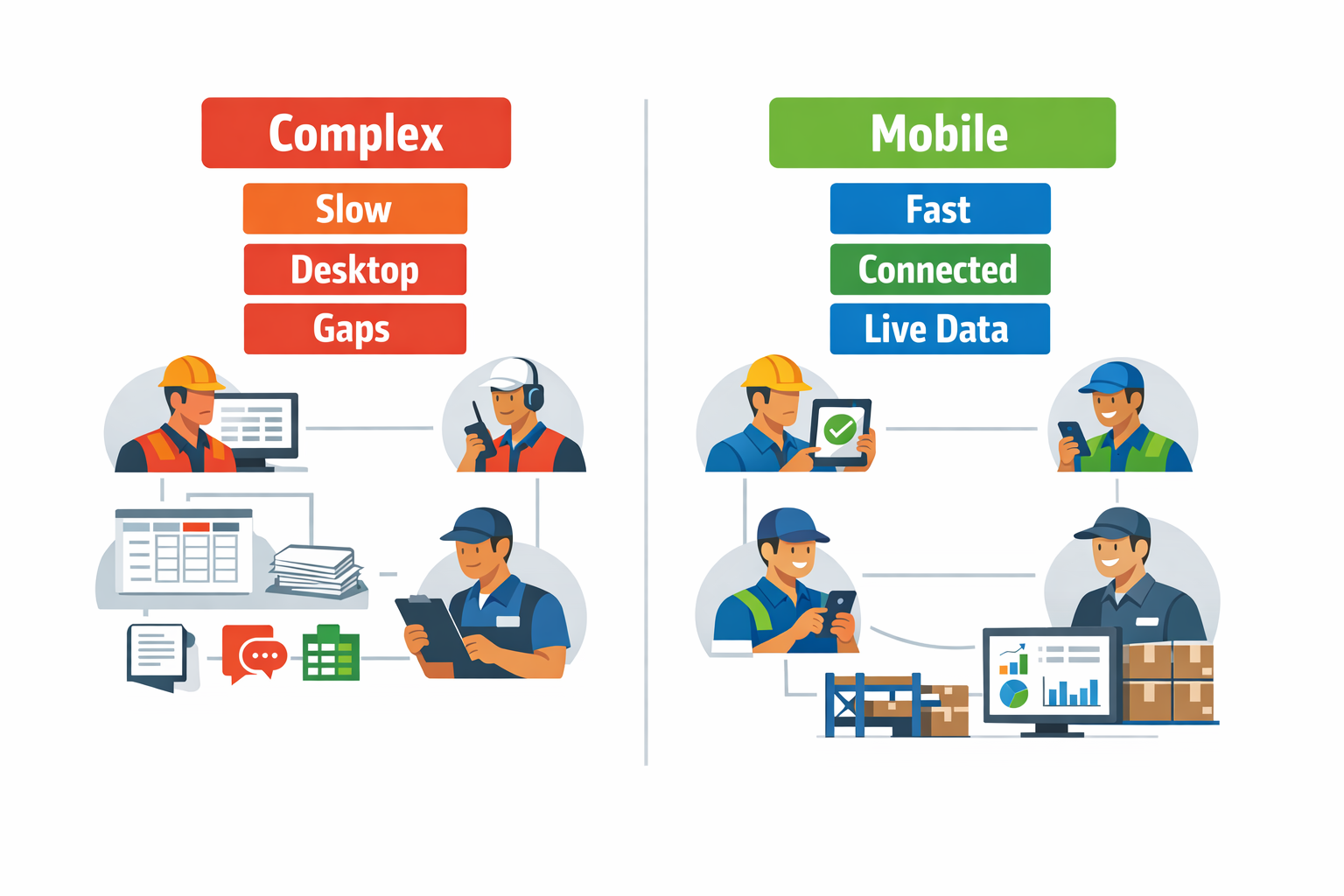
A common issue with enterprise-grade CMMS system projects is that they are designed for highly standardized, multi-site environments with dedicated IT and reliability teams. Mid-sized plants often need something simpler: fast work order creation, clear maintenance tracking, spare parts visibility, downtime logging, and mobile updates from the shop floor. Instead, they get layers of fields, menus, coding structures, and approval paths that add administrative work before the first wrench is even picked up. When the system takes five minutes to log a ten-minute repair, technicians stop using it properly.
Imagine a maintenance supervisor at an electronics assembly plant where SMT lines run at high speed, and changeovers happen daily. A feeder issue stops one line, production wants an immediate response, and quality wants traceability in case boards are affected. If the plant maintenance system requires technicians to return to a desktop terminal, select from a long asset tree, complete multiple mandatory fields, and wait for planner review before closing the job, the real work gets pushed back to WhatsApp messages, paper notes, or end-of-shift updates. The result is partial records, weak failure history, and poor decision-making on recurring breakdowns.
Long Implementations Delay Value and Weaken Momentum
Another hidden problem is implementation time. Some maintenance management software projects take months to configure because every asset hierarchy, preventive maintenance schedule, role permission, spare part category, and workflow rule must be set up before teams can use the system properly. By the time go-live happens, production priorities have changed, maintenance routines have shifted, and the original project team has already lost momentum.
This matters because maintenance does not run in isolation. In a food processing plant, for example, a packaging line fault may trigger sanitation checks, QA signoff, and production rescheduling at the same time. If the CMMS system is still in rollout while those connected processes remain outside the system, teams continue using email, spreadsheets, and whiteboards to coordinate. The software may technically be live, but the workflow around maintenance is still fragmented, which limits adoption from day one.
Technician Adoption Falls When the System Does Not Match Real Work
Technician adoption is often treated as a training problem when it is actually a usability problem. Most maintenance teams work in noisy, fast-moving environments where hands are occupied, PPE is required, and internet access may be inconsistent near utilities, cold rooms, or older production areas. If the interface is built mainly for office users, mobile usage suffers, and maintenance tracking becomes incomplete.
A study by Deloitte found that poor user adoption is one of the biggest reasons digital transformation efforts underperform, and manufacturing is no exception. In practice, if technicians cannot quickly log fault symptoms, upload a photo, scan an asset QR code, or close a task from a phone, they will delay updates until later or skip them entirely. That weakens the mean time to repair analysis, preventive maintenance compliance, and the quality of data used by supervisors.
Rigid Workflows Break Down in Cross-Functional Scenarios
A factory does not experience maintenance as a single department workflow. It is usually a chain of events involving operations, quality, engineering, stores, and sometimes external contractors. Many systems handle standard work orders well but struggle when maintenance also depends on approvals, downtime classification, safety checks, or spare part escalation. That is where rigid workflow design becomes a serious barrier.
Consider a garments factory running steam boilers, compressors, and sewing lines across multiple buildings. A compressor failure is not just a repair ticket; it may require shift supervisor confirmation, contractor dispatch approval, spare parts release, and downtime reporting to operations. If the asset management system manufacturing setup only supports fixed work-order logic, teams will split the process across separate tools. One system holds the repair record, another tracks approval, and a spreadsheet captures lost production hours, which means no one has a complete view.
Plants Outgrow Spreadsheets but Still Resist Heavyweight Systems
This is the uncomfortable middle ground for many manufacturers. Spreadsheets cannot handle rising asset counts, preventive schedules, audit requirements, or real-time maintenance tracking across shifts and sites. But traditional maintenance management software can feel too heavy when plants need flexible forms, fast approvals, mobile data capture, and coordination beyond the maintenance department.
That is why selection should not focus only on feature depth. You also need to ask whether the maintenance management system reflects how your plant actually runs work orders, breakdown response, approvals, and downtime communication in real time. In many factories, the adoption problem starts long before go-live, when the software assumes maintenance is a closed-loop back-office process instead of a live operational workflow shared across the plant.
How to Evaluate Maintenance Management Software for a Mid-Size Factory
For a mid-size factory, choosing a maintenance management system is less about buying the most feature-heavy platform and more about finding the right operational fit. A global survey by McKinsey has estimated that predictive and preventive maintenance approaches can reduce maintenance costs by 10% to 40% and cut downtime by as much as 50%, but those gains only happen when the software is actually used on the shop floor. That is why buyers should compare not just features, but also rollout speed, usability, and how well the system matches real maintenance workflows. Whether you are reviewing a full CMMS system, a broader plant maintenance system, or a lighter asset management system, teams can configure quickly, and the evaluation criteria should stay practical and factory-specific.
Start With Setup Time and Process Fit
A mid-size factory usually does not have the IT resources to spend nine months customizing a rigid enterprise platform. Ask vendors how long it takes to configure asset registers, maintenance schedules, technician roles, approval flows, and reporting for a single plant. If the answer depends heavily on external consultants, that is a sign the system may be too complex for your team to sustain after go-live. A strong option should let your maintenance or operations team adapt forms, fields, and workflows as equipment or SOPs change.
Imagine a maintenance manager at an electronics assembly plant who wants to digitize SMT line inspections, reflow oven servicing, and compressed air system checks. If every new checklist or work order field requires a vendor support ticket, small process changes will slow down quickly. In that case, lighter maintenance management software with no-code configurability can be more practical than a traditional enterprise rollout. The goal is not just implementation speed, but the ability to keep improving the system without waiting on IT.
Check Mobile Usability on the Factory Floor
Maintenance work does not happen at desks, so mobile usability should be a core buying criterion, not an extra. Technicians need to open work orders, scan equipment IDs, upload photos, log meter readings, and close jobs directly at the machine. If a mobile app is slow, hard to navigate, or missing key functions available on desktop, your maintenance tracking data will become incomplete within weeks. Ask vendors to demonstrate a full mobile workflow, from receiving a task to recording completion and parts usage.
This matters even more in environments where technicians move constantly between zones. In a food processing plant, for example, a technician may inspect conveyors in raw material intake, then respond to a fault at packaging, then verify lubrication records for a palletizer. A mobile-first plant maintenance system helps that technician work in real time instead of writing notes on paper and re-entering them later. That directly improves data accuracy and response visibility.
Evaluate Work Order Flexibility, Not Just Work Order Volume
Many systems can generate work orders, but fewer can handle how factories actually use them. Ask whether the software supports corrective, preventive, inspection-based, calibration, shutdown, and contractor work orders with different fields, priorities, and approval paths. You should also check whether the system can attach photos, manuals, lockout-tagout instructions, and standard task steps to each job. This is especially important when maintenance processes vary across utilities, production equipment, and facility assets.
For example, a garments factory may need one work order flow for sewing machine repairs, another for steam boiler inspections, and another for facility HVAC maintenance. A generic template may not capture the right data for each case. Good maintenance management software should let you configure work order types without forcing every task into the same structure. That flexibility improves reporting later because your team captures consistent information from the start.
Look Closely at Preventive Maintenance Support
Preventive maintenance should be easy to schedule, trigger, and verify. Ask vendors whether PMs can be based on calendar intervals, runtime hours, production counts, or condition readings. Also, ask how the system handles overdue tasks, recurring checklists, technician assignment, and escalation when a PM is missed. If a CMMS system makes preventive maintenance hard to manage, your team will fall back on spreadsheets for planning.
A useful test is to ask the vendor to model one real PM plan from your factory. For a beverage bottling line, that could include daily filler inspection, weekly conveyor chain checks, monthly labeler calibration, and quarterly air compressor servicing. If the software can represent that schedule clearly, notify the right people, and show completion status in one dashboard, it is likely a good fit. If not, the platform may be strong in asset records but weak in execution.
Make Spare Parts Visibility Part of the Decision
Maintenance performance depends heavily on parts availability, so your evaluation should include spare parts workflows, not just maintenance tickets. Ask whether the platform can track min-max stock, issue parts against work orders, show parts by asset, and alert when critical spares fall below threshold. According to Deloitte, poor MRO inventory practices can tie up significant working capital while still leaving plants exposed to stockouts, which is why maintenance and inventory visibility should not be separated. A system that improves maintenance tracking but leaves spare parts in another spreadsheet creates a gap in execution.
This is where a practical asset management system team can adapt and may outperform a narrow point tool. If the same platform can connect equipment records, work orders, spare parts transactions, and supplier data, supervisors can see why jobs are delayed and which assets consume the most parts. For a mid-size factory, that level of visibility is often more valuable than advanced features that are rarely used. Ask vendors to show how a technician reserves a bearing, records consumption, and triggers replenishment after closing a job.
Review Dashboard Flexibility for Different Roles
A maintenance supervisor, a plant manager, and a finance director do not need the same dashboard. Ask whether dashboards can be customized by role to show KPIs such as PM compliance, mean time to repair, backlog age, downtime by line, repeat failures, and spare parts consumption. The best systems let you drill from a high-level KPI into the underlying work orders and assets without exporting data to another tool. That shortens the gap between seeing a problem and acting on it.
For instance, a plant manager at a packaging factory may want a weekly dashboard showing downtime by line, top failure modes, and overdue PMs by department. A maintenance planner, on the other hand, may need technician loading, open work order aging, and part shortages for the next shutdown window. A flexible plant maintenance system should support both views from the same live data. When comparing vendors, ask who can build or edit dashboards and how long those changes take.
Ask About Integrations and Data Flow
Most factories already have ERP, purchasing, production, quality, or energy systems in place. That means your maintenance management system should not be evaluated as a standalone tool. Ask what integrations are available for inventory, purchasing, production counts, vendor records, and machine data, and whether those integrations require custom development every time. Strong integration matters because maintenance decisions are connected to parts, production schedules, and budget control.
A practical example is an electronics components plant where machine runtime data from production should trigger maintenance schedules, while approved spare parts requests should flow to procurement. If the software cannot exchange data reliably, planners end up doing manual updates across multiple systems. Platforms like Jodoo can be valuable here because they allow teams to build connected maintenance apps, workflows, dashboards, and integrations without heavy custom coding. That makes them especially useful for factories that need tailored workflows but want to avoid full enterprise software complexity.
Test Scalability Without Overbuying
Scalability does not always mean buying the largest platform available. For a mid-size factory, the better question is whether the software can start with one plant, one maintenance team, and a manageable asset scope, then expand to multiple lines, departments, or sites later. Ask about user limits, record volume, performance with image-heavy work orders, permission controls, and the effort needed to add another plant. You want a system that grows with your operation without forcing enterprise-level complexity on day one.
This is where the choice between a traditional CMMS system, a broader plant maintenance system, and a lighter asset management system manufacturing tool becomes clearer. If you run a highly standardized multi-site operation with strict corporate governance, a heavier system may make sense. If your main goal is faster rollout, adaptable workflows, and strong frontline adoption, a configurable no-code platform can be the better fit. The right buyer’s question is not “Which tool has more modules?” but “Which tool will our team still be using well 12 months after launch?”
Questions to Ask Vendors During the Shortlist Stage
To make your comparison more objective, ask every vendor the same operational questions. First, ask them to demonstrate how they would configure one of your real assets, one preventive maintenance plan, one reactive breakdown workflow, and one spare parts issue process. Second, ask what your team can change on its own after implementation, and what still requires vendor or IT support. Third, ask how long a pilot takes and what success metrics they recommend for the first 90 days.
You should also ask about audit trails, mobile offline capability, role-based permissions, and reporting depth. For regulated environments, ask how inspection records, approvals, and history logs are stored and retrieved. Finally, ask for examples from similar factory sizes, not just large enterprise references. A system that works well in a 20-plant corporation is not automatically the right maintenance management software for a mid-size operation trying to digitize quickly and standardize maintenance execution.
CMMS System vs. Lightweight Maintenance Management Software: Which Fit Is Right for Your Factory?
Choosing between a full CMMS system and lighter maintenance management software is less about which category is “better” and more about operational fit. In practice, both can improve maintenance tracking, but they serve different factory environments, team structures, and rollout priorities. If you run a highly regulated, asset-dense site with strict maintenance governance, a traditional plant maintenance system may be the right choice. If you need faster deployment, flexible workflows, and closer alignment between maintenance, production, and quality teams, a configurable maintenance management system can be the better fit.
Start With Process Complexity, Not Feature Count
A full CMMS system usually makes sense when your maintenance process is already mature and standardized across multiple asset classes, plants, or business units. These platforms are designed for structured preventive maintenance, spare parts control, technician scheduling, work order history, and long-term asset records. They are especially useful when your factory needs a strong hierarchy, formal failure coding, and lifecycle-level reporting similar to an asset management systems teams use for strategic planning. In larger plants, that depth can justify the extra setup effort.
Lightweight maintenance management software is often a better fit when the priority is to digitize and improve workflows quickly without waiting for a long enterprise rollout. Imagine a production manager at an electronics assembly plant who needs operators to log machine abnormalities, technicians to receive mobile alerts, and supervisors to review recurring stoppages by line within days, not months. In that case, a simpler and more flexible system can deliver value faster because it focuses on execution and visibility rather than heavy master-data design. The result is practical control over daily maintenance activities without overbuilding the system.
Compare the Real Decision Factors
1. Process Structure and Asset Depth
A traditional CMMS system is strongest when you need detailed equipment hierarchies, meter-based preventive maintenance, spare parts linkage, vendor records, and compliance-grade audit trails. This is common in factories with hundreds or thousands of maintainable assets where maintenance planning must be tightly controlled. If your maintenance team already uses formal failure modes, downtime coding, and detailed asset criticality scoring, a full plant maintenance system will usually fit better. It supports standardization at scale.
Lightweight maintenance management software is stronger when your workflows vary by line, shift, or department and need to adapt often. For example, a food processing plant may want separate digital routines for sanitation checks, refrigeration inspections, conveyor maintenance, and changeover verification, all with different approval paths. A flexible platform can support those variations without forcing the factory into a rigid template. That matters when maintenance intersects with quality, hygiene, safety, and production scheduling every day.
2. Internal IT Resources and Implementation Capacity
Full CMMS platforms typically require more cross-functional effort to implement well. Maintenance, engineering, stores, IT, and sometimes finance all need to align on asset structures, naming conventions, user roles, and data migration. Industry studies often show that enterprise software implementations fail less because of technology and more because of process definition and adoption gaps; for maintenance systems, poor master data is a common reason ROI takes longer than expected. If your organization has dedicated IT support and can sustain a structured implementation, this is manageable.
ライター maintenance management system is often easier for operations teams to configure with limited IT involvement. That matters in mid-sized factories where maintenance leaders need to move quickly and cannot wait for a six-month systems project. Platforms like Jodoo are relevant here because teams can build inspection forms, work request flows, approval rules, and dashboards without heavy custom development. For factories still refining their SOPs, that flexibility reduces implementation risk.
3. Rollout Speed and User Adoption
Speed matters when your goal is visible operational improvement within one quarter. A traditional CMMS system can take longer because asset libraries, PM plans, user permissions, and spare parts records must be built carefully before go-live. That approach is sensible for large enterprises, but it is not always ideal for plants that need immediate gains in execution discipline. In many cases, the first 90 days determine whether a system becomes part of daily routines or just another underused tool.
Lightweight maintenance management software usually wins on rollout speed because you can launch one workflow at a time. A garments factory, for instance, could start with digital machine repair requests for sewing lines, then add preventive maintenance checklists, and then connect downtime tags to production reports. This phased approach makes adoption easier because technicians and supervisors see immediate relevance in their daily work. It also avoids overwhelming teams with functions they do not need on day one.
4. Customization and Cross-Department Alignment
A full CMMS system can be powerful, but customization may require specialist support or compromise with the platform’s default logic. That is acceptable if your processes are already stable and your main objective is control. However, many factories need maintenance workflows to connect with production handovers, quality inspections, spare part requests, energy checks, and escalation approvals. In those environments, flexibility matters as much as maintenance depth.
A more configurable maintenance management system is often better when maintenance is part of a broader operational workflow rather than a standalone department function. For example, in an electronics plant, an operator may submit an abnormality report with a photo, maintenance may convert it into a work order, production may confirm restart time, and quality may review first-pass output after repair. A no-code platform can support that end-to-end flow in one connected process. That is difficult to replicate with a rigid tool designed mainly for maintenance records.
5. Total Cost of Ownership
Total cost of ownership is where many buyers underestimate the difference. A full CMMS system may have higher licensing, implementation, consulting, and change-management costs, especially if you need integrations with ERP, purchasing, or inventory systems. Research from Gartner and other enterprise software analysts consistently shows that software cost is only part of the picture; configuration, training, and long-term administration often represent a significant share of total investment. For a complex multi-site operation, that spending may still be justified.
Lightweight maintenance management software typically lowers upfront costs and shortens time to value, especially when business teams can handle configuration themselves. If your factory mainly needs maintenance tracking, inspections, digital work requests, recurring task control, and clear dashboards, paying for a heavy enterprise platform may not be necessary. A flexible system can also reduce hidden costs later because changes to forms, workflows, and reports do not always require outside consultants. That matters when your process changes every few months.
A Practical Rule of Thumb
Choose a full CMMS system if you have a large asset base, stable maintenance processes, strong internal governance, and the resources to support a structured implementation. It is the better fit when your factory treats maintenance as a formal asset lifecycle discipline and needs the depth of an asset management system manufacturing environment typically requires. In those cases, standardization and control outweigh flexibility. The investment makes sense because complexity is already part of the operation.
Choose lightweight maintenance management software if you need a faster, more adaptable system that supports inspections, technician workflows, approvals, and operational coordination without a heavy IT project. This is often the better route for plants that want to connect maintenance with daily production management, not just log work orders. If your priority is a practical, scalable maintenance management system that your team can refine as the factory evolves, a flexible platform is usually the smarter starting point. You can begin with the workflows you need now and expand as maturity grows.
Conclusion: Why Jodoo Is a Right-Sized Maintenance Management System for Modern Manufacturers
Choosing the right maintenance management system comes down to fit. Many factories do not need a heavy CMMS with long rollout cycles, complex licensing, and features their teams will never use. They need a practical system that helps maintenance, production, stores, and supervisors work from the same data, with less paperwork and faster response times.
Jodoo is a good fit for manufacturers that want structured maintenance control without adding unnecessary software overhead. On one configurable no-code platform, you can manage work orders, preventive maintenance checklists, inspection records, spare parts requests, downtime reporting, and cross-functional approvals. That matters in real factory settings, where even short equipment stoppages can reduce OEE, delay shipments, and increase overtime costs.
想像してみてください 250-person metal fabrication plant replacing paper repair requests and Excel equipment logs with a Jodoo-based maintenance management software workflow in just a few weeks. Operators submit breakdown reports from mobile devices, technicians receive assigned work orders, store teams track spare parts usage, and plant managers view downtime trends on live dashboards. Instead of chasing updates across departments, the factory gets a clearer, faster maintenance process.
If you want a right-sized plant maintenance system, Jodoo is worth exploring as a no-code lean manufacturing platform. 無料トライアルを開始 または デモを予約する to see how it can fit your factory workflows.