Browse by category

Introduction: Why a Lean Manufacturing App Matters on Today’s Shop Floor
A lean initiative can fail for a simple reason: the problem happens on the line, but the data sits on paper, in Excel, or in someone’s inbox. A lean manufacturing app closes that gap by giving production teams a mobile way to capture issues, assign actions, verify standards, and track results directly from the shop floor. In practical terms, it turns lean tools such as 5S checklists, Kaizen ideas, layered process audits, and A3 follow-up into live workflows that managers can run from a phone.
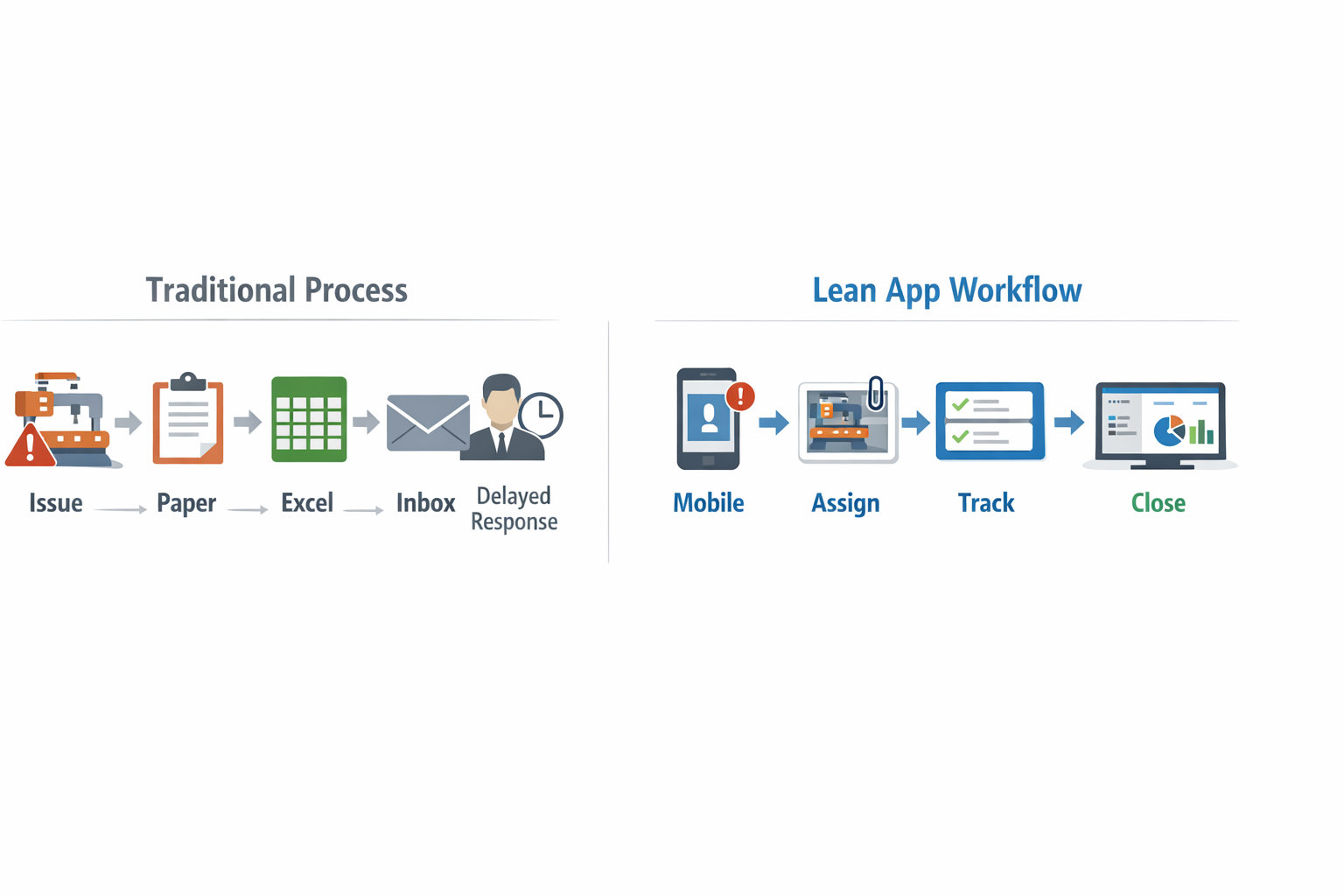
That matters because today’s production managers and shift supervisors are rarely at a desk when problems happen. Imagine a production manager at an automotive parts plant who spots repeated changeover delays during the night shift. With a lean manufacturing mobile app, he can log the issue immediately, attach photos, assign countermeasures, and follow closure status before the next shift starts. That is the real value of mobile lean management: faster response, better accountability, and fewer missed actions.
Manufacturers that digitize frontline workflows often see measurable gains, with studies on mobile-enabled work showing faster reporting cycles and lower process delays. In this article, you will see how a lean factory app helps you manage daily lean tools from your phone, what features matter most, and how to roll it out without creating extra admin work.
Where Paper, Spreadsheets, and Static Lean Tools Break Down
Delays Turn Small Abnormalities Into Daily Losses
On a live production floor, timing matters as much as the issue itself. Paper checklists, whiteboards, and end-of-shift spreadsheet updates create a gap between what happens at the machine and what management sees later. In lean environments, that delay weakens daily management because problems are recorded after the fact, not when the abnormal condition first appears. A lean manufacturing mobile app changes that timing, but without one, teams often run the day based on incomplete information.
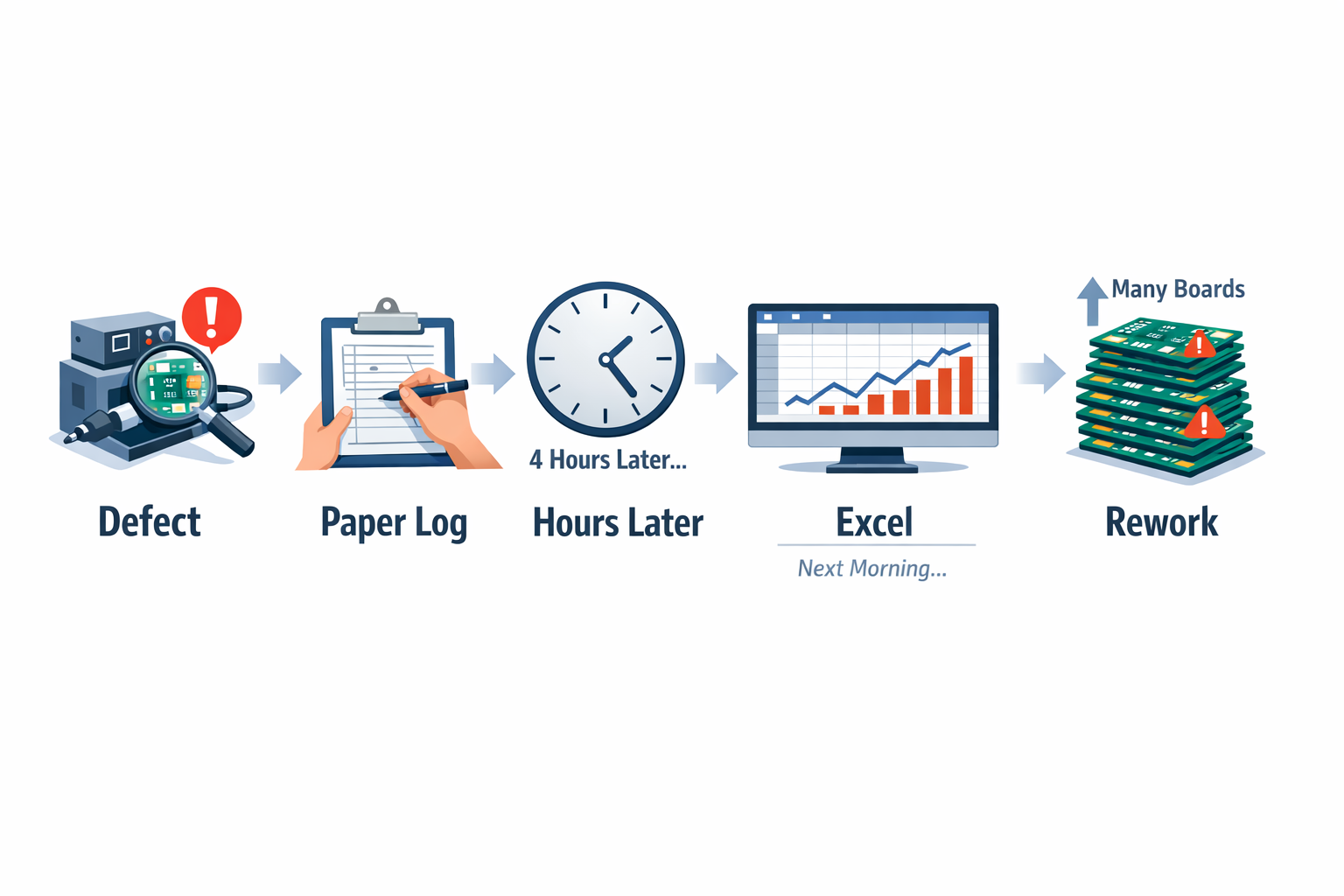
During a Gemba walk in an electronics assembly plant, repeated soldering defects may be noticed before the pattern is formally reported. The operator writes the issue on a paper log, the supervisor reviews it hours later, and the engineer only sees the trend the next morning when someone updates Excel. By then, hundreds of boards may already need rework, and the team has lost the chance to contain the issue at source. In high-mix electronics lines, where defects can cascade quickly, even a half-day reporting delay can distort first-pass yield and labor planning.
Audits Become Inconsistent Across Shifts and Lines
Lean systems depend on repetition, standard work, and consistency, especially for 5S checks, layered audits, and line walks. The problem with static forms is not just that they are manual; it is that they are interpreted differently by different people. One shift leader may score a workstation as acceptable, while the next shift flags the same condition as noncompliant because the checklist is too vague or the records are not visible in real time. This makes it hard to compare performance fairly across shifts, areas, or plants.
In a food and beverage packaging factory, for example, a 5S audit on the filling line may be completed on paper during the day shift and filed in a binder near the supervisor’s desk. When the night shift starts, the team cannot easily see which abnormalities were already identified, which actions are still open, or whether the same housekeeping issue keeps returning around changeover areas. As a result, audits become a documentation exercise instead of a control method. This is where the limits of a traditional checklist become clear, and why many plants start looking for a lean tools app or lean factory app to standardize audit execution.
Corrective Actions Often Stall After the Event
Many factories run solid Kaizen events, problem-solving workshops, and Gemba reviews, but the follow-up is where momentum is lost. Action items are often captured on flip charts, in meeting minutes, or in isolated spreadsheet trackers owned by one coordinator. Once the event ends, responsibilities become less visible, due dates slip, and there is no easy way for a shift supervisor to verify whether the countermeasure was actually implemented on the floor. Lean work then becomes episodic rather than sustained.
This is especially common in garment manufacturing, where supervisors manage multiple sewing lines with frequent style changes and tight output targets. A Kaizen team may identify excess motion at a trimming station and assign actions to rebalance material placement, update standard work, and retrain operators. But if those actions sit in an Excel file on a desktop in the production office, line leaders on the floor may not revisit them for several days. Without strong mobile lean management, accountability weakens because the improvement plan is no longer connected to the place where work happens.
Visibility Breaks Down Between Shifts, Departments, and Managers
Lean management relies on fast feedback loops, but static tools do not travel well across roles. A shift supervisor may know what happened on Line 3, but the maintenance leader, quality engineer, and operations manager may each have only part of the picture. When audit results, Kaizen actions, and Gemba observations are stored in separate files or printed sheets, cross-functional visibility becomes slow and fragmented. That weakens escalation and makes it harder to prioritize the few issues that are driving most of the waste.
What a Lean Manufacturing Mobile App Should Help You Manage
A lean manufacturing app should do more than digitize checklists. It should support the daily workflows that keep lean routines moving on the shop floor, especially when supervisors, auditors, and operators are working across multiple lines and shifts. In practice, that means a lean manufacturing mobile app needs to capture issues at the point of work, route actions to the right people, and give managers live visibility without waiting for end-of-shift paperwork.
5S Audits and Workplace Checks
5S is one of the first workflows that belongs on mobile because it happens in real operating conditions, not at a desk. A shift supervisor should be able to walk a line, open a lean factory app, score each area, attach photos of misplaced tools or blocked aisles, and submit corrective actions immediately. This is especially useful in an electronics assembly plant, where ESD controls, workstation cleanliness, and component storage all need fast visual verification.
A mobile 5S workflow also makes follow-up easier. Instead of treating each audit as a one-off activity, the app can assign owners, due dates, and verification steps for every finding. According to industry studies, poor workplace organization can increase motion waste and search time significantly, and even small delays repeated across a shift can reduce line productivity by several percentage points.
Layered Process Audits and Standard Work Verification
Layered process audits are most effective when they happen consistently across operator, supervisor, and management levels. A good lean tools app should let each layer see the right audit questions, complete checks on a phone, and escalate abnormalities when a control is missed. This supports standard work verification in real time, rather than after paper sheets are collected and reviewed later.
A production manager at a food packaging plant may need to verify label checks, changeover controls, and sanitation points across three lines in real time. With a lean manufacturing software app, the manager can complete an LPA on the floor, record nonconformities with time-stamped evidence, and trigger an immediate supervisor review if a critical check fails. That kind of mobile execution is far more useful than a spreadsheet updated at the end of the day.
Downtime Reporting and Escalation
Downtime is another workflow that should be handled inside a lean manufacturing mobile app, especially for short stops that are often underreported. Operators or team leaders should be able to log the event, choose a cause code, add a photo or short note, and send it directly to maintenance or production leadership. This creates cleaner loss data for daily management and helps teams separate recurring minor stoppages from true breakdowns.
In a garments factory, for example, a line leader may notice repeated thread breakage on one sewing station causing two- to three-minute interruptions every hour. A mobile lean management workflow allows those interruptions to be logged immediately instead of being grouped under a vague “machine issue” later. Over a week, that level of detail helps the factory decide whether the problem is operator method, machine condition, or material variation.
CAPA, Suggestion Tracking, and Action Closure
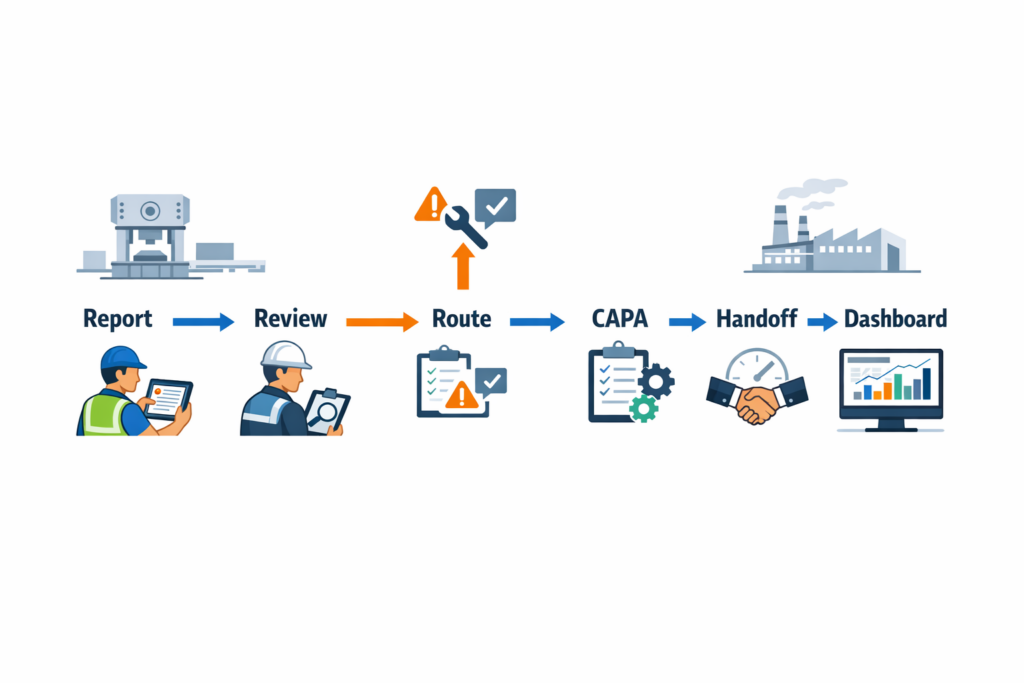
A strong lean factory app should also connect frontline findings to structured action management. If an audit failure, defect trend, or repeated stoppage needs corrective action, the app should open a CAPA record, assign responsibility, track due dates, and document verification. That keeps improvement work tied to execution instead of leaving it in meeting notes.
Suggestion tracking is just as important for mobile lean management. In many plants, operators see waste first, but ideas are lost if submission is inconvenient. With a lean manufacturing app, an operator can submit an improvement idea from a phone, attach a photo, and route it to the area supervisor for review, while managers track approval rates, implementation speed, and savings by line or department.
Approvals and Supervisor Response
Lean workflows often fail in the handoff between finding an issue and getting someone to act on it. A useful lean manufacturing software app should include mobile approvals for red-tag disposal, temporary deviation approval, action-plan signoff, and supervisor confirmation. This is where a simple workflow engine matters: one submission should move automatically to the correct approver based on plant, area, severity, or shift.
For example, in an automotive components plant, a supervisor might flag a repeated torque-check miss during a layered audit. The app can notify the area manager, request a containment action, and escalate again if no response is recorded within a set time window. That turns the lean manufacturing mobile app into an execution tool, not just a reporting tool.
One App, Multiple Lean Workflows
The most useful lean tools app is not a separate tool for every activity. It brings audits, issue reporting, CAPA, approvals, and escalations into one connected system so teams can move from observation to action without re-entering data. Platforms like Jodoo are well suited to this because manufacturing teams can build these workflows without custom coding, while still giving supervisors mobile forms, automated routing, and dashboards that show open actions by line, shift, or plant.
How to Evaluate the Right Lean Factory App for Your Plant
Choosing a lean manufacturing app is not just a software decision. It is an operating model decision that affects how supervisors capture shop-floor data, how lean managers follow up on actions, and how plant leaders measure whether improvements are sustained. If you are selecting a lean factory app, the best approach is to use a practical evaluation framework instead of focusing first on feature lists or pricing pages. That helps you compare options based on how well they fit your production environment, your audit routines, and your rollout plans across lines or sites.
Start With the Actual Lean Process You Want to Run
Before evaluating any lean manufacturing software app, define the process you want to digitize first. That might be 5S audits, layered process audits, Kaizen suggestions, A3 tracking, red-tag follow-up, or daily Gemba checks. If the workflow is unclear on paper, the app will not fix it; it will only digitize confusion faster. A useful selection exercise is to map one real process from trigger to closure, then test whether the app can support every step on mobile.
Consider an electronics assembly plant trying to digitize line walk checks and abnormality escalation across daily operations. The team needs operators to submit issues with photos, shift supervisors to assign containment actions, and the CI manager to review repeat defects by model and station. In that case, the right lean tools app must support structured forms, photo capture, due dates, status changes, and trend reporting in one workflow. If any of those steps still need email or spreadsheets outside the app, the tool will create extra handoffs instead of reducing them.
Evaluate Ease of Use on the Shop Floor
A strong lean manufacturing mobile app must work for frontline users, not only for engineers or administrators. On most factory floors, people have limited time to enter data, often while standing, wearing gloves, or moving between stations. That means the interface should be simple, fast, and optimized for mobile screens with large buttons, minimal typing, and clear field labels. If it takes more than a minute or two to complete a standard audit or submit an improvement idea, usage rates will usually drop.
Ask vendors to show the exact mobile experience for common tasks such as creating a Kaizen record, scanning a machine QR code, attaching a photo, or closing an action item. According to industry studies on mobile form adoption in manufacturing, completion rates improve significantly when forms are shortened and standardized for the task. For plant environments, the practical benchmark is straightforward: can a shift supervisor complete the task during a normal walk without stopping production flow? If the answer is no, the tool may look good in a demo but fail in daily use.
Check No-Code Configurability for Continuous Improvement Work
Lean processes do not stay fixed for long. Audit checklists change, escalation rules change, KPI targets change, and one site may use a different approval flow from another. That is why no-code configurability matters when evaluating a lean factory app. You need to know whether your operations team can adjust forms, logic, and workflows without waiting weeks for IT or external developers.
This is especially important in food manufacturing, where audit points can change based on customer requirements, internal hygiene programs, or certification updates such as ISO 9001 or ISO 45001-linked routines. A lean manager may want to add a temperature verification field, a sanitation photo requirement, or an automatic escalation when a critical control step is missed. A no-code platform lets the plant update these rules quickly while keeping the workflow controlled and traceable. That flexibility becomes even more valuable when you are standardizing one framework across multiple production areas with slightly different operating conditions.
Look Closely at Workflow Automation
The best mobile lean management tools do more than collect data. They automate what happens next. When an audit fails, a corrective action should be assigned automatically; when a due date is missed, the responsible person should be reminded; when a pattern repeats, leaders should be able to review it quickly without manually compiling reports.
For evaluation, ask whether the app supports workflows such as auto-assignment by department, escalation by severity, approval routing, overdue reminders, and closure verification. In a garments factory, for example, a line quality issue found during a layered audit may require immediate containment by the line leader, review by the quality supervisor, and final verification by the production executive. A capable lean manufacturing app should move that issue through each stage with status visibility and timestamped records. This is critical because follow-through, not just data capture, is what sustains lean execution.
Make Sure Dashboards Support Daily Management
A good app should not trap lean data inside individual records. It should turn activity into visible management signals. That means dashboards for audit completion, open action items, repeat findings, closure time, and participation levels by line, shift, or site. If leaders need to export everything into spreadsheets before they can review performance, the reporting layer is too weak.
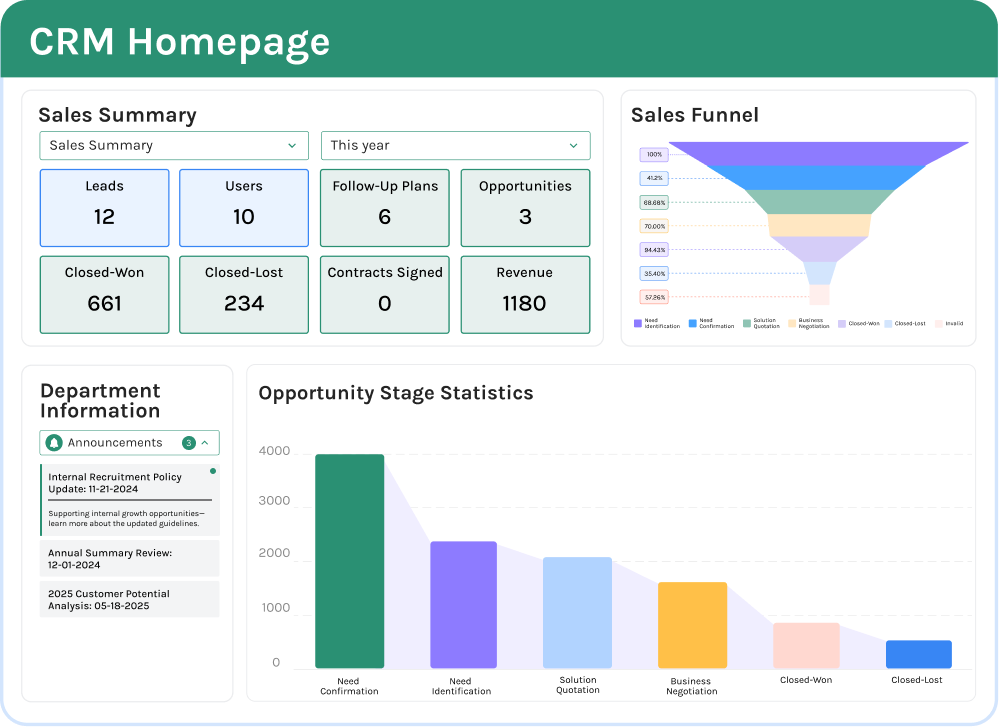
Ask whether dashboards refresh in real time and whether different roles can see different KPI views. A plant manager may want site-level trends, while a shift supervisor may only need today’s overdue actions by area. McKinsey and other operations studies have repeatedly shown that real-time visibility supports faster intervention and better decision cycles, especially in multi-line environments. In practice, your lean manufacturing mobile app should help run tier meetings from live data, not from yesterday’s manually prepared slides.
Review Permissions, Audit Trails, and Control
Lean systems often involve cross-functional users, but not everyone should see or edit everything. Operators may submit issues, supervisors may assign actions, quality may verify closure, and plant leadership may review summaries across departments. For that reason, permissions should be role-based and detailed enough to control who can view, edit, approve, or export records. This is particularly important if your lean process links to quality, safety, or compliance workflows.
You should also check whether the app maintains a clear audit trail. If a finding is edited, reassigned, or closed, the record should show who changed it and when. In regulated or customer-audited environments, that history is not optional; it helps support traceability and management review. A lean manufacturing software app with strong governance is easier to trust during internal audits and site standardization efforts.
Test Offline and Mobile Performance in Real Factory Conditions
Mobile support should mean more than “there is an app.” In many plants, Wi-Fi coverage is uneven near warehouses, utility rooms, loading bays, or older production blocks. A useful lean manufacturing mobile app should handle offline data entry or low-connectivity conditions without losing records. It should also sync reliably when the device reconnects.
This matters in larger industrial sites where supervisors move constantly across buildings or outdoor areas. During evaluation, test the app in the actual plant, not just in a meeting room with strong internet access. Ask users to submit an audit, upload photos, and reopen a previous task from the shop floor. A lean tools app that performs well under real site conditions will reduce friction during rollout and improve adoption across shifts.
Assess Integration With Your Existing Systems
Lean data becomes more valuable when it connects with the rest of plant operations. Depending on your process, you may want the app to link with ERP, MES, maintenance systems, HR directories, or BI tools. For example, a corrective action raised from a process audit may need to trigger a maintenance work order, or a daily management board may need production output data to contextualize losses and improvement results. Without integration, teams often end up duplicating data between systems.
When evaluating options, ask what integration methods are available: APIs, webhooks, no-code connectors, or export/import tools. The goal is not to integrate everything on day one, but to avoid choosing a platform that becomes a silo later. A strong lean factory app should support gradual expansion from standalone use to connected operations as your digital maturity grows.
Consider Scalability Across Lines, Plants, and Regions
Many apps work well in one pilot area and struggle when rolled out across multiple sites. That is why scalability should be part of your selection framework from the start. Ask whether the app can support standardized templates, site-specific variations, centralized reporting, and large user volumes without becoming hard to manage. These factors matter if your organization plans to scale lean programs from one line to several factories in Southeast Asia or globally.
A practical test is to imagine your first use case succeeding in one plant, then expanding to five. Can headquarters compare audit closure rates across sites? Can local plants adapt checklists without breaking the corporate structure? Can permissions, dashboards, and workflows be managed centrally while still reflecting local operating differences? If the answer is yes, the lean manufacturing app is more likely to support long-term deployment rather than remain a pilot tool.
Use a Simple Scorecard Before You Decide
To compare options objectively, build a scorecard with 6 to 8 weighted criteria. Typical categories include mobile ease of use, no-code configurability, workflow automation, dashboard visibility, permissions, offline performance, integrations, and scalability. Score each item on a 1-to-5 basis using one real use case from your plant, not a generic vendor demo. This makes the evaluation more practical and helps operations, CI, and IT align around the same decision criteria.
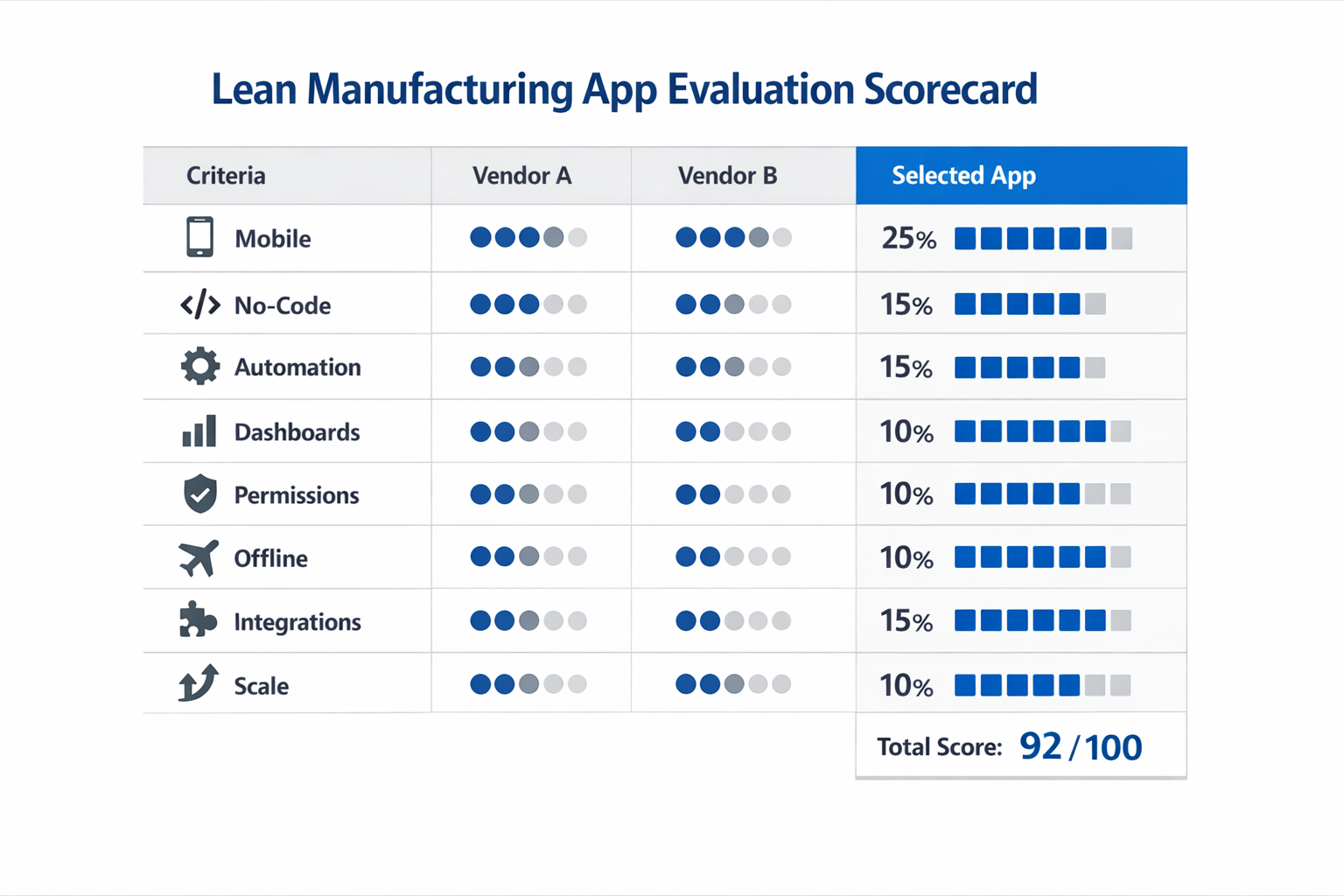
If you want a lean manufacturing mobile app that lasts, choose the platform that matches your real shop-floor routines and can evolve with your lean program over time. The right decision is usually not the app with the longest feature list. It is the one that your teams will actually use every day to run audits, manage actions, and sustain improvement at scale.
Off-the-Shelf Lean Apps vs. No-Code Platforms: Why Jodoo Stands Out
Single-Purpose Lean Apps Are Fast to Start, but Narrow in Scope
A single-purpose lean manufacturing mobile app can work well when you only need one function, such as 5S audits, red tag tracking, or suggestion capture. In many factories, these tools are easy to deploy because operators can start using a checklist on their phones with minimal training. The limitation appears a few months later, when the lean team wants to connect that activity to corrective actions, maintenance follow-up, supervisor approvals, and KPI reporting. At that point, one app becomes several disconnected tools.
Imagine an electronics assembly plant rolling out a lean tools app just for layered process audits. The audits may be completed digitally, but action items still end up in email or spreadsheets, and plant leaders still need separate reports for closure rate, repeat findings, and line-level trends. That means the team has digitized one step, not the full lean workflow. For production managers, that gap matters because lean performance depends on follow-through, not just data capture.
Rigid Enterprise Systems Offer Control, but Often Move Too Slowly
At the other end of the market, large enterprise systems provide stronger governance, integration, and security. For multi-site manufacturers, that can be useful, especially where ISO 9001 traceability and approval records are required. But these systems are often too rigid for day-to-day continuous improvement, where forms, routing rules, and dashboards need frequent adjustment by operations teams. A Lean Manager may wait weeks or months for IT support just to add one new escalation step or update an audit form.
This is where many factories struggle to scale mobile lean management. Lean processes are not static like a fixed finance workflow; they evolve line by line, shift by shift, and site by site. A food packaging plant, for example, may want different 5S check items for raw material storage, filling, and palletizing areas, plus different approval rules for hygiene-related findings. If every change requires a developer ticket, the system quickly falls behind the real factory process.
Why No-Code Platforms Fit Lean Operations Better
A no-code platform sits between those two extremes. It gives you more flexibility than a single-purpose lean factory app, but without the heavy development cycle of traditional enterprise software. Instead of buying one app for audits, another for Kaizen, and another for action tracking, you can build connected lean workflows on one platform and adapt them as your operation changes. That is especially important because manufacturers that digitize workflows effectively can reduce process cycle times by 20% to 30%, according to industry studies on workflow automation and mobile operations.
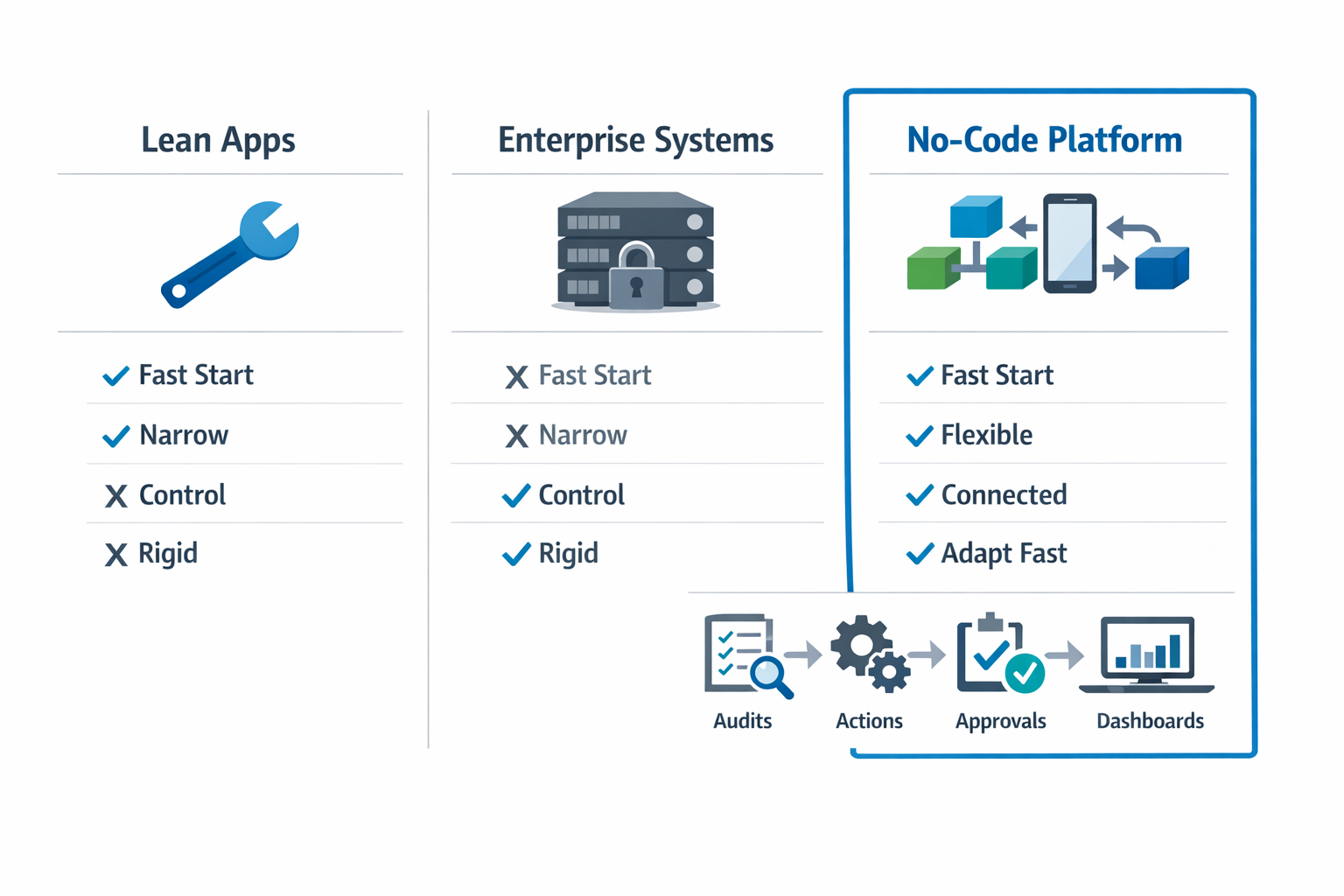
For lean teams, the real value is not just mobility but connection. A lean manufacturing software app should link issue reporting, approvals, ownership, deadlines, evidence, and dashboard visibility in one flow. With Jodoo, operations teams can build those workflows without heavy IT involvement, using forms, automation, dashboards, and role-based permissions in the same environment. That makes it easier to standardize lean methods across lines while still allowing each plant to reflect its own SOPs and escalation rules.
Where Jodoo Stands Out in Daily Factory Use
Jodoo stands out because it is not limited to one lean use case. You can use it to build a 5S audit process, then extend the same system into Kaizen tracking, A3 follow-up, layered process audits, TPM checks, and management dashboards. For a regional manufacturer with several plants, that means fewer disconnected tools and a clearer view of how lean activities convert into measurable action. In practice, that helps teams manage adoption as well as compliance.
Take a garment factory shift supervisor who spots a 5S issue at the sewing line, such as an unsafe tool storage point near a workstation. Using Jodoo on a phone, the supervisor submits the issue immediately, attaches a photo, and the workflow auto-routes it to maintenance based on location and issue type. The same record can then be tracked on a mobile dashboard until closure, with timestamps, owner status, and response progress visible to both operations and CI leaders. That is continuous improvement in action: faster response on the floor, better accountability across departments, and live visibility without waiting for end-of-shift paperwork.
Conclusion: Start Small with a Lean Manufacturing App and Scale with Jodoo
A lean manufacturing app does not need to start as a full plant-wide system. In most factories, the best approach is to begin with one workflow that creates fast, visible results, such as digital 5S audits, layered process audits, Kaizen idea tracking, or A3 follow-up management. Imagine a production manager at an automotive parts plant who replaces paper audit sheets with a mobile app first, then expands into action tracking and KPI dashboards once the team sees fewer overdue items and faster issue closure.
That step-by-step model matters because lean failure is often not about tools like 5S or Kaizen themselves. It is about weak follow-through, scattered data, and poor visibility across shifts, departments, and sites. A mobile-first system helps standardize data capture, shorten response time, and give supervisors, lean managers, and operations leaders a shared view of what is open, overdue, and improving.
Jodoo gives manufacturers a practical way to build that system without heavy custom development. As a no-code lean manufacturing platform, it helps you launch one workflow quickly and scale into a connected lean management app across the plant over time. If you want to digitize lean tools without adding IT complexity, start a free trial or book a demo to see how Jodoo can fit your operation.