Browse by category

Monday.com‘s significant push into AI in 2025 is particularly notable. The platform now integrates AI features such as automated text enhancement and smart column autofill. “Monday Sidekick,” the dedicated AI assistant, manages task details, while AI automation autonomously builds complex workflows.
Monday has surpassed traditional task tracking, evolving into a comprehensive Work Operating System (Work OS). The platform centralizes collaboration and improves efficiency by optimizing workflows. This review will examine whether monday.com delivers on these promises, identify which organizations benefit most, and evaluate whether its current pricing is justified.
What is Monday.com?
Launched in 2014, monday.com is a cloud-based Work OS that centralizes project planning, tracking, and execution. The platform brings teams together in one unified workspace. It supports various business functions, including project management, CRM, software development, and customer service.
The platform uses a highly visual, board-based system. Teams customize these boards to match their specific workflows. Each board organizes items in rows and uses customizable columns for various data, including status, deadlines, and time tracking. This flexibility enables the platform to adapt to needs such as marketing campaigns and sales pipelines.
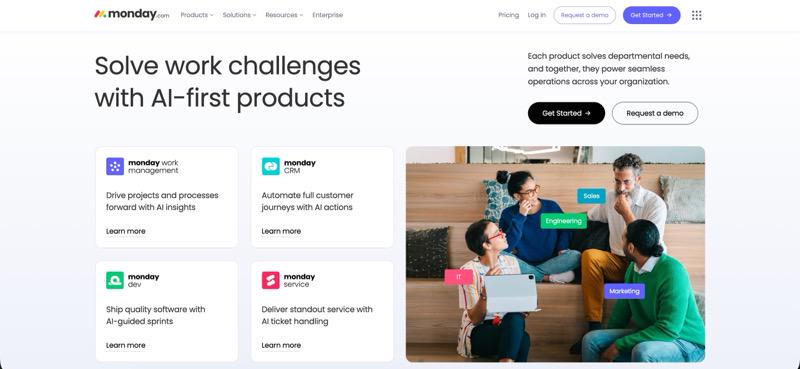
Monday emphasizes visual clarity, distinguishing it from traditional tools. Teams can quickly switch between views like Kanban boards, Gantt charts, calendars, and timelines. The platform currently offers four products built on the same Work OS foundation: monday Work Management, monday CRM, monday dev, and monday services.
Key Features of Monday.com
Monday.com boasts an exceptionally rich feature set designed to handle everything from simple task tracking to complex enterprise workflows. The platform offers the following capabilities to empower teams to manage their work efficiently.
Visual Project Management and Multiple Views
The foundation of monday.com is its highly visual approach to work management. Teams organize projects using boards displayed in a colorful, easy-to-scan format. The platform offers over 15 view options, enabling team members to visualize the same data in ways that suit their individual style.
Each view serves a specific functional need:
- Kanban view: Suits Agile teams by showing tasks moving through stages.
- Timeline and Gantt charts: Illustrate schedules and dependencies to identify bottlenecks.
- Calendar views: Integrate deadlines into a familiar format.
- Map view: Assists field teams by showing task locations geographically.
This variety ensures different team members can effectively work in their preferred format while accessing a single source of truth.
Automation and Workflow Management
Monday.com’s robust automation features eliminate repetitive tasks without requiring any code. Users build workflows visually by selecting triggers, defining conditions, and setting actions. The platform provides hundreds of pre-built templates for common tasks. These include notifying teams when statuses change and creating recurring items.
With recent AI integration, the platform now supports natural language automation creation. Users simply describe the desired workflow, and the AI generates the corresponding recipe. AI-driven automations can also anticipate actions based on past data and flag workflow anomalies. It is important to note that automation capacity varies significantly by subscription level, ranging from 250 monthly actions on the Standard plan to 250,000 on the Enterprise plan.
Collaboration and Communication Tools
Monday.com turns your work items into conversation hubs. Team members can discuss tasks right where the work happens. They share updates, ask questions, and loop in colleagues through mentions. Files attach directly to these discussions. The platform also includes Monday WorkDocs for real-time collaborative editing. These documents live inside your project boards, so collaboration happens without jumping between apps.
External collaboration is seamless too. Monday connects with tools your team already uses, like Slack and Microsoft Teams. Board updates flow into chat channels automatically. Your team can even spin up new tasks from chat messages. When you need to involve clients or partners, guest access lets them participate. They can view and contribute to designated boards without needing their own paid account.
Dashboards and Reporting
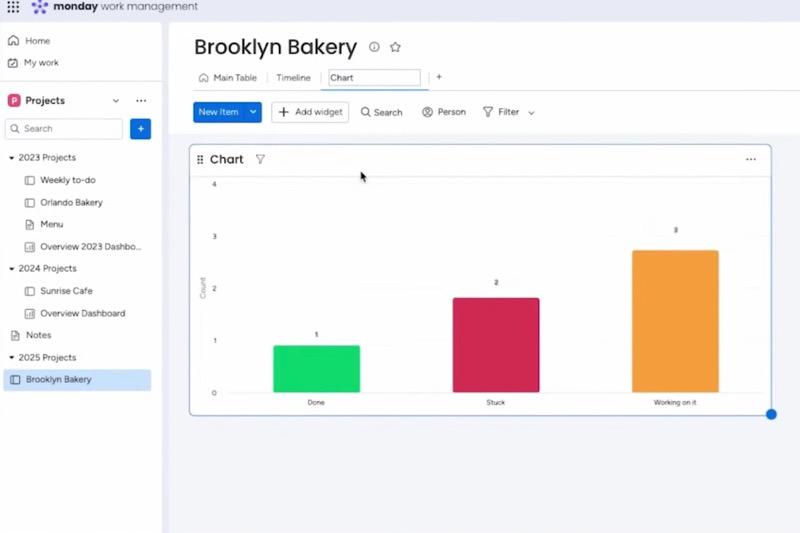
Monday.com dashboards function to aggregate data from multiple boards into custom visualization panels. Users build these panels by combining elements such as charts, graphs, number displays, and various widgets. This construction provides high-level overviews of both project status and team performance. The platform supports over 80 widget types, many of which are sourced via third-party integrations.
Dashboard capability scales directly according to the subscription level. Standard plans allow data aggregation from a maximum of 5 boards per dashboard, while Pro plans increase this limit to 10 boards. Enterprise plans offer the maximum capacity, enabling dashboards to combine data from up to 50 boards. Notably, the AI-powered reporting features introduced in 2025 automatically generate critical insights, identify relevant trends, and flag potential risks.
Monday.com Pricing Plans
Monday.com uses a tiered pricing structure with a bucket system. Seats come in groups starting at 3 minimum, then scale up in increments of 5. Here’s what each plan includes.
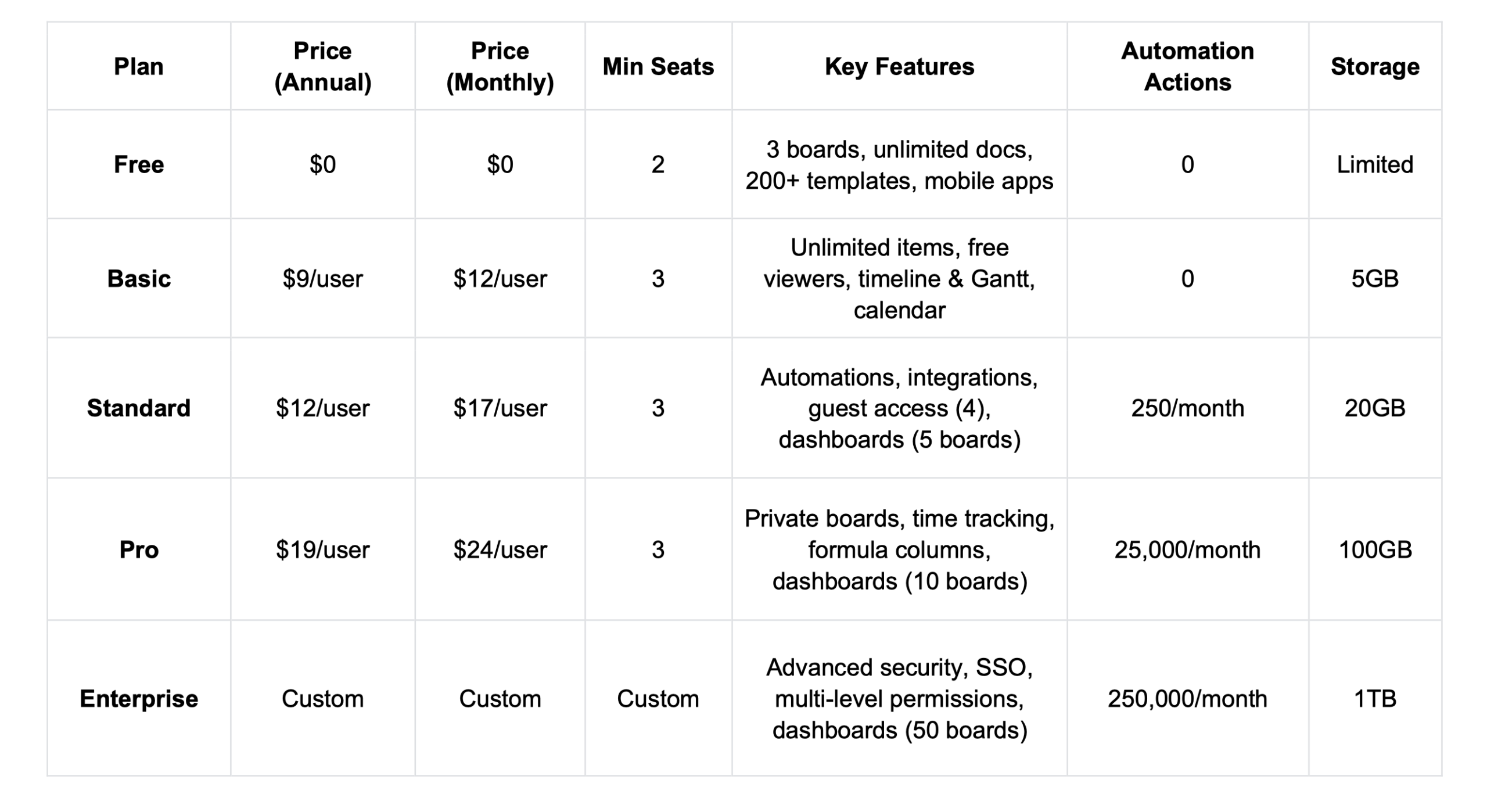
AI Add-On: All paid plans include 500 AI credits monthly. Additional AI credits start at $200/month for Standard, Pro, and Enterprise plans.
The minimum starting cost for Basic is $27 monthly (3 seats x $9). Standard starts at $36 monthly, while Pro begins at $57 monthly. Enterprise pricing requires a sales contact, with reports indicating approximately $40 per user monthly for a 25-user team.
A common user complaint highlights how essential features are often restricted behind higher paywalls. One user noted that even the Pro plan, their second-highest tier, lacked expected basic functions such as item-specific access control and the ‘Projects’ or ‘Portfolios’ feature. This structure often leads to unexpected cost escalation for growing teams, as critical capabilities remain locked behind the top-tier Enterprise plan.
Advantages of the Monday.com Platform
Monday.com delivers several strong benefits that appeal to teams looking for solid project management tools.
AI-Powered Intelligence: The 2025 AI features automate repetitive tasks, provide intelligent insights, summarize emails and activities, and help teams focus on strategic work rather than administrative overhead.
Intuitive Visual Interface: The colorful, visual design makes project tracking engaging and easy to grasp at a glance, reducing onboarding time and keeping team members engaged with their tasks.
Strong Automation Capabilities: The visual automation builder lets non-technical users create workflows easily. AI-powered natural language features make building sophisticated workflows even simpler.
Comprehensive Integration Options: With 200+ native integrations and API access, monday.com connects seamlessly with existing tool stacks, reducing context switching and keeping information flowing between systems automatically.
Disadvantages of Monday.com
Despite its strengths, monday.com has notable limitations that frustrate users and create barriers for certain teams.
- Pricing Escalation: The bucket pricing model and feature paywalls create significant cost escalation. Essential features like automation require at least the Standard plan, time tracking needs Pro, and SSO requires Enterprise, quickly spiraling costs to $20,000-$50,000+ annually for growing teams.
- Automation and Integration Limits: The 250 monthly actions on Standard plans deplete rapidly with active boards. Teams automating multiple workflows quickly hit limits, forcing manual work or expensive upgrades to Pro plans.
- Limited Free and Basic Plans: The Free plan’s two-user limit and lack of automations make it impractical for business use. Basic doesn’t add enough value to justify its cost, effectively pushing most teams directly to Standard or higher.
- Feature Fragmentation: Even Pro plan users encounter features locked behind Enterprise paywalls. Item-level permissions, portfolio views, and advanced reporting remain unavailable at lower tiers, creating frustration when teams discover needed capabilities require expensive upgrades.
- Reporting Complexity: While dashboards are powerful, creating meaningful reports requires understanding how to combine widgets effectively. Some users find reporting less intuitive than other platform aspects.
- Minimum Seat Requirements: The bucket pricing means a team of 11 pays for 15 seats, creating waste for organizations that don’t fit neatly into pricing brackets.
Looking for a More Affordable monday.com Alternative?
If monday.com’s pricing escalation and feature limitations concern you, exploring alternatives makes practical sense. Jodoo offers a compelling option focused on no-code database and workflow management without enterprise-level overhead.
Jodoo is a no-code platform that enables teams to build custom business applications, workflows, and databases without programming knowledge. The platform specializes in drag-and-drop database modeling, visual workflow automation, and cross-form data relationships, making it particularly strong for CRM, inventory management, HR processes, and internal tools.
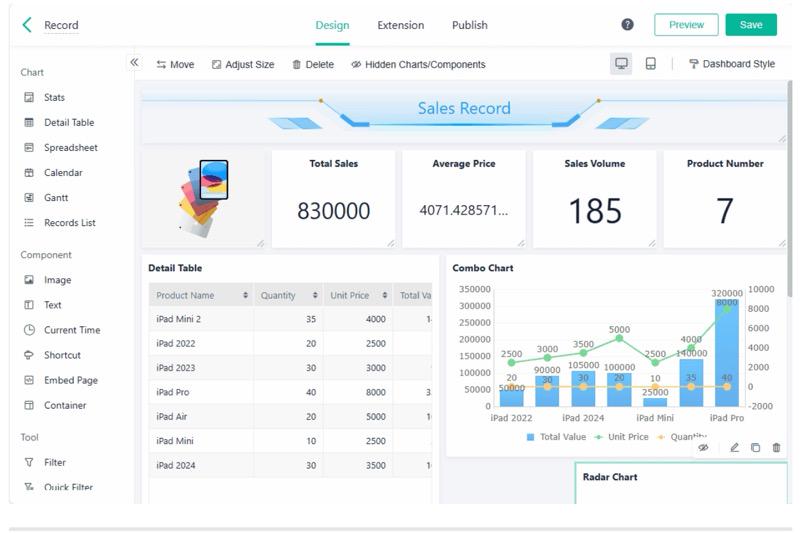
Why Choose Jodoo?
Jodoo’s pricing structure is dramatically more budget-friendly. The platform starts with a free plan supporting 5 users with 20,000 data records and unlimited apps. The Business plan costs just $12 per user monthly (minimum $60 for 5 users), including generous limits like 750,000 data records and 300,000 monthly automations. This contrasts sharply with monday.com’s $39+ monthly for 5 users, where automation and scale quickly require expensive add-ons.
Jodoo excels at empowering non-technical users to create sophisticated databases and workflows:
- Drag-and-drop database builder creates custom tables without SQL knowledge
- Cross-form linkages establish relationships between different data sets automatically
- Visual approval workflow routes requests through multi-step approval processes
- E-signature integration enables digital signing within workflows
- PDF template generation produces branded documents from your data
Jodoo takes a different approach than monday.com’s project-board structure. Its interface is built specifically for creating internal business applications. This design feels more natural when you need custom solutions. Teams can quickly build CRM systems, inventory trackers, employee onboarding workflows, and client portals. The platform adapts to your specific requirements rather than forcing you to work within a predefined framework. You shape the tools around how your business actually operates.
Final Verdict
Monday.com stands out as a robust work management platform with flexible visual project tracking. The interface feels intuitive and adapts to your workflow through customization. Automation features centralize your work in one place. The 2025 AI capabilities add real value by handling repetitive tasks and surfacing intelligent insights that save time.
That said, the platform comes with trade-offs. The pricing tiers climb steeply, and feature restrictions can frustrate teams watching their budget. Monday makes sense for enterprises that can afford Pro or Enterprise plans. Smaller businesses might struggle with the cost. If your main priority is straightforward no-code database functionality, alternatives like Jodoo could offer better value for your investment.