Introduction: Why Production Management Software Matters for Manufacturers in 2026
A missed material update, a late quality check, or one spreadsheet version error can delay an entire shift. For manufacturers, those small coordination gaps add up fast. Recent industry research continues to show that unplanned downtime, manual data entry, and poor real-time visibility remain major causes of lost productivity across automotive, electronics, and food manufacturing plants. That is exactly why production management software is becoming a priority in 2026, especially for companies that need tighter control without committing to a long, expensive ERP project.
In simple terms, production management software helps you plan, track, and manage what is happening on the shop floor in real time. It often overlaps with what buyers also call manufacturing operations software or a factory management system: tools for handling production orders, work-in-progress tracking, labor reporting, quality checks, downtime logs, and shift coordination in one connected workflow. Imagine a production manager at an automotive parts plant who still relies on paper travelers and WhatsApp updates between supervisors; one missing update can throw off delivery schedules for the whole day.
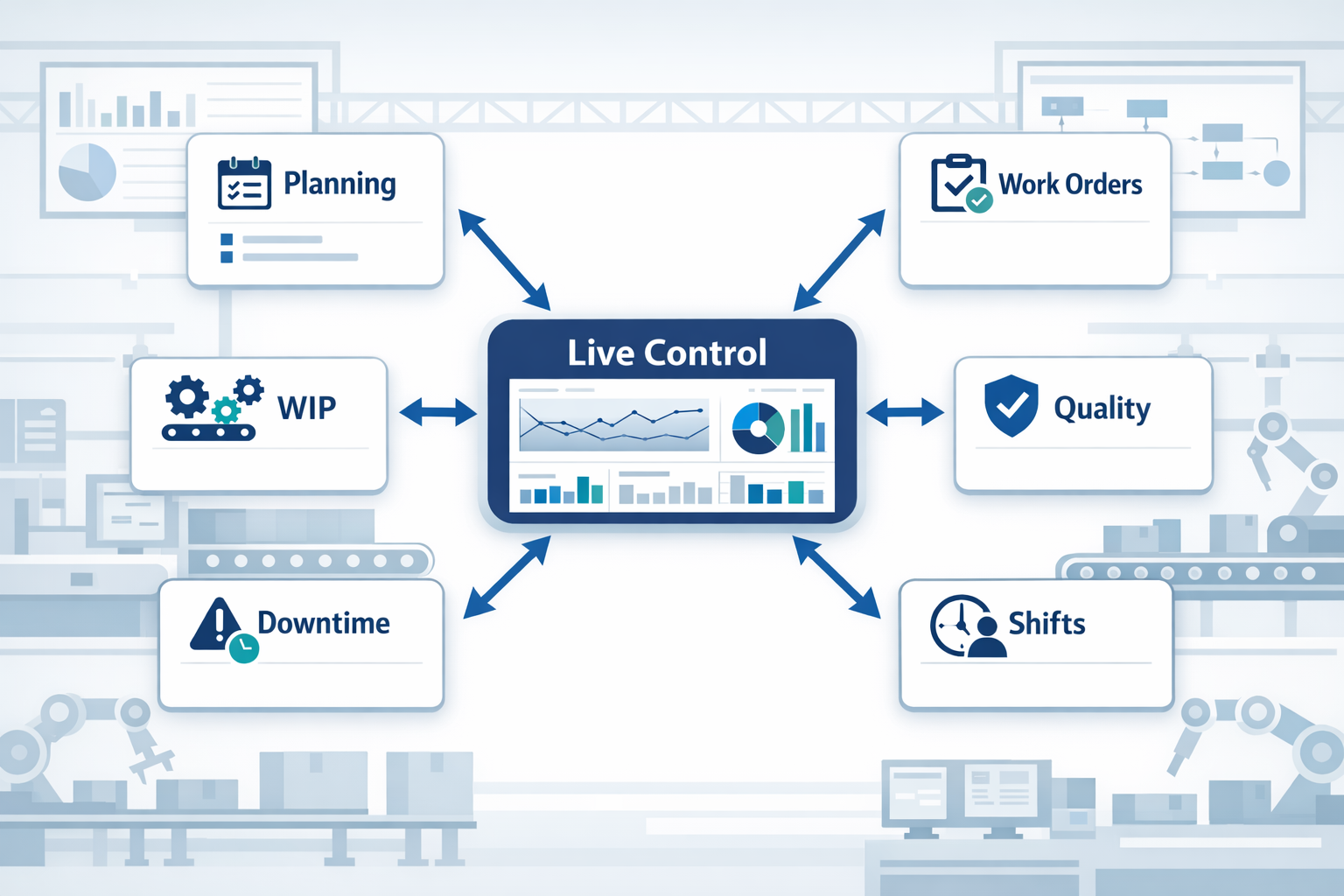
In this article, you will learn what to look for in the best tools, which features matter most, and how to choose the right fit for your factory in 2026.
The Operational Pain Points That Push Manufacturers to Replace Spreadsheets and Legacy Tools
As production volume grows, the limits of spreadsheets, whiteboards, and paper-based tracking become harder to ignore. What works for one line, one planner, or one shift often breaks down when a factory has multiple SKUs, frequent changeovers, and tight delivery windows. This is the point where many manufacturers start looking for production management software not because they want more technology, but because their current tools can no longer support day-to-day execution reliably. The demand for a proper production planning tool usually starts with visible operational friction on the shop floor.
Disconnected Planning Creates Blind Spots
In many plants, production planning still lives across Excel files, printed job sheets, WhatsApp messages, and supervisor notes. The problem is not just inconvenience; it is that no one is fully confident they are working from the latest version of the plan. If a scheduler updates a priority order at 10:00 a.m. but the line leader sees the old printout until after lunch, the factory loses hours before anyone notices the mismatch. This is where general-purpose tools fall short compared with purpose-built production scheduling software.
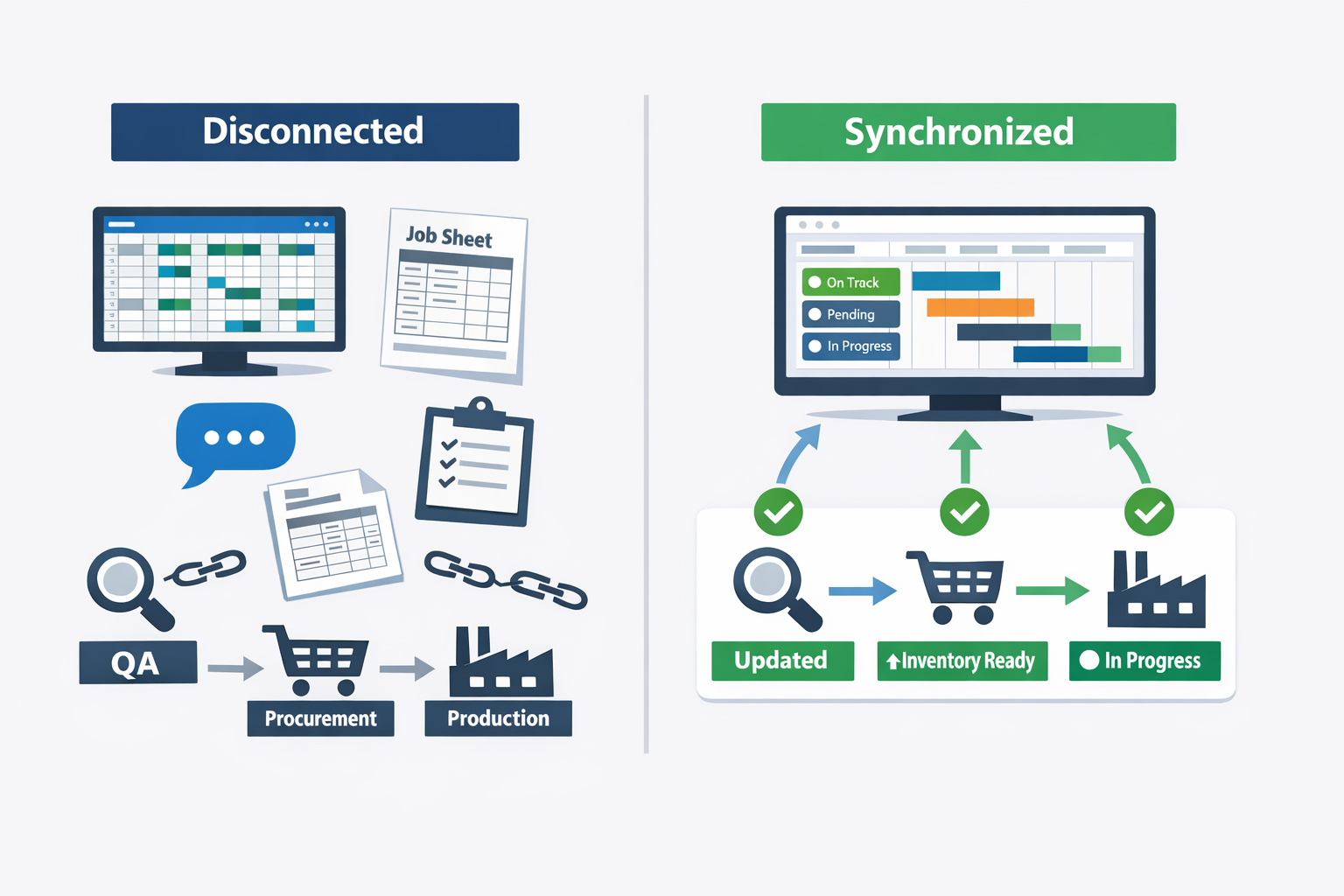
Imagine a production manager at an electronics assembly plant who is juggling short-run orders for control boards, cable harnesses, and final box-build work. A component shortage forces one job to be pushed back, but procurement, production, and QA are all tracking status in different files. The result is predictable: operators prepare the wrong batch, inspection resources are assigned to the wrong line, and customer delivery dates become harder to commit to. In this situation, the issue is not a lack of effort; it is a lack of synchronized execution.
Delayed Updates Turn Small Changes Into Big Disruptions
Manufacturing schedules change constantly due to machine downtime, material delays, urgent orders, and quality holds. Manual systems are too slow to absorb these changes without creating ripple effects across departments. A supervisor may adjust a shift plan on a whiteboard, but warehouse staff, maintenance teams, and planners may not see that change until much later. By then, forklifts, raw materials, and labor have already been allocated based on outdated assumptions.
This delay has a measurable cost. According to industry research from Deloitte, unplanned downtime can cost manufacturers thousands of dollars per hour, with the impact rising sharply in high-throughput environments. Even when the direct downtime cost is manageable, the indirect cost from missed sequencing, overtime, and expedited shipments can be just as damaging. That is why many growing factories move from static spreadsheets to manufacturing operations software that reflects live production conditions.
Weak Handoffs Between Teams Increase Rework and Missed Commitments
Another common failure point is the handoff between planning, production, quality, and warehousing. Legacy tools often track each function separately, so a work order may be “released” in one file without the next team having the right specifications, revision level, or packaging instructions. In food manufacturing, that can mean the wrong label version reaches the packing area; in regulated environments, it can also create compliance exposure. The cost is not just rework, but delayed shipments and damaged customer trust.
Consider a packaged foods factory running multiple SKUs with frequent allergen changeovers. The planning team updates the sequence to prioritize a retailer promotion, but the change is not fully communicated to sanitation and QA. Production starts late because line clearance and verification were prepared for the previous run order, and the plant loses valuable throughput in a narrow dispatch window.
Manual Scheduling Struggles With Complexity
Spreadsheet-based scheduling may look manageable until complexity increases. Once a factory has parallel lines, shared equipment, limited skilled operators, and sequence-dependent setups, planners spend more time fighting the schedule than improving output. A single late supplier delivery can force dozens of manual changes, and each change creates another opportunity for error. Over time, the schedule becomes less of an operational control tool and more of a daily recovery exercise.
This is especially clear in high-mix manufacturing environments where priorities shift quickly. A garment factory, for example, may need to balance fabric arrival dates, stitching capacity, finishing schedules, and export deadlines across many small orders. If planners are rebuilding schedules manually every day, they have less time to manage exceptions proactively.
Legacy Systems Cannot Support Fast, Cross-Functional Decisions
Older ERP modules and homegrown systems may store data, but they often do not support fast decisions on the shop floor. If a planner has to wait for IT to update a report, or if supervisors have to call three departments to confirm order status, response time suffers. In fast-moving manufacturing environments, slow decisions are operational losses. A delayed reschedule can mean missed line time, idle labor, or incomplete orders at dispatch cutoff.
This gap becomes more obvious in companies trying to scale from one plant to multiple production cells or locations. What leaders need is not just recordkeeping, but shared operational visibility across planning, execution, and follow-up. That is why many manufacturers eventually move beyond spreadsheets and fragmented legacy tools toward a connected manufacturing operations software environment that supports real-time coordination.
How to Evaluate Production Management Software: Features, Fit, and Deployment Factors
Choosing production management software is not just about comparing feature lists. Two tools may both offer scheduling, dashboards, and work order tracking, but deliver very different results once they reach the shop floor. For operations managers, the better question is: which system fits your process, your team capability, and your rollout timeline without creating a long IT project or a costly workaround environment.
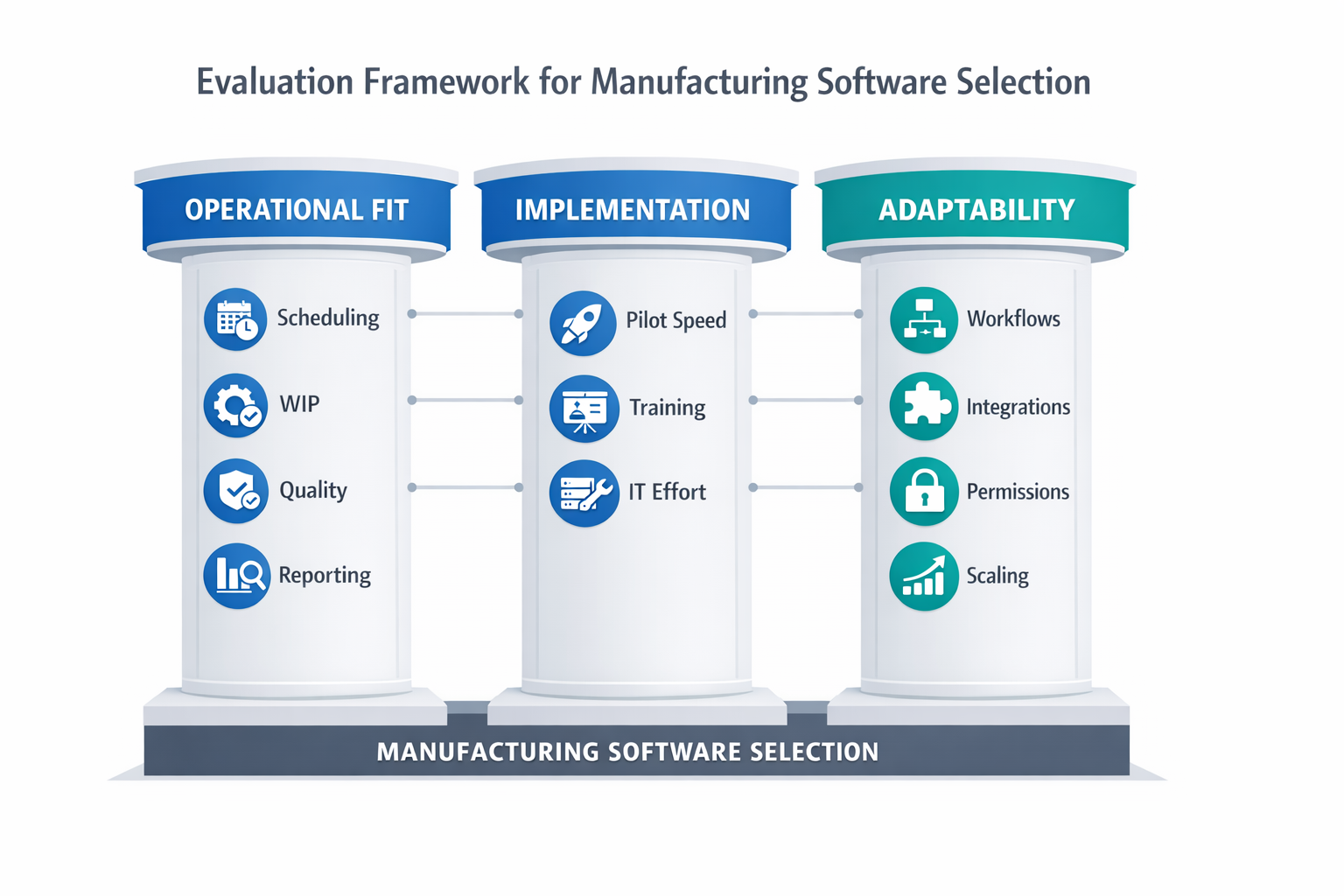
A practical evaluation should look at three things together: operational fit, implementation effort, and long-term adaptability. This matters because manufacturers that digitize effectively can see major gains in visibility and responsiveness; for example, McKinsey has reported that digital manufacturing transformations can improve productivity by 30% to 50% in the right environments. That kind of result usually comes from choosing a system that operators will actually use, supervisors can adjust, and managers can trust for daily decisions.
Evaluate Core Production Control Capabilities First
Start with the workflows your team runs every shift. A strong production planning tool should support finite scheduling, capacity planning by line or machine group, work order release, WIP tracking, and actual-versus-plan reporting. If your factory runs mixed-model production, the software should also handle changeovers, priority orders, and short-run adjustments without forcing planners back into spreadsheets.
For example, imagine a production manager at an electronics assembly plant handling SMT lines, manual assembly cells, and final test stations. The right system should show whether a delayed PCB lot will affect downstream testing capacity, automatically update work order status, and alert supervisors if output falls behind takt for the shift. If the tool cannot connect planning, execution, and reporting in one flow, it is not functioning as a complete factory management system.
Check How Well the Software Handles Real Factory Data
Many tools look strong in demos because they use clean sample data, but manufacturing data is rarely clean. Your shortlist should be tested against actual use cases such as split batches, rework orders, partial completions, operator handovers, and scrap logging. A useful manufacturing operations software platform should let you capture these events in structured form, not bury them in notes or offline files.
Mobile usability matters here more than many buyers expect. In a food processing plant, shift leaders may need to confirm line clearance, record downtime causes, and approve material substitutions while moving between packaging lines and cold storage areas. If operators need a desktop terminal for every update, data entry lags behind production reality and reporting becomes less trustworthy.
Compare Scheduling Depth, Not Just Scheduling Screens
Not every scheduling module deserves to be called production scheduling software. Some tools simply display planned dates, while stronger systems account for machine availability, labor constraints, tooling, maintenance windows, and material readiness. Ask vendors whether the schedule can recalculate when one line goes down, whether planners can run what-if scenarios, and whether dispatch lists update automatically by workstation.
This is especially important in factories with seasonal demand or tight delivery windows. A garment manufacturer, for instance, may need to rebalance sewing lines based on operator skill mix, urgent export orders, and fabric arrival status. A tool that only shows static due dates may look organized on screen, but it will not help planners make better daily decisions.
Assess Customization, Approvals, and Workflow Flexibility
Every plant has process variations that standard software does not fully cover. One site may require QA approval before pack-out, while another needs engineering sign-off for substitute materials or nonstandard routings. The best production management software should let you configure forms, workflows, and approval logic without waiting months for custom development.
This is where ease of customization becomes a major buying factor. If a supervisor wants to add a downtime reason code, a production report field, or a shift-end approval step, how hard is that change to make? In fast-moving operations, a platform that non-technical teams can adapt is often more valuable than a rigid system with a longer feature list.
Review Integration, Permissions, and Reporting Together
Production software should not sit in isolation. You should check whether it can connect with ERP, inventory, procurement, maintenance, barcode systems, and BI tools, because disconnected systems create duplicate data entry and version-control issues. Integration matters most when one production event, such as a completed batch or material issue, must trigger updates elsewhere automatically.
Permissions are equally important, especially for manufacturers with multiple plants or contract production setups. A planner may need visibility across all lines, while a line leader should only edit records for one workshop, and finance may only need access to output summaries. Good reporting also depends on this structure, because reliable dashboards require consistent source data, role-based access, and clear audit trails for approvals and edits.
Measure Deployment Speed and Total Cost of Ownership
Implementation risk is often underestimated during software selection. Ask how long it takes to deploy a pilot, how much internal IT support is required, and what level of process mapping or external consulting is needed before the first line can go live. For many SMB manufacturers, a system that goes live in weeks and expands module by module is a safer choice than a large-scale rollout that delays value for six to twelve months.
Total cost should include more than license fees. You also need to calculate onboarding time, workflow changes, maintenance effort, integration work, mobile device requirements, and the cost of future modifications. A lower-priced tool that requires constant vendor intervention for small changes can become more expensive over time than a flexible no-code platform that operations teams can adjust themselves.
Use a Practical Buyer’s Checklist
When you compare options, score each tool against the same criteria rather than relying on polished demos. A simple checklist makes the evaluation more objective and easier to defend internally.
- Scheduling and capacity planning: Can it support real machine, labor, and material constraints?
- Work order tracking: Can you monitor release, progress, completion, scrap, and rework in real time?
- Reporting and dashboards: Can supervisors and managers see shift, line, and plant KPIs without manual consolidation?
- Approvals and workflow: Can you configure sign-offs for quality, maintenance, or engineering exceptions?
- Mobile data capture: Can operators and supervisors update records from the shop floor easily?
- Integrations: Can it connect to ERP, inventory, maintenance, and barcode or scanning systems?
- Permissions and auditability: Can you control access by role, team, plant, or process?
- Customization: Can your team adapt forms, fields, and workflows without heavy coding?
- Deployment speed: How quickly can you launch a pilot and expand to more lines or plants?
- Scalability and cost: Will the software still fit when transaction volumes, users, and workflows grow?
If you want a modern factory management system that fits changing production environments, prioritize software that combines operational depth with fast configuration. In practice, that often means choosing a platform that gives you scheduling visibility, workflow control, mobile execution, and reporting in one connected environment rather than buying separate tools for each layer of the process.
Best Production Management Software for Manufacturers in 2026: Top Tools Compared
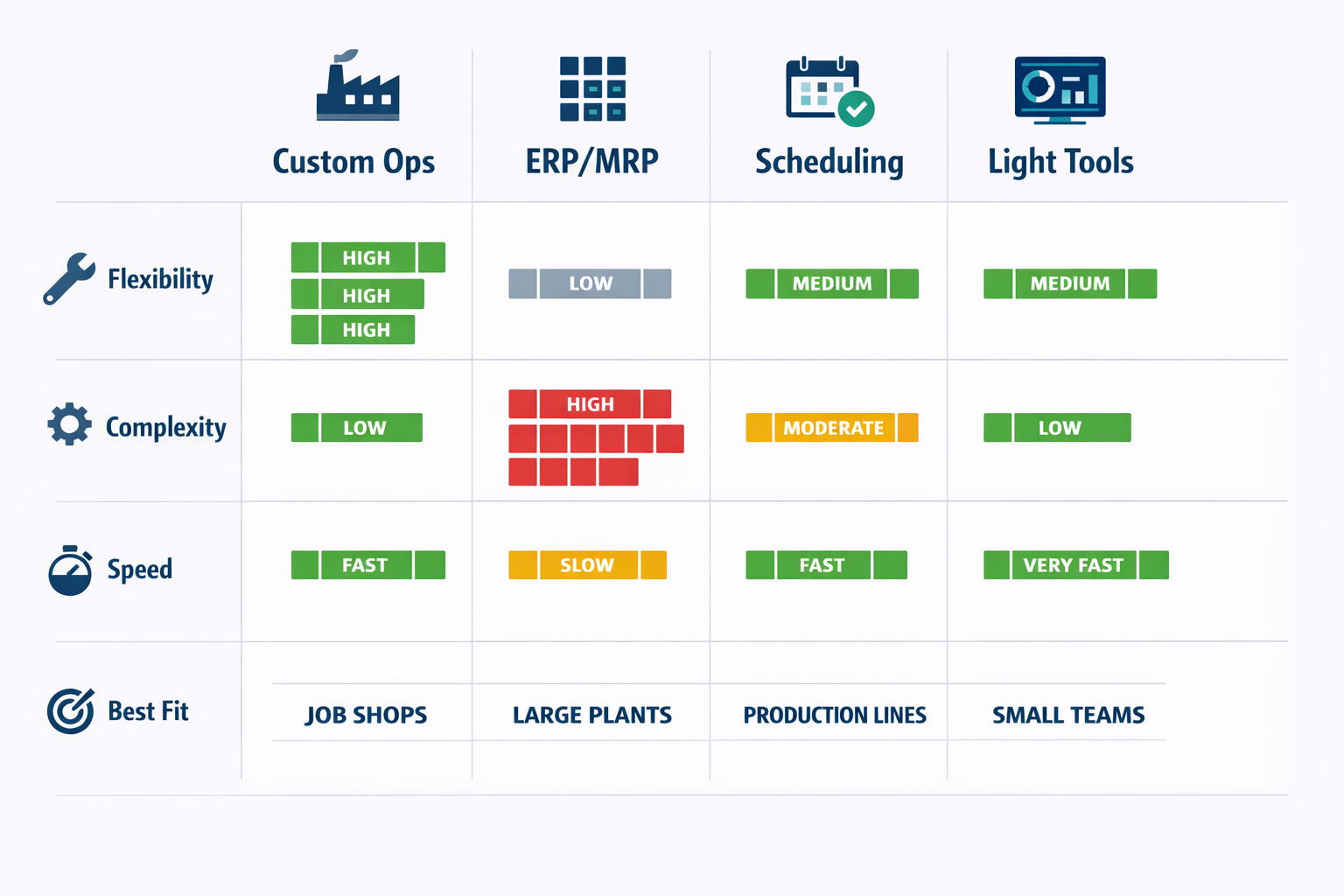
Choosing the best production management software in 2026 depends less on brand recognition and more on fit. Some tools are built for deep ERP and MRP control, some are stronger as production scheduling software, and others work better as flexible manufacturing operations software that connects shop floor execution, quality, maintenance, and reporting. If you are comparing options, the practical question is this: do you need a planning engine, a full factory management system, or a platform you can adapt as your production processes change?
A useful way to compare the market is by business size, process complexity, and how much customization you need. A 60-person food packaging plant running short production runs has very different software needs from a multi-site electronics manufacturer managing traceability, engineering changes, and subcontractors. The tools below are best understood in categories, because most manufacturers are not simply buying software—they are deciding how much process standardization and operational flexibility they want over the next three to five years.
Customizable Manufacturing Operations Platforms
These tools are best for manufacturers that need more than fixed-function planning screens. They are especially relevant if your team wants to digitize production reporting, quality checks, shift handovers, maintenance requests, downtime logging, and approvals in one environment. In this category, the platform matters as much as the feature list because every plant runs differently.
Jodoo is a strong fit for small to mid-sized manufacturers and growing multi-site operations that need configurable manufacturing operations software without a long custom development cycle. It is particularly useful when standard software covers only part of the process, such as when production planning lives in one system but line clearance, first-article inspection, material issuance, and shift reporting still happen in spreadsheets or paper forms. Jodoo is better suited for execution and broader factory management than for highly advanced finite-capacity planning, and its main strength is that operations teams can build and adjust apps, workflows, dashboards, and mobile forms without heavy coding.
Imagine a production manager at an electronics assembly plant who wants one connected workflow from SMT line output reporting to in-process quality checks and rework approvals. A rigid ERP may track work orders, but it often does not reflect the exact approval path for nonconformance handling or engineering deviation requests on the shop floor. In that case, Jodoo works well as a configurable layer for plant execution, giving teams role-based forms, real-time dashboards, mobile reporting, and workflow automation around the actual process.
Best for: SMBs to mid-sized manufacturers, plants with evolving processes, teams replacing spreadsheets and paper
Strengths: High customization, fast deployment, strong workflow and dashboard capability, mobile usability
Tradeoffs: Not the first choice for highly complex APS or enterprise-wide financial consolidation
Customization level: High
Best suited for: Execution, visibility, and connected plant workflows
ERP/MRP Platforms for End-to-End Control
ERP and MRP platforms remain the core choice for manufacturers that want formal control over BOMs, routing, inventory, procurement, costing, and production orders in one structured system. These tools are usually strongest when a company has stable master data, disciplined process ownership, and enough internal capacity to manage implementation. They are less flexible than no-code platforms, but they often go deeper into transactional control.
Odoo Manufacturing fits small to mid-sized manufacturers that want an affordable ERP/MRP foundation with room to expand into purchasing, inventory, maintenance, and accounting. It works well for companies that want integrated planning and back-office process control without the cost of large enterprise ERP deployments. The tradeoff is that deeper manufacturing requirements often require more configuration, add-ons, or partner support, especially if the factory has specialized workflows.
NetSuite is typically better for mid-sized and upper mid-market manufacturers that need stronger multi-entity visibility, financial control, and broader business integration. It is often selected by companies operating across plants or countries where manufacturing data must connect tightly with finance, order management, and supply chain planning. Its strengths are breadth and governance, but it can be heavier to deploy and less agile for shop-floor-specific workflow changes.
SAP S/4HANA and similar enterprise platforms are better suited for large manufacturers with complex supply chains, compliance needs, and mature IT resources. These systems are usually chosen when the business needs enterprise-grade planning, standardization across multiple plants, and deep integration across departments. The tradeoff is clear: they can support highly complex operations, but implementation time, cost, and change management effort are much higher than what most SMB manufacturers need.
Best for: Mid-sized to large manufacturers with formal ERP governance
Strengths: Strong MRP, inventory, procurement, costing, and enterprise integration
Tradeoffs: Longer deployment, higher implementation effort, less flexibility for plant-level process changes
Customization level: Medium to high, usually with specialist support
Best suited for: Planning and enterprise-wide control
Specialized Production Planning and Scheduling Tools
Some manufacturers already have an ERP but need stronger scheduling logic. In those cases, a dedicated production planning tool or production scheduling software can deliver better sequencing, capacity balancing, and what-if planning than a general ERP module. These tools are often valuable in plants where setup times, allergen changeovers, or machine constraints drive daily output decisions.
For example, in a food and beverage factory producing sauces and ready-to-eat products, scheduling is not just about available labor and materials. The planner also has to sequence production to reduce cleaning downtime, avoid allergen cross-contact, and protect shelf-life windows. A specialized scheduling tool can model those realities far better than a basic work-order list, making it the better choice when planning precision directly affects throughput and waste.
Tools in this category are generally best for medium to large manufacturers with high scheduling complexity. Their strength is optimization, not full plant digitization, so they usually work alongside ERP or MES rather than replacing them. If your main requirement is smarter sequencing and finite-capacity planning, this category deserves attention; if you also need digital quality checks, shift workflows, and maintenance coordination, you will likely need a broader factory management system around it.
Best for: Manufacturers with complex sequencing, machine constraints, or frequent schedule changes
Strengths: Better finite-capacity scheduling, scenario planning, optimization
Tradeoffs: Often requires integration with ERP, limited value for broader execution workflows
Customization level: Medium
Best suited for: Planning and scheduling
Lighter Tools for Smaller Factories
Lighter planning and tracking tools still have a place, especially for small factories with straightforward production flows. These systems are often used by garment factories, contract packers, or component producers with limited product complexity and lean admin teams. They can be a practical starting point when the goal is visibility and basic coordination rather than full digital transformation.
A lighter production planning tool is often easier to adopt, but it may hit limits once the business adds more lines, subcontracting steps, quality checkpoints, or traceability requirements. That is why smaller manufacturers should think not only about current needs, but also about how quickly they expect process complexity to grow. In many cases, a flexible platform with modular rollout offers a better long-term path than a simple tool that must be replaced within two years.
Which Type of Tool Is Right for You?
If your top priority is formal planning logic, inventory control, and BOM-driven production orders, ERP/MRP platforms are usually the strongest option. If your factory already has ERP but needs sharper sequencing and constraint-based scheduling, dedicated production scheduling software will likely add more value. If you need to connect production reporting, quality, maintenance, approvals, dashboards, and mobile workflows across departments, a configurable manufacturing operations software platform is often the better fit.
For many manufacturers in 2026, the smartest decision is not choosing one system to do everything. It is combining a stable planning core with a flexible execution layer that reflects how the plant actually runs. That is where a platform like Jodoo stands out: not as a replacement for every ERP function, but as a practical way to build the operational apps and workflows that standard systems often leave unfinished.
Why Jodoo Stands Out as a Lightweight ERP Alternative for Custom Manufacturing Workflows
Jodoo stands out because it gives manufacturers a practical middle path between spreadsheets and a full ERP rollout. If your team needs production management software that can be configured around your actual SOPs, forms, approval paths, and reporting logic, Jodoo is designed for that job. Instead of forcing a plant to adapt to rigid modules, it lets operations teams build a lightweight manufacturing operations software layer that fits how production, quality, maintenance, and supervisors already work together. For SMB manufacturers and mid-sized plants, that often means faster results, lower implementation risk, and less dependence on outside developers.
Built for Fast Deployment Without Heavy ERP Complexity
A traditional ERP project can take months, sometimes longer, especially when production routing, approval logic, QC checkpoints, and shop-floor reporting need customization. By contrast, Jodoo uses a no-code setup with forms, workflows, dashboards, and mobile data capture, so teams can digitize targeted processes much faster. That matters when you need a working factory management system for one plant, one line, or one business unit first, rather than a multi-phase enterprise transformation.
Imagine a 60-person job shop producing mixed-volume industrial components with highly variable work orders. The team replaced spreadsheet-based work order tracking with Jodoo and launched a custom dashboard and approval flow in weeks instead of months. Supervisors could track order status, pending approvals, and late-stage exceptions in one place, while managers got a live view of throughput without waiting for end-of-day updates.
Flexible Enough for Real Factory Workflows
What makes Jodoo different from many off-the-shelf tools is how easily you can adapt the workflow as operations evolve. A plant can create apps for production reporting, first-piece inspection, changeover sign-off, downtime escalation, material issue logging, and shift handoff notes, then adjust those apps without rebuilding the whole system. That flexibility is useful in sectors like electronics assembly, where engineering changes, traceability rules, and inspection steps can shift quickly across product families.
For example, imagine a production manager at an electronics plant who wants operators to log hourly output, attach defect photos, and trigger an automatic approval if yield drops below target. In Jodoo, that can be built as a connected workflow rather than handled across paper forms, chat messages, and separate spreadsheets. The same setup can feed a dashboard for supervisors and become part of a broader production planning tool that links actual output against daily schedules.
Cross-Functional Process Digitization in One Platform
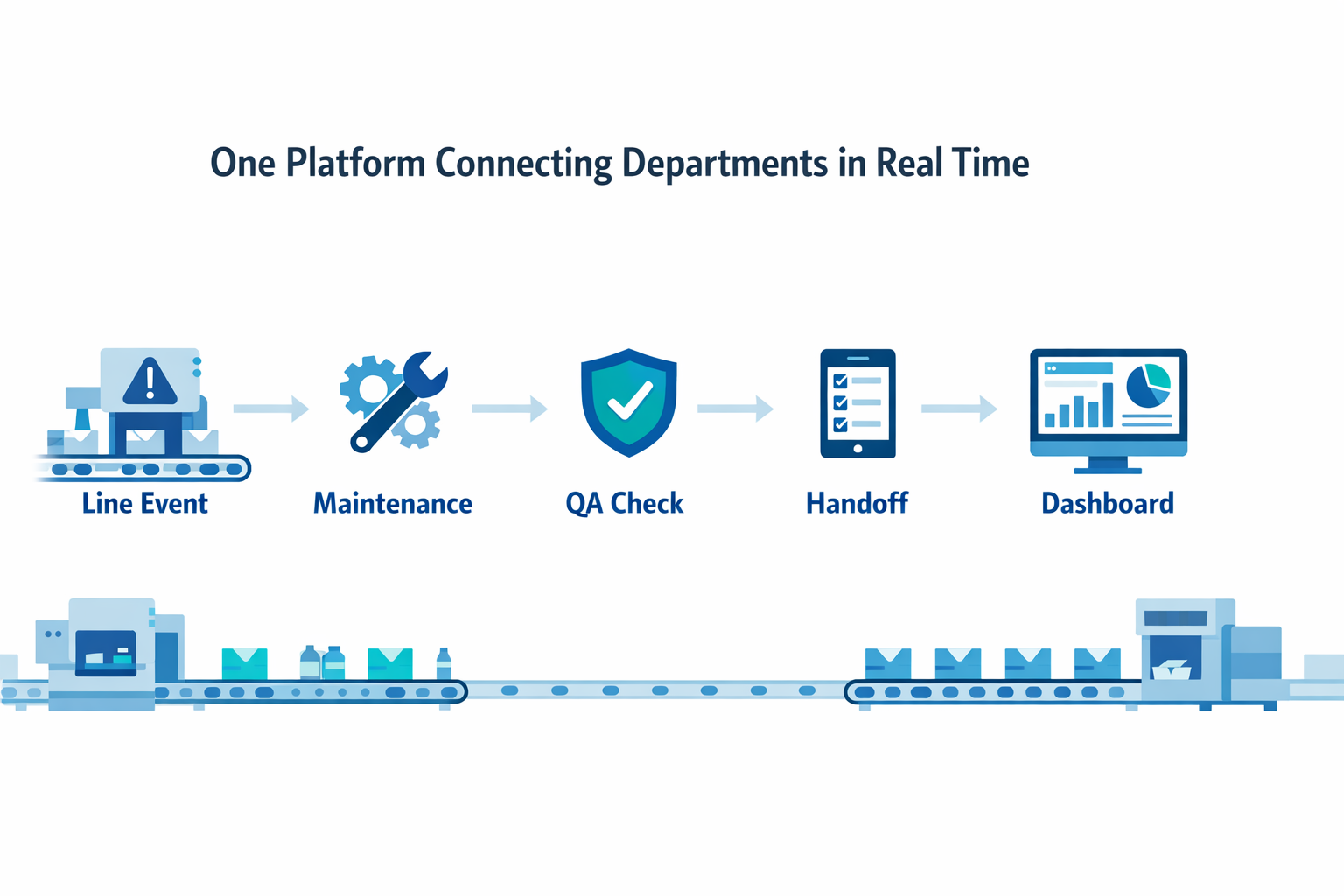
Many manufacturers do not just need one more isolated production app. They need production, QA, maintenance, and supervisors to work from the same operational data so actions happen faster and records stay traceable. Jodoo supports that by connecting forms, approvals, alerts, and dashboards in one platform, which is especially useful for processes that cross departmental boundaries.
Take a food packaging facility running multiple shifts and short product runs. A line leader can submit a downtime event, maintenance can receive an escalation instantly, QA can verify restart conditions, and the next shift can see the full handoff record on mobile before the line resumes. In that setup, Jodoo works not just as production scheduling software, but as an execution layer that connects scheduling decisions with approvals, exceptions, and line-level follow-through.
Better Fit for Manufacturers With Evolving Processes
For manufacturers whose workflows change often, a rigid ERP can become a bottleneck after go-live. Jodoo is better suited to plants that want to start with high-impact workflows and expand over time, such as adding layered process audits, supplier issue intake, rework authorization, or digital maintenance checklists. That makes it a strong option if you want production management software that can grow into a broader manufacturing operations software environment without becoming a long, expensive implementation program.
If your priority is standardizing custom workflows quickly, Jodoo offers a lighter, more adaptable alternative to ERP-heavy projects. You can build the exact forms, logic, dashboards, and role-based approvals your factory needs, then keep refining them as operations change. For many manufacturers in 2026, that level of speed and flexibility is exactly what a modern factory management system should deliver.
Conclusion: How to Choose the Right Production Management Software and When to Start with Jodoo
The best production management software for your factory depends on three things: your plant size, your process complexity, and how fast you need to digitize. If you run a high-volume electronics line with stable workflows, a more standardized system may be enough. But if you manage an automotive parts plant with changing customer requirements, multi-step approvals, and frequent schedule adjustments, rigid software often creates workarounds instead of control.
In practice, manufacturers should look for software that connects production planning, shop floor reporting, quality checks, inventory, and maintenance in one usable system. That matters because disconnected tools still slow decisions, and manufacturers lose an estimated 20% to 30% of productivity to inefficiencies tied to manual processes, poor data flow, and unnecessary downtime.
If you want a faster, more flexible alternative to traditional factory systems, Jodoo is worth considering. As a no-code lean manufacturing platform, it helps you build workflows that match your real operations without heavy custom development. You can start with one process, such as production scheduling or shift reporting, and expand from there. Start a free trial or book a demo to see how Jodoo can fit your factory.