Browse by category

Introduction: Why Production Scheduling Software Matters More Than Ever
A delayed job on one line can trigger overtime, missed shipments, and idle machines across the plant by the end of the shift. That is why production scheduling software has become a priority for manufacturers that can no longer rely on spreadsheets, whiteboards, or static ERP planning screens to manage daily changes. In practice, even a small disruption matters: unplanned downtime is estimated to cost industrial manufacturers thousands of dollars per hour, and the real impact often includes expediting costs, lower OEE, and damaged customer trust.
Imagine a production manager at an automotive parts plant who has to reshuffle press capacity after a tooling issue, while sales are pushing an urgent order and maintenance has already blocked one machine for inspection. Or picture an electronics factory trying to balance short production runs, material shortages, and strict delivery windows for export customers. In both cases, the problem is not just planning the schedule once, but adjusting it fast without losing control.
This article is a practical guide for production planners, operations managers, and plant managers evaluating better options. We will look at what modern scheduling tools should do, where traditional systems fall short, and how to choose a smarter fit for your factory.
The Hidden Costs of Manual Scheduling in Manufacturing
Spreadsheets Stop Working When the Shop Floor Starts Changing
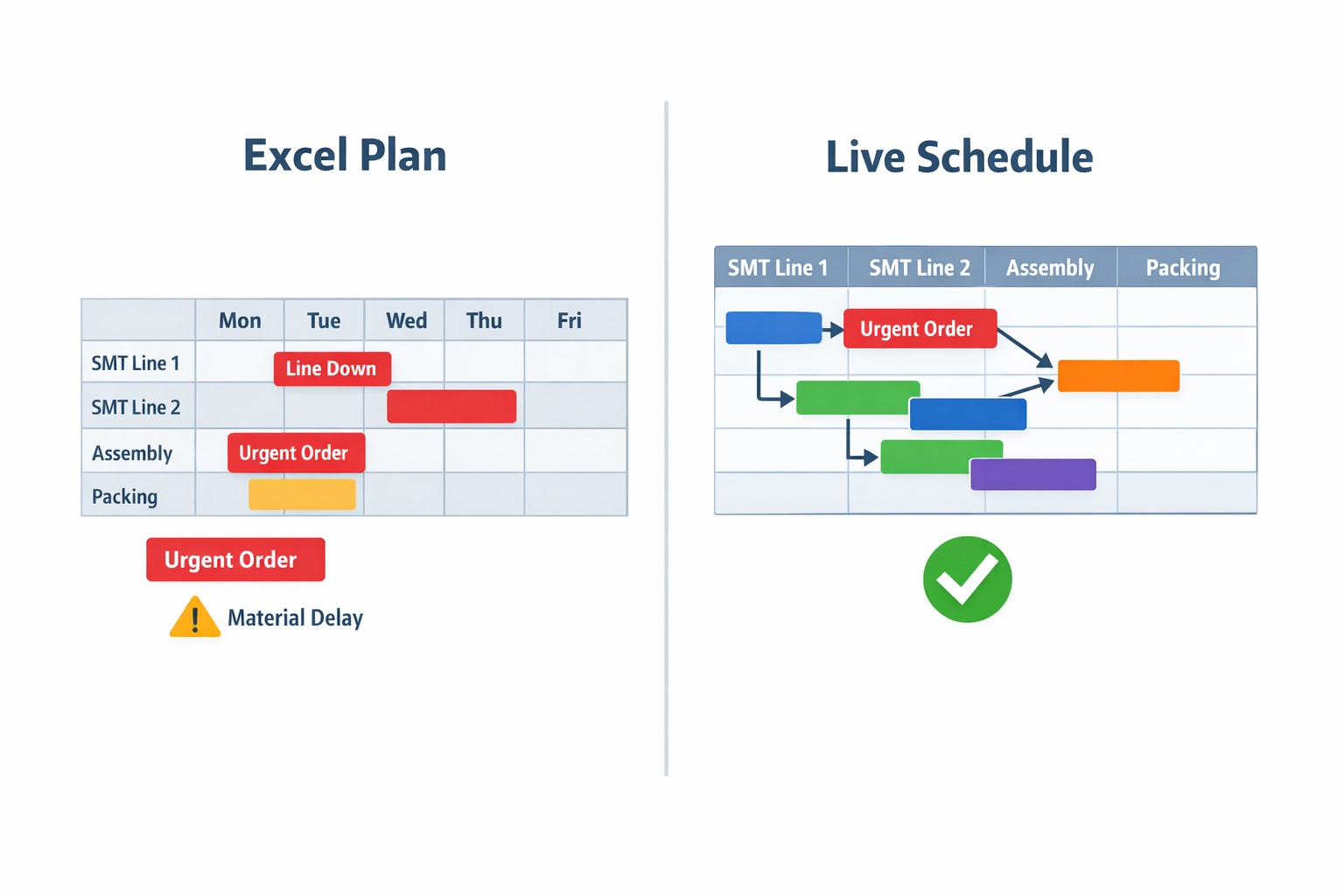
Manual scheduling often looks manageable when demand is stable, product mix is simple, and only a few work centers need coordination. The problem starts when actual factory conditions shift hour by hour. An Excel file cannot automatically account for an urgent order, a line stoppage, a missing operator, and a delayed material delivery at the same time. That is where many manufacturers realize they no longer need just a spreadsheet—they need production scheduling software that can respond to change in real time.
Imagine a production manager at an electronics assembly plant who builds the weekly plan in Excel every Monday. By Tuesday afternoon, one SMT line is down for unplanned maintenance, a customer pulls forward an order for control boards, and a key component shipment is delayed by 12 hours. The spreadsheet may still show a “complete” schedule, but the shop floor is already working from outdated assumptions. Instead of optimizing output, the team spends the rest of the shift manually reshuffling jobs, operators, and priorities.
Missed Due Dates Are Usually a Scheduling Visibility Problem
Late deliveries are not always caused by poor execution on the line. In many plants, they begin with limited visibility into true production status, available capacity, and job dependencies. A manual scheduling process may show planned start and finish dates, but it rarely gives planners a live view of whether upstream processes are slipping and pushing downstream orders off track. That gap creates hidden risk, especially for make-to-order or mixed-model production environments.
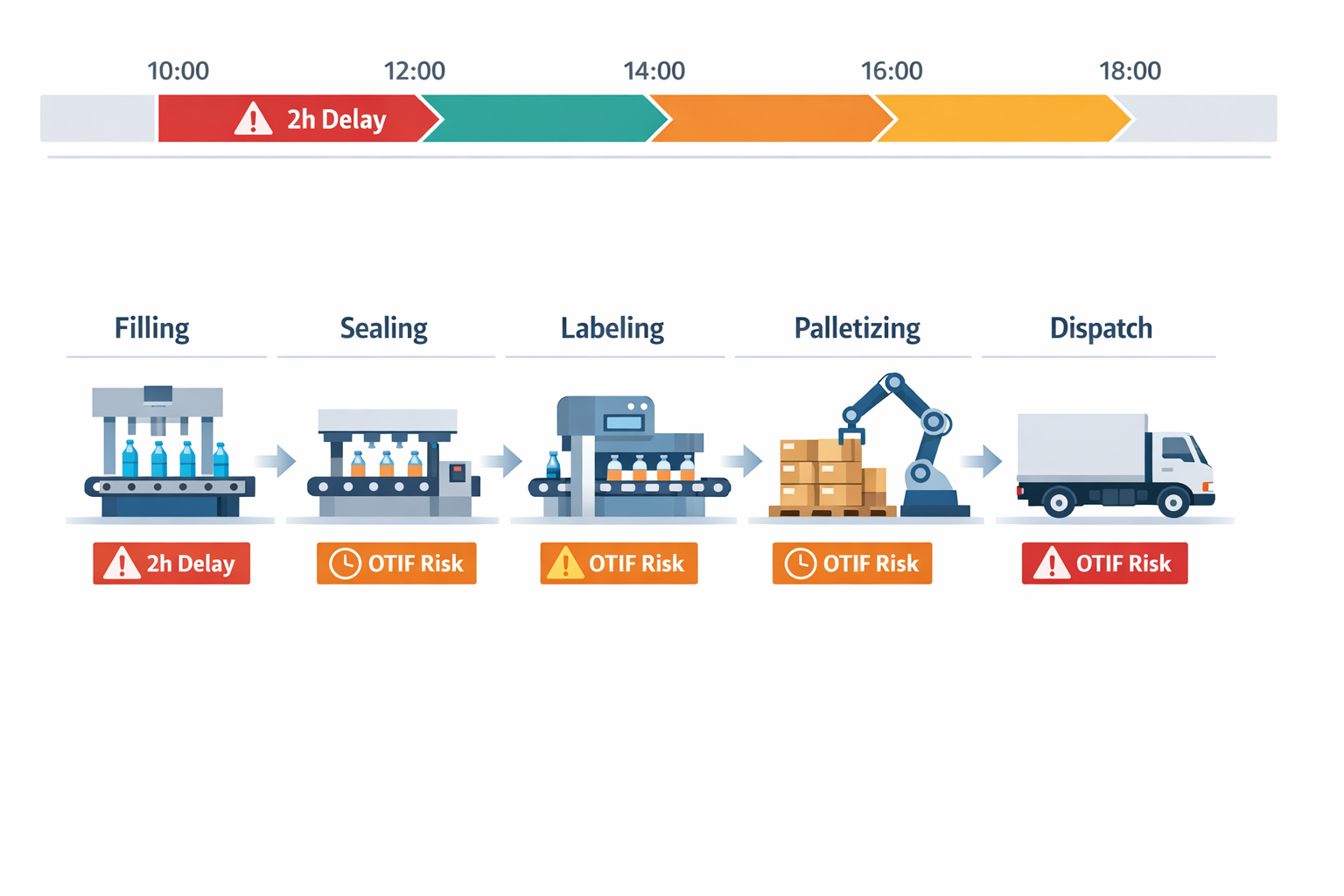
A food packaging manufacturer, for example, may schedule filling, sealing, labeling, and palletizing as if every line will run to standard speed. But if one filling line loses two hours due to a changeover overrun, the impact cascades into packing and dispatch. Without a connected manufacturing scheduling tool, planners may not see the knock-on effect until trucks are already being rescheduled. Industry studies often estimate that unplanned downtime costs manufacturers thousands of dollars per hour, but the secondary cost of missed OTIF performance can be even more damaging in customer contracts.
Bottlenecks and Machine Conflicts Stay Hidden Too Long
Manual scheduling tends to flatten complexity instead of exposing it. A planner may assign jobs based on due date and rough machine availability, but spreadsheets do not reliably flag conflicts such as two high-priority jobs needing the same oven, press, or packaging line at overlapping times. This leads to bottlenecks that are discovered only when operators are waiting, WIP starts piling up, or supervisors begin escalating for decisions. By that stage, the cost is no longer administrative—it is operational.
This is especially common in factories with shared constrained resources. In a garment manufacturing plant, for instance, multiple styles may compete for the same heat-transfer station or final inspection team. A manual plan can look balanced on paper while creating a queue that adds hours of delay in reality. A proper job scheduling software setup helps expose finite capacity limits early, so planners can sequence work based on real constraints rather than assumptions.
Labor and Materials Drift Out of Sync With the Schedule
A spreadsheet-based plan usually focuses on machines and order dates, but factories run on a combination of labor, materials, tooling, and timing. If one of those elements is missing, the schedule is not truly executable. This is where manual methods often break down: labor is assigned evenly by headcount instead of skill, and materials are assumed available because procurement updated a separate file earlier in the day. The result is a plan that looks efficient but cannot run as scheduled.
For example, a snack food plant may have enough line capacity for a weekend production run but not enough trained sanitation staff to release lines fast enough between allergen changeovers. At the same time, seasoning inventory may be available in the ERP, while the actual batch release is still pending QA. Without tighter links between scheduling, inventory status, and labor allocation, the plant shifts into reactive mode. This is why manufacturers evaluating production planning software increasingly prioritize integrated capacity planning instead of schedule boards alone.
Reactive Firefighting Carries a Real Cost
When scheduling is manual, planners become full-time expediters. They spend their day updating spreadsheets, calling supervisors, chasing material status, and negotiating which order gets delayed least. That reactive work rarely appears in standard cost reports, but it drains management time and increases decision fatigue across the plant. It also makes continuous improvement harder because teams are too busy recovering the schedule to improve it.
Over time, this firefighting culture creates wider business consequences: more overtime, higher premium freight, unstable labor utilization, and weaker confidence in the production plan. Deloitte and other industry sources have repeatedly highlighted that manufacturers with stronger digital planning and scheduling capabilities are better positioned to improve service levels and asset utilization. In practical terms, once your scheduling process depends on tribal knowledge and constant manual correction, it is usually a sign you have outgrown spreadsheets and need production scheduling software that connects planning with real shop floor conditions.
What to Look for in a Manufacturing Scheduling Tool
When you compare production scheduling software, the goal is not just to create a cleaner schedule on screen. You need a system that reflects how your plant actually runs: shift calendars, machine limits, changeovers, material availability, labor constraints, and urgent customer orders. A strong manufacturing scheduling tool should help planners make faster decisions with fewer manual adjustments, while giving supervisors and managers clear visibility into what happens next.
Below is a practical checklist you can use when evaluating any production planning software for your factory.
Drag-and-Drop Scheduling That Matches Shop-Floor Reality
A useful scheduler should let planners move jobs quickly without rebuilding the entire plan from scratch. Drag-and-drop scheduling matters because production conditions change every day, especially in plants with short runs, mixed models, or frequent priority changes. If every schedule update requires spreadsheet edits or IT support, the tool will slow your team down instead of helping it.
Imagine a production planner at an electronics assembly plant who needs to move a PCB order forward after a customer brings in a higher-priority order for control boards. In a capable job scheduling software system, the planner can drag the urgent order into an earlier slot and immediately see the impact on SMT lines, test stations, and downstream packing. The best tools do this in real time, not after a long batch refresh or overnight calculation.
Work Order Prioritization and Rule-Based Sequencing
Not all urgent orders should be treated the same way, so the system should support clear prioritization rules. Look for the ability to rank work orders by due date, customer priority, margin, material readiness, setup family, or service-level commitments. This is especially important in plants balancing export orders, local replenishment, and make-to-order production in the same schedule.
A good manufacturing scheduling tool should also let you automate sequencing logic. For example, a food manufacturer producing sauces may want to schedule lighter flavors before stronger ones to reduce wash-down time and allergen risk. If the software only sorts by due date and ignores practical production rules, planners will still end up working outside the system.
Finite Capacity Planning, Not Infinite Wishful Thinking
One of the most important capabilities is true capacity planning based on actual limits. That means the software should account for machine hours, labor availability, tool constraints, planned maintenance, and shift calendars instead of assuming every work center has unlimited time. In many factories, this is the difference between a schedule that looks good in a meeting and one that can actually run on the shop floor.
Ask vendors how their production planning software handles finite capacity planning across multiple resources. Can it show overloads by line, by machine, and by operator group? Can it factor in setup time, cleaning time, or mold availability? If not, your team may still need spreadsheets to validate whether the schedule is feasible.
Constraint Visibility and What-If Analysis
Good scheduling decisions depend on seeing constraints clearly, not discovering them after release. Your software should show when a job is blocked by missing materials, unavailable operators, quality hold status, or a bottleneck machine. This helps planners make decisions earlier and reduces unnecessary rescheduling later in the shift.
What-if analysis is equally important. In a garments factory, for example, a planner may want to test whether moving a high-volume export order to Line 3 will delay smaller domestic runs. The right job scheduling software should let the planner simulate that change, compare outcomes, and choose the best option before committing it to production.
Alerts, Exceptions, and Real-Time Dashboards
The best scheduling tools do more than publish a plan; they highlight exceptions that need action. Look for configurable alerts for late orders, overloaded work centers, material shortages, machine downtime, or schedule deviations beyond a set threshold. This is how planners and plant managers stay ahead of execution issues without manually checking dozens of reports.
Dashboards should also be role-based and easy to read. A planner may need schedule adherence, queue status, and bottleneck utilization, while a plant manager may want OTIF risk, line loading, and capacity utilization across the week. According to industry research from McKinsey and other manufacturing studies, better real-time visibility can significantly improve planning responsiveness and reduce reaction time to disruptions, especially in multi-line operations.
ERP/MRP Integration and Data Flow Across Systems
Even strong production scheduling software loses value if it operates as a standalone island. At a minimum, the tool should connect with ERP or MRP data for sales orders, inventory, BOMs, routing, and purchase status. Otherwise, planners risk making scheduling decisions based on outdated demand or incomplete material information.
When evaluating integration, ask practical questions. Does the system pull live work order data automatically, or does someone upload files manually each day? Can it push schedule updates back to ERP, maintenance, or shop-floor reporting systems? Platforms like Jodoo are especially useful here because manufacturers can build scheduling-related workflows, dashboards, approvals, and data capture apps around the scheduling process, then connect them with existing operational systems without heavy custom development.
Usability, Flexibility, and Deployment Speed
Finally, consider how easy the tool is to adapt as your operation changes. A plant may add a new line, split one work center into two, introduce a subcontracting step, or change approval rules for schedule release. If every change requires a long development cycle, the software will lag behind actual operations.
This is where flexibility matters as much as features. For many manufacturers, especially mid-sized plants, the best option is not just a packaged scheduler but a system they can configure around their own process. If you want to evaluate fast and avoid a long IT project, look for a solution that combines scheduling support with no-code workflows, dashboards, and integrations so your planning process can evolve with the factory.
A Practical Evaluation Checklist
Use this shortlist when comparing vendors:
- Drag-and-drop scheduling with immediate schedule recalculation
- Work order prioritization based on business and production rules
- Finite capacity planning by machine, labor, tooling, and shift
- Clear constraint visibility for materials, maintenance, and bottlenecks
- What-if simulation before releasing schedule changes
- Real-time alerts for overloads, delays, and exceptions
- Role-based dashboards for planners, supervisors, and managers
- Reliable ERP/MRP integration and two-way data flow
- Configurable workflows without heavy coding
- Fast deployment and easy adaptation as operations change
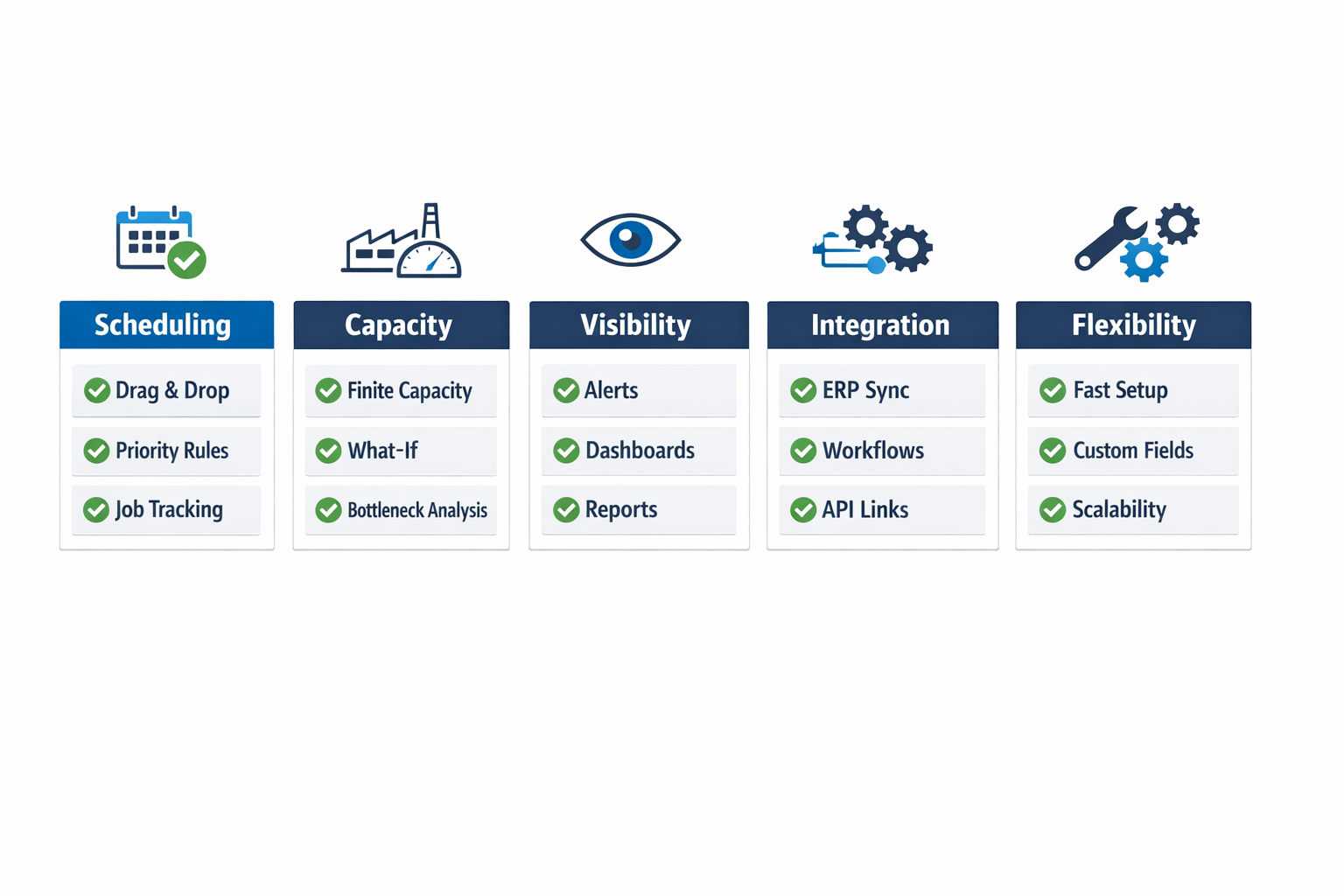
If a manufacturing scheduling tool cannot support these basics, it may improve schedule presentation without improving schedule execution. And for most plants, execution is where the real return comes from.
How to Compare Production Scheduling Software Options
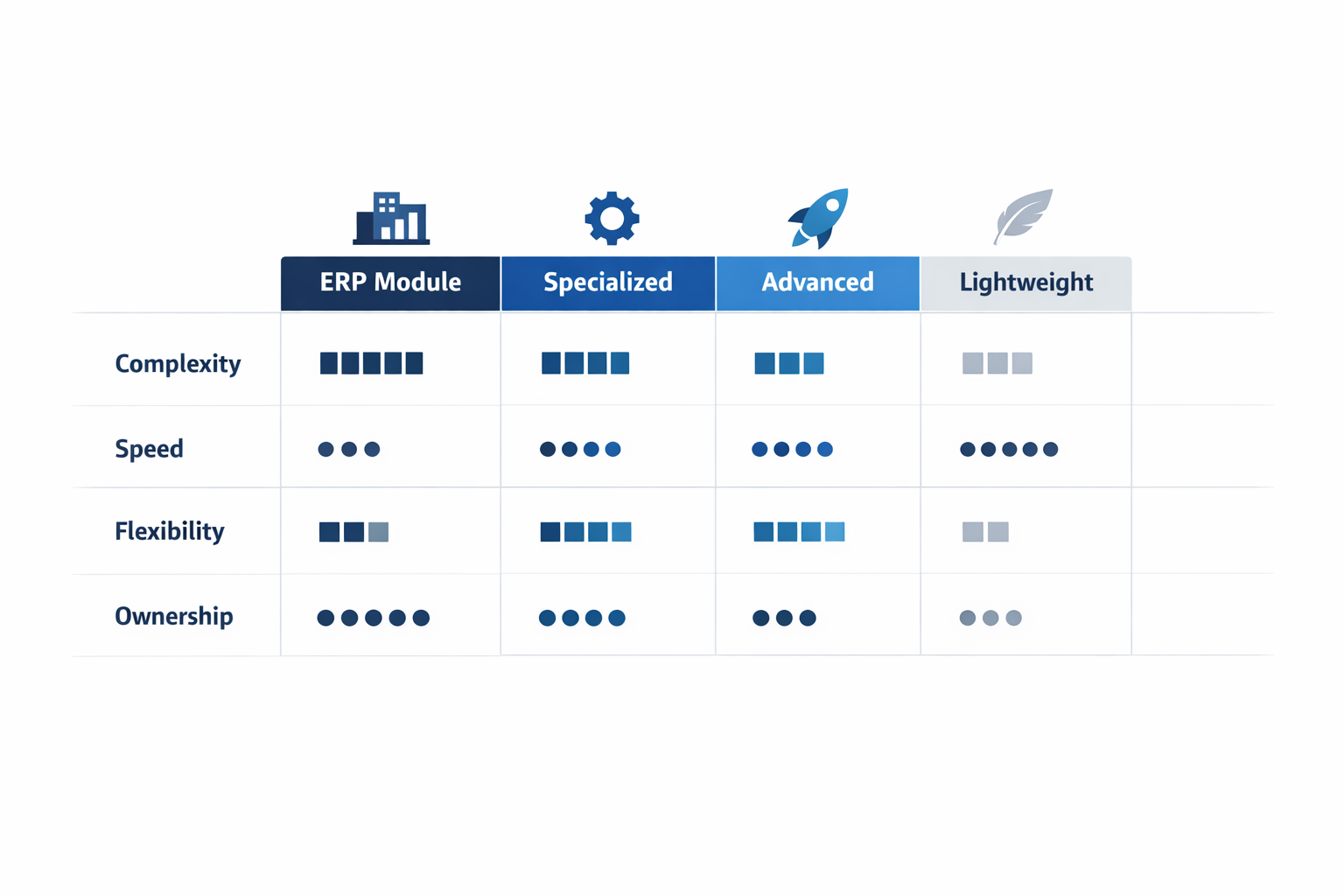
Choosing the right production scheduling software is less about feature volume and more about fit. A plant with high-mix, short-run assembly will evaluate software very differently from a processor running long campaigns with strict changeover rules. In practice, most manufacturers compare four categories: ERP scheduling modules, specialized production scheduling software, advanced planning tools, and lighter job scheduling software for smaller teams. The best choice depends on how much scheduling complexity you need to manage, how quickly you need to deploy, and how much ongoing support your team can realistically handle.
ERP Scheduling Modules
ERP scheduling modules are often the first option manufacturers consider because they already sit close to orders, inventory, purchasing, and finance. That makes them useful for basic production planning software needs, especially when you want one system to connect demand, materials, and work orders. For a food packaging plant, for example, an ERP module may be enough to sequence standard runs based on order due dates, available raw materials, and line calendars.
Where ERP modules usually fall short is in detailed shop-floor responsiveness. They can struggle when you need minute-by-minute rescheduling based on labor constraints, machine changeovers, allergen cleaning windows, or urgent order insertion across multiple lines. Many ERP tools are strong at transaction control but less effective as a dynamic manufacturing scheduling tool. If your schedulers still rely on spreadsheets to fine-tune the daily plan, that is often a sign the ERP module is not handling real operational complexity on its own.
Specialized Production Scheduling Software
Specialized production scheduling software is designed specifically for finite scheduling, sequencing, and schedule optimization. These tools are a better fit when your planners need to balance machine availability, setup times, tooling constraints, and labor skills in one view. Imagine a production manager at an electronics assembly plant who must schedule SMT lines, manual assembly cells, and testing stations while keeping delivery commitments for dozens of SKUs. A specialized tool can recalculate schedules faster and give planners better visibility into sequence trade-offs.
This category is often the most practical middle ground for manufacturers that have outgrown ERP scheduling but do not need a full advanced planning stack. It usually offers stronger dispatching logic, visual boards, and what-if scheduling than ERP modules, while staying more focused than enterprise-scale planning suites. The trade-off is that you may need integration work to connect orders, inventory, and actual production feedback. That means the software fit is not just about scheduling logic, but also about how easily it connects to your broader production workflow.
Advanced Planning Tools
Advanced planning tools go beyond daily sequencing and support broader optimization across plants, lines, materials, and sometimes the supply network. They are most useful when capacity planning is tightly linked to demand volatility, multi-site coordination, or long lead-time materials. In a garments manufacturing group, for instance, planners may need to allocate orders across factories based on sewing line efficiency, fabric arrival dates, subcontractor availability, and export deadlines. That level of planning is where advanced tools can add real value.
The downside is implementation burden. These systems typically require cleaner master data, stronger planning discipline, and more cross-functional alignment than other categories. Industry studies frequently show that large-scale software projects can take several months to more than a year, depending on process scope and integration depth. If your plant still changes routing logic frequently or relies on informal planner knowledge, an advanced planning platform may be more system than you can absorb in the first phase.
Lighter Job Scheduling Software for Smaller Teams
Lighter job scheduling software is typically used by smaller factories or by departments that need fast deployment without a major IT project. These tools usually focus on drag-and-drop scheduling, calendar-based planning, and simple workload balancing. For a custom metal fabrication workshop or a small contract manufacturer, that can be enough to organize work centers, track job status, and assign production slots with less manual coordination.
The limitation is scale and depth. Many lighter tools do not handle complex routing dependencies, detailed finite capacity rules, or multi-level planning across procurement, production, and fulfillment. They may also become difficult to govern once the business grows and more teams need controlled workflows, approvals, and live reporting. In other words, they solve scheduling visibility quickly, but they do not always provide the structured foundation needed for broader digital operations.
How to Choose Based on Operational Fit
A useful way to compare options is to score each category across four factors: process complexity, implementation speed, flexibility, and total ownership burden. ERP modules usually score well on system consistency but lower on scheduling depth. Specialized production planning software tends to offer the best balance for manufacturers that need stronger scheduling logic without a massive transformation program. Advanced planning tools rank highest for optimization power, but also highest for cost, data demands, and change management effort.
Flexibility matters just as much as features. Many factories do not need a rigid scheduling engine alone; they need a system that supports schedule approvals, production updates, exception workflows, and KPI dashboards in the same environment. That is why some manufacturers choose a configurable platform like Jodoo to build a scheduling process around their actual operations, rather than forcing planners to adapt to a fixed template. With a no-code approach, teams can create a connected manufacturing scheduling tool that links production orders, shop-floor reporting, workflow automation, and dashboards without waiting on heavy custom development.
If you are comparing options, start with the complexity of your plant, not the popularity of the software category. A simple line with predictable routing does not need the same toolset as a high-mix factory with shared resources and frequent schedule revisions. The right decision is the one that improves scheduling quality, supports realistic capacity planning, and does not create more administrative overhead than your team can maintain.
Why Jodoo Is a Flexible No-Code Alternative to Traditional Production Planning Software
Traditional production planning software often works well when your plant follows one fixed routing logic, one approval path, and one way of handling disruptions. But many manufacturers operate with more variation than standard software can support. A planner may need one rule for export orders, another for rework batches, and a different escalation path when a line stops because of maintenance or a quality hold. In that environment, production scheduling software needs to fit the factory’s actual process, not force the process into a rigid template.
Jodoo takes a different approach. Instead of giving you only a fixed scheduling module, it lets your team build a connected system around scheduling using no-code forms, workflows, dashboards, and data views. That matters when scheduling is tied to material readiness, approval checkpoints, labor constraints, and machine availability. For plant managers who need a more adaptable manufacturing scheduling tool, this means you can change rules and layouts without waiting for a long ERP customization cycle.
Build Scheduling Around Your Real Plant Rules
In many factories, the schedule is only one part of the decision. A production order may need release approval from operations, confirmation that components are available, and a check that the required machine is not already reserved for preventive maintenance. With Jodoo, you can create forms for work orders, shortage reporting, quality release, and maintenance status, then connect them into one scheduling workflow. The result is not just job scheduling software, but a practical operations layer that reflects how your plant actually runs.
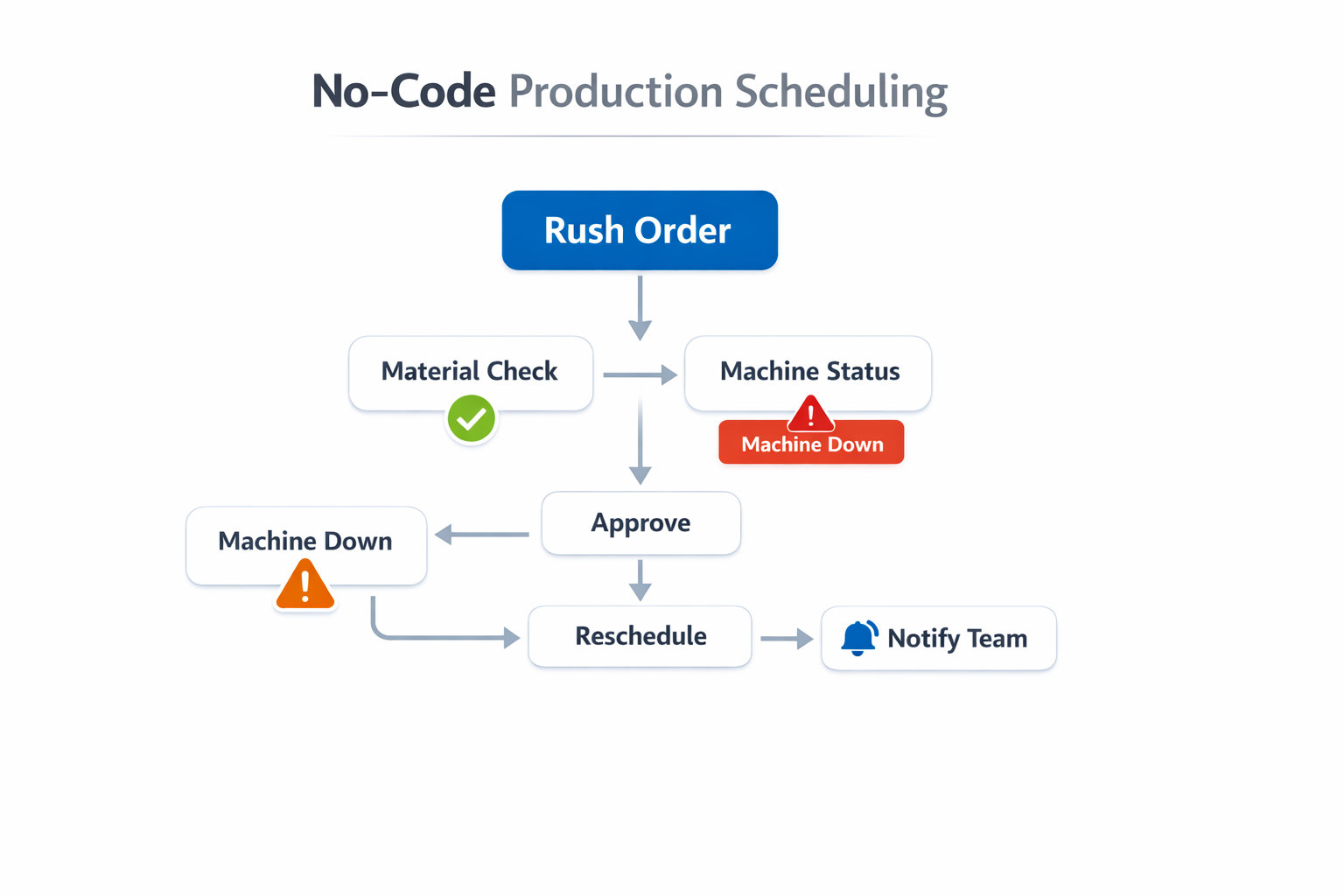
Imagine a mid-sized assembly manufacturer producing industrial control panels. A rush order comes in for a key customer, but one cutting machine is down for an unexpected motor replacement. In Jodoo, the planner can flag the order as priority, trigger a workflow that checks material availability and machine status, route the rescheduling request to the production supervisor, and automatically notify line leaders from a shared scheduling board. Instead of manually updating several spreadsheets and sending messages across departments, the team works from one live workflow with clear ownership.
Adjust Quickly Without Heavy IT Support
This flexibility is especially useful for plants that refine their planning logic often. For example, an electronics manufacturer may want to change how it prioritizes orders during peak demand, shifting from due-date sequencing to a rule that protects high-margin SKUs and critical export shipments. In a traditional system, that kind of change may require vendor support or custom development. In Jodoo, operations teams can update forms, workflow conditions, and dashboard views themselves, which makes the production scheduling software easier to adapt as planning priorities change.
You can also configure exception handling in ways most standard tools do not support well. If a batch enters a quality hold, the system can stop downstream scheduling actions until release is approved. If material shortages affect only one component family, planners can automatically move affected jobs into a review queue while keeping other orders on track. That gives you a more practical link between scheduling, capacity planning, and real shop-floor execution.
Connect Scheduling, Visibility, and Response
A scheduling system becomes more valuable when supervisors and planners see the same data in real time. Jodoo dashboards can show order status, machine loading, delayed jobs, shortage-driven reschedules, and open approvals in one place. For an operations director, this creates a clearer view of whether the current plan is still achievable, not just whether it looked feasible at the start of the shift. In practice, that makes Jodoo more than a simple manufacturing scheduling tool; it becomes a control layer for daily production decisions.
For manufacturers that find standard ERP scheduling too rigid and standalone job scheduling software too narrow, Jodoo offers a more adaptable option. You can build the workflows you need, adjust them as plant conditions change, and keep planning, execution, and communication connected on one platform. If your scheduling process depends on plant-specific rules rather than generic software logic, that flexibility is often what makes the difference.
Conclusion: Choose Production Scheduling Software That Fits the Way Your Plant Really Works
The right production scheduling software is not the one with the longest feature list. It is the one that helps your team make practical decisions on the shop floor, balance real capacity constraints, and respond quickly when machines go down, materials arrive late, or urgent orders appear. In most factories, scheduling is not a one-time planning exercise. It is a daily coordination process that affects throughput, labor utilization, OEE, delivery performance, and downtime.
Imagine a production manager at an electronics plant who needs to reshuffle jobs after a surface-mount line stops for two hours, or a planner at a food factory who must adjust around short shelf-life materials and sanitation windows. In these situations, rigid systems and spreadsheet-based planning both create risk. What you need is a scheduling setup that reflects how your plant actually works, not how a generic software template assumes it should work.
That is where Jodoo can help. As a no-code lean manufacturing platform, Jodoo lets you build and adapt production scheduling workflows, shop floor reporting, approvals, dashboards, and alerts without heavy custom development. If you want to replace spreadsheets and go beyond rigid ERP scheduling, start a free trial or book a demo to see how Jodoo fits your operation.