Browse by category

Introduction: Why Production Tracking Software Matters for Modern Manufacturing
A job can look “on schedule” at 10 a.m. and still become a late shipment by the end of the shift. That happens when planners rely on spreadsheets, whiteboards, and verbal updates instead of production tracking software that shows what is actually happening on the shop floor in real time. In many factories, the cost is not just delay. It is also overtime, excess WIP, rushed changeovers, and missed delivery promises that damage customer trust.
In plain terms, production tracking software is a system that follows every job from release to completion, recording where each work order stands, what quantity has been produced, what is waiting, and what is blocked. Imagine a production manager at an automotive parts plant who needs to know whether Line 3 is running, whether a machining batch is stuck at inspection, and whether today’s output will meet the customer shipment plan. Without that visibility, small disruptions turn into schedule failures.
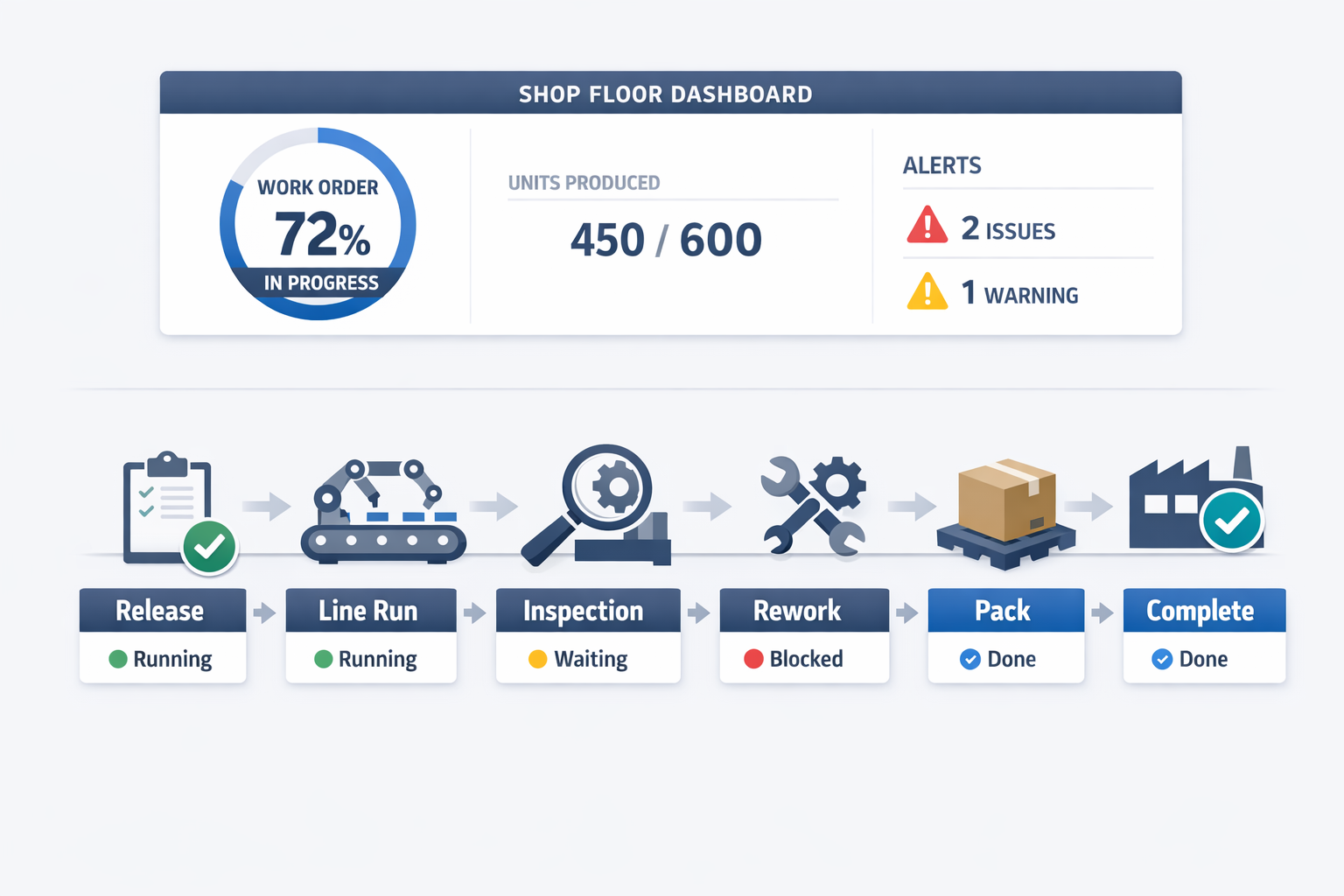
This article is a practical guide to setting up better job tracking in manufacturing, work order tracking, production progress tracking, and WIP tracking software workflows. You will learn what data to capture, which features matter most, and how to build a system that helps supervisors act faster, not just report later.
Where Manual Job Tracking Manufacturing Breaks Down
Status Updates Arrive Too Late to Be Useful
In manual job tracking manufacturing environments, the problem is often not that data is missing entirely—it is that the data arrives after the decision window has already passed. A supervisor may only learn that a batch is still waiting at soldering, packing, or final inspection when the next meeting starts or when the downstream team complains. By that point, the line has already lost hours, and production progress tracking becomes a backward-looking exercise instead of a live control tool.
Imagine a production manager at an electronics assembly plant who is running 120 work orders across SMT, manual assembly, testing, and packing. Operators mark completion on paper travelers, while team leaders update a spreadsheet at the end of each shift. If one high-priority order stalls at functional testing because of rework, the planner may not see it until several hours later, which means delivery commitments, labor allocation, and line sequencing are all adjusted too late.
Work Order Status Becomes Open to Interpretation
Manual work order tracking also breaks down when different teams use different definitions of status. One department may label a job as “in progress” once materials are issued, while another only uses that status after the first good unit is produced. When planners, supervisors, and warehouse teams are looking at different versions of the truth, handoffs become slower, and schedule adherence suffers.
This is common in food manufacturing, where one batch may move through weighing, mixing, filling, labeling, and cold storage in a single day. If the whiteboard says a batch is “running” but quality has put it on hold for a packaging seal issue, the production office may still schedule transport or promise dispatch timing to sales. The issue is not only visibility—it is the lack of a shared, real-time status model that everyone trusts.
Escalations Depend on People Remembering
Manual systems are weak at exception management because they rely on someone noticing a problem and then acting on it. A delayed mold change, a missing component reel, or a machine stoppage may sit unreported until the next round of calls or physical checks. In practice, that means the factory responds to disruptions based on who is most experienced or most vocal, not based on a consistent escalation rule.
For example, in a garment factory, one cutting order may be ready, but stitching cannot start because a trim kit is incomplete. If the delay is noted on a paper sheet but no alert reaches planning or stores, the job simply waits in the queue while supervisors assume another team is handling it. Over time, this creates hidden bottlenecks that are difficult to spot from spreadsheets because the job appears released, but not truly executable.
WIP Visibility Is Incomplete and Often Misleading
Weak tracking also causes major issues with WIP accuracy. A spreadsheet may show 800 units in process, but it rarely shows how many are waiting for rework, how many are blocked at inspection, or how many are physically on the line versus staged beside it. Without reliable WIP tracking software, managers are forced to estimate throughput, buffer levels, and likely completion times using partial data.
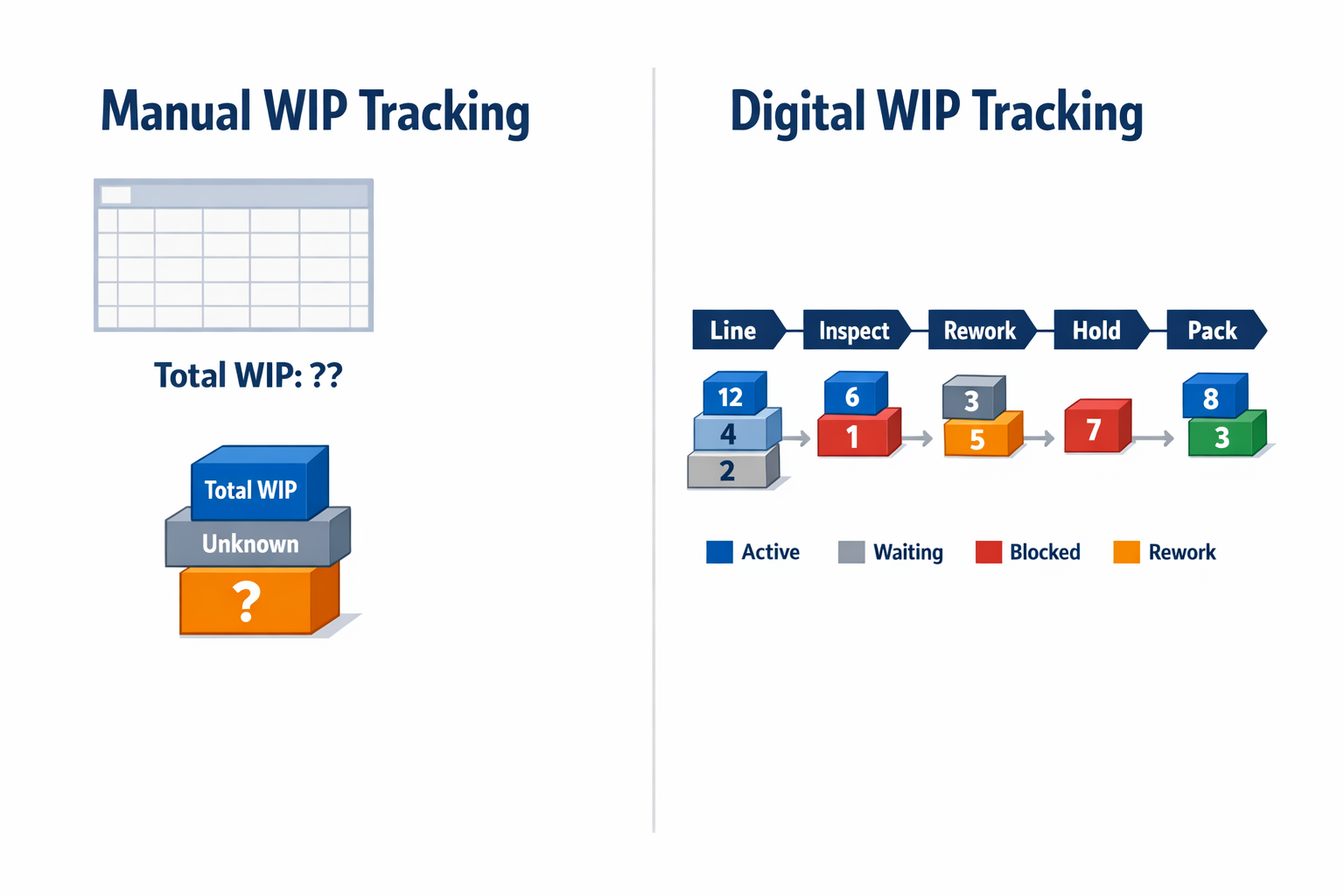
That matters because WIP is not just an inventory number—it drives capacity decisions. If an operations manager cannot see where semi-finished goods are accumulating, they cannot tell whether the real constraint is machine availability, labor balancing, changeover time, or material shortages. The result is that corrective action happens after output drops, rather than while the problem is still containable.
The Shop Floor Loses Flow and Planning Loses Confidence
When spreadsheets, paper travelers, and disconnected systems sit at the center of production progress tracking, every small delay compounds across the day. Supervisors spend time chasing updates, planners keep rechecking promised completion times, and team leaders make local decisions without seeing the full impact on upstream and downstream jobs. Instead of running to plan, the factory keeps switching into recovery mode.
This is where production tracking software changes the conversation. Rather than asking, “Has anyone updated the sheet?” teams can see which job is running, which work order is waiting, which station is overdue, and which exception needs action now. That shift—from manual reporting to live operational control—is what makes shop floor execution more predictable.
What to Look for in Production Tracking Software and WIP Tracking Software
Choosing production tracking software is not just about seeing which jobs are open. You need to know whether the system can reflect how work actually moves through your plant, from released order to finished goods, including rework, pauses, inspections, and handoffs between teams. The right tool should help you improve production progress tracking without forcing you to redesign a proven shop floor process just to fit the software.
A useful evaluation starts with one question: Can the platform support both standard processes and exceptions? In many factories, some steps are fully digital, while others still rely on operator input, paper travelers, barcode scans, or supervisor sign-offs. Strong WIP tracking software should handle that hybrid reality instead of assuming every machine and workstation is already connected.
Configurable Work Order Tracking That Matches Real Production Flow
The first thing to assess is how flexible the work order tracking model is. Can you track by production order, batch, lot, operation, line, shift, or individual unit, depending on the product and process? A rigid tool may show order status at a high level, but it often struggles when one order is split across multiple lines, partially completed, or held for inspection.
Imagine a production manager at an electronics assembly plant who needs to follow one customer order across SMT, manual assembly, functional testing, and packaging. If the software only supports a simple “open/in progress/closed” status, it will not show where boards are waiting, which step is behind schedule, or how much WIP is sitting before test. Better job tracking manufacturing systems let you configure stages, statuses, routing logic, and quantity reporting so each operation reflects the actual production path.
Live Dashboards for Production Progress Tracking
Dashboards should do more than display yesterday’s output. Buyers should look for real-time views of order status, planned versus actual quantities, WIP by station, cycle time by operation, and exceptions that need action. This matters because a delayed order is easier to recover when supervisors can see the bottleneck during the shift, not after the daily report is closed.
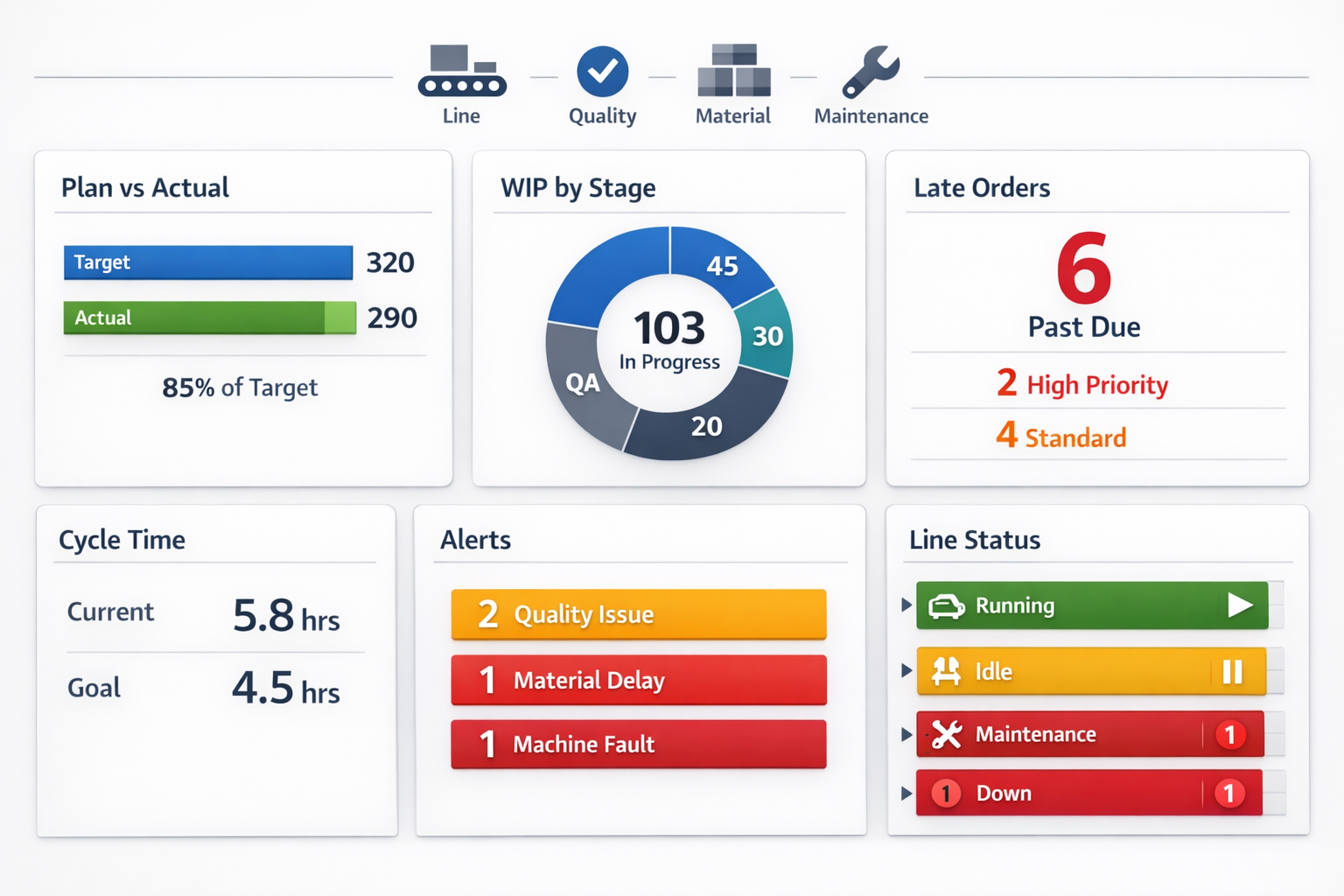
For example, in a food processing plant running multiple SKUs, a live dashboard can show which batch is mixing, which is waiting for quality release, and which packaging line is starved for material. According to Deloitte, manufacturers that improve real-time visibility can make faster operational decisions and reduce response delays across production and supply chain workflows. In practical terms, that means a supervisor can reassign labor or rebalance line loading before service levels are affected.
Operator Data Capture Must Be Fast and Practical
Good production tracking software makes data capture easy at the point of work. Operators should be able to record start and stop times, completed quantities, scrap, downtime reasons, material consumption, and inspection results without navigating a complex interface. If shop floor input takes too many clicks, data quality drops and the tracking system becomes unreliable.
Look for support for barcode or QR scans, touchscreen forms, tablets at workstations, and role-based input screens. In a garments factory, for instance, sewing line leaders may need to report bundle movement, defects, and hourly output in seconds between line checks. The best WIP tracking software supports simple forms for operators while giving planners and managers deeper views in the background.
Alerts and Escalation Rules for Execution Control
A tracking system becomes far more valuable when it can actively signal exceptions. Buyers should look for configurable alerts for late work orders, stalled jobs, excessive scrap, missed inspections, low material availability, or orders that sit too long between operations. These alerts should reach the right person automatically, whether that is a supervisor, planner, quality engineer, or maintenance lead.
This is where basic tracking tools usually fall short. They may store status updates, but they do not trigger action when a threshold is crossed. A stronger system can notify a shift supervisor if a batch has been in hold status for more than 30 minutes, or escalate to planning if a high-priority order misses its scheduled start window.
Mobile Access for Supervisors and Cross-Functional Teams
Mobile access is especially important in plants where supervisors, engineers, and warehouse teams move constantly. They should be able to check production progress tracking, approve exceptions, capture photos, confirm counts, and review open actions without returning to a desktop terminal. This is not just a convenience feature; it shortens response time on the shop floor.
In practice, a maintenance technician may receive a mobile alert that a filler on Line 2 has stopped and that three orders are now at risk. A quality supervisor might review a nonconformance record from a tablet beside the line and release the next step immediately after verification. When mobile access is built in, work order tracking stays current across departments, not just inside the production office.
Workflow Automation and Cross-System Integration
The most effective production tracking software does not stop at visibility. It should automate what happens next when a job changes status, a deviation is reported, or a quantity threshold is reached. That includes routing approvals, creating follow-up tasks, updating related records, and pushing data to connected systems.
Integration is a key buying criterion here. Your tracking platform should connect with ERP for order and material data, QA for inspections and nonconformance workflows, and maintenance for machine-related downtime or corrective work orders. If a packing order is delayed because a checkweigher failed calibration, the system should link that production event to maintenance and quality records instead of leaving teams to reconcile it manually later.
Choose Flexibility Over Either Extreme
When comparing options, it helps to think in three groups. Basic tools are easy to deploy but often limited to simple status logging and reporting. Traditional rigid systems may offer depth, but they can be slow to adapt when your routing, approval flow, or reporting logic changes. Flexible WIP tracking software sits in the middle: structured enough for control, but configurable enough to match how your factory actually runs.
That flexibility matters most in hybrid environments, which are common across Southeast Asia and global manufacturing operations. You may have one line with barcode-based reporting, another with manual quantity entry, and a third where supervisors validate completion at each stage. Platforms like Jodoo are useful in this context because you can build custom forms, workflows, dashboards, and integrations around your own process instead of forcing production teams into a fixed template.
How to Set Up Production Progress Tracking Step by Step
A good production tracking software rollout works best when you treat it like an operations design project, not just a software setup. The goal is to make every work order visible from release to completion, with clear rules for status updates, WIP movement, and exception handling. If you build this in the right sequence, your team gets reliable production progress tracking without adding unnecessary admin work on the shop floor.
Map Your Real Production Stages First
Start by mapping the actual stages each job passes through, using your current routing rather than an idealized process chart. For example, in an electronics assembly plant, a work order might move through kitting, SMT placement, reflow, manual insertion, testing, conformal coating, final inspection, and packing. That stage map becomes the backbone of your job tracking manufacturing workflow because every scan, status change, and delay alert will be tied to it.
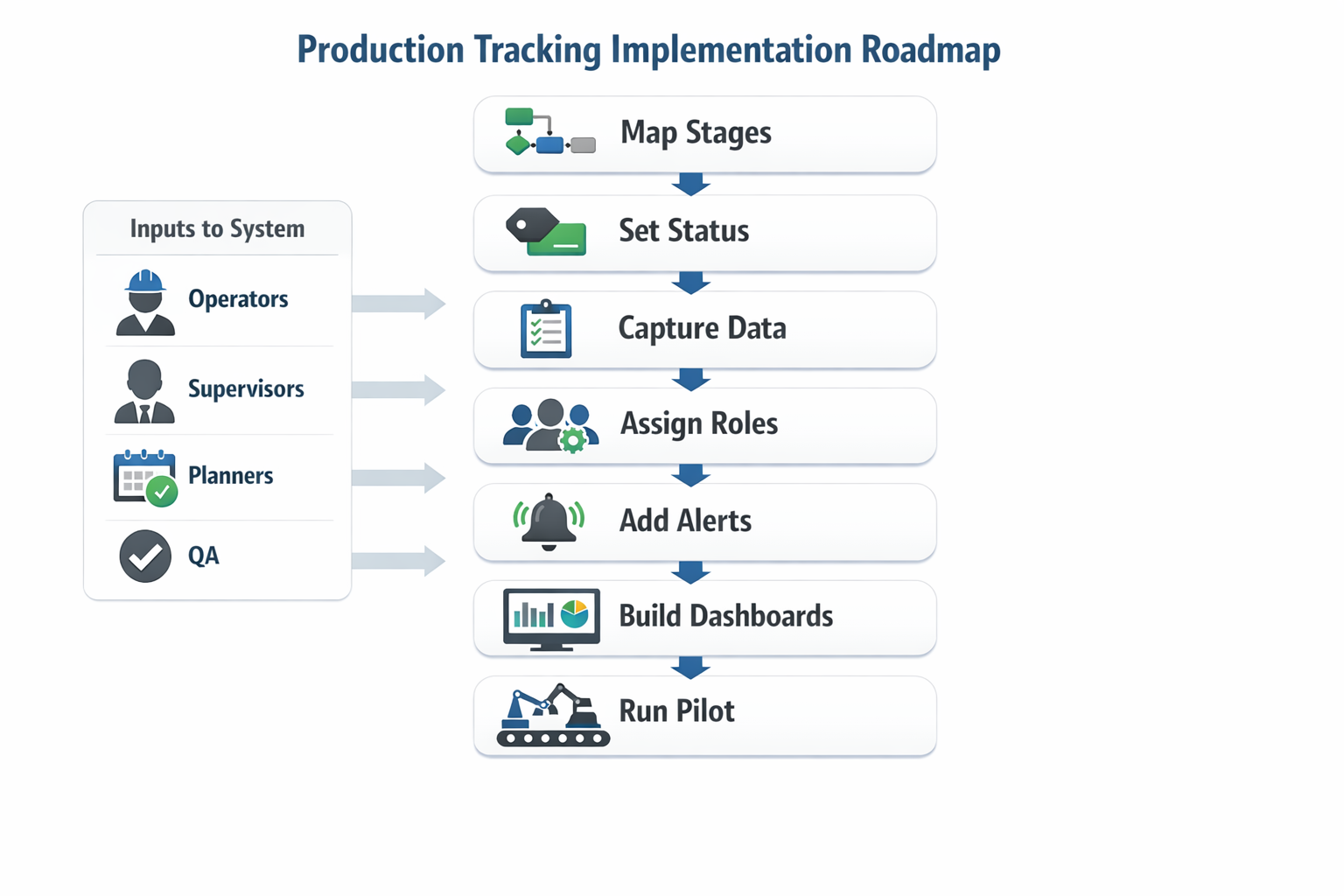
Keep the stage list specific enough to show real progress, but not so detailed that operators spend more time updating screens than building product. In most factories, 5 to 10 production stages per order is a practical starting point, with sub-steps captured only where traceability or bottleneck control matters. This is especially important if you want your WIP tracking software to show where orders are waiting, not just whether they are “in production.”
Define Work Order Statuses That Everyone Uses the Same Way
Next, create a standard status model for every order and operation. A simple structure often works best: planned, released, in progress, paused, waiting for material, waiting for QC, completed, and closed. These statuses should apply consistently across lines, shifts, and departments so supervisors and planners are looking at the same operational truth.
Imagine a production manager at a packaged food plant who is tracking daily sauce-filling batches. If one batch is marked “in progress” while another line uses “running” for the same condition, reporting becomes inconsistent immediately. Strong work order tracking depends on standard status definitions, clear rules for when each status can be used, and visible timestamps for every change.
Decide What Data to Capture at Each Step
Once stages and statuses are set, define the minimum data needed to manage execution well. For most manufacturers, that includes work order number, SKU, planned quantity, actual quantity, scrap, start time, end time, operator or line ID, machine ID, and current status. If traceability matters, you may also capture lot number, material batch, inspection result, downtime reason, and rework quantity.
The key is to match data capture to decision-making, not collect everything possible. A planner needs enough detail to see output against schedule, while a supervisor needs enough detail to act on stalled jobs and abnormal scrap. According to industry studies, manufacturers can spend 20% to 30% of their time on non-value-added data handling when reporting is poorly designed, so lean data design matters as much as system capability.
Assign Responsibilities by Role
Production progress updates should be owned by the people closest to the event, with approval or review handled by supervisors where needed. Operators should confirm start, stop, completion, quantity produced, and scrap at the workstation or through a mobile device. Line leaders should validate exceptions, such as downtime over a threshold or a work order that moves to hold status.
Planners and production control teams should manage order release, priority changes, and schedule adjustments, while quality teams update inspection gates that affect downstream release. This role-based setup is where a no-code platform like Jodoo is useful, because you can configure forms, permissions, and workflows by role without forcing every department into the same screen. In practice, that means operators see only the fields they need, while supervisors and planners see broader work order tracking and capacity data.
Set Up Exception Alerts Before You Build Reports
Do not wait until dashboards are finished to define exceptions. The most useful alerts usually cover orders not started on time, jobs exceeding cycle-time thresholds, WIP stuck at one station too long, output falling below plan, and orders blocked by quality or material shortages. These alerts turn production progress tracking from passive reporting into active control.
For example, in a garments factory, imagine a sewing line where bundle movement is updated every hour. If a work order sits in finishing for more than two hours without output confirmation, the system can notify the floor supervisor automatically. That kind of alert is much more actionable than discovering the delay at the end-of-shift meeting.
Build Dashboards for Different Users
Supervisors, planners, and operations managers should not all use the same dashboard. A shop-floor supervisor needs a live view of active orders, actual vs planned output by line, delayed jobs, and open exceptions for the current shift. A planner needs forward-looking visibility, such as released orders by due date, stage-by-stage completion rate, and jobs at risk of missing the schedule.
A practical dashboard structure for WIP tracking software usually includes three layers: shift control, daily production control, and order-level drilldown. In Jodoo, for example, you can build role-based dashboards that combine real-time form inputs, workflow status, and exception counters in one place. That makes it easier for each team to act on the same data set without creating separate spreadsheets for production, planning, and quality.
Pilot on One Product Family, Then Expand
Roll out your setup on one line, one product family, or one plant area first. A focused pilot lets you validate stage definitions, operator inputs, status rules, and dashboard usefulness before you scale across the site. In many factories, a 2- to 4-week pilot is enough to identify missing statuses, confusing inputs, or alert thresholds that are too sensitive.
For example, an industrial bakery might begin with one packaging line that handles high-volume SKUs. Once the team confirms that order release, line reporting, and exception alerts are working reliably, the same structure can be adapted for mixing, baking, and secondary packing areas. This phased approach reduces disruption and helps your job tracking manufacturing process become part of daily execution rather than a parallel reporting exercise.
Why Jodoo Is Different: A No-Code Way to Build Custom Production Tracking Software
Build Around Your Actual Shop-Floor Flow, Not a Standard MES Template
What makes Jodoo different from typical production tracking software is that you are not forced into a fixed MES structure before you can start improving visibility. Many manufacturers already know their workflow is not purely linear: a job may move from assembly to inspection, then to rework, then back to final test before packing. With Jodoo, you can build those real-world paths into one app using forms, workflow rules, dashboards, and mobile updates, without waiting for a long custom development cycle.
This matters most when your process includes special approvals, QA handoffs, or non-standard routing by product family. Imagine a production manager at a mid-sized electronics assembly plant who runs low-volume, high-mix orders for control panels and wiring assemblies. One order may need an engineering sign-off after first article inspection, while another can move directly from kitting to assembly and final test. Instead of forcing both jobs into the same rigid system, Jodoo lets the team configure different statuses, required checkpoints, and escalation rules inside the same work order tracking environment.
A Practical Example: From Excel-Based Updates to One Connected App
Take a mid-sized assembly manufacturer with 120 shop-floor employees and three production lines. The team currently tracks job release in Excel, operator output on paper sheets, and quality holds in email or WhatsApp messages. In Jodoo, they can replace that setup with a custom app that captures each work order, assigns it by line or cell, records operator updates by shift, and shows live production progress tracking on dashboards for supervisors and planners.
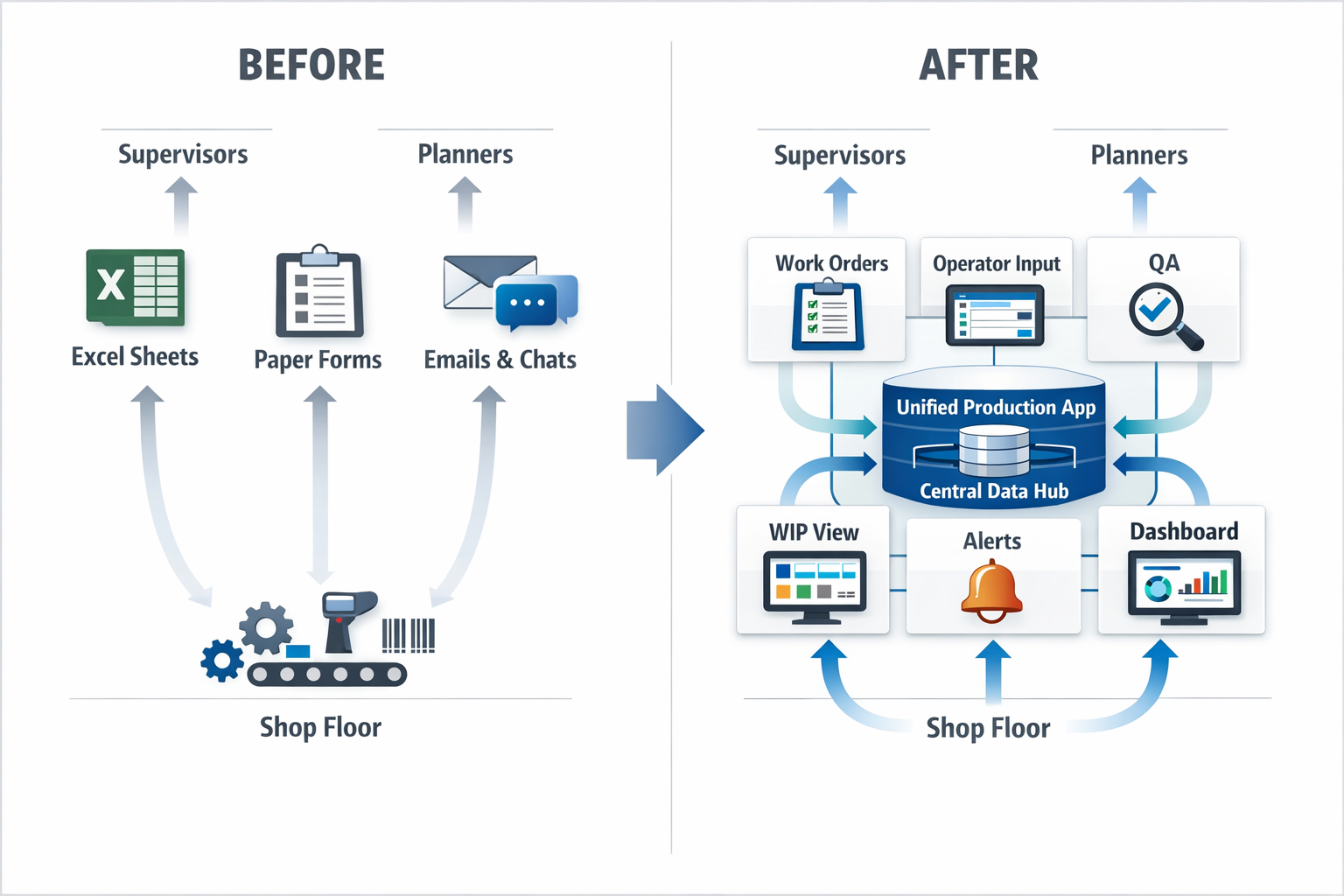
The setup can be done in a few weeks because the company is configuring process logic rather than commissioning a full MES rollout. A planner creates the work order record, operators update completed quantities from tablets or mobile devices, and QA staff log inspection results against the same job number. Supervisors then see a shared view of open jobs, delayed operations, and current WIP by stage, turning disconnected spreadsheets into usable job tracking manufacturing data.
Role-Based Forms Keep Each Team Focused
Jodoo’s no-code model is especially useful because different functions need different views of the same production order. Operators may only need to scan a barcode, confirm start and stop times, enter output, and flag abnormalities. QA needs defect categories, photo attachments, and disposition fields, while production planning needs schedule status, due date risk, and line loading. With role-based forms and permissions, each user sees only the fields and actions relevant to their job.
That structure reduces noise while improving data quality. In practice, an operator cannot accidentally edit planning data, and a warehouse clerk can confirm material issue status without accessing sensitive quality records. For manufacturers that want WIP tracking software without buying multiple separate tools, this creates a cleaner path to digital execution.
Rework Loops and QA Handoffs Can Be Built In From Day One
A key gap in many off-the-shelf systems is how they handle exceptions after the first pass. In real factories, a rejected batch does not simply stop; it often moves into review, rework, reinspection, and release with clear accountability at each step. Jodoo allows teams to configure those loops directly into workflow logic, so the production order history reflects what actually happened on the floor.
For example, in a food packaging plant, a line supervisor might place a batch on hold due to seal integrity issues found during in-process checks. The system can automatically notify QA, assign a corrective action, and block the batch from moving to final packing until the hold is cleared. That same workflow can update dashboard status in real time, giving operations managers better control over production progress tracking without relying on manual follow-up.
Dashboards Turn Shop-Floor Updates Into Actionable Visibility
The difference is not only data capture; it is what you can do with the data once it is centralized. Jodoo dashboards can show open work orders by line, late jobs by customer priority, first-pass yield trends, and live WIP counts at each process stage. If a supervisor wants to see how many jobs are waiting for inspection versus actively being assembled, that information is available from the same app rather than spread across separate files.
This is important because the speed of response often drives performance more than reporting frequency. According to industry studies, manufacturers using real-time production visibility can reduce response times to disruptions and improve schedule adherence compared with teams relying on end-of-shift reporting alone. For planners and supervisors, that means a production tracking software platform should support decisions during the shift, not just summaries after it ends.
Why This Approach Fits Mid-Sized Manufacturers
For many mid-sized manufacturers, the real question is not whether they need digital tracking, but whether they need a full enterprise MES project to get it. Jodoo gives them another path: start with a focused use case such as work order tracking, operator reporting, and rework management, then expand into quality, maintenance, or inventory workflows over time. Because the platform is no-code, operations teams can refine statuses, approval rules, and dashboard views as the process changes.
That flexibility is especially valuable in plants where product mix, customer requirements, or staffing models change frequently. A garment factory adding a new finishing step for export orders, for instance, can update routing and approval logic without rebuilding the whole system. Instead of adapting your process to the software, you build production tracking software that matches the way your factory already runs.
Conclusion: Start Small and Scale Production Tracking with Jodoo
The main value of production tracking software is simple: it helps you see what is happening on the shop floor as each job moves from release to completion. When operators, supervisors, and planners all work from the same live data, you reduce blind spots, speed up handovers, and respond faster to delays, scrap, and bottlenecks. In practical terms, that means fewer missed delivery dates, better labor coordination, and more reliable production progress tracking across every shift.
Imagine a production manager at an electronics plant who starts by digitizing just one assembly line’s work order tracking. Once cycle times, WIP status, downtime reasons, and completion updates are visible in real time, it becomes much easier to standardize daily meetings and fix recurring issues. From there, the same system can expand into broader job tracking manufacturing workflows, quality checks, maintenance requests, and shift reporting without forcing the plant to rebuild everything from scratch.
That is where Jodoo fits well. As a no-code lean manufacturing platform, Jodoo lets manufacturers pilot one workflow first, then scale into connected production tracking, reporting, and dashboards over time. If you want to test a practical approach, start a free trial or book a demo to explore how Jodoo can support your factory’s next step.