Browse by category

Introduction: Why Manufacturers Are Moving to 5S Audit Software
A paper 5S checklist can be completed in minutes, but the follow-up often breaks down for days or weeks. In many factories, audit sheets sit in clipboards, supervisors retype findings into Excel, and action items get lost between production meetings. That is why more manufacturers are replacing manual inspections with 5S audit software that captures issues in real time and makes accountability visible across lines, shifts, and sites.
In this article, you will see how manufacturers use workplace organization software teams can deploy quickly to standardize audits, improve follow-through, and gain real-time visibility from the shop floor to the plant dashboard.
What 5S Audit Software Does in a Manufacturing Environment
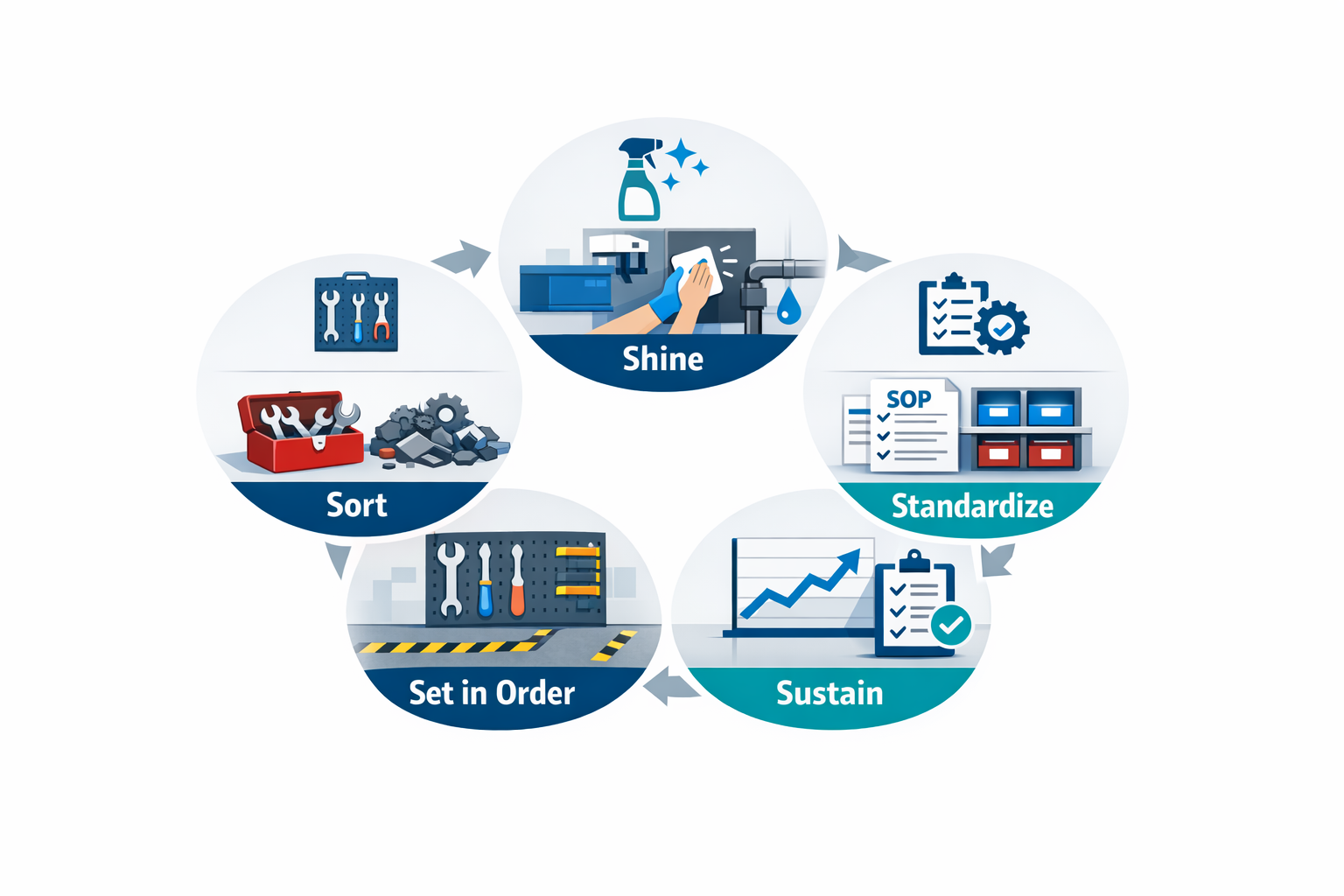
In manufacturing, 5S is the discipline of keeping work areas organized, clean, visible, and repeatable so operators can work safely and efficiently. The five pillars—Sort, Set in Order, Shine, Standardize, and Sustain—are simple in principle, but hard to maintain when audits rely on paper forms, clipboards, and manual follow-up. That is where 5S audit software becomes useful. It turns 5S from a periodic housekeeping exercise into a structured, trackable daily management process.
On the shop floor, each 5S pillar translates into specific audit checks. Sort means confirming that only the necessary tools, materials, and documents are present at the station. Set in Order checks whether items are stored in defined locations with labels, shadow boards, floor markings, or rack IDs. Shine focuses on cleanliness, leaks, dust, spills, and basic equipment condition, while Standardize verifies that visual controls, work instructions, and cleaning routines are current and followed. Sustain measures whether the first four pillars are being maintained consistently over time, across shifts, lines, and departments.
How Digital Audits Work on the Shop Floor
A 5S checklist software tool replaces printed forms with mobile or tablet-based inspection checklists that supervisors, team leaders, or operators can complete in real time. Instead of ticking boxes on paper and later retyping results into Excel, users can log findings directly at the machine, line, warehouse aisle, or packing station. They can attach photos, add comments, capture timestamps, and assign responsibility before they leave the area. This matters because speed affects closure: in many plants, issues found on paper during the morning audit are not entered into any tracking file until hours later, which delays action.
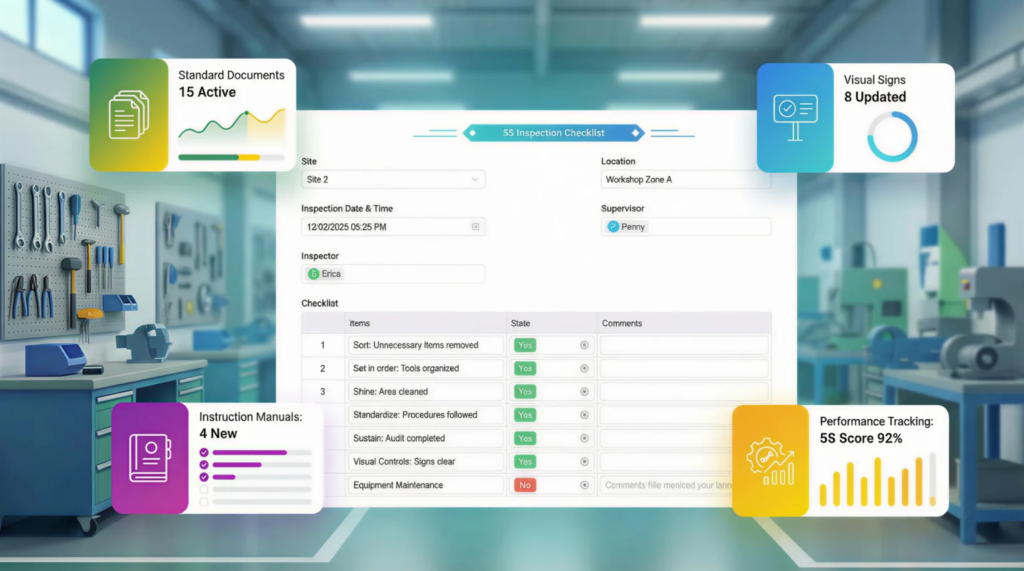
Consider a production manager at an automotive parts plant who audits three machining cells at the start of each shift. Using a 5S inspection app, the manager can scan a QR code at each cell, open the correct checklist, and verify items such as tool placement, coolant leak status, chip tray cleanliness, and labeling of gauges. If a red-tagged item is still sitting beside the line or a cleaning standard is not followed, the manager can take a photo and assign a corrective action to the area leader immediately. That creates a closed-loop process instead of a checklist that disappears into a binder.
Connecting the Five Pillars to Daily Execution
The biggest value of a digital 5S audit is consistency. Paper audits often vary by auditor, department, or site, especially in multi-line plants where different supervisors interpret standards differently. With digital forms, every line can use the same scoring logic, mandatory photo evidence, pass/fail criteria, and escalation rules. This is especially important in electronics assembly or food manufacturing, where workplace organization directly affects contamination risk, changeover time, and operator error.
For example, in a food packaging plant, Shine is not just about neatness—it may include checks for powder buildup near sealing equipment, cleaning verification for conveyors, and the condition of waste bins near allergen-controlled areas. A 5S management software setup can require photo proof for failed hygiene points and automatically notify sanitation or production leads when scores fall below the threshold. In that case, the audit is no longer only an inspection record; it becomes part of the plant’s response system.
Standardization, Visibility, and Follow-Up
A strong 5S checklist software system also supports standardization beyond the checklist itself. It can store master audit templates by area, revision-controlled standards by process, and role-based permissions so operators, supervisors, and plant managers see the right level of data. When the same rules are applied across fabrication, assembly, warehouse, and maintenance zones, leaders get more reliable trend data. That makes it easier to compare one line against another and identify where 5S is slipping before it affects quality or safety.
This is where workplace organization software manufacturing teams’ use starts to support broader lean goals. Instead of treating 5S as a standalone activity, plants can connect audit findings to action tracking, layered process audits, maintenance requests, or daily management dashboards. Research from lean implementation studies consistently shows that sustainment is the weak point of 5S programs, not initial rollout. Digital tools help close that gap by making missed items visible, assigning owners, and tracking whether corrective actions are actually completed.
From Inspection Records to Plant-Wide Control
At the plant level, 5S audit software gives operations leaders a way to see trends across departments, shifts, and sites. Rather than reviewing stacks of paper or waiting for a monthly summary, they can monitor audit completion rates, average scores, repeat findings, and overdue actions in real time. If one warehouse zone repeatedly fails on labeling or one production line shows recurring cleaning issues, the pattern is visible early. That helps CI teams focus on root causes instead of chasing scattered observations.
Platforms such as Jodoo are useful here because they combine forms, workflows, dashboards, and action tracking in one system. A plant can build a 5S inspection app that fits its own scoring method, approval flow, and area structure without custom coding, then link findings to escalation workflows and dashboards for management review. For lean managers trying to sustain improvements across multiple lines, that is the practical role of 5S management software: standardize the audit, capture issues at the source, and turn every finding into an accountable next step.
Common Pain Points with Paper Checklists, Excel, and Basic Forms Apps
Many manufacturers start their 5S journey with paper sheets, Excel files, or a simple mobile form. That approach works for a pilot area, but it usually breaks down once audits expand across multiple lines, shifts, or plants. If you are managing 5S in an automotive parts plant, an electronics assembly site, or a food packaging facility, the real problem is not just collecting audit data. The problem is sustaining standards, tracking actions, and proving that 5S is improving workplace performance over time.
A paper-based process also creates hidden waste that lean teams often underestimate. Supervisors spend time printing checklists, chasing missing sheets, retyping scores, and clarifying handwritten comments instead of coaching teams on the shop floor. In practice, that means your 5S system starts adding administrative work instead of removing it. This is where the gap becomes clear between a basic checklist tool and real 5S audit software.
Lost Forms and Missing Audit History
Paper checklists are easy to start with, but they are also easy to lose, damage, or leave incomplete. In a busy factory environment, forms can be misplaced during shift changes, clipped to the wrong board, or filed too late to be useful. When that happens, the plant loses audit history, and trend analysis becomes unreliable.
Consider a production manager at an electronics plant who runs weekly 5S audits across SMT lines, final assembly, and material staging areas. If one supervisor forgets to submit two weeks of paper forms, the plant cannot accurately compare area scores or identify repeat issues. A proper digital 5S audit system keeps every record in one place with timestamps, photos, and user history, so missing data is far less likely.
Version-Control Problems Create Audit Confusion
Excel and printed forms often create a second problem: different teams use different versions of the checklist. One department may still be checking old criteria, while another is already following updated standards from a recent kaizen or customer audit. That makes scoring inconsistent and weakens trust in the results.
This happens often in multi-line or multi-site operations. For example, a food manufacturing plant may update its 5S criteria to include stricter visual controls around allergen segregation and cleaning-tool storage. If one line leader is still using last month’s file from a shared folder, the plant is no longer auditing to one standard. Good 5S checklist software solves this by centrally controlling forms, scoring logic, and revision history so every auditor uses the latest checklist.
Delayed Reporting Slows Down Improvement
Paper and spreadsheet systems create delays between inspection and action. A supervisor completes the audit today, but the results may only be compiled at the end of the week or a month after someone manually enters the data. By then, the opportunity for fast correction is already gone.
Speed matters because 5S issues are usually visible and actionable in the moment. A blocked aisle, an unlabeled raw material rack, or an overflowing red-tag area should trigger an immediate response, not wait for a monthly review meeting. With a 5S inspection app, the audit result can be submitted from the shop floor and instantly pushed to a dashboard, making it easier for managers to spot abnormal areas the same day.
Inconsistent Scoring Undermines Credibility
One of the biggest weaknesses of manual systems is scoring inconsistency. Different supervisors interpret criteria differently, assign scores based on personal judgment, and write comments with varying levels of detail. Over time, the audit becomes less of a standard and more of an opinion.
For example, in an automotive supplier plant, one area supervisor may score shadow board compliance as 5/5 if tools are present, while another only gives 5/5 when every outline, label, and quantity marker is correct. Those differences make plant-wide comparisons meaningless. Strong 5S management software can reduce this variation by using standardized scoring rules, required evidence fields, photo references, and conditional prompts that guide auditors through each item.
Corrective Actions Often Have No Clear Owner
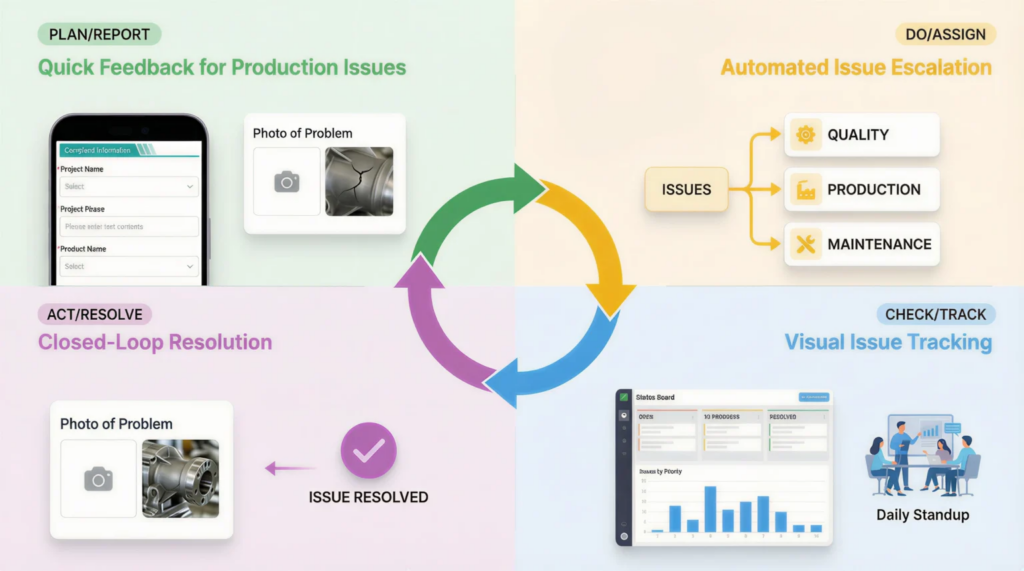
The most common failure point in manual 5S systems is what happens after the audit. Teams record issues, discuss them briefly, and then move on without assigning a clear owner, due date, or follow-up check. As a result, the same nonconformities appear again the next week.
This is a major reason why many lean managers struggle to sustain gains after a 5S campaign. According to industry studies on quality and safety inspections, action items without digital tracking are significantly more likely to remain overdue because there is no automatic reminder or escalation path. Real 5S audit software closes this gap by linking every finding to a corrective action workflow, with owner assignment, deadlines, status visibility, and escalation for overdue items.
Basic Forms Apps Digitize Data, but Not the Process
A basic mobile form app is better than paper, but it still may not solve the core operational problem. If the app only captures answers and exports them to a spreadsheet, you have digitized the checklist but not the management system behind it. That means recurring audits, area-based schedules, follow-up workflows, and exception alerts are still handled manually.
This distinction matters for manufacturers scaling lean programs across departments. A simple form may help one supervisor complete an audit faster, but it does not help a plant manager monitor compliance across 20 production zones or ensure every red-tag issue is closed on time. True workplace organization software manufacturing teams need to support recurring schedules, role-based assignments, trend dashboards, and closed-loop improvement.
What True 5S Audit Software Does Differently
Real 5S audit software is built to manage the full audit cycle, not just the form itself. It supports scheduled audits by area, line, shift, or department, automatically notifies the right people, and standardizes how scoring is done. It also keeps photo evidence, tracks repeat findings, and gives management a live view of compliance by zone or site.
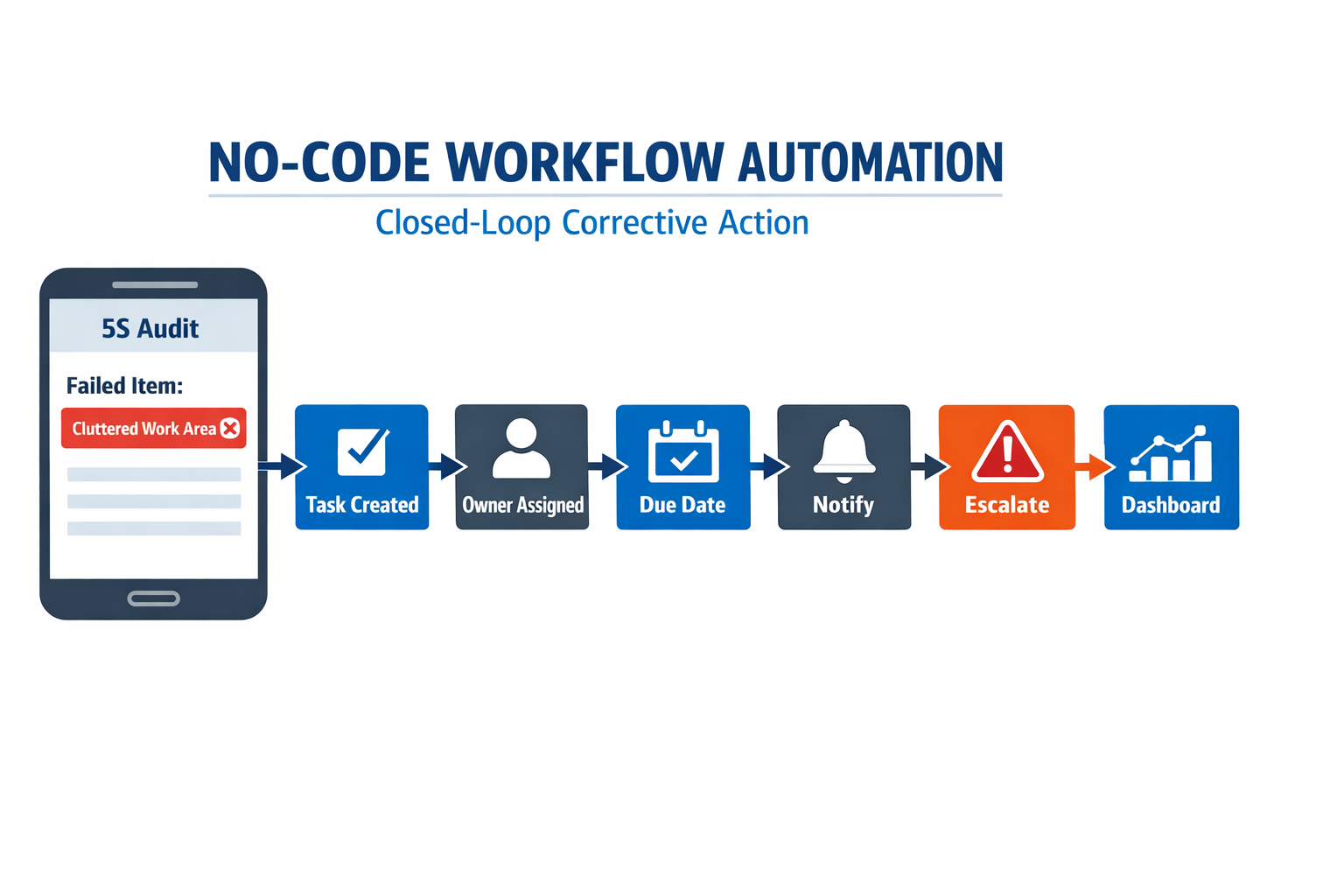
For example, with a no-code platform like Jodoo, a manufacturer can build a digital 5S audit workflow that starts with a mobile inspection form, routes failed items into corrective actions, sends reminders before due dates, and escalates overdue tasks to the area manager. The same system can feed dashboards showing score trends, top recurring issues, and closure rates by department. That is a very different outcome from simply replacing paper with a digital form.
The Real Issue Is Sustainability
The goal of 5S is not to collect more audit sheets. It is to create a safer, cleaner, more disciplined workplace that holds its standard every day. If your current process cannot show whether issues were fixed, whether standards were followed consistently, or which areas are slipping, then it is not supporting continuous improvement.
That is why many lean teams eventually move from paper or basic forms to a dedicated 5S checklist software approach. They need a system that turns audits into action, action into accountability, and accountability into measurable improvement. In the next section, it makes it easier to see what features actually matter when evaluating 5S audit software for a manufacturing environment.
What a Digital 5S Checklist Should Include
A good 5S audit software setup should do more than copy a paper form onto a tablet. It should guide auditors through consistent checks, capture evidence on the shop floor, calculate scores automatically, and trigger follow-up actions when standards are missed. For lean managers, the value is not just faster auditing but better control of workplace discipline across lines, shifts, and sites.
In practice, the best 5S checklist software reflects how manufacturing audits actually happen. Consider a production manager at an automotive parts plant who audits a CNC machining cell every Monday morning. He needs a checklist that is fast enough to complete in 10 to 15 minutes, detailed enough to detect early deterioration, and structured enough to compare results across departments without manual Excel work.
Sort: Identify What Should Not Be There
The Sort section of a digital 5S audit should focus on unnecessary items, excess inventory, obsolete tools, and materials that create clutter or safety risks. Questions should be specific, such as whether non-required jigs are present at the workstation, whether expired labels or old work instructions are still posted, and whether scrap bins are overflowing beyond defined limits. In electronics assembly, for example, auditors may check whether unused feeders, spare reels, or rejected boards are left around the line instead of being moved to designated holding areas.
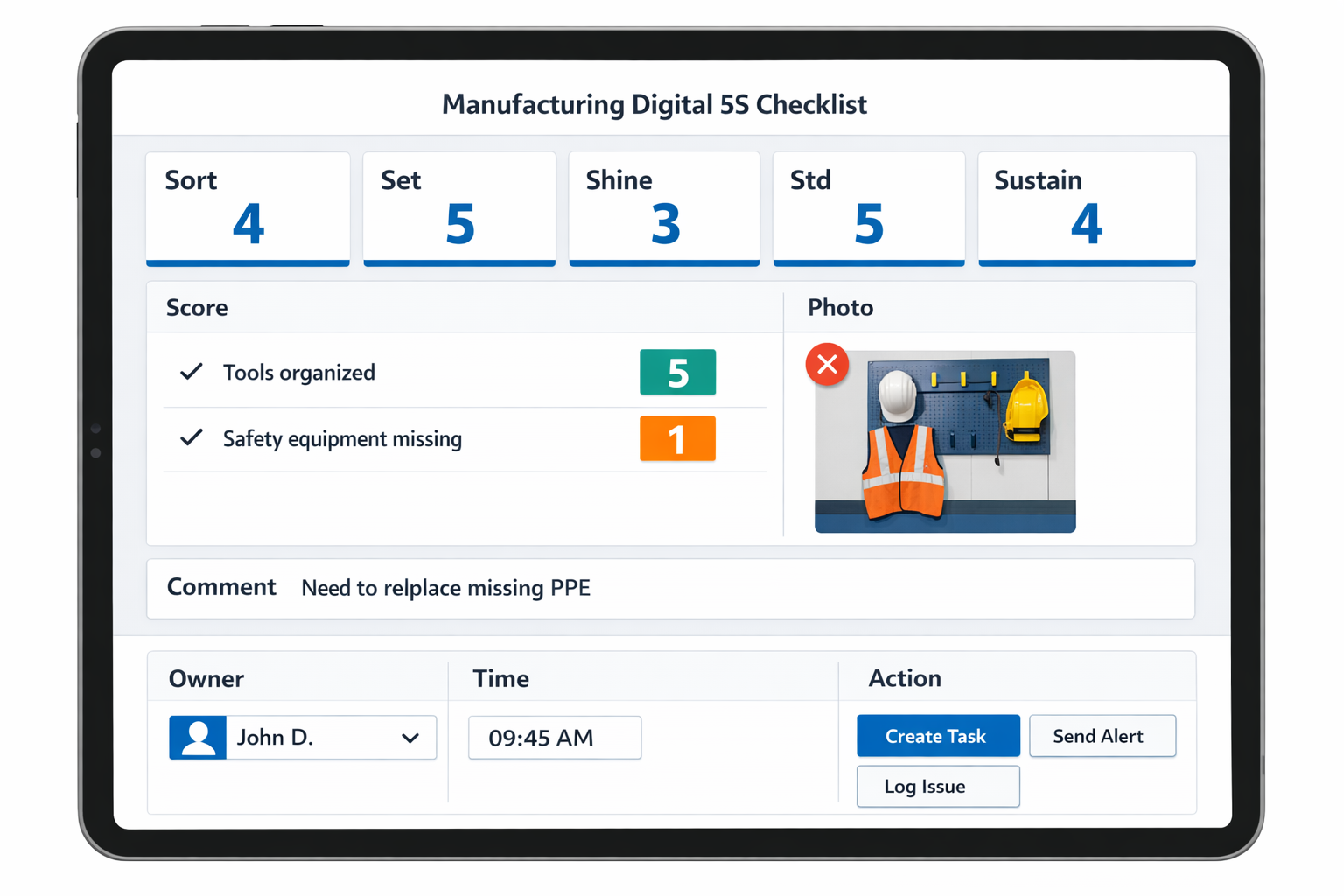
A strong 5S inspection app should let you score each item quickly using simple formats such as pass/fail, 1-to-5 ratings, or weighted scoring for critical areas. It should also allow photo capture when unnecessary items are found, because visual evidence reduces debate later. If a red-tag area is part of your process, the checklist should record item type, quantity, location, owner, and disposal due date directly in the audit form.
Set in Order: Verify Location Control and Visual Management
The Set in Order section should confirm that tools, materials, documents, and equipment are stored in their assigned locations. Effective checklist questions include whether shadow boards match actual tool placement, whether floor markings are visible and not damaged, and whether pallets, trolleys, and WIP are parked only in approved zones. In a food manufacturing plant, this could include checks on utensil storage segregation, cleaning tool locations, and color-coded handling equipment used to prevent cross-contamination.
This is where workplace organization software teams often become more useful than paper. A digital form can require the auditor to attach a photo if a location label is missing or if an aisle is partially blocked. It can also use conditional logic so that when the auditor selects “No” for “Materials stored in designated area,” a follow-up field appears asking for the exact obstruction, affected area, and responsible department.
Shine: Check Cleanliness and Early Signs of Equipment Deterioration
The Shine section should not only ask whether an area looks clean but also whether cleaning standards reveal abnormal conditions. Good questions include whether oil leaks are visible, whether machine guards are free of dust buildup, whether drains are clear, and whether cleaning tools are available and in usable condition. In an automotive stamping plant, for example, a dirty press area is not just a housekeeping issue; it may hide lubrication leaks, metal scrap buildup, or unsafe walking surfaces.
A practical digital 5S audit should allow inspectors to log comments and photos against each abnormality instead of writing vague remarks like “cleaning needed.” This matters because specific findings drive faster action. Research widely cited in manufacturing and safety management shows that visual documentation improves issue clarity and speeds resolution, especially when multiple supervisors review the same area across shifts.
Standardize: Confirm SOPs and Visual Standards Are Followed
The Standardize section is where many 5S programs weaken because the audit checks appearance but not consistency. Your checklist should verify that standard work documents are current, audit frequency is being followed, cleaning schedules are visible, and labeling formats are consistent across the area. In an electronics plant, this may include verifying ESD signs, bin labels, material identification cards, and workstation layouts against the approved standard.
This is where 5S management software should support version control and role-based access. If the latest standard is updated, auditors should see the current checklist immediately rather than using an outdated printed sheet. A stronger digital system can also link the audit item directly to the relevant SOP, so if an operator station fails a labeling check, the supervisor can open the correct standard from the same screen.
Sustain: Measure Discipline, Ownership, and Follow-Through
The Sustain section should test whether 5S is being maintained over time, not just cleaned up before an audit. Useful questions include whether previous audit findings were closed on time, whether area owners are clearly assigned, whether daily 5S checks were completed, and whether score trends are stable or declining. In many factories, this is the difference between a one-time housekeeping campaign and a real lean discipline system.
A well-designed 5S checklist software workflow should make sustainment visible through trends, recurrence tracking, and overdue-action alerts. For example, if the same issue appears three times in a row in a machining cell, the system should flag it as a repeat nonconformance rather than three separate isolated findings. That gives lean managers better evidence when discussing root causes with maintenance, production, or warehouse teams.
Scoring Logic Should Be Simple, Consistent, and Actionable
Scoring is one of the most important parts of 5S audit software, because inconsistent scoring makes cross-line comparison almost useless. Most manufacturers use either a pass/fail format for speed or a 1-to-5 scale for more nuance, but the key is standard scoring rules by area and audit type. Critical items such as blocked fire exits, missing safety markings, or contaminated work surfaces should carry higher weight than cosmetic issues.
The system should calculate total scores automatically by S category, department, line, and site. This makes it possible to compare, for example, whether Assembly Line 2 is weaker in Shine while Warehouse B is repeatedly underperforming in Set in Order. Some manufacturers set action thresholds, such as below 85% requires supervisor review and below 70% triggers immediate corrective action, which helps convert audit data into a response standard instead of just a number.
Photos, Comments, and Evidence Capture Are Essential
A manufacturing-ready 5S inspection app should make evidence capture part of the workflow, not an optional extra. Auditors should be able to add photos, annotate issues, leave voice-to-text comments if needed, and record timestamps and locations from a mobile device. In plants with multiple buildings or large production halls, this removes ambiguity about where the problem was found and what condition existed at the time of the audit.
What a Practical Manufacturing-Ready Checklist Looks Like
In most factories, the best checklist is not the longest one. It is the one that matches the work area, takes only a few minutes to complete, and produces data the plant can act on. A machining cell, SMT line, and raw material warehouse should all follow the same 5S structure, but the actual questions should reflect their different risks, materials, and housekeeping standards.
At a minimum, your digital checklist should include the five
5S categories, item-level scoring, required evidence for failed items, auditor comments, area ownership, automatic timestamps, and corrective-action rules. If your current form cannot do that, it is not really supporting a digital 5S audit process; it is just replacing paper with a screen. The right 5S checklist software should help you standardize audits, improve accountability, and sustain workplace organization at scale.
What to Look for in 5S Audit Software
Choosing the right 5S audit software is not just about replacing a paper checklist with a mobile form. For most manufacturers, the real issue is sustaining 5S across shifts, lines, and sites without creating more admin work for supervisors. A strong system should help you standardize audits, trigger follow-up actions quickly, and give managers visibility into whether workplace organization is actually improving. That is why the best 5S management software should support the full cycle: audit, score, assign, correct, verify, and report.
In practice, many tools marketed as 5S checklist software are little more than digital forms. They let users tick boxes and upload photos, but they do not handle recurring schedules, escalation rules, site-specific scorecards, or action tracking. That becomes a problem when one plant audits assembly cells weekly, another audits warehouse aisles daily, and a food production site needs hygiene-related 5S checks tied to GMP routines. If your process varies by plant or production line, your software must adapt to your operation rather than force every site into the same template.
Mobile Usability on the Shop Floor
A 5S inspection app should be easy to use while walking the floor, wearing gloves, and moving between workstations. Auditors should be able to complete checks from a phone or tablet, attach photos, scan QR codes for area identification, and submit findings in a few taps. If the interface is slow or cluttered, supervisors will revert to paper, especially during peak production hours.
Imagine a production manager at an automotive parts plant who audits stamping, welding, and packing zones before the first shift meeting. He needs to capture overflowing scrap bins in stamping, missing shadow-board tools in welding, and blocked material lanes in packing without returning to an office PC. A mobile-first digital 5S audit tool makes that possible, while also time-stamping findings and storing image evidence automatically. This matters because visual proof helps prevent disputes over whether an issue was observed, corrected, or repeated.
Recurring Scheduling and Audit Discipline
One of the biggest weaknesses of paper-based 5S programs is inconsistency. Audits are missed, duplicate checks happen in some zones, and no one notices gaps until the monthly review. Good 5S audit software should let you schedule audits by area, line, shift, department, or frequency, such as daily, weekly, or monthly, with automatic reminders and overdue alerts.
This is especially useful in electronics manufacturing, where audit frequency often differs by process risk. For example, an SMT line may need daily checks for material labeling and workstation cleanliness, while a finished goods warehouse may only need a weekly audit. With proper scheduling, the software ensures that each area is audited at the right interval instead of relying on memory or a printed calendar pinned to a notice board.
Dashboards That Show Trends, Not Just Forms
A digital form alone does not help managers see whether 5S is getting better or worse. Strong 5S audit software should provide dashboards that show scores by area, repeat findings, overdue corrective actions, and trends over time. This allows plant leaders to move from anecdotal discussions to fact-based reviews during tier meetings or monthly operations meetings.
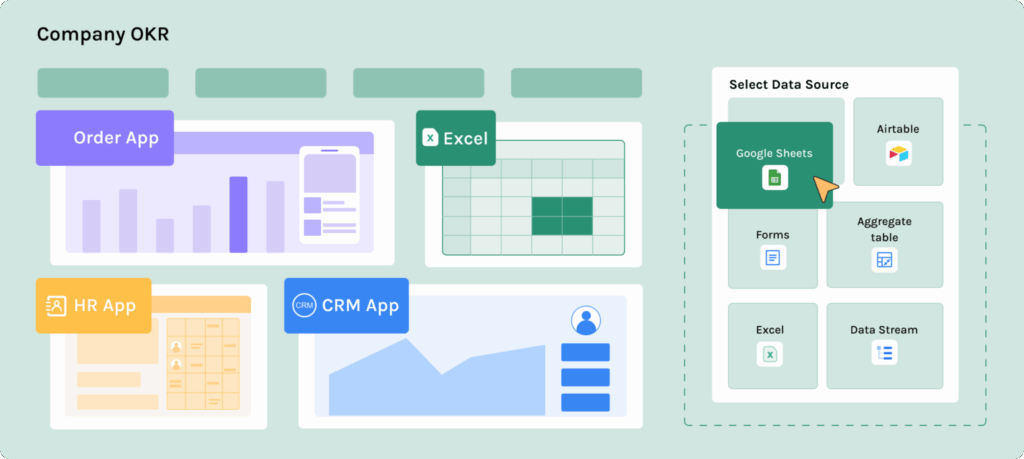
Research across manufacturing and quality environments consistently shows that visual KPI tracking improves response speed and management alignment, especially when data is updated in real time. In a practical sense, if one assembly line drops from 92% to 81% over three audit cycles, the dashboard should make that visible immediately. That gives the lean manager a chance to intervene before poor workplace organization starts affecting safety, changeover time, or first-pass yield.
Role-Based Permissions and Audit Governance
Not everyone should see or edit everything in your system. A robust 5S inspection app should include role-based permissions so operators, auditors, supervisors, and plant managers each have the right level of access. Operators may need to view assigned actions only, auditors may need to submit and edit findings, and senior managers may need read-only access to site-wide dashboards.
This becomes even more important in larger manufacturing groups with multiple plants. You may want each site to manage its own audits while the headquarters compares trends across facilities. Without role-based permissions, you risk poor data control, accidental edits, or reporting confusion. For factories working under ISO 9001 or ISO 45001 disciplines, clean audit trails and controlled access also support stronger compliance practices.
Multilingual Support for Diverse Workforces
In Southeast Asia and other global manufacturing environments, audit participation often involves multilingual teams. A supervisor may prefer English, while frontline operators are more comfortable with Bahasa Malaysia, Thai, Vietnamese, or another local language. Good 5S audit software should support multilingual forms, labels, instructions, and notifications so the process is clear to everyone involved.
This is not a minor feature. If users do not fully understand audit criteria or corrective action instructions, data quality drops, and follow-up slows down. In a mixed workforce environment, multilingual capability improves adoption and reduces training time. It also helps standardize how 5S expectations are communicated across shifts and departments.
How Jodoo Helps Build a Custom Digital 5S Audit Without Code
Many manufacturers start with off-the-shelf 5S audit software, then hit a familiar problem: the tool does not match how their plant actually runs. One line needs different audit criteria, another site uses different scoring rules, and supervisors still end up exporting data to Excel to manage follow-up. Jodoo solves this by letting operations teams build a digital 5S audit process around their own standards, workflows, and reporting structure without waiting for IT development.
For lean managers, this matters because 5S is never just a checklist. In a real factory, it connects to corrective actions, equipment conditions, safety observations, operator discipline, and management review. A flexible no-code platform makes it possible to turn a basic 5S checklist software setup into a broader operating system for workplace discipline and continuous improvement.
Build Plant-Specific 5S Audit Forms in Minutes
With Jodoo, you can create mobile-friendly audit forms that reflect your exact 5S criteria, area structure, and scoring logic. Instead of using a generic template, you can build forms by production line, zone, process, or department, then add the fields your team actually uses, such as photos, pass/fail checks, numerical scores, comments, signatures, and defect categories. This is especially useful in manufacturing environments where the same 5S standard does not apply equally to stamping, assembly, warehouse, and maintenance workshops.
Customize Scoring, Weighting, and Escalation Rules
One of the main weaknesses of fixed 5S management software is rigid scoring. In practice, many plants weigh some criteria more heavily than others because not every miss has the same operational risk. A blocked emergency path, a missing machine cleaning standard, or an unidentified raw material bin should not carry the same importance as a slightly untidy workstation.
Jodoo allows you to configure scoring formulas, weighted sections, automatic grading, and pass thresholds without code. You can set rules so that any critical finding automatically reduces the area score, triggers a supervisor review, or escalates to a department head. This helps lean teams build a more realistic audit system that aligns with plant priorities, ISO 9001 discipline, and shop floor risk management.
Automate Corrective Actions Instead of Chasing Them Manually
Paper audits often fail at the same point: follow-up. Someone finds an issue, writes it down, and then the corrective action gets buried in a file, WhatsApp thread, or whiteboard note. A digital process is far more effective when the system automatically assigns responsibility and tracks closure dates.
With Jodoo, a failed 5S item can trigger an action task immediately, with owner, due date, severity, photo evidence, and approval flow attached. For example, if an electronics assembly audit finds ESD tools stored outside marked zones, the system can assign the issue to the line leader, notify the production supervisor, and escalate overdue actions after 48 hours. This turns a simple digital 5S audit into a closed-loop improvement process rather than a passive record.
Standardize Across Sites While Keeping Local Flexibility
Multi-site manufacturers often struggle to balance standardization and local control. Headquarters wants consistent audit categories and comparable KPI reporting, but each plant has different layouts, product families, and operating risks. Jodoo supports both by letting you create a common audit framework, then adapt sections, logic, and user permissions at the site level.
This is important for regional manufacturing groups in sectors like food processing or electronics, where one factory may focus on high-mix manual assembly while another runs semi-automated packaging lines. You can standardize core 5S pillars, score definitions, and reporting dashboards across all locations, while allowing each site to add local checkpoints. The result is a more practical form of workplace organization software that manufacturing teams will actually use.
Connect 5S Findings to CAPA, Maintenance, and CI Workflows
A good 5S system should not operate in isolation. Repeated audit failures often point to larger issues such as unclear SOPs, equipment deterioration, weak visual management, or a lack of ownership. Jodoo makes it easier to connect 5S findings with broader workflows like CAPA, maintenance requests, Kaizen tracking, and layered process audits.
For example, a food manufacturing plant may notice repeated 5S failures around cleaning tool storage and washdown area discipline. Instead of logging the same issue every week, the team can route recurring findings into a CAPA workflow, assign root cause analysis, and track whether the corrective action reduces repeat nonconformities. In this way, 5S audit software becomes part of a continuous improvement system, not just a compliance exercise.
Give Managers Real-Time Visibility on 5S Performance
One major advantage of digital tools is visibility. Research across manufacturing and quality operations consistently shows that delayed reporting slows corrective action and weakens accountability, especially in multi-line environments. When audit data sits on paper for days, supervisors cannot see where standards are slipping until the problem becomes visible in downtime, rework, or safety incidents.
Jodoo dashboards let plant managers monitor audit completion rates, average scores by area, repeat findings, overdue action items, and trends over time. A lean manager can quickly identify if one packaging line has dropped from 92% to 78% in two weeks, or if one department has the highest concentration of repeat abnormalities. That kind of visibility helps teams move from reactive firefighting to structured daily management.
Reduce Dependence on IT for Continuous Improvement Changes
5S standards evolve. New production lines are added, red-tag rules change, customer audits tighten expectations, and supervisors want new scoring fields or photo requirements. If every small change requires software development support, the system quickly becomes outdated, and users return to spreadsheets or paper.
Jodoo’s no-code approach allows lean, production, and operations teams to update their own forms and workflows as conditions change. That means you can pilot a new audit structure in one workshop, refine it after two weeks, and roll it out plant-wide without a long implementation cycle. For manufacturers trying to sustain 5S across multiple departments, that flexibility is often the difference between adoption and abandonment.
Example: How a Manufacturer Could Replace Paper with a 5S Inspection App
Imagine a production manager at an automotive parts plant running three shifts across stamping, machining, and final assembly. The factory already has a solid 5S standard, but audits still happen on paper checklists that supervisors fill out by hand and later pass to an admin team for Excel entry. By the time results are compiled, the issues are already old, photos are missing, and no one is fully sure which team owns which corrective action. This is exactly where 5S audit software starts to create value.
Before: Paper Audits Create Delays and Weak Follow-Up
In a typical paper-based process, each area supervisor completes a 5S checklist at the end of the shift and leaves it in a tray or sends a photo of the form through WhatsApp. A lean manager then consolidates the findings into a spreadsheet to prepare a weekly review, often spending several hours chasing incomplete forms, unreadable handwriting, and missing evidence. If the plant has 20 audit zones and each audit takes 10 to 15 minutes to complete, even a small amount of rework can quickly add up to several lost admin hours every week.
The bigger problem is not the audit itself, but what happens after it. A loose tool shadow board in machining, excess WIP near an assembly station, or an unlabeled cleaning chemical in maintenance may be noted on paper, but action items are rarely tracked in a structured way. Studies on frontline digitization consistently show that delays in data capture and follow-up reduce response speed and make audit programs harder to sustain across departments. In practice, that means one shift corrects a problem while the next shift repeats it because the issue was never escalated properly.
After: A Digital 5S Audit Process Built in Jodoo
With Jodoo, the same plant can replace paper forms with a mobile 5S inspection app that supervisors use directly on the shop floor. The form can be built with the plant’s exact audit criteria, including scoring by zone, pass/fail items, photos, comments, signatures, and required fields for abnormal findings. Because Jodoo is a no-code platform, the lean team can adapt the app as standards evolve, without waiting for custom software development.
Now imagine a supervisor in final assembly opening the audit on a tablet at the line. If she marks “Sort” as non-compliant because obsolete fixtures are stored under a workstation, the app can require a photo and description before submission. That same record can automatically trigger a corrective action workflow, assign the issue to the area owner, and set a due date based on severity. Instead of sitting in a folder, the finding becomes a live task with accountability.
Practical Example: Electronics Assembly Across Multiple Shifts
Consider an electronics manufacturer with SMT lines, manual assembly cells, and a packing area. Before digitization, each department used a slightly different paper form, so audit scores were not comparable and site-level reporting was inconsistent. The quality and lean teams could not easily tell whether poor 5S performance came from one line, one shift, or one recurring category such as labeling, storage, or cleaning discipline.
After moving to a digital 5S audit process in Jodoo, the company standardizes one scoring structure across all departments while still allowing line-specific checks where needed. Supervisors complete audits on mobile devices, attach photos of cable routing, component bin labeling, or rejected material segregation, and submit results in real time. Dashboards then show 5S scores by shift, department, and audit category, making it much easier to spot patterns such as repeated “Set in Order” failures in night shift packing or housekeeping gaps in rework zones.
Measurable Operational Improvements
The operational gains are usually straightforward and visible. Audit completion becomes faster because supervisors no longer fill out paper, re-enter data, or search for old forms, and many manufacturers see reporting time cut from hours to minutes once dashboards are automated. If a lean manager used to spend 4 to 6 hours per week consolidating audit sheets in Excel, a digital process can reduce most of that manual work.
Action-item closure also improves because ownership is clear from the start. In many factories, the real weakness of paper-based 5S is not identifying issues but closing them before they become routine. With digital assignment, reminders, and status tracking, plants can reduce overdue audit actions significantly and create a stronger culture of accountability across shifts. That matters because sustained 5S performance is closely tied to safety, quality, and equipment uptime, especially in high-mix manufacturing environments.
Why This Approach Scales Better Than Excel
Excel can store audit scores, but it does not manage frontline execution well. It cannot easily enforce mandatory photo evidence, route issues automatically, control permissions by role, or give each department a live queue of open actions without heavy manual effort. As soon as a plant has multiple buildings, shifts, or audit owners, spreadsheets usually become a reporting layer rather than a true execution system.
Jodoo gives manufacturers a way to build a connected 5S inspection app that links forms, workflows, and dashboards in one place. That means you can start with one pilot area, such as machining or packaging, then expand to layered audits, safety inspections, TPM checks, or broader lean management processes on the same platform. For lean managers trying to sustain standards beyond a single kaizen event, that flexibility is often the difference between a short-term improvement and a system that actually sticks.
Conclusion: Choosing the Right 5S Audit Software for Long-Term Lean Success
The real value of 5S audit software is not just replacing clipboards with tablets. It is about creating a system that helps your plant sustain standards, close gaps faster, and turn audit findings into measurable improvement. In many factories, paper checklists slow down response time because issues stay trapped in binders, spreadsheets, or email chains instead of moving directly to the people responsible for action.
If you are a lean manager or plant manager, the right tool should do more than digitize forms. It should let you standardize audit criteria across lines, capture photos and evidence on the shop floor, assign corrective actions automatically, and track closure rates in real time.
That is where a configurable platform matters. Jodoo is a no-code lean manufacturing platform that helps manufacturers build flexible 5S checklist software tailored to their own audit workflows, escalation rules, and KPI dashboards. If you want to move beyond paper and build a more sustainable 5S process, you can start a free trial or book a demo to see how Jodoo fits your operation.