Browse by category

Introduction: Why TPM Software Matters for Modern Manufacturing
A single unplanned machine stoppage can cost a factory thousands of USD per hour, especially in high-volume automotive, electronics, and food & beverage operations. That is why TPM software is becoming a priority for manufacturers that can no longer rely on paper checklists, whiteboards, and disconnected Excel files to manage maintenance. When operators miss a daily inspection on a stamping press, a pick-and-place line, or a packaging machine, the result is often the same: rising downtime, lower OEE, and maintenance teams constantly stuck in firefighting mode.
In practical terms, TPM software is a digital system that helps factory teams run Total Productive Maintenance in a structured, trackable way. It supports core TPM activities such as autonomous maintenance checks, planned maintenance scheduling, breakdown reporting, spare parts visibility, and action tracking. Imagine a production manager at an automotive parts plant who needs to see recurring losses across multiple lines before they become major failures; a TPM digital platform makes that visibility possible in real time.
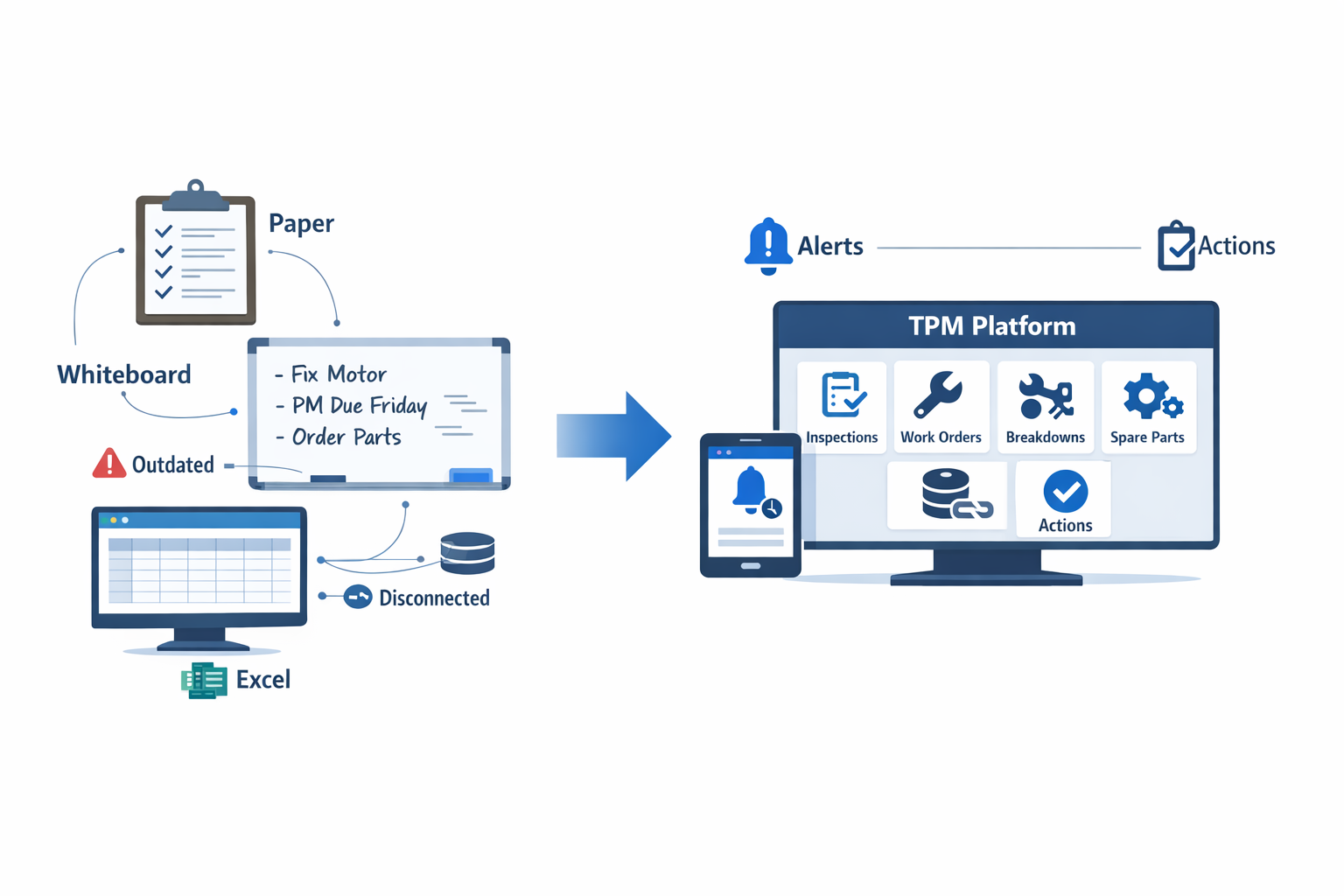
This article will explain what total productive maintenance software does, which features matter most, how it compares with paper-based systems, and what to look for when choosing equipment maintenance software that factory teams will actually use.
What TPM Software Is and How It Supports Total Productive Maintenance
Total Productive Maintenance, or TPM, is a plant-wide approach to keeping equipment in ideal operating condition while involving everyone who touches production. It goes beyond the maintenance department and asks operators, supervisors, engineers, and planners to work together to prevent breakdowns, reduce minor stops, improve safety, and extend asset life. In practice, TPM is built around goals such as higher Overall Equipment Effectiveness (OEE), fewer unplanned stoppages, and more stable daily output. For factories running high-volume lines, even a small reduction in downtime matters, since unplanned downtime is estimated to cost industrial manufacturers thousands of dollars per hour in lost production and recovery effort.
TPM software is the digital layer that makes those principles executable on the shop floor every day. Instead of relying on paper check sheets, whiteboards, Excel trackers, and WhatsApp messages, teams use a structured system to capture inspections, trigger work orders, log failures, escalate abnormalities, and monitor follow-up actions in real time. A good TPM management tool helps plants standardize how maintenance work is requested, approved, completed, and reviewed across shifts and departments. That matters in multi-line environments where missed handovers and delayed responses often create more downtime than the original fault itself.
The Core Idea: Turning TPM From Philosophy Into Routine
Many factories understand the TPM conceptually but struggle with execution consistency. Autonomous maintenance may start strong after a Kaizen event, but three months later, operators are back to paper checks, lubrication points are missed, and abnormality tags are not closed on time. This is where total productive maintenance software adds value: it converts TPM tasks into repeatable digital workflows with assigned owners, due dates, evidence, and escalation rules. The result is not just better documentation, but better control over what happens when an issue is found.
Imagine a production manager at an automotive parts plant who runs ten stamping presses across three shifts. Operators are expected to complete daily cleaning, inspection, and tightening checks before startup, but the paper forms often stay at the machine and maintenance only hears about issues after a press trips during production. With a TPM digital platform, operators can complete mobile checklists at the machine, attach photos of oil leaks or loose guards, and automatically create a maintenance request when a reading falls outside standard. The maintenance supervisor sees the issue immediately, assigns a technician, and tracks closure before the next shift begins.
How TPM Software Supports the Main TPM Activities
At the shop-floor level, TPM depends on disciplined daily actions. Software supports this by digitizing operator care routines, scheduled maintenance, and corrective work into one connected process. Instead of treating inspections, PM tasks, and breakdown analysis as separate activities, a digital system links them through shared equipment records and workflows. This is especially useful in plants where one missed inspection can later become a major stoppage or quality issue.
For autonomous maintenance, operators use digital checklists for cleaning, lubrication, bolt checks, visual inspections, and simple condition monitoring. These checklists can be tied to each machine, product family, or shift, ensuring the right standard work is followed every time. If an operator detects overheating on a motor or unusual vibration on a conveyor, the system can require a photo, classify severity, and trigger escalation. That makes abnormalities visible earlier, which is one of the biggest practical benefits of a modern equipment maintenance software factory setup.
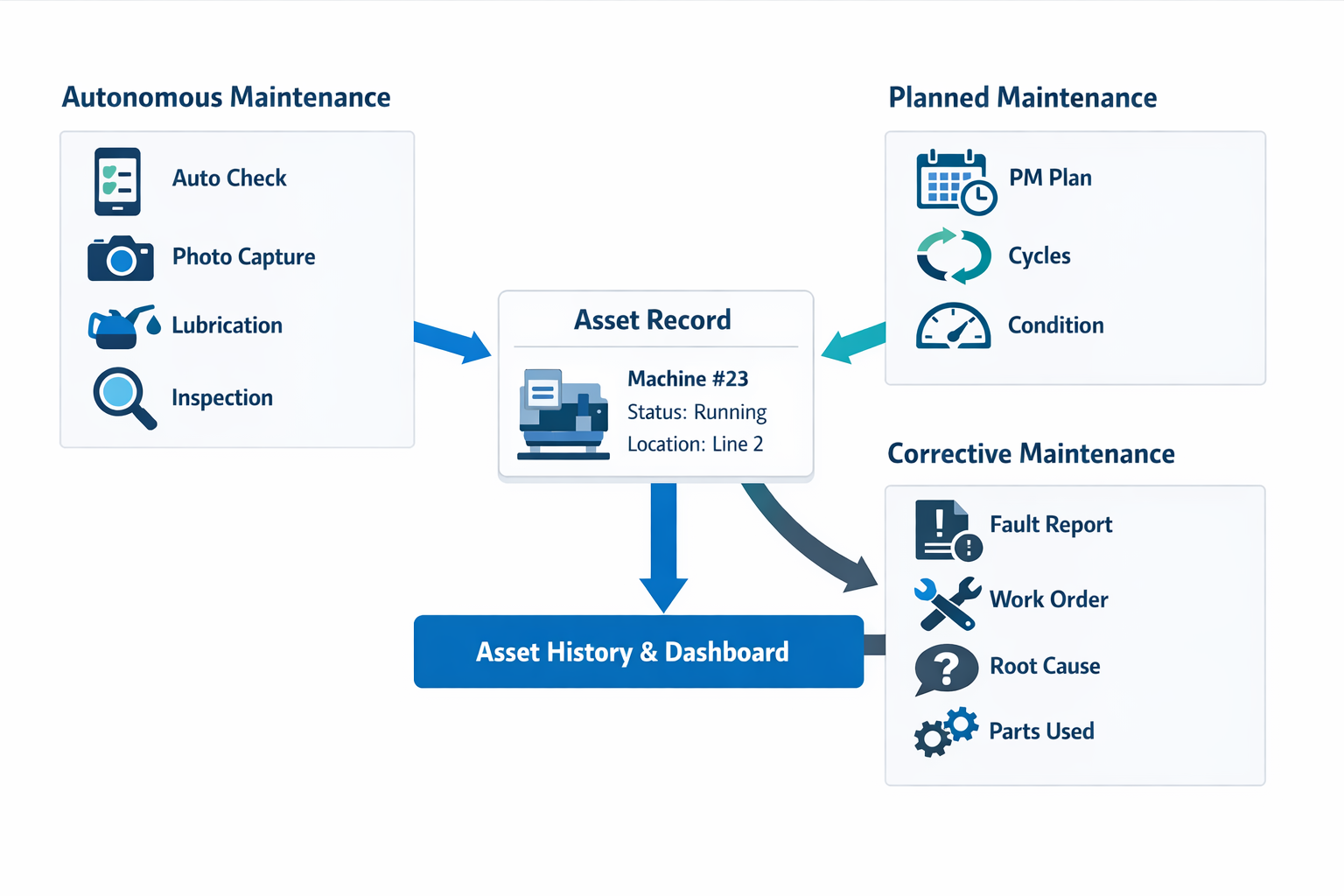
For planned maintenance, the software schedules preventive tasks based on time, usage, cycles, or condition thresholds. In a food processing plant, for example, a filler may need weekly inspection, monthly seal replacement, and sanitation verification after each product changeover. A digital TPM system ensures these tasks are assigned automatically, recorded with timestamps and signatures, and linked to the asset history for audit and reliability review.
For corrective maintenance, TPM software creates a structure around work orders and response time. A technician receives the fault, sees the asset history, checks previous failures, and records root cause, actions taken, parts used, and downtime minutes in one place. That information is critical because chronic losses usually come from repeated minor faults, not just major breakdowns. When plants can see repeat failures by machine, shift, part number, or line, they can prioritize focused improvement efforts instead of reacting case by case.
Supporting TPM Pillars With a Digital System
TPM is often organized around pillars such as autonomous maintenance, planned maintenance, focused improvement, quality maintenance, training, and safety. Software does not replace those pillars, but it gives each one a way to operate consistently at scale. In many factories, the problem is not a lack of TPM activity but a lack of visibility across teams, which makes it difficult to sustain gains or prove results. A strong TPM management tool creates that shared operational view.
For autonomous maintenance, it standardizes operator checks and abnormality tagging. For planned maintenance, it automates PM schedules and tracks compliance rates by asset or department. For focused improvement, it reveals recurring causes of downtime, helping CI teams target the “vital few” losses that affect OEE most. For training and skill development, it can link tasks to required competencies, ensuring only qualified personnel complete higher-risk maintenance steps.
Safety and quality also benefit when TPM software is integrated into daily work. If a machine abnormality could create contamination risk, unsafe guarding, or dimensional drift, the issue can be routed to both maintenance and quality teams with clear priority. In electronics assembly, for example, a poorly maintained placement machine may not fail completely but can create subtle alignment variation that drives rework and first-pass yield loss. Digital maintenance records help teams connect asset condition to production performance, instead of treating maintenance and quality as separate conversations.
Why TPM Software Improves Reliability and Coordination
The biggest gain from TPM software is not simply digitizing forms. It is creating faster communication and better coordination across operators, maintenance, production, and management. When machine conditions, work orders, PM compliance, and downtime reasons are stored in one system, decisions are based on actual data rather than memory or incomplete shift reports. This is particularly important in plants with mixed manual and automated processes, where small equipment issues can cascade into missed schedules, overtime, and scrap.
A typical factory using spreadsheets may know total downtime at month-end but still lack clarity on which assets are causing the most instability week by week. A TPM digital platform helps teams monitor breakdown frequency, mean time to repair, mean time between failures, backlog, and open abnormalities in real time. That allows supervisors to intervene earlier, planners to schedule maintenance windows more effectively, and plant managers to align maintenance priorities with production targets. In practical terms, it reduces the “hidden factory” effect where teams spend hours chasing updates instead of solving equipment problems.
This is also why many manufacturers now evaluate TPM software as part of broader digital operations improvement. A connected system can link maintenance with spare parts, production orders, layered process audits, CAPA workflows, and management dashboards. For a multi-site electronics manufacturer or a regional automotive supplier, that standardization makes it easier to compare maintenance discipline across plants and replicate good practices faster. In that sense, total productive maintenance software is not just a maintenance tool; it is a coordination system for plant reliability.
When implemented well, TPM software helps move a factory from reactive firefighting to controlled daily management. Operators know what to inspect, technicians know what to fix, supervisors know what is overdue, and managers can see whether TPM routines are actually reducing losses. That is the practical role of a TPM management tool: turning TPM from a workshop initiative into a measurable operating system that improves equipment reliability, strengthens cross-functional execution, and supports continuous improvement over time.
Common TPM Pain Points in Factories That Still Rely on Manual Processes
Paper Checklists Hide Problems Instead of Solving Them
Paper checklists are still common for autonomous maintenance, cleaning inspections, lubrication rounds, and safety checks. The problem is not that operators refuse to complete them; the problem is that the information often sits in a folder, on a clipboard, or in a supervisor’s tray until the end of the shift. By the time maintenance reviews the sheet, the machine may already have caused a short stop, quality defect, or unplanned downtime event.
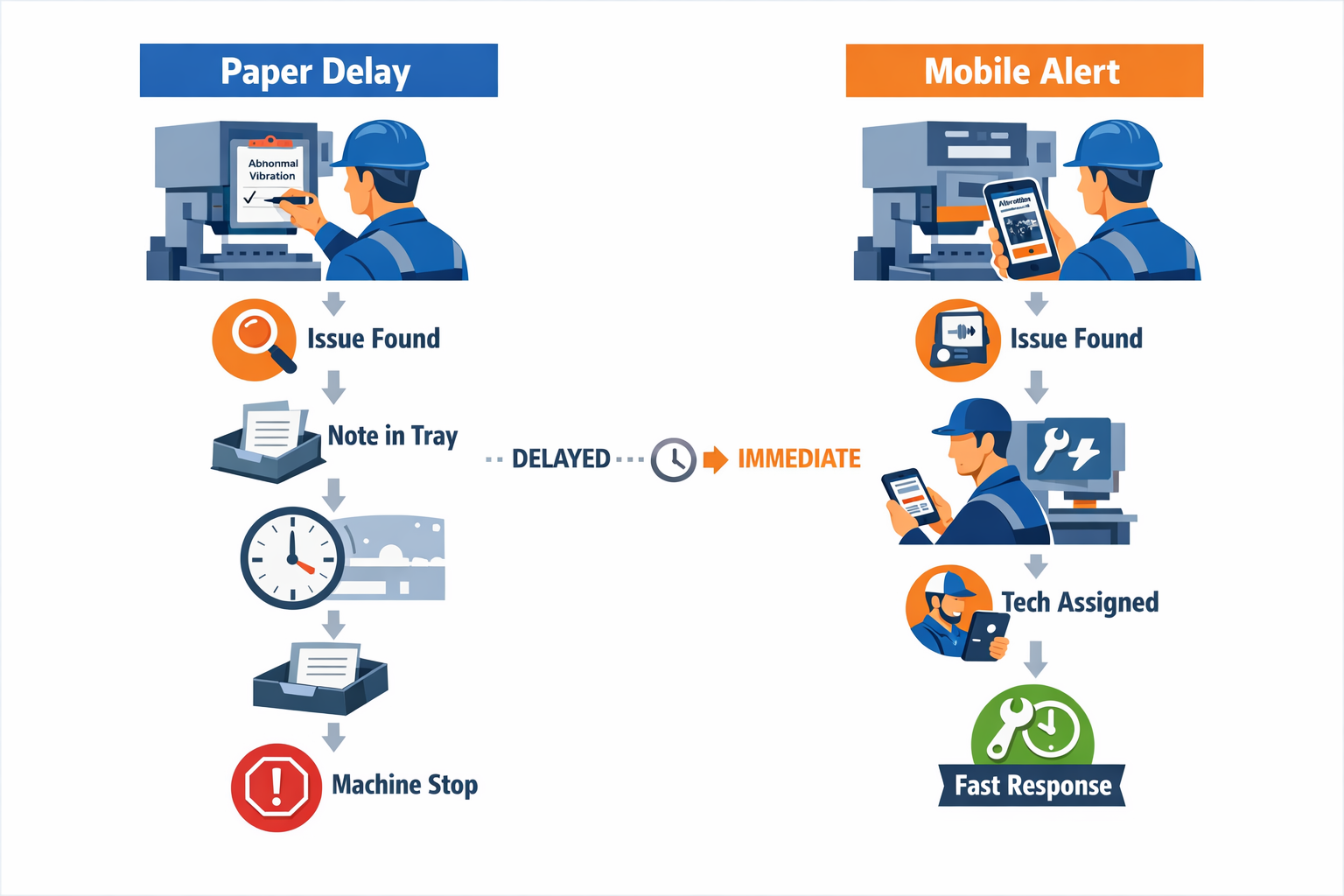
Imagine a production manager at an automotive parts plant who asks operators to inspect stamping presses every four hours for oil leaks, loose fasteners, and abnormal noise. If an operator circles “abnormal vibration” on paper at 10:00 a.m. but the note is only reviewed during the afternoon meeting, the plant loses critical response time. With TPM software or an equipment maintenance software factory team can access on mobile devices, that same abnormality can trigger an instant alert, attach a photo, and route the task directly to the right technician.
Delayed Issue Escalation Turns Minor Defects Into Breakdowns
One of the core goals of TPM is to catch small abnormalities before they become major failures. Manual systems make that difficult because escalation depends too much on individual discipline—someone has to notice the issue, write it clearly, pass the form along, and then follow up again. In busy plants, especially in electronics or food manufacturing, where line speed is high, that chain often breaks.
This is why many plants experience repeat failures that were technically “reported” but not acted on in time. Industry studies frequently show that unplanned downtime can cost manufacturers 5% to 20% of productive capacity, depending on the process and asset criticality. A TPM management tool helps by standardizing what happens when an abnormality is found: who gets notified, how quickly they must respond, and how closure is recorded for audit and analysis.
Autonomous Maintenance Is Inconsistent Across Shifts and Lines
Autonomous maintenance only works when operators perform the same basic care tasks consistently, using the same standards. In manual environments, each shift leader may interpret the checklist differently, skip low-priority tasks during production pressure, or fail to document abnormalities in a usable format. Over time, the result is uneven machine condition and weak TPM discipline across the factory.
This is especially common in multi-line operations where different supervisors train operators differently. For example, in an electronics assembly plant, one SMT line may be diligent about feeder cleaning and sensor checks, while another line only completes the form after the shift ends. A TPM digital platform makes standards visible on mobile devices, adds photo-based work instructions, enforces required fields, and time-stamps completion so plant leaders can see whether autonomous maintenance is actually happening as designed.
Poor Shift Handoffs Create Rework and Missed Follow-Up
Shift handover is a major weak point in manual TPM systems. Operators and technicians often rely on notebooks, verbal updates, or messaging groups to explain what happened during the previous shift. Important details—such as when the fault started, whether a temporary fix was applied, or whether spare parts were requested—can easily be missed.
In a food processing plant, for instance, a filler machine may show intermittent sensor faults during the night shift but continue running after a temporary reset. If the next shift only sees a short handwritten note saying “sensor issue, monitor closely,” they may not know the fault occurred three times already or that contamination risk must be checked. With total productive maintenance software, the handoff record can include fault history, images, technician comments, and open actions, giving the incoming team a clear picture instead of an incomplete summary.
Production and Maintenance Data Stay in Separate Silos
In many factories, production records sit in one spreadsheet, maintenance logs in another, and breakdown reasons on a whiteboard or in a CMMS that operators do not use. That separation makes it hard to answer basic performance questions. Are minor stops increasing after a certain changeover? Does a packaging machine create more downtime on one product format than another? Which recurring faults are hurting both output and quality?
When data is siloed, maintenance teams spend more time arguing about causes than solving them. A connected preventive maintenance software manufacturing team can use alongside production reporting to help link machine condition, downtime events, work orders, and output losses in one system. That matters because TPM is not just about fixing assets; it is about reducing the six big losses with facts, not assumptions.
Limited Visibility Into Recurring Losses Slows Continuous Improvement
Manual TPM makes trend analysis difficult because records are incomplete, inconsistent, and hard to consolidate. Even if the maintenance team collects months of forms, someone still has to manually summarize failure modes, overdue actions, recurring defects, and asset-level patterns. In reality, most plants do this only during monthly reviews, which means recurring losses remain hidden for too long.
A plant manager cannot improve what the factory cannot see clearly. If conveyor motor trips have occurred 18 times in the past six weeks across two shifts, that pattern should trigger root cause analysis immediately—not after quarter-end reporting. A TPM software dashboard or TPM management tool can show recurring downtime categories, MTTR trends, overdue preventive tasks, and chronic-loss assets in real time, helping maintenance and production teams prioritize the issues that affect throughput most.
Why Mobile Access Matters on the Shop Floor
TPM does not happen at a desk. It happens beside presses, mixers, conveyors, chillers, and assembly stations, where operators and technicians need to capture information in the moment. If the system requires people to return to an office terminal later, data quality drops, and response time slows down.
That is why mobile-first equipment maintenance software for factory teams can be used on the shop floor is so important. Operators can scan a machine QR code, complete an autonomous maintenance check, upload a photo of a leak, and trigger an escalation in less than two minutes. With a no-code TPM digital platform like Jodoo, manufacturers can build these workflows around their real SOPs, approval paths, and reporting needs—without waiting for a long custom software project.
Core TPM Workflows Every TPM Digital Platform Should Digitize
A lot of factories buy TPM software expecting better maintenance control, but what they actually implement is often just a digital equipment list with work orders. That is not enough for real Total Productive Maintenance. A strong TPM digital platform should connect operators, maintenance technicians, supervisors, production planners, quality teams, and EHS in one workflow so issues move from detection to closure without getting lost in paper forms, WhatsApp messages, or Excel files.
This matters because unplanned downtime is expensive and highly visible. In automotive and electronics plants, even a short stoppage on a bottleneck machine can delay downstream assembly, increase overtime, and hurt on-time delivery. Studies commonly estimate that unplanned downtime costs manufacturers thousands of USD per hour, and the bigger problem is not only the downtime itself, but the slow response and weak follow-up caused by disconnected systems.
Autonomous Maintenance Inspections
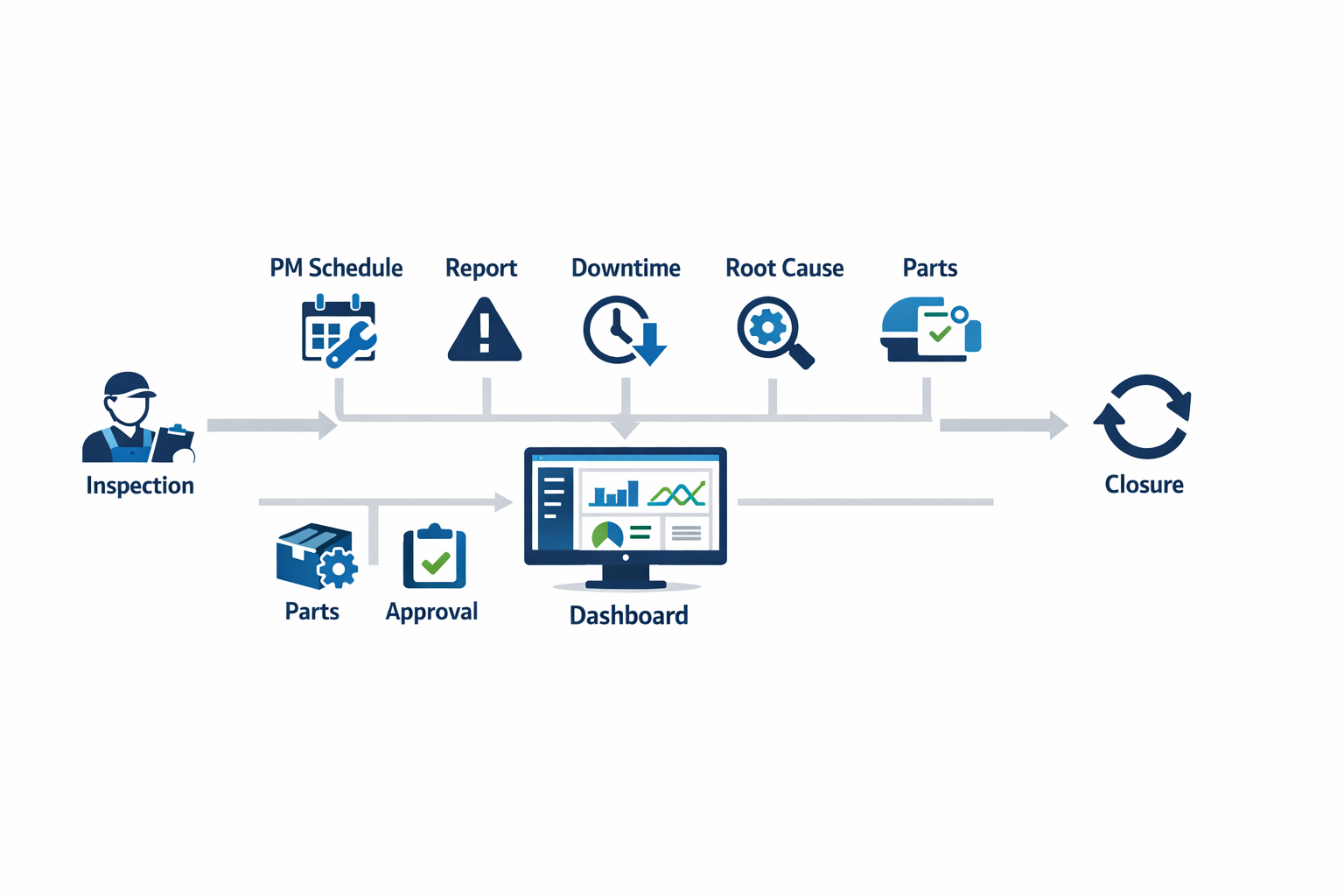
Autonomous maintenance is one of the first workflows that a total productive maintenance software platform should digitize. Operators should be able to complete daily and shift-based checks on mobile devices, including cleaning, lubrication, bolt tightening, visual inspection, and simple condition checks such as vibration, temperature, leaks, or abnormal noise. A digital form should allow photos, standard checklists, QR code asset scanning, and immediate escalation when readings fall outside limits.
Planned Maintenance Scheduling
Planned maintenance is where many factories still rely on whiteboards and spreadsheet calendars, especially across multiple lines or utilities. A good preventive maintenance software manufacturing setup should schedule tasks by time, usage, cycles, or condition, then automatically assign jobs to technicians based on asset type, line, or shift. It should also track overdue PMs, record technician completion time, and store service history in one place.
This is especially important in food manufacturing, where mixers, fillers, conveyors, and refrigeration units often require tightly controlled service intervals to support both uptime and hygiene standards. If a filler lubrication task is delayed by two weeks because no one saw the spreadsheet update, the plant risks both breakdowns and product loss. A connected equipment maintenance software factory workflow makes these delays visible early, not after the line stops.
Abnormality Reporting and Escalation
A TPM program fails when people see abnormalities but do not report them in a structured way. Operators, team leaders, and maintenance technicians need a simple method to log defects such as oil leaks, worn belts, guard damage, sensor faults, and repeated minor stops.
In an electronics assembly plant, for example, an operator may notice that a pick-and-place feeder jams three times per shift but keeps restarting the machine without formal reporting. Over a month, that “small” issue becomes hours of hidden loss and unstable output. A proper TPM digital platform captures every abnormality, links it to the asset, and shows whether the same failure mode is recurring across shifts or product models.
Downtime Logging and Loss Visibility
Downtime logging is one of the most valuable workflows to digitize because it directly connects maintenance performance to production loss. Instead of writing broad reasons like “machine issue” on a shift report, factories should capture start time, end time, asset, cause code, line, product, and response time in real time. This gives maintenance and production teams a shared dataset for OEE improvement instead of two different versions of the same event.
For example, in a beverage plant, a packaging line may stop repeatedly due to label sensor faults, but maintenance records show only one repair ticket while production records show several short stops. That gap makes analysis unreliable. With a digital TPM management tool, the short stops, major breakdowns, technician interventions, and restart confirmations can all be tied together, making true chronic losses visible.
Root Cause Analysis and CAPA Follow-Up
If your system stops at work order completion, it is not supporting TPM maturity. Repeated failures need structured root cause analysis using tools like 5 Whys, fishbone diagrams, and 8D-style corrective action tracking. A capable total productive maintenance software platform should not only document the analysis but also assign actions, set deadlines, require verification, and show whether recurrence has actually been reduced.
This is where many factories lose momentum. A line supervisor may run a quick 5 Why session after a breakdown, but the agreed actions—replace a bracket design, retrain operators, revise lubrication frequency, update guarding—sit in an email thread and are never fully closed. With a connected TPM digital platform, corrective and preventive actions can be tracked across departments, including maintenance, engineering, production, quality, and EHS, with full accountability.
Spare Parts Requests and Inventory Coordination
Maintenance delays are often caused by missing spare parts rather than technician availability. That is why spare parts requests should be part of the TPM workflow, not a separate manual process. When a technician identifies a failed bearing, sensor, valve, or motor, the system should allow direct request submission, stock checking, approval routing, and linkage to the work order and asset history.
In a palm oil processing plant or food factory, even a low-cost part can create a major disruption if it is not available during a planned stop. A digital spare parts workflow reduces back-and-forth calls to the store and gives planners clearer visibility into consumption trends. Over time, this helps plants reduce both emergency buying and excessive inventory, which is critical when MRO spending is under pressure.
Supervisor Approvals and Cross-Functional Control
TPM is not only about maintenance execution; it also depends on disciplined approvals and governance. Certain actions should require supervisor review, such as high-cost spare replacement, PM postponement, contractor work, machine restart after critical failure, or CAPA closure. A strong equipment maintenance software factory solution should allow role-based approvals, audit trails, and escalation rules without slowing down urgent work.
This is particularly useful in regulated or safety-sensitive environments. If a machine guarding issue is reported in a food or electronics plant, the action may require both maintenance rectification and EHS verification before restart. A proper TPM software workflow ensures that approval is documented, visible, and linked to the incident, which supports both compliance and safer operations.
Why TPM Software Must Connect Maintenance, Production, Quality, and EHS
The biggest mistake is treating TPM as a maintenance department system only. In reality, operators detect many issues first, production owns part of basic care, quality sees defect patterns linked to equipment condition, and EHS must be involved when failures create safety risk. That is why the right TPM management tool should function as a cross-functional operational system, not just a CMMS-style database.
Jodoo is useful here because manufacturers can build a TPM digital platform around their actual factory process, rather than forcing teams into rigid screens. You can digitize operator checks, planned maintenance, abnormality tagging, downtime logging, approval flows, CAPA tracking, and dashboards in one environment. For plants trying to move beyond paper checklists and spreadsheet PM trackers, that is what makes total productive maintenance software practical on the shop floor.
What to Look for in TPM Software: Buyer’s Checklist for Manufacturers
Choosing TPM software is not the same as choosing a basic maintenance ticketing system. Many factories already use some form of preventive maintenance software that manufacturing teams rely on for schedules, work orders, and spare parts tracking. That is useful, but TPM goes further: it involves operators, supervisors, maintenance technicians, and plant leaders in a shared system for daily care, abnormality reporting, root cause follow-up, and performance improvement. If your software only supports the maintenance department, it is not a complete TPM management tool.
A good evaluation approach is simple: ask whether the system can support how maintenance actually happens on the shop floor. Imagine a production manager at an automotive parts plant who wants operators to report oil leaks, loose guards, and recurring micro-stoppages during the shift, while maintenance needs structured follow-up, and leadership wants downtime trends by line. If the software cannot connect those three needs in one workflow, you will end up back in WhatsApp chats, paper tags, and Excel trackers within weeks. That is exactly why many rigid systems fail after the pilot stage.
Ease of Use for Operators Matters First
The best total productive maintenance software is not judged only by what the maintenance manager can configure. It is judged by whether line operators, team leaders, and technicians will actually use it during a busy shift. In manufacturing, adoption breaks down when reporting a machine abnormality takes more than a minute or requires too many fields, logins, or screens.
Look for a system with clean mobile forms, large buttons, photo capture, barcode or QR scanning, and simple status options such as “reported,” “under review,” “in progress,” and “closed.” In an electronics assembly plant, for example, an operator should be able to scan a machine QR code, attach a photo of a feeder jam, choose the abnormality type, and submit the issue in under 30 seconds. That kind of usability is what turns TPM from a management initiative into a daily operating habit.
This matters because frontline participation is one of the biggest TPM success factors. Studies on digital frontline tools and maintenance workflows consistently show that faster, simpler reporting increases issue capture and shortens response time. If your current process depends on handwritten tags or verbal escalation, you are likely losing smaller abnormalities that later become breakdowns, scrap, or safety risks.
Configurable Workflows Beat Rigid Templates
No two factories run TPM in exactly the same way. A food manufacturer may require hygiene verification before maintenance work starts, while an automotive supplier may need layered approvals for safety-related stoppages or machine parameter changes. That is why a strong TPM digital platform should let you configure workflows without forcing your plant to adapt to a fixed software logic.
At a minimum, the workflow should support abnormality reporting, triage, task assignment, escalation, root cause tracking, verification, and closure. It should also allow different workflows for autonomous maintenance, planned maintenance, focused improvement, and audit findings. If your plant follows ISO 9001 or ISO 45001 procedures, configurable approvals and audit trails become especially important because the process must be visible and repeatable.
A rigid off-the-shelf tool often falls short here. Many systems are designed mainly for preventive work orders, so they can schedule lubrication and inspections but struggle with TPM-specific flows such as operator-tagged abnormalities, recurring minor stoppage analysis, or cross-functional action tracking after a Kaizen event. When that happens, teams create side spreadsheets to fill the gap, and the software stops being the single source of truth.
Mobile Forms and QR-Based Reporting Should Be Standard
Shop floor maintenance data should be captured where the problem happens, not re-entered later from notebooks. This is why mobile-first forms and QR-based reporting are now essential in any equipment maintenance software that factory teams want to use seriously. If a technician or operator must walk back to a desktop terminal to log a fault, reporting quality drops and delays increase.
Look for mobile forms that support photos, signatures, timestamps, dropdowns, conditional logic, and offline or low-connectivity use where needed. QR-based reporting is especially valuable because it reduces identification errors and speeds up submission. In a food packaging plant, for example, operators can scan the QR code on a filler, log a recurring seal temperature deviation, and trigger an alert to maintenance before the line suffers a longer stoppage.
The QR workflow should do more than open a blank form. Ideally, it should automatically pull in machine ID, line, asset class, maintenance history, standard check items, and open issues related to that equipment. That turns a simple scan into a context-aware TPM action point, which is far more useful than a generic fault report.
Dashboards Should Show Action, Not Just History
A common mistake when evaluating TPM software is focusing too much on data capture and not enough on decision support. The right dashboards should help plant managers and maintenance leaders act faster, not just review last month’s charts. If a dashboard cannot show overdue actions, recurring abnormalities, MTTR trends, downtime by machine family, and open issues by owner, it is not supporting TPM discipline.
For example, imagine a production manager at an electronics plant reviewing a dashboard at the morning meeting. She should be able to see that one SMT line has the highest number of repeat feeder-related stoppages, that three autonomous maintenance findings are overdue, and that one technician team is carrying most of the unclosed work. That visibility helps the plant respond before the problem affects output, OEE, or customer delivery.
Dashboards should also support different roles. Operators may need a simple list of open abnormalities by line, while maintenance managers need response time, closure rate, mean time between failures, and failure mode patterns. Plant directors may want a multi-site view showing whether TPM compliance and equipment losses are improving quarter over quarter.
Alerts and Escalation Rules Prevent Issues from Going Quiet
One of the biggest weaknesses of paper-based TPM is that reported issues disappear into notebooks, whiteboards, or email threads. Effective total productive maintenance software should include alerts, reminders, and escalation rules so that no abnormality sits unaddressed for days. This is especially important in plants running high-mix or 24/7 operations, where shift handovers can easily break issue ownership.
Look for automated notifications based on priority, asset type, elapsed time, or production impact. For instance, if a critical bottleneck machine in an automotive stamping plant has an unresolved lubrication abnormality for more than four hours, the system should escalate it automatically to the maintenance supervisor. If a food processing line has repeated sanitation-related defects linked to equipment condition, the software should trigger immediate review by both maintenance and quality.
This is where a broader TPM management tool often outperforms a basic CMMS-style setup. A simple PM system may remind technicians about scheduled tasks, but TPM requires active management of abnormalities, cross-functional ownership, and escalation when issues affect safety, quality, or throughput. That demands workflow automation, not just calendar reminders.
Role-Based Permissions Are Essential in Real Factories
Manufacturing plants do not need everyone to see or edit everything. Operators should be able to report and view issues relevant to their area, technicians should update assigned work, supervisors should approve closures, and plant leaders should review cross-line KPIs. A capable TPM digital platform must support role-based permissions at a detailed level.
This matters more in multi-department and multi-site environments than many buyers expect. In a Tier 1 automotive supplier, for example, production may need access to line-level abnormality status, engineering may need root cause and corrective action data, and corporate reliability teams may only need dashboard visibility. Without permission controls, companies either expose too much sensitive data or restrict access so heavily that collaboration suffers.
Role-based access is also critical for auditability. When a safety-critical issue is reported, you need a clear record of who logged it, who approved the action, who completed the work, and when the machine was verified for restart. That is difficult to manage consistently with spreadsheets and almost impossible with informal messaging tools.
Integration Matters More Than Most Buyers Expect
TPM does not operate in isolation. Maintenance data often needs to connect with ERP, spare parts inventory, production systems, quality records, HR training data, or BI tools. If your TPM software cannot integrate with these systems, your team will spend time on duplicate entry and manual reconciliation instead of solving equipment problems.
A practical example is spare parts consumption. If a technician closes a work order for a conveyor drive replacement in a food plant, the system should ideally update parts usage, asset history, and cost records automatically. In more advanced setups, downtime events can also be linked with production loss data, helping managers quantify the business impact of poor equipment conditions.
Integration is also important when you are upgrading from the existing preventive maintenance software that manufacturing teams already use. You do not necessarily need to replace every tool at once. In some plants, the right approach is to extend maintenance processes with a more flexible TPM layer for operator reporting, audits, action tracking, and dashboards while keeping certain backend asset or inventory records connected through integration.
Multi-Site Standardization With Local Flexibility
Large manufacturers often want one TPM framework across plants, but each site still has different equipment, staffing, product mix, and escalation rules. Your software should support both standardization and local variation. This is one of the clearest differences between a scalable TPM digital platform and a narrow standalone tool.
For example, a regional manufacturer with plants in Malaysia, Thailand, and Vietnam may want common abnormality categories, KPI definitions, audit formats, and reporting structures across all sites. At the same time, the food plant may need allergen-control checkpoints, while the electronics plant needs ESD-related machine checks and faster escalation for high-value bottleneck equipment. The platform should let headquarters standardize the core model without forcing every site into an impractical one-size-fits-all process.
This flexibility also supports continuous improvement. Plants should be able to test better checklists, escalation rules, and visual dashboards locally, then roll successful practices into the wider standard. That is much harder to achieve with rigid packaged software that locks form structure or workflow logic behind vendor change requests.
Compare TPM Software Against Your Existing PM Tool
When buyers evaluate new systems, they often compare software feature lists instead of comparing operational coverage. A better question is this: what TPM work is currently happening outside your existing PM system? If operators report abnormalities on paper, if autonomous maintenance checks are stored in folders, or if Kaizen actions are tracked in Excel, then your current system is not covering TPM well enough.
A basic preventive maintenance software that manufacturing teams already use may be strong in scheduling, work orders, and asset history. But a full TPM management tool should also support operator care routines, daily checklists, condition-based abnormality reporting, visual escalation, root cause workflows, audit records, and cross-functional action management. That difference is important because TPM is not only about maintaining equipment on time; it is about building shared ownership of equipment performance.
In practice, many manufacturers need both structured maintenance planning and flexible TPM execution. The most effective systems bridge the two, so a reported abnormality can become a task, a repeated task can trigger root cause analysis, and the resulting insights can be rolled into new preventive standards. That closed loop is what separates disconnected maintenance tools, which often fail to deliver.
A Practical Shortlist Checklist
When you evaluate TPM software, use a shortlist based on plant realities rather than vendor demos alone. Can operators submit an issue in under 30 seconds? Can you configure workflows without coding? Can the system support QR-based machine reporting, mobile audits, automated alerts, and site-specific rules? Can managers see live KPIs by line, asset, owner, and site?
Also, ask whether the platform can evolve with your TPM maturity. A plant may start with abnormality reporting and autonomous maintenance checklists, then later add spare parts linkage, layered audits, root cause workflows, or multi-site dashboards. A flexible equipment maintenance software factory teams can adapt over time is usually a better long-term investment than a rigid tool that looks polished in a demo but cannot match your processes six months later.
For many manufacturers, that is where a configurable no-code platform such as Jodoo fits well. Instead of forcing your factory into fixed templates, you can build a TPM system around your actual workflows, forms, dashboards, approval logic, and integration needs. That gives maintenance, production, and CI teams one connected environment to manage TPM as an operating system, not just a maintenance checklist.
How Jodoo Works as a Flexible TPM Management Tool for Your Factory
Jodoo works well as a TPM software option because it is not limited to one fixed maintenance workflow. Instead of forcing your plant to adapt to rigid screens and fields, Jodoo lets you build a TPM digital platform around the way your production, maintenance, and quality teams already operate. That matters in real factories, where an automotive parts line, an SMT electronics line, and a food packaging line often have very different inspection points, escalation rules, and maintenance approval paths. For plants trying to move away from paper checklists, WhatsApp messages, and scattered Excel files, this flexibility is a practical advantage.
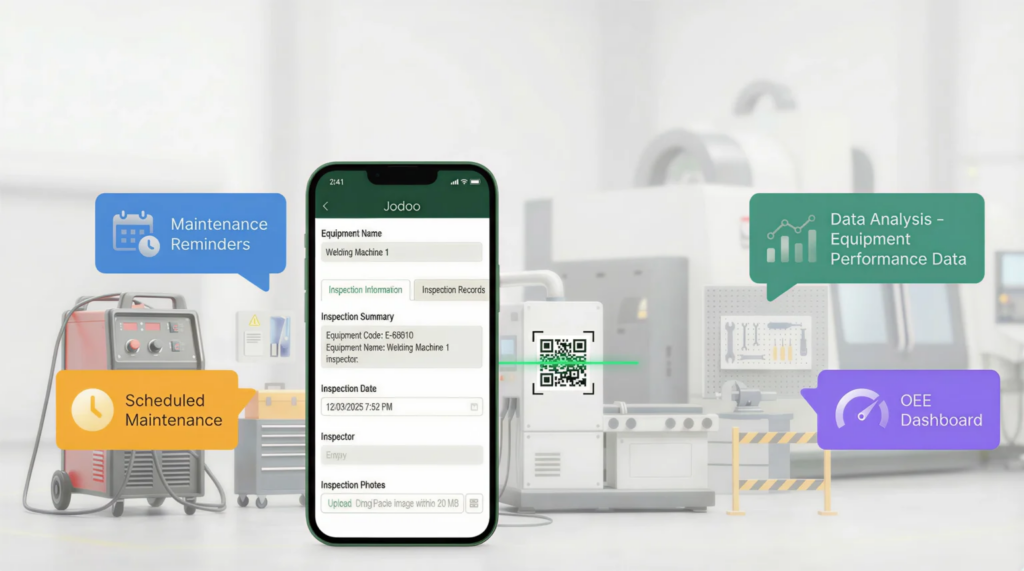
In TPM, the challenge is rarely just “record maintenance activity.” The bigger challenge is coordinating autonomous maintenance, planned maintenance, abnormality reporting, spare parts follow-up, and management review in one connected process. Jodoo helps manufacturers do that without heavy custom development, so operations teams can digitize workflows faster and keep improving them as the plant changes. This makes it a strong fit for companies looking for total productive maintenance software that can evolve with new assets, lines, and KPI requirements.
Build TPM Workflows Around Your Actual Shop Floor Process
Many factories do not run TPM exactly the same way across every department. A stamping press in an automotive plant may require hourly checks for lubrication, temperature, and die condition, while a filling machine in a food factory may need sanitation verification, changeover sign-off, and daily condition checks. With Jodoo, you can configure different digital forms, workflows, and dashboards for each asset group while still keeping all data in one system. That gives you a more practical TPM management tool than a one-size-fits-all package.
Imagine a production manager at an automotive parts plant who wants operators to complete autonomous maintenance checks at the start of every shift. In Jodoo, the team can build a mobile checklist that captures machine condition, photos of leaks or wear, meter readings, and operator signatures. If an operator finds a hydraulic oil leak, the same workflow can trigger an abnormality report, notify maintenance, and create a trackable action item without re-entering data. This reduces the delay between detection and response, which is critical because unplanned downtime can cost manufacturers thousands of USD per hour, depending on the process.
Support Mobile Inspections and Faster Abnormality Escalation
A good equipment maintenance software factory environment needs to work where the problem happens: at the machine, not later at a desktop. Jodoo supports mobile data capture, so operators, technicians, and supervisors can submit inspections directly from the shop floor using phones or tablets. They can attach photos, scan QR codes on equipment, record readings, and submit faults immediately. This is especially useful in large plants where maintenance teams cover multiple lines and need instant visibility.
Abnormality escalation is where many TPM programs break down. Operators may notice loose guards, unusual vibration, or recurring minor stops, but the issue gets buried in a paper form or mentioned only during shift handover. With Jodoo, you can set rules so that high-priority abnormalities automatically alert the right people, assign deadlines, and track closure status. In practice, this helps prevent small defects from becoming larger failures, which supports the TPM goal of reducing breakdowns and chronic losses.
Connect Maintenance Requests, Approvals, and Follow-Up
In many plants, maintenance requests still move through informal channels such as phone calls, whiteboards, or chat groups. That creates gaps in traceability, especially when production, maintenance, and quality each keep separate records. Jodoo helps standardize this process by turning a machine issue into a digital request with status, ownership, timestamps, and supporting evidence. For factories that need stronger compliance and auditability, that is a major step up from spreadsheets.
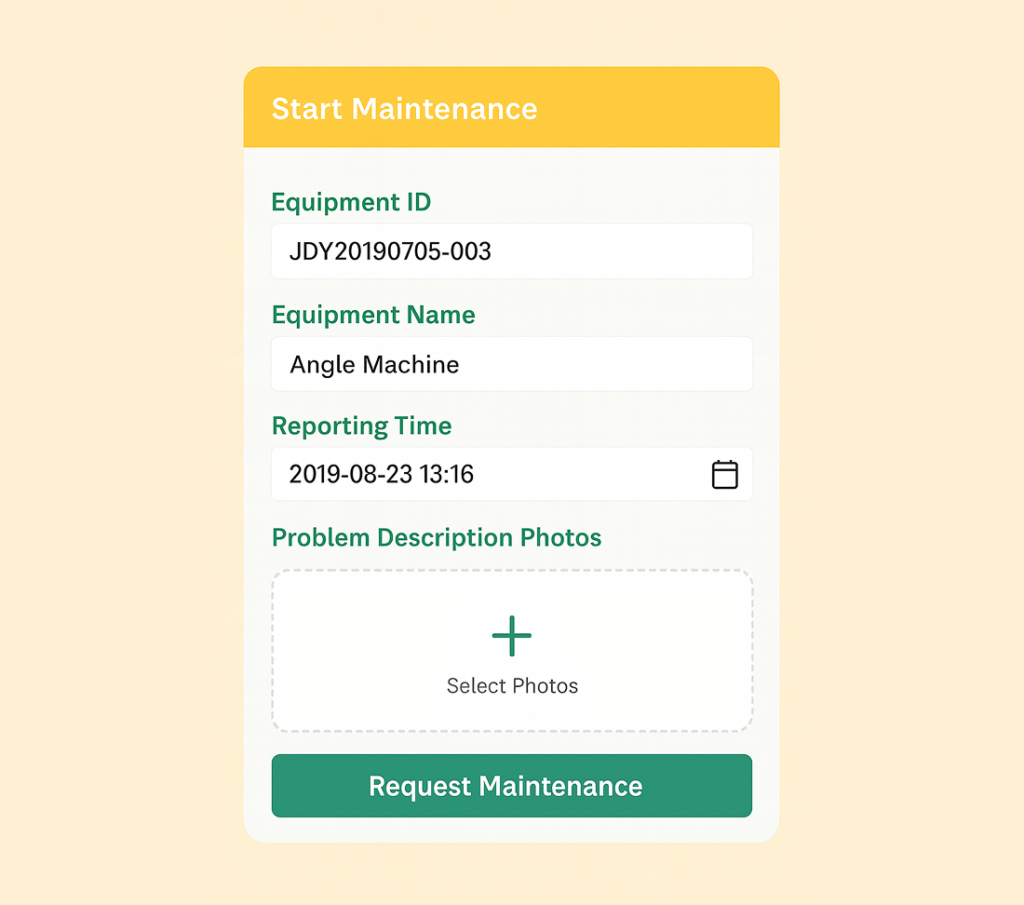
For example, an electronics manufacturer may require different approval routes depending on the issue severity. A minor feeder calibration issue can go straight to the line technician, while a reflow oven temperature deviation may need production, maintenance, and quality review before restart. Jodoo’s workflow engine allows plants to build those approval paths without coding, so the process reflects actual control requirements on the floor. This makes Jodoo useful not just as maintenance tracking software, but as preventive maintenance software, manufacturing teams can align with internal SOPs and ISO-driven procedures.
Give Production, Maintenance, and Quality One Shared View
TPM performance improves when departments stop working from different versions of the truth. Jodoo centralizes inspection records, maintenance requests, abnormality logs, action items, and KPI dashboards in one place, so production, maintenance, and quality teams can see the same live status. A maintenance manager can track overdue PM tasks, a production manager can monitor equipment downtime by line, and a quality manager can review whether recurring machine issues are linked to defect trends. This cross-functional visibility is essential because equipment losses rarely sit within one department only.
Real-time dashboards also make TPM reviews more effective. Instead of manually compiling weekly reports, plants can visualize mean time between failures, mean time to repair, open abnormalities, planned maintenance completion rate, and recurring loss categories automatically. Studies commonly show that poor maintenance practices can reduce productive capacity by 5% to 20%, so even modest improvement in response time and PM completion can have a measurable output impact. With a configurable dashboard layer, Jodoo helps turn TPM data into actions rather than static reports.
Adapt as Your Factory Changes
One reason manufacturers struggle with traditional software is that TPM processes do not stay fixed. New equipment arrives, lines are rebalanced, audit criteria change, and management wants new KPIs after every improvement cycle. A rigid system often means long IT queues or expensive customization work each time the plant needs an adjustment. Jodoo’s no-code approach gives operations teams more control to update forms, add fields, change approval logic, or build a new maintenance app for a different department much faster.
That flexibility is valuable for multi-site or mixed-process manufacturers. A food plant may want sanitation-focused checklists, while a palm oil processing site may need route-based inspections for pumps, conveyors, and tanks across wide outdoor areas. Both can operate on the same total productive maintenance software framework in Jodoo while keeping site-specific workflows.
A Practical Fit for Continuous Improvement
TPM is not only about scheduling maintenance work; it is also about sustaining daily discipline and making losses visible. Jodoo supports that by linking shop floor data capture, workflow automation, and dashboards in one platform, which helps plants close the loop from inspection to action to management review. Instead of treating TPM as a separate maintenance activity, manufacturers can connect it with layered audits, CAPA, spare parts control, and continuous improvement initiatives. That makes Jodoo a strong option for companies looking for a TPM digital platform that can support both daily execution and long-term operational improvement.
Example: How a Manufacturer Can Use Jodoo to Digitize Total Productive Maintenance Software Workflows
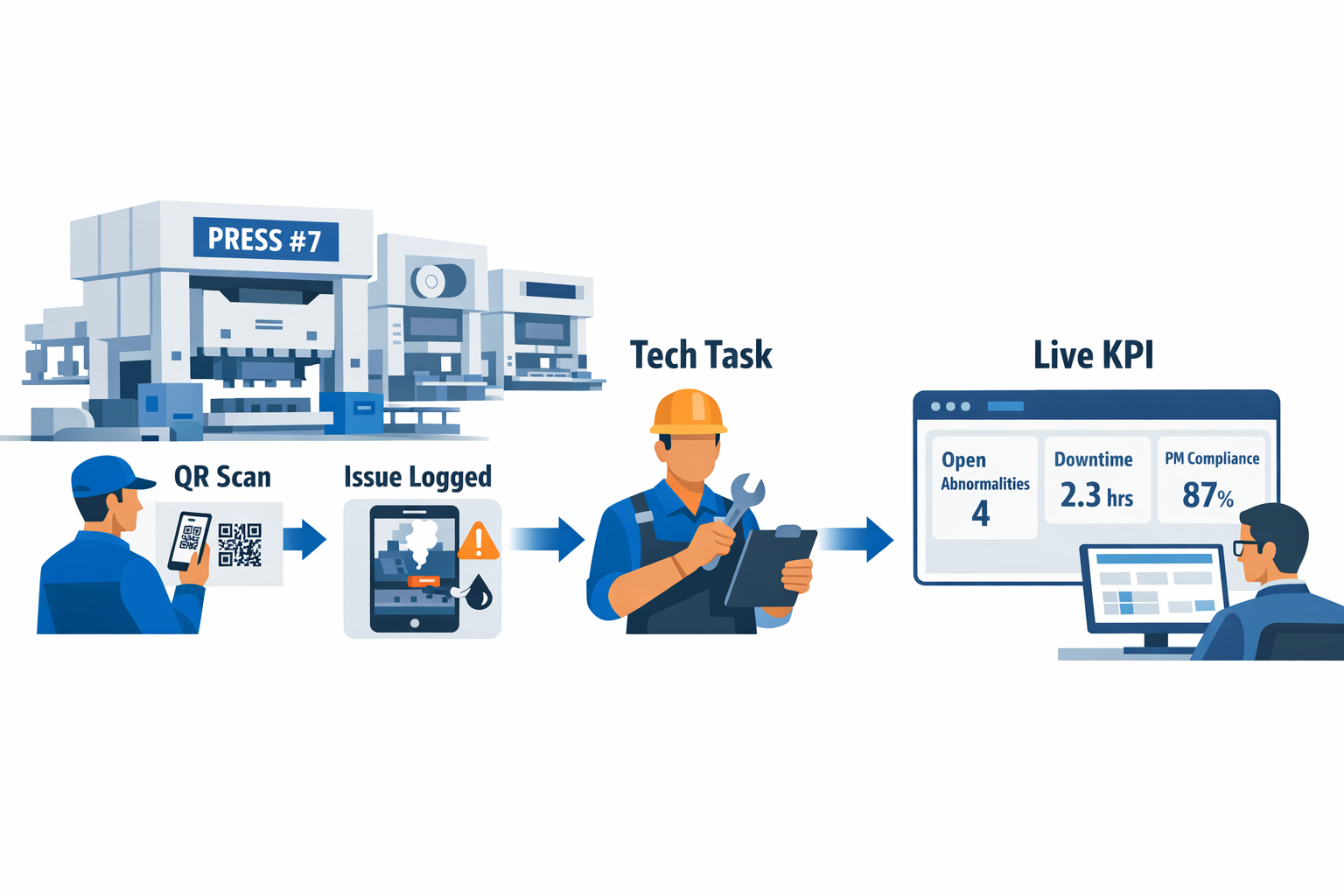
Now imagine the same plant using Jodoo as a TPM digital platform built around its actual workflow. Operators complete autonomous maintenance checks on a mobile form at the machine, attach photos, and scan a QR code linked to the asset record. If they log an abnormality such as overheating on Press #7, Jodoo automatically creates a maintenance task, routes it to the right technician, and timestamps the event. Instead of waiting for the next toolbox meeting or spreadsheet update, the maintenance team gets an alert immediately and can act before the issue becomes unplanned downtime.
How The Workflow Looks on the Shop Floor
In this setup, each machine has a digital asset card with equipment ID, line location, last PM date, common failure modes, and open issues. An operator doing a start-of-shift check records lubrication status, safety guard condition, air pressure, and cleaning completion in a Jodoo form. If any answer falls outside the standard, the system triggers a follow-up workflow automatically. That makes Jodoo function not just as a data collection app, but as a practical TPM management tool tied directly to equipment conditions.
For the maintenance manager, the next step is preventive work control. Jodoo can schedule recurring PM tasks based on calendar intervals, runtime, or production cycles, depending on how the plant maintains its assets. In an electronics factory, for example, a reflow oven may require chamber inspection every week and sensor calibration every month. With Jodoo, teams can adapt themselves, technicians receive task lists by priority, supervisors can track overdue work, and every completed activity is logged with signatures, comments, and photos.
Downtime Capture Becomes More Accurate
One of the biggest TPM problems in many factories is that downtime data is incomplete or delayed. Operators often note “machine down” on a whiteboard, while the maintenance team records a different cause later in Excel. That creates disputes over whether the real problem was tooling, material, settings, or equipment failure. A digital workflow helps standardize the truth at the source.
With Jodoo, the operator can submit a downtime event from the line as soon as the machine stops, choosing from predefined categories such as mechanical fault, electrical fault, sensor issue, jam, or changeover-related issue. The technician then updates the same record with root cause, action taken, spare parts used, and restart time. This gives the plant one shared downtime record instead of multiple disconnected versions. In a food packaging plant, that could mean identifying that repeated sealing-machine stops were caused by worn heating elements, not operator error, allowing the team to revise PM frequency and reduce recurring losses.
What Management Can See in Real Time
For plant managers, the value of total productive maintenance software is not only faster issue handling but also visibility. Jodoo dashboards can show open abnormalities by line, PM completion rate by week, mean time to repair, repeat failures by asset, and downtime minutes by cause. Instead of asking supervisors to manually consolidate reports every Friday, the dashboard updates as operators and technicians enter data. This is especially useful in multi-line environments where maintenance resources must be prioritized quickly.
Imagine a maintenance manager reviewing Monday morning performance for an injection molding area. The dashboard shows that Line 4 had six minor stops over the weekend, all tied to the same hydraulic unit, and that two preventive jobs are already overdue. With that information, the manager can assign a planned intervention before the next high-volume order starts. In practice, this shifts TPM from reactive firefighting to controlled maintenance planning, which is exactly what an equipment maintenance software factory environment needs.
Why This Approach Works for TPM Rollout
Many factories hesitate to roll out a new TPM software system because they assume it will require a long IT project or a full replacement of existing tools. In reality, a no-code system like Jodoo lets the plant start with one pilot area, such as stamping, molding, or packaging, and then expand once the workflow is proven. You can begin with operator checks, abnormality escalation, PM scheduling, and downtime logging, then later add spare parts, layered audits, or OEE analysis. That phased rollout is often the fastest way to build confidence and sustain adoption across maintenance and production teams.
Conclusion: Choose TPM Software That Fits the Way Your Plant Really Works
The right TPM software should do more than log breakdowns or schedule PM tasks. It should help your team run TPM the way it is meant to work on the shop floor: with clear operator checks, fast escalation of abnormalities, closed-loop corrective actions, and visible performance tracking across maintenance and production. In practice, that means one system connecting autonomous maintenance, planned maintenance, audits, spare parts, and continuous improvement instead of splitting them across paper forms, Excel files, and separate tools.
Imagine a production manager at an electronics plant who needs to reduce minor stops on a high-speed SMT line, while the maintenance manager is tracking recurring feeder issues and overdue actions. If their TPM software cannot adapt to that real workflow, the system becomes another admin burden instead of an operational tool. The best approach is to choose software that matches your plant’s processes today and can still evolve as your lines, teams, and KPIs change.
That is where Jodoo fits. As a no-code lean manufacturing platform, Jodoo helps manufacturers digitize TPM, maintenance workflows, inspections, action tracking, and improvement activities without heavy custom development. If you want a more flexible total productive maintenance software solution, you can start a free trial or book a demo to see how Jodoo can fit your factory.