Introduction: Why Kaizen Software Matters in Modern Manufacturing
In many factories, the biggest barrier to continuous improvement is not a lack of ideas. It is the lack of follow-through. Studies often show that a large share of improvement actions stall after workshops because teams still rely on paper checklists, Excel trackers, and long email chains. That is why kaizen software has become increasingly important for manufacturers that need faster execution, better visibility, and stronger accountability on the shop floor.
Imagine a production manager at an automotive parts plant who runs a successful kaizen event that cuts changeover time by 12%, but three weeks later half the follow-up actions are still open because ownership was unclear. Or think of an electronics factory where operators submit improvement ideas, but no one can see which ideas were approved, implemented, or tied to measurable savings. In both cases, the problem is not lean knowledge. The problem is a disconnected system for managing improvement work.
This article explains what kaizen management software does, which features matter most, how it compares with spreadsheets, and how you can use a no-code platform like Jodoo to digitize continuous improvement across lines, departments, and plants.
What Is Kaizen Software and How Does It Support Continuous Improvement?
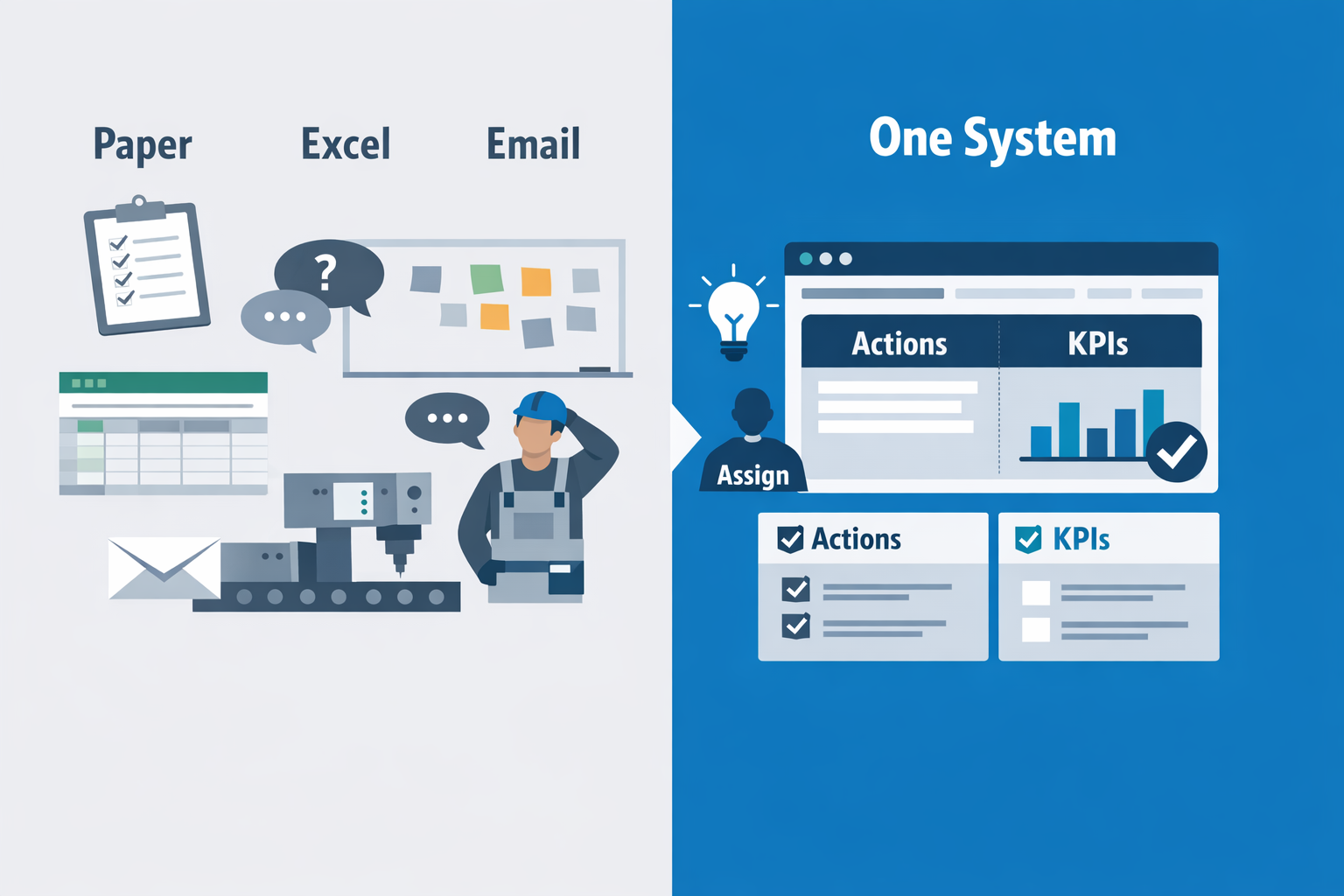
Kaizen is often described as a mindset of small, ongoing improvements, but on a factory floor, mindset alone is not enough. If ideas stay on paper sheets, whiteboards, Excel files, or in supervisors’ WhatsApp chats, improvement activity becomes difficult to track and even harder to sustain. Kaizen software is the digital system that turns continuous improvement from a philosophy into a repeatable operational process. In practical terms, it gives your plant a structured way to capture improvement ideas, evaluate them, assign owners, track completion, and verify business results.
For Lean Managers and Plant Managers, this matters because most CI programs fail at follow-through, not ideation. One operator may suggest reducing changeover walking distance, another team may identify repeated labeling errors, and a CI engineer may launch an A3 on scrap reduction, but without one system of record, those actions get fragmented. A good continuous improvement software platform connects these activities in one place so teams can see what is open, what is overdue, and what has delivered measurable gains. That is what separates isolated kaizen events from a scalable improvement system.
More Than a Suggestion Box
Many factories already collect ideas, but collecting ideas is only the first 10% of the work. A true kaizen management software solution goes beyond suggestion submission by supporting the full lifecycle of improvement. It should let you log problems and ideas, classify them by area or loss category, route them for review, assign action owners, and monitor closure status with timestamps and evidence. This is especially important in plants with multiple shifts, multiple production lines, or more than one site, where paper-based follow-up quickly breaks down.
Imagine a production manager at an automotive parts plant who notices recurring downtime during fixture changeovers on Line 3. Operators have raised the issue before, but each shift documents it differently, and no one can see whether previous actions worked. With a kaizen digital platform, the team can submit the issue from a mobile device, attach photos of the fixture setup, assign maintenance and production actions, set deadlines, and track whether changeover time actually drops after the countermeasure is implemented. Instead of discussing the same problem every month, the plant builds a digital record of what was tried and what worked.
How Kaizen Software Supports the Full CI Cycle
The biggest value of kaizen software is that it supports each stage of continuous improvement in a disciplined way. First, it captures ideas and problems in a standard format so teams are not relying on memory or inconsistent paper forms. Second, it helps leaders prioritize opportunities based on impact, urgency, cost, or safety risk, which prevents teams from spending too much time on low-value improvements. Third, it assigns responsibilities and due dates, making action ownership visible across departments.
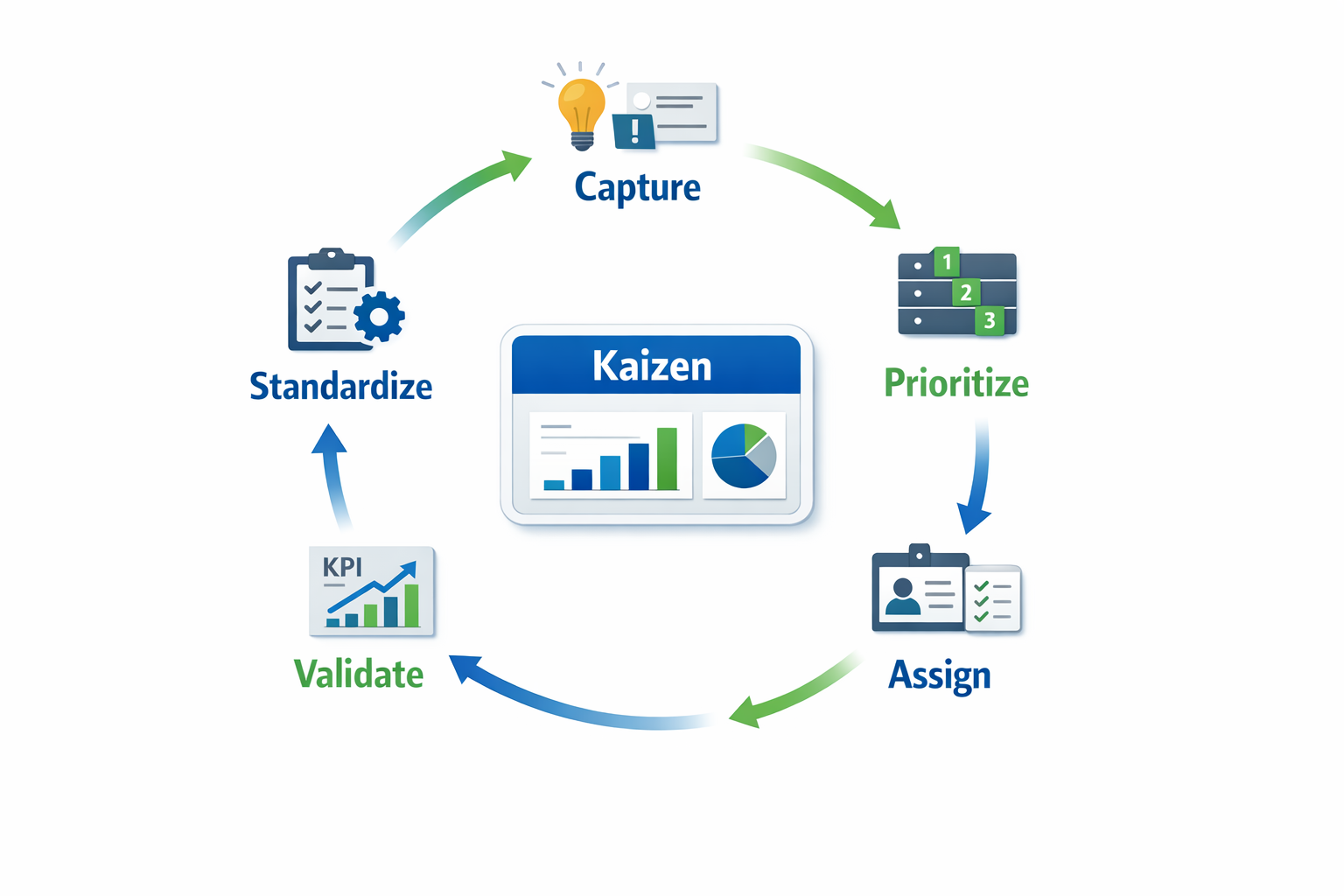
After actions are completed, the software should help verify results rather than assume success. For example, if an electronics assembly plant changes workstation layout to reduce motion waste, the team should be able to compare before-and-after cycle times, defect rates, or output per labor hour. This is where CI management software becomes especially useful, because it links actions to measurable KPIs instead of closing tasks based on opinion. In many factories, this step is missing, which is why management often questions the ROI of kaizen activity.
The final stage is standardization. Once an improvement proves effective, it should not live only in one supervisor’s notebook or in the memory of the day shift. A strong kaizen tracking tool helps plants update SOPs, training checklists, audit items, and control plans so the improvement becomes part of normal work. That is how kaizen moves from event-based problem solving to sustained operational discipline.
Typical Functions You Should Expect
In manufacturing, the most useful kaizen software features are practical rather than flashy. Teams typically need digital forms for idea submission, workflows for approval and escalation, action tracking with reminders, and dashboards that show open items, overdue tasks, completion rates, and savings delivered. It is also valuable when the system can support related lean processes such as A3 problem solving, 8D, layered process audits, and shop floor inspections, because improvement opportunities often come from those activities. When all of these are connected, the plant gets one source of truth for continuous improvement.
For example, in a food manufacturing plant, a line leader may raise repeated minor stoppages caused by inconsistent film feeding on packaging equipment. Using continuous improvement software, the issue can be tagged under OEE loss, routed to maintenance, and linked to photos, downtime records, and corrective actions. If the team reduces stoppages by 18% over six weeks, the result can be documented in the same system and then rolled into standard checks for operators and technicians. That level of traceability is difficult to maintain with spreadsheets alone.
Why Manufacturers Are Moving to Digital CI Systems
The shift toward digital improvement management is driven by scale, speed, and accountability. According to industry research, manufacturers that digitize frontline workflows often see faster issue resolution and better cross-functional visibility because data no longer sits in disconnected tools. In practice, even a mid-sized plant can generate dozens of kaizen ideas, audit findings, and action items every month, and once those exceed the capacity of manual tracking, teams start losing momentum. A kaizen digital platform helps prevent that by making status visible in real time.
This is particularly relevant for plants working under ISO 9001 or customer-specific audit requirements, where evidence of corrective action and process control matters. If an auditor asks how your site tracks improvement actions from internal audits, safety observations, or quality escapes, a digital record is far stronger than folders of paper forms. More importantly, plant leaders can see whether improvement activity is balanced across departments or concentrated in only one area. That visibility helps CI become part of factory management, not just a side project owned by the lean team.
Common Pain Points: Why Spreadsheets and Manual Kaizen Tracking Break Down
Improvement Ideas Get Lost Before They Become Results
In many factories, continuous improvement still starts on paper, in Excel, or in a chat group. That may work for a single kaizen event on one line, but it quickly breaks down when you have dozens of ideas, multiple departments, and several approvers involved. A suggestion raised during a morning Gemba walk can easily stay in a notebook, get buried in email, or disappear after a shift change. Without a proper kaizen tracking tool, the real problem is not idea generation—it is idea survival.
Imagine a production manager at an automotive parts plant who collects improvement ideas from stamping, welding, and final inspection teams. One supervisor logs ideas in Excel, another uses WhatsApp photos, and the maintenance team writes actions on a whiteboard near the workshop. After two weeks, nobody has a complete list of what was proposed, what was approved, and what was completed. That is where manufacturers begin to see the limits of manual tracking and start looking for kaizen management software that can centralize every idea in one place.
Follow-Up Is Inconsistent and Action Items Stay Open Too Long
The biggest failure in manual kaizen systems is usually not identification of waste, but poor follow-through. Teams run a good workshop, agree on actions, and then return to daily firefighting. If open items are tracked in separate files and reminders depend on one coordinator, actions slip past due dates without visibility. In practice, this means a valuable setup reduction idea or defect-proofing action can stay open for 30, 60, or 90 days with no escalation.
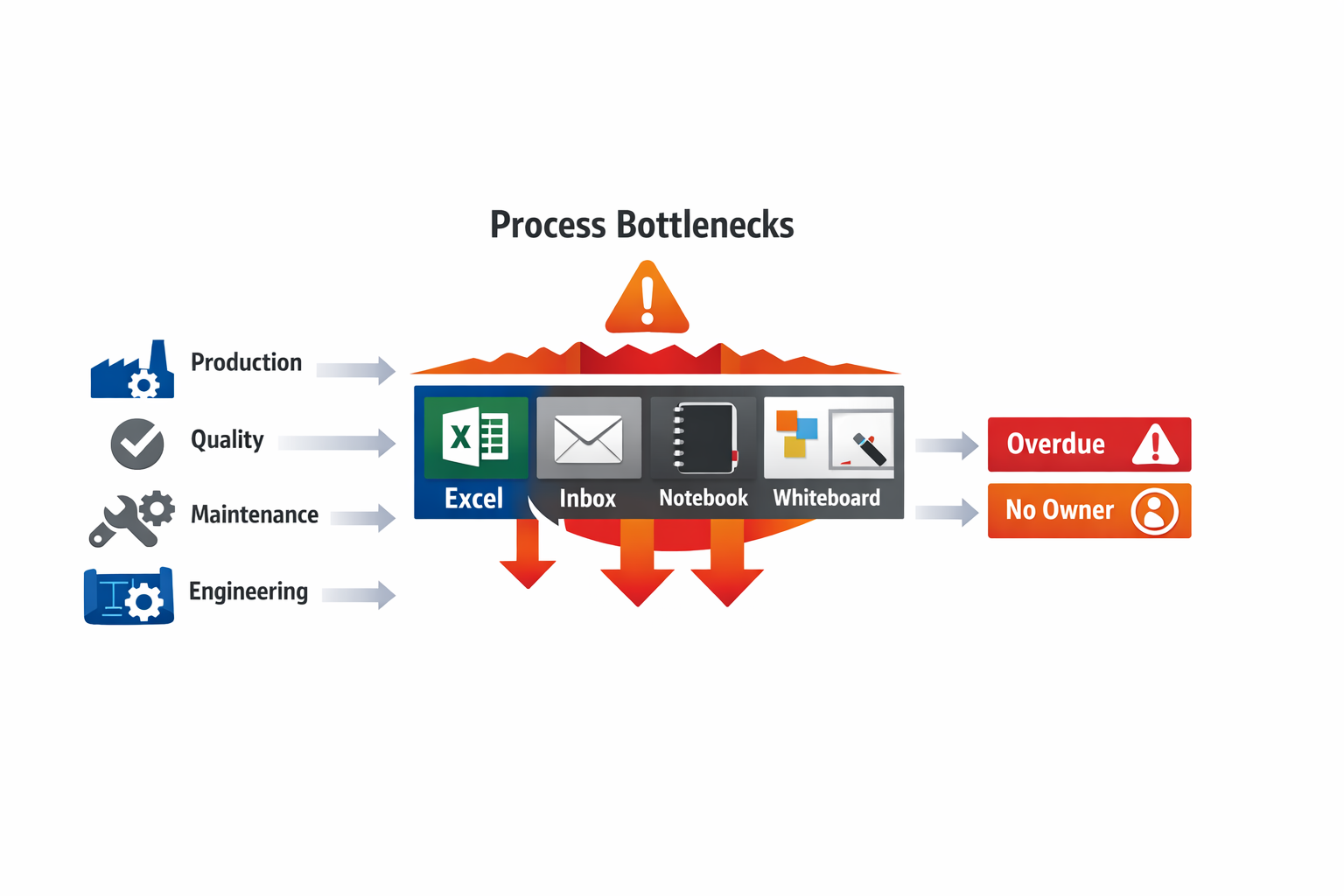
This is especially common in electronics plants where process changes often require input from production, quality, engineering, and EHS. A line leader may identify repeated soldering defects and suggest a fixture modification, but approval is delayed because the action owner is unclear and the engineering review sits in someone’s inbox. Manual systems make time-to-close hard to control because there is no workflow, no automatic alert, and no live status view. A strong continuous improvement software setup solves this by assigning owners, due dates, and escalation rules automatically.
Visibility Across Lines and Plants Is Weak
Spreadsheets are often local by nature. One file may be stored on a shared drive for Plant A, another on a desktop in Plant B, and another maintained only by the CI engineer. This creates a serious problem for regional manufacturers with multiple sites, because leadership cannot compare improvement activity, closure rate, or savings performance consistently across operations. You cannot manage what you cannot see.
For example, a food manufacturer with three plants may run separate kaizen programs for mixing, packaging, and warehouse operations. One site reports monthly cost savings in USD, another reports only idea counts, and the third tracks nothing beyond completed actions. When senior management asks which plant is reducing changeover loss fastest, the answer is often based on opinion rather than data. A kaizen digital platform gives all sites a common structure, so CI teams can compare participation, cycle time, and verified savings using the same metrics.
Accountability Becomes Personal Instead of Systematic
When kaizen follow-up depends on a few disciplined people, the process is fragile. If the CI manager is on leave, if a production supervisor transfers, or if the Excel owner forgets to update the file, momentum drops immediately. Manual systems create hidden dependencies on individuals rather than a repeatable management process. That makes sustainability difficult, especially in plants with high supervisor turnover or fast production ramp-ups.
A reliable CI management software approach makes accountability visible to everyone involved. Each improvement has a clear owner, target date, approval path, and status history. Instead of asking, “Who has the latest version of the file?” managers can ask the better question: “Which overdue actions are blocking implementation on Line 4?” That shift matters because it moves kaizen from informal coordination to operational control.
Approvals Are Slow and Hard to Audit
Many improvements require approval before implementation, especially if they affect tooling, process parameters, safety controls, or quality documentation. In manual environments, approval often happens through email chains, paper signatures, or verbal agreement during meetings. This slows down implementation and makes audit trails weak. In ISO 9001-driven environments, that lack of traceability becomes a real compliance issue.
Consider a packaging improvement in a food plant that reduces film waste by adjusting machine settings and changing inspection frequency. Production supports it, but quality wants validation data and maintenance needs to confirm machine limits. If those approvals are handled through separate messages and handwritten notes, it is difficult to confirm who approved what and when. A digital workflow inside kaizen management software keeps those decisions documented, time-stamped, and easy to review later.
Measuring Savings and ROI Is Often Unreliable
One of the most common frustrations for Lean and CI leaders is proving that kaizen work delivers business value. Teams may complete many actions, but if savings are estimated inconsistently—or not tracked at all—management sees kaizen as activity rather than measurable performance improvement. This is where spreadsheets often fail badly. Different people use different formulas, assumptions are not documented, and there is no standard way to distinguish projected savings from validated savings.
Manual Systems Reduce Employee Participation Over Time
Operators and supervisors are more likely to submit ideas when they believe something will happen next. If they never hear back, or if approved ideas take months to move forward, participation drops. This is one reason many suggestion programs fade after the initial launch. The problem is not workforce engagement alone; it is the absence of a responsive system.
Manual Kaizen Tracking Cannot Scale With Factory Complexity
A factory may start with one Excel file and one enthusiastic CI champion. But once you add multiple production lines, layered process audits, A3 actions, 8D follow-ups, and cross-functional approvals, the manual system becomes too slow and too fragmented. More data does not create more control if the process for managing it is weak. It only creates more admin work.
That is why manufacturers eventually move toward kaizen software instead of relying on disconnected tools. A modern kaizen digital platform gives you one system for idea capture, review, assignment, approval, action tracking, and KPI reporting. Instead of chasing files and reminders, your team can focus on implementing improvements faster and sustaining results longer.
What Workflows Kaizen Management Software Should Support in a Factory
Good kaizen software should do much more than collect employee suggestions. In a real factory, improvement work moves across departments, shifts, and approval levels, and the system needs to follow that flow without breaking. If your kaizen management software only captures ideas but cannot assign owners, track actions, verify results, and update standards, it becomes another digital suggestion box. Strong kaizen management software should support the full improvement lifecycle from shop-floor input to sustained control.
Idea Submission From the Shop Floor
The first workflow is simple but critical: frontline teams must be able to submit improvement ideas quickly. In many plants, the biggest barrier is not lack of ideas but the effort required to document them. If operators need to open a laptop, write a long form, and email a supervisor, participation drops fast. A practical kaizen digital platform should support mobile forms, tablet entry at the line, QR code access at workstations, and photo uploads to capture issues in seconds.
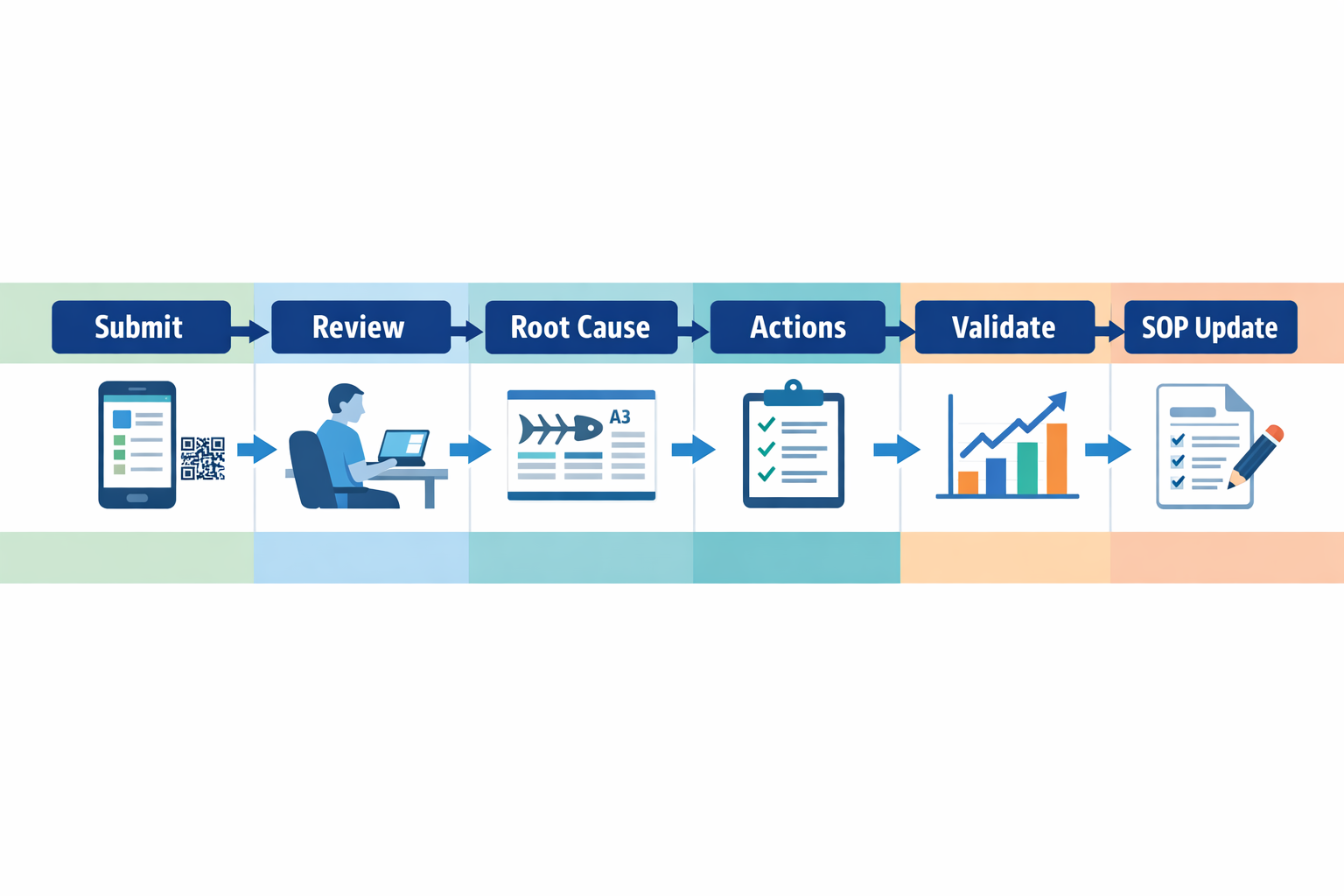
Imagine a production manager at an automotive parts plant who wants operators to report recurring bin shortages at an assembly cell. With a mobile-friendly kaizen tracking tool, the operator scans a QR code posted at the station, selects the line, attaches a photo of the empty rack, and submits the issue before the next cycle starts. That single workflow preserves context that usually gets lost in verbal handovers. It also creates structured data the CI team can analyze later by line, shift, part number, or department.
Evaluation And Prioritization Workflow
Once ideas come in, the next workflow is screening and prioritization. A factory may receive dozens of suggestions each week, but not every item needs a full kaizen event. Your continuous improvement software should route submissions to the right reviewer based on area, category, or estimated impact, whether that is production, quality, maintenance, engineering, or EHS. This avoids the common problem where good ideas sit in a shared inbox with no owner.
For example, a food manufacturing plant may receive three different improvement submissions in one day: a changeover reduction idea for packaging, a recurring seal defect complaint from quality, and a slip hazard report near a washdown area. These should not follow the same review path. A capable CI management software setup can automatically send the packaging idea to the production supervisor and IE engineer, the defect issue to quality and process engineering, and the safety concern to EHS with higher urgency. That kind of routing shortens response time and reduces risk.
Root Cause Analysis And Problem-Solving Workflow
A strong kaizen management software platform should also support formal problem solving, not just idea capture. Once a recurring issue is approved for action, teams need a structured workflow for root cause analysis using A3, 5 Whys, fishbone, or even 8D for more serious quality problems. The important point is that the workflow should connect the original issue, the analysis record, and the corrective actions in one place. Otherwise, factories end up with disconnected Excel files, printed A3 sheets, and email approvals that are hard to audit.
This matters in electronics manufacturing, where intermittent defects can be expensive and difficult to trace. Imagine a surface-mount line with repeated solder bridging on one product family. The kaizen software should allow quality engineers to log defect evidence, maintenance to attach machine calibration records, production to add shift patterns, and engineering to document process parameter changes. Cross-functional visibility is essential because many factory problems are not owned by one department alone.
Action Tracking Across Departments
The most valuable workflow in kaizen management software is often action tracking. Many plants are good at identifying waste but weak at closing the loop, especially when actions involve several functions. A production issue may require maintenance to replace a worn sensor, engineering to redesign a fixture, purchasing to source a new part, and training to update operator instructions. If these actions are tracked in separate systems or spreadsheets, deadlines slip and improvement momentum fades.
Your kaizen tracking tool should assign action owners, due dates, escalation rules, and completion evidence for each task. It should also show status clearly: open, in progress, overdue, awaiting validation, or closed. According to lean program benchmarks cited by industry practitioners, one of the most common reasons kaizen gains are not sustained is poor follow-up after the event itself. In practical terms, a plant with 100 open CI actions and no digital ownership will struggle to prove progress to management.
Validation Of Results Before Closure
Closing an action is not the same as proving an improvement worked. A reliable continuous improvement software workflow should require validation of results before final closure. That means comparing before-and-after metrics such as cycle time, scrap rate, downtime minutes, changeover duration, or safety incidents. Without that step, teams may close actions based on effort rather than outcome.
Consider an electronics factory that launches a kaizen to reduce feeder setup errors. After implementing color-coded trays and revised setup checks, the team should log actual results over a defined period, such as four weeks of line performance. The system should capture whether setup-related stoppages dropped, whether first-pass yield improved, and whether operators followed the new process consistently. This is how CI managers build credible ROI cases instead of relying on anecdotal success stories.
Standardization And Control Plan Updates
The final workflow is standardization, which is where many kaizen programs break down. Once an improvement is validated, the new method must be reflected in SOPs, work instructions, checklists, LPA questions, training records, and audit routines. If the change stays only in the kaizen report, the process often drifts back within weeks. Research on lean sustainment regularly shows that lack of standard work reinforcement is a major cause of backsliding after improvement events.
A good kaizen digital platform should trigger standardization tasks automatically when a project is approved for closure. For example, in a food plant that reduces label mix-up risk by changing line clearance steps, the system should route updates to quality documentation, operator training, and layered process audit checklists. That way, the improvement becomes part of daily management rather than a one-time project. This is where kaizen management software shifts from tracking activity to sustaining operational discipline.
What to Look for in Kaizen Software for Manufacturing
Choosing kaizen software for a factory is not the same as choosing a general task app. In manufacturing, every improvement idea links to real production conditions, operator behavior, quality results, safety risks, and cost impact. If your system cannot reflect how your plant actually runs, it quickly becomes another isolated tool that teams stop using after the first few kaizen events.
A good buying question is not just, “Can this system log ideas?” It should be, “Can this software help us capture, approve, execute, verify, and sustain improvements across lines, departments, and plants?” That is the difference between a basic suggestion box and a true continuous improvement software platform.
Configurable Workflows That Match Your Improvement Process
Every manufacturer runs kaizen differently. An automotive parts plant may require team leader review, production manager approval, trial validation, and quality sign-off before a process change is closed. A food manufacturer may need extra checks for HACCP controls, sanitation impact, and document revision before implementation.
Your kaizen management software should let you configure these workflows without custom coding. That includes approval stages, automatic notifications, escalation rules for overdue actions, and status tracking from idea submission to verified result. If the workflow is rigid, your team ends up working around the system in Excel, email, or paper, which defeats the point of digitization.
Role-Based Permissions for Shop Floor Control
Manufacturing improvement programs involve many roles, and not everyone should see or edit the same information. Operators may submit ideas and view their own action status, while supervisors need access to line-level issues, and plant managers need cross-site KPI visibility. Quality, maintenance, and engineering teams may also need different edit rights depending on the improvement type.
Strong role-based permissions are essential in CI management software because they protect data quality and simplify adoption. Imagine a production manager at an electronics assembly plant who wants operators to submit soldering defect improvement ideas through tablets on the line. Operators should be able to upload photos and describe the problem, but only engineers or CI leaders should approve process parameter changes that affect product quality.
Dashboards That Show Results, Not Just Activity
Many systems can count how many ideas were submitted. Fewer can show whether those ideas reduced scrap, improved OEE, shortened changeover time, or eliminated repeated defects. For plant leadership, the real value of kaizen software is visibility into business impact, not just participation volume.
Look for dashboards that track open vs. closed actions, overdue items, completion rate by department, cost savings, and trend data over time. According to industry findings from continuous improvement programs, one common failure point is poor follow-up rather than poor idea generation. A dashboard-driven kaizen tracking tool helps CI managers quickly identify where actions are stuck, which departments close improvements fastest, and which sites need support.
Mobile Access for Real Shop Floor Use
If your team cannot use the system at the gemba, adoption will drop. In many factories, improvement opportunities are identified during line walks, layered process audits, maintenance inspections, or shift handovers. By the time someone returns to a desktop, the details are incomplete or the issue is forgotten.
A practical kaizen digital platform should support mobile phones or tablets for data capture on the shop floor. That means operators and supervisors can submit ideas with photos, scan equipment QR codes, attach defect samples, and update action status in real time. In a food packaging plant, for example, a supervisor spotting repeated film jams on one packing line should be able to log the issue immediately, assign maintenance follow-up, and track corrective action without waiting for the end of shift.
Audit Trails and History Tracking for Accountability
Sustaining improvements requires traceability. You need to know who submitted an idea, who approved it, what changed, when it was implemented, and whether the result was verified after 7, 14, or 30 days. This matters not only for management discipline but also for ISO 9001 and internal audit readiness.
Audit trails are especially important when kaizen actions affect SOPs, process settings, inspection criteria, or maintenance standards. If a line team changes a fixture setup to reduce changeover time, the record should show the original condition, the approved countermeasure, and the post-implementation result. Without that history, successful improvements are hard to standardize and failed changes are hard to learn from.
Plant-Level Reporting Across Lines and Sites
Many factories start kaizen tracking in one department, then struggle when they try to scale. One plant uses spreadsheets, another uses email, and a third uses a standalone app that cannot compare performance across sites. That makes it difficult for regional operations leaders to understand where continuous improvement is working and where it is stalling.
The right kaizen management software should provide plant-level and multi-site reporting with consistent data structures. You should be able to compare metrics like idea participation rate, action closure time, verified savings, recurring issue categories, and implementation rate by line, department, or plant. For a Tier 1 automotive supplier with multiple plants in Southeast Asia, this kind of reporting helps standardize best practices and identify which facilities are truly sustaining lean gains.
Integrations With ERP, MES, QMS, and Maintenance Systems
Improvement data becomes far more valuable when it connects to operational systems. If a kaizen action reduces downtime, you should be able to relate that improvement to maintenance history. If an idea targets recurring defects, linking it to QMS nonconformance data makes prioritization much easier. If a process change affects routing, labor standards, or material usage, ERP and MES integration becomes important.
This is where many basic tools fall short. A standalone kaizen tracking tool may capture ideas well, but it often cannot connect those ideas to production orders, downtime codes, defect categories, or preventive maintenance records. A stronger continuous improvement software platform lets manufacturers integrate improvement workflows with ERP, MES, QMS, or CMMS data so teams can move from anecdotal problem-solving to data-driven action.
Flexible Enough to Evolve With Your Lean Program
Your lean program will change over time. You may start with simple suggestion management, then expand into A3, 8D, layered process audits, 5S findings, TPM actions, or cross-functional CAPA workflows. If your software only supports one fixed process, you will outgrow it quickly.
That is why manufacturers should be careful with rigid point solutions. A narrow tool may work for one use case, but an adaptable CI management software platform can evolve as your factory matures. For example, a plant might begin by digitizing kaizen idea submissions, then later add approval workflows, LPA follow-up, maintenance-triggered improvements, and executive dashboards without replacing the system.
Point Solution vs. Adaptable Kaizen Platform
Rigid point solutions are usually faster to deploy at the start, but they often become limiting once your process becomes more complex. They may offer fixed forms, limited approval paths, weak reporting, and little support for role-based access or cross-department workflows. In manufacturing, that usually leads to side spreadsheets, manual follow-up, and fragmented reporting within months.
An adaptable kaizen digital platform is better suited for real factory conditions because it can mirror your process instead of forcing your process to fit the software. With a no-code platform like Jodoo, manufacturers can build and adjust kaizen, A3, 8D, audit, and action-tracking workflows as requirements change across plants or product lines. That flexibility matters when your improvement process needs to respond to customer audits, new product introduction, line expansion, or stricter compliance requirements.
Practical Buyer Checklist
When evaluating kaizen software, check whether it can support the following:
- Configurable workflows for approvals, validations, and escalations
- Role-based permissions for operators, supervisors, engineers, and managers
- Real-time dashboards for actions, savings, trends, and participation
- Mobile access for shop floor submissions, photo capture, and updates
- Audit trails with full history of changes, approvals, and closures
- Plant-level and multi-site reporting with standardized KPI views
- Integrations with ERP, MES, QMS, and maintenance systems
- Flexibility to expand into A3, 8D, LPA, CAPA, or TPM workflows later
If a tool only helps you collect ideas, it is not enough. The best kaizen management software helps you sustain action, prove ROI, and scale continuous improvement across the factory. That is what turns isolated kaizen events into a repeatable operating system for manufacturing excellence.
Why No-Code Kaizen Software Gives Manufacturers More Flexibility
The core idea behind Kaizen is simple: your process should keep improving. That same logic should apply to the software you use to run continuous improvement. If your kaizen software is rigid, slow to change, or dependent on an IT queue every time you want to update a form or approval rule, it quickly becomes a bottleneck instead of a support system.
For manufacturers, this matters more than it does in office-based environments. A food plant may need different escalation rules for hygiene deviations than an electronics factory tracking soldering defects, while an automotive supplier may want layered approvals tied to customer complaint severity. The best kaizen digital platform should let each site adapt quickly without forcing the business into one fixed workflow.
Fixed-Function Tools Often Break at the Plant Level
Many off-the-shelf kaizen management software products look strong in a demo because they come with prebuilt suggestion forms, action lists, and dashboards. The problem appears after rollout, when the plant wants to change practical details such as defect categories, action ownership logic, audit checklists, or how savings are calculated. In many factories, those changes happen monthly as teams refine their CI process, especially during the first 6 to 12 months of digitization.
Imagine a production manager at an automotive parts plant who wants operators to log improvement ideas by line, machine family, and shift, while supervisors must review them within 24 hours and route safety-related items to EHS immediately. A fixed-function tool may support the general idea of a suggestion workflow, but not the exact routing logic, scoring method, or dashboard layout the plant needs. That usually leads to workarounds in Excel, manual emails, or parallel paper logs, which defeats the point of implementing continuous improvement software in the first place.
Custom Software Is Flexible, but Often Too Slow and Expensive
At the other end of the spectrum, custom-built systems can match plant requirements very closely. But in manufacturing, the issue is not only the initial build cost. The bigger issue is ongoing change: every new plant, production line, CI template, or approval step becomes another development request that competes with ERP, quality, and maintenance priorities.
This is why many CI teams struggle to sustain momentum after the pilot phase. A plant may launch a solid Kaizen tracking process in one facility, then spend months waiting for IT or an external developer to replicate and adapt it for three more sites. That delay is costly, especially when industry studies often show that digital workflow automation can reduce administrative processing time by 30% to 50%, yet those gains are delayed because the system itself cannot evolve fast enough.
Generic Workflow Apps Miss Manufacturing Context
Some manufacturers try to bridge the gap with general-purpose workflow tools. These apps can be useful for basic approvals, but they often lack the structure required for shop-floor improvement work. A proper kaizen tracking tool needs more than a digital form; it needs traceable action ownership, status visibility, photo evidence, due-date escalation, and links between ideas, root causes, audits, and KPI outcomes.
For example, in an electronics assembly plant, a CI engineer may want to connect recurring solder bridge defects to operator suggestions, 8D actions, and verification audits on the SMT line. A generic workflow app may capture a request and approval, but it may not give the team a practical way to see whether that improvement reduced defects by station, product family, or shift over the next eight weeks. That is where purpose-built but configurable CI management software has a clear advantage.
Why No-Code Fits the Reality of Factory Improvement
No-code sits in the middle ground that many manufacturers actually need. It gives you far more flexibility than fixed-function tools, but without the long lead times and heavy cost of traditional custom development. For lean teams, that means the software can improve at the same pace as the improvement process itself.
With no-code kaizen software, you can update forms, approval flows, dashboards, and field logic as your process matures. If a plant in Malaysia wants a simpler operator suggestion form on mobile, while a regional CI leader wants a more detailed A3 workflow with ROI tracking and multi-level approval, both can be built within the same environment. That is especially useful for multi-site manufacturers that need standardization at group level but still need room for plant-level variation.
Faster Deployment Without Waiting on IT Backlogs
Speed matters when you are trying to build engagement in continuous improvement. If teams submit ideas but wait weeks for the workflow to be adjusted, they lose confidence in the system. A no-code kaizen digital platform allows operations teams to make practical changes quickly, such as adding a new waste category, introducing a manager review step, or changing dashboard filters for weekly Gemba meetings.
This is one reason no-code is gaining traction across operations functions, not just in CI. According to Gartner, low-code and no-code technologies continue to expand because business teams need faster delivery than traditional development models can provide. In manufacturing terms, that means your Lean Manager does not need to open a ticket and wait behind finance or CRM projects just to change an action-closure workflow.
Better Local Flexibility, With Central Control
Factory groups often need two things at once: local flexibility and corporate visibility. A beverage manufacturer may want each plant to run its own suggestion campaign, audit cadence, and approval thresholds, while headquarters still needs a single dashboard showing idea participation, closure rate, and verified savings across all sites. Fixed systems usually force too much standardization, while fragmented spreadsheets create no standardization at all.
A no-code kaizen management software approach makes this balance more practical. You can standardize core fields such as problem type, department, owner, target date, and savings category, then allow each plant to add line-specific fields or routing rules. That creates a much stronger foundation for comparing CI performance across facilities without ignoring local operating reality.
Practical Use Case: Updating a Kaizen Process in Weeks, Not Months
Consider a food manufacturing company running three plants with different improvement maturity levels. Plant A wants a simple operator idea submission form with photo upload and QR-based area selection. Plant B is more advanced and wants department managers to score ideas by safety, quality, delivery, cost, and morale before approval, while Plant C needs an escalation workflow for overdue corrective actions from hygiene audits.
In a traditional setup, supporting those differences might require separate spreadsheets, manual follow-up, or custom development. In a no-code continuous improvement software environment such as Jodoo, the team can build one connected app with different forms, workflows, and dashboards for each plant while keeping all data in a shared structure. That makes it easier to see which site has the highest participation rate, which department carries the most overdue actions, and which improvements delivered verified cost reduction in USD.
No-Code Supports Continuous Improvement of the System Itself
This is the main point: the software should not become more static than the process it supports. As your factory learns, your forms should improve, your approval rules should improve, and your dashboards should improve. A strong no-code CI management software approach supports that cycle by letting teams test, adjust, and standardize what works.
For manufacturers trying to scale Kaizen beyond isolated events, this flexibility is not a nice-to-have. It is what allows digital CI to stay relevant on the shop floor, align with real plant conditions, and keep pace with operational change. That is why no-code kaizen software is such a strong fit for factories that need fast deployment, practical customization, and measurable improvement without adding more complexity.
How Jodoo Helps Build a Practical CI Management Software System
Many factories do not fail at continuous improvement because they lack ideas. They fail because their kaizen process lives in disconnected tools: paper suggestion forms, Excel action lists, email approvals, and PowerPoint summaries for management review. Jodoo helps you build kaizen software around the way your plant already operates, so your team can standardize improvement work without forcing every line, department, or site into the same rigid template.
Build Kaizen Submission Forms That Match Shop Floor Reality
A good kaizen management software system starts with simple data capture. If operators and supervisors cannot submit ideas in less than a few minutes, participation drops fast. With Jodoo, you can build mobile-friendly submission forms that capture the exact information your factory needs, such as line number, machine ID, waste category, before/after photos, estimated savings, safety impact, and implementation status.
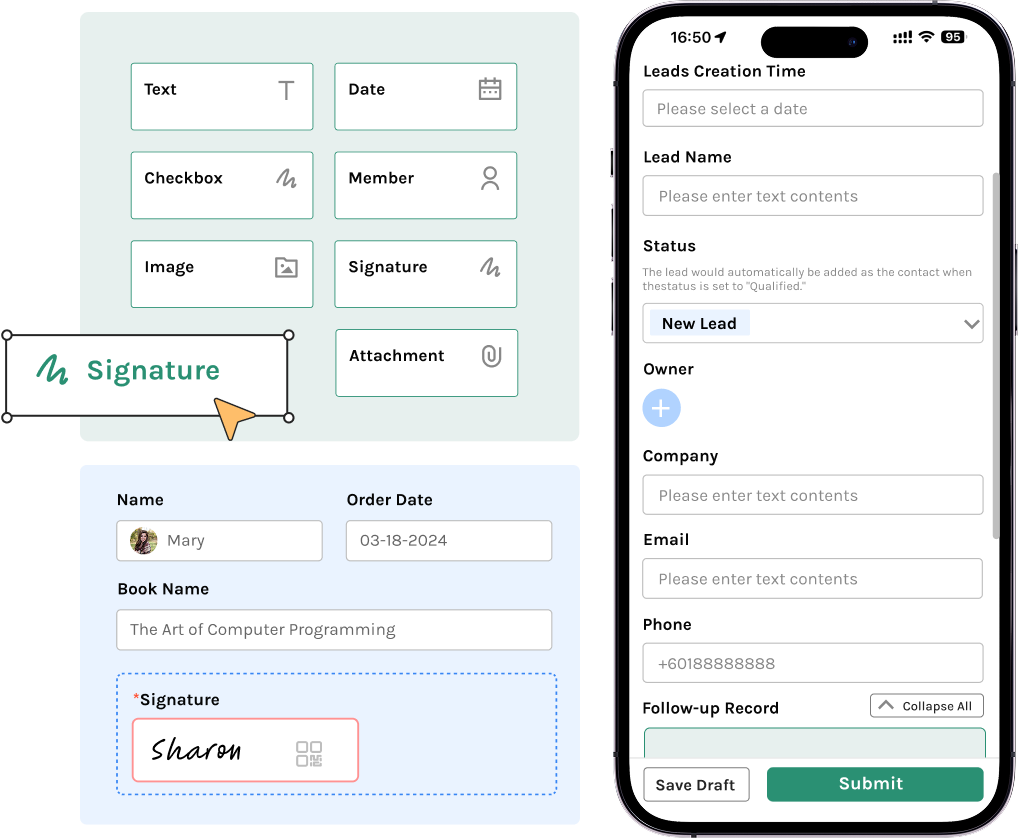
Imagine a production manager at an automotive parts plant who wants every team leader to log small improvements during daily Gemba walks. Instead of using a generic template, the plant can create separate form logic for assembly, stamping, and quality inspection areas. Assembly teams might log cycle-time losses and ergonomic concerns, while quality teams can attach defect images and link the issue to an 8D or A3 case. That makes Jodoo more than a suggestion box; it becomes a structured kaizen digital platform for frontline participation.
This approach also helps with data quality. Required fields, drop-down categories, barcode or QR-based equipment identification, and photo uploads reduce incomplete submissions. In practice, that means fewer follow-up calls from the CI team just to clarify where the issue happened, what was observed, or who owns the next action.
Turn Ideas Into Action With a Real Kaizen Tracking Tool
One of the biggest gaps in many CI programs is not idea generation but follow-through. Industry studies often show that execution is where improvement efforts stall, especially when action items are tracked manually across spreadsheets and meetings. Jodoo can be configured as a kaizen tracking tool that moves each idea through review, assignment, implementation, verification, and closure with full status visibility.
For example, a Continuous Improvement Manager in an electronics assembly plant can set up stages such as New, Under Review, Approved for Trial, In Progress, Pending Validation, Closed, and Rejected. Each stage can trigger notifications, due dates, escalations, and role-based approvals. If an improvement remains stuck in “In Progress” for more than 14 days, the system can notify the area manager automatically. That prevents kaizen actions from disappearing after the workshop ends.
This is especially useful in plants running monthly kaizen events or focused improvement weeks. Instead of managing action closure in a separate tracker, the actions stay tied to the original idea, owner, target date, and evidence of completion. Managers can see open items by department, overdue actions by owner, and closure rates by site in one place. That is what turns continuous improvement software from a record-keeping tool into an execution system.
Add Approval Flows Without Slowing Down Improvement
Not every improvement should move at the same speed. A visual management update on a packaging line may only need a supervisor’s approval, while a fixture change in a machining cell may require maintenance, engineering, and EHS review. Jodoo lets you configure approval logic based on risk, cost, or department, so the process stays controlled without becoming bureaucratic.
A food manufacturing plant, for instance, may define one workflow for low-cost improvements under USD 200 and another for changes that affect food safety controls or cleaning procedures. The first can move directly from team leader approval to implementation. The second can require QA review, updated work instructions, and supervisor sign-off before the change goes live. This kind of flexible approval routing is essential if you want kaizen management software that supports both speed and compliance.
Because approvals, comments, timestamps, and attachments are stored in one system, audit readiness also improves. If your plant is working under ISO 9001 or ISO 45001 requirements, it becomes much easier to show who approved what, when the change was implemented, and whether effectiveness was verified afterward.
Connect Root Cause Workflows to A3, 8D, and CAPA
Many improvements start as small kaizen ideas but reveal deeper recurring issues. A recurring solder defect in electronics assembly, for example, may begin as a suggestion to adjust workstation settings, then require a full root cause investigation when the issue appears across multiple shifts. Jodoo can connect frontline improvement records to A3, 8D, or CAPA workflows so your team does not need to re-enter the same issue in multiple systems.
This matters because disconnected tools create blind spots. If your kaizen log is in Excel, your CAPA record is in another system, and your audit findings sit in email, nobody has a complete picture of recurring loss patterns. In Jodoo, you can link an improvement proposal to a nonconformance, assign root cause tasks, track containment and corrective actions, and verify effectiveness in a single workflow chain. That makes the platform useful not only as kaizen software, but as broader CI management software for structured problem solving.
For plant leaders, the benefit is visibility. You can quickly identify which ideas are one-point improvements and which ones point to systemic causes such as equipment instability, training gaps, or unclear SOPs. That helps CI teams prioritize the work that will have the biggest operational impact.
Use KPI Dashboards to Prove CI Results
A common complaint from Lean and CI managers is that management supports kaizen in principle but asks for hard numbers when budgets are discussed. Jodoo includes dashboards that let you track improvement performance in real time, making it easier to prove the value of your continuous improvement software system. You can monitor submissions by line, closure rate, overdue actions, average days to close, estimated savings, recurring issue categories, and participation by department or site.
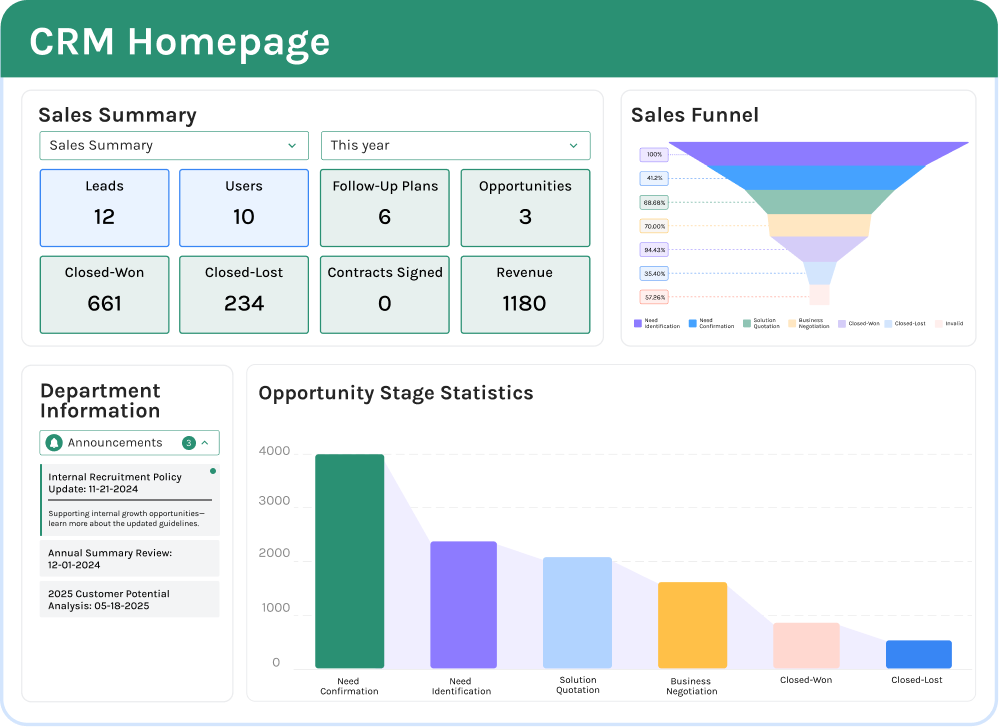
Imagine a regional operations director overseeing three plants in Southeast Asia. With a dashboard, they can compare which site closes actions fastest, which department generates the most implemented ideas, and where overdue approvals are slowing progress. If one electronics plant closes 85% of actions within 30 days while another closes only 52%, the gap becomes visible immediately. That creates a better management conversation than reviewing static monthly reports that are already outdated.
Dashboards are also useful at the shop-floor level. Team leaders can view active actions for their area, CI managers can track savings pipelines, and executives can see high-level trends without digging through raw records. In many factories, this visibility alone is enough to improve action discipline because owners know overdue tasks are no longer hidden in a spreadsheet.
Standardize Multi-Site Governance Without Losing Local Flexibility
Large manufacturers often struggle between two extremes. Either each site runs kaizen differently, making group reporting difficult, or headquarters imposes one rigid template that local teams resist. Jodoo helps you strike a practical middle ground by standardizing core fields, workflows, and KPIs while still allowing each plant to adapt forms and approval rules to local operations.
For example, a multinational supplier with plants in Malaysia, Thailand, and Indonesia may want one global structure for improvement categories, savings classification, and closure reporting. At the same time, one site may need bilingual operator forms, another may require maintenance review for machine changes, and another may prioritize food safety or traceability fields. Jodoo supports that kind of governed flexibility, which is critical for a scalable kaizen digital platform.
Role-based permissions also support governance. Operators can submit and view their own ideas, supervisors can manage area actions, plant CI leaders can monitor site performance, and corporate excellence teams can benchmark sites without changing local workflows. That keeps the system usable on the floor while still giving leadership the control and visibility they need.
Extend Kaizen Into Audits, Maintenance, and SOP Updates
In most factories, improvement work does not stop with kaizen suggestions. A layered process audit may uncover a missing standard. A maintenance request may reveal the true source of repeated stoppages. A corrective action may require an SOP revision and retraining. Jodoo is useful because it does not treat kaizen as an isolated module; it can extend into the connected processes that sustain improvement.
A practical example is a packaging line in a food plant where operators repeatedly report film misalignment. The initial kaizen record can trigger a maintenance request for roller inspection, a root cause task for engineering, and an SOP update once the countermeasure is confirmed. If the issue appears during an LPA, that audit finding can be linked to the same action record instead of opening a separate disconnected log. This reduces duplication and gives managers one source of truth for improvement-related work.
That connected workflow is where many plants see the biggest operational gain. Instead of managing one system for ideas, another for audits, and another for CAPA, they can build an integrated continuous improvement software environment on a single platform. For operations teams, that means faster closure, better accountability, and less administrative work.
A Practical Digital CI Use Case
Consider a mid-sized automotive supplier that previously managed kaizen activity using paper cards and a shared Excel file. Operators submitted improvement ideas into a physical box, supervisors reviewed them during weekly meetings, and the CI engineer manually updated status in the tracker. By the time management reviewed monthly results, many actions were already overdue, and nobody could easily see which department was blocking closure.
Using Jodoo, the plant could replace that process with a mobile submission form, automatic routing by department, due-date reminders, photo evidence for before-and-after conditions, and dashboards for open actions by owner and line. Improvement ideas involving tooling changes could be routed to engineering, while safety-related ideas could require EHS review before closure. In a setup like this, it is realistic to reduce administrative tracking time significantly and improve closure speed because owners receive automatic reminders and managers can act on overdue tasks earlier.
This kind of use case reflects why flexible kaizen management software matters. The value is not just digitizing a form. It is building a workflow that fits your plant’s real approval paths, action ownership rules, and reporting needs so continuous improvement becomes easier to run every day.
If you want a kaizen software system that matches your actual plant process instead of forcing you into a fixed template, Jodoo gives you the building blocks to create it—then expand it into audits, CAPA, maintenance, and SOP control as your CI program matures.
Conclusion: Start Digitizing Continuous Improvement with Jodoo
The main takeaway is simple: kaizen software should do much more than collect suggestions in a digital box. In a factory environment, it needs to connect ideas, root-cause analysis, action tracking, audits, approvals, and KPI reporting into one system that people actually use every day. That is how you move from isolated kaizen events to a repeatable continuous improvement process that scales across lines, departments, and plants.
Imagine a production manager at an automotive parts plant who can see every open kaizen action, overdue corrective task, and improvement trend from one dashboard instead of chasing updates through spreadsheets and email. Or a CI manager in an electronics factory who can track employee participation, closure rates, and savings by project in real time. That level of visibility makes it easier to sustain gains, prove ROI, and respond faster when performance starts to slip.
If you want a practical way to build that system without heavy custom development, Jodoo is a strong option. As a no-code lean manufacturing platform, Jodoo helps you create a flexible kaizen digital platform for idea capture, A3 workflows, LPA follow-up, and CI dashboards. You can start a free trial or book a demo to see how Jodoo can support a faster, more adaptable continuous improvement program.