Browse by category

Introduction: Why No-Code Manufacturing Software Is Gaining Traction
Many factories are still running critical processes on paper, Excel, and WhatsApp—even though unplanned downtime can cost manufacturers thousands of USD per hour and quality issues can spread across a line in minutes. The problem is not that operations teams do not want to digitize. The problem is that traditional software projects often move too slowly, with IT backlogs, custom development costs, and long rollout cycles that do not match the pace of daily production changes. That is why no-code manufacturing software is gaining attention across automotive, electronics, and food plants.
Take an automotive parts plant as an example: a production manager needs a simple app for shift handover, downtime tracking, and layered process audits. Waiting three to six months for a custom system is not realistic when the line is already losing output this quarter. With no-code tools, operations and lean teams can build and adjust factory apps themselves, using forms, workflows, dashboards, and mobile data capture instead of relying on hard-to-change software.
In this article, you will see what no-code manufacturing software is, where it fits on the shop floor, which use cases deliver the fastest ROI, and how manufacturers can use platforms like Jodoo to digitize production, quality, maintenance, and approvals without heavy IT involvement.
The Biggest Operational Pain Points No-Code Factory Management Can Solve
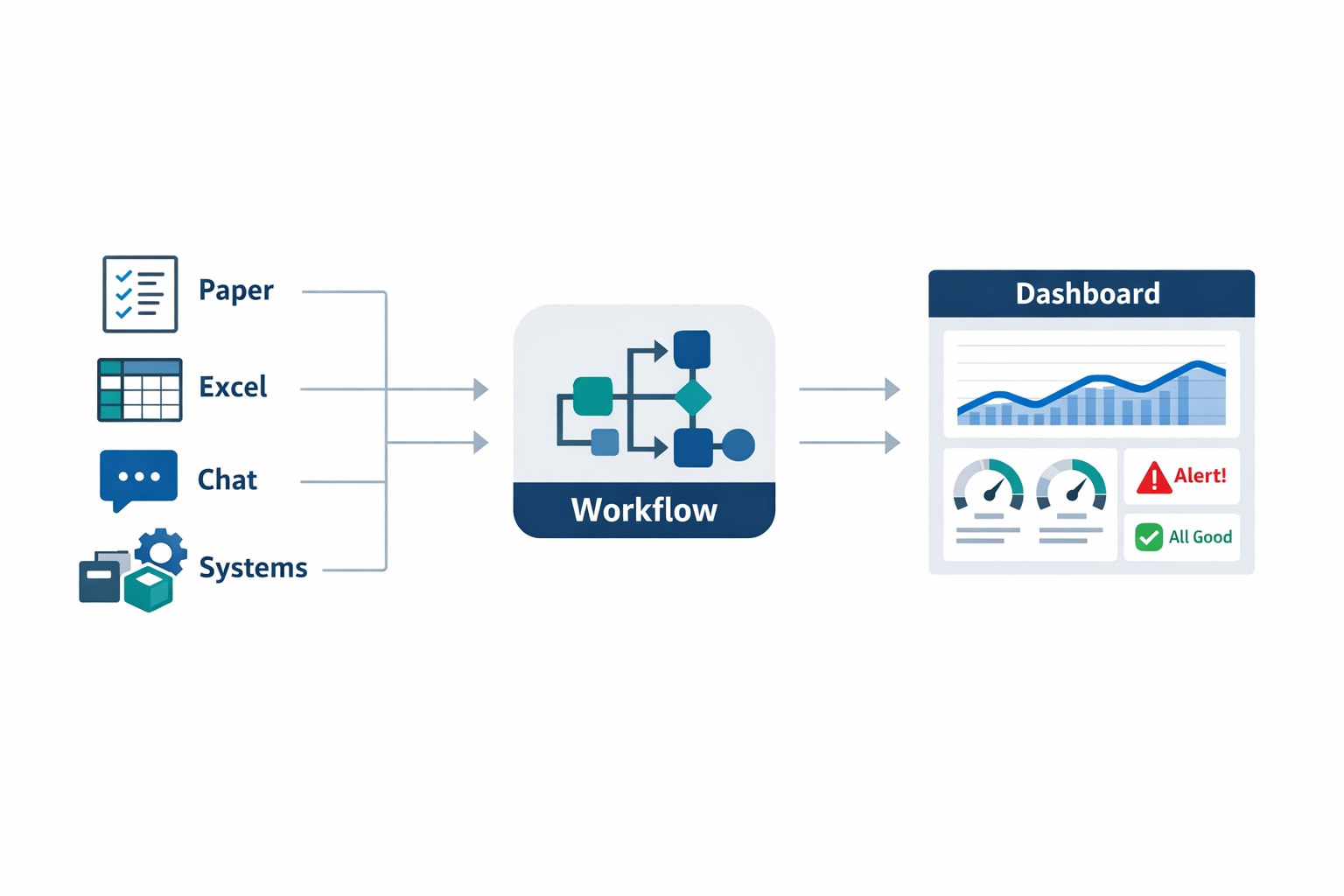
Many manufacturers do not struggle because they lack data. They struggle because the data is trapped in paper checklists, Excel files, WhatsApp messages, and separate department systems. That creates delays, blind spots, and constant follow-up work for supervisors, engineers, and plant managers. This is exactly where no-code manufacturing software delivers value: it turns disconnected manual processes into structured workflows that frontline teams can actually use.
Paper Forms Still Slow Down Daily Operations
In many plants, critical shop floor activities still run on paper. Quality checks, machine inspection sheets, maintenance requests, shift handovers, layered process audits, and improvement suggestions are often written by hand first and entered into a spreadsheet later. That means the information reaches decision-makers hours late or not at all, especially on night shifts and weekends.
In one automotive parts plant, a recurring torque-check failure is only discovered after paper records are collected at the end of the shift. By then, several pallets of parts may already be waiting for sorting, rework, or containment. With no-code factory management, operators can submit a check on a tablet or mobile phone, attach a photo, and trigger an alert immediately when a value goes out of spec. That shortens response time and reduces the cost of poor quality.
Spreadsheet Sprawl Makes Lean Improvements Hard to Sustain
Spreadsheets are familiar, but they become a problem when every department builds its own version of the truth. Continuous improvement teams may track Kaizen ideas in one file, maintenance logs in another, and action item follow-up in email threads. Over time, nobody is sure which file is current, which actions are overdue, or which line is actually improving.
This is one reason lean initiatives often lose momentum after the workshop ends. A digital workflow built with no-code lean tools gives you one place to log ideas, assign owners, track due dates, and measure closure rates. Instead of manually merging reports every month, your CI team can see open actions by line, department, plant, or owner in real time.
Delayed Approvals Create Avoidable Production Delays
Approval bottlenecks are a common hidden source of lost time in manufacturing. A maintenance spare purchase, deviation approval, tool change request, overtime request, or engineering change can sit in an inbox for hours because the process depends on email or paper signatures. On a busy production day, that delay can affect output, labor efficiency, and delivery performance.
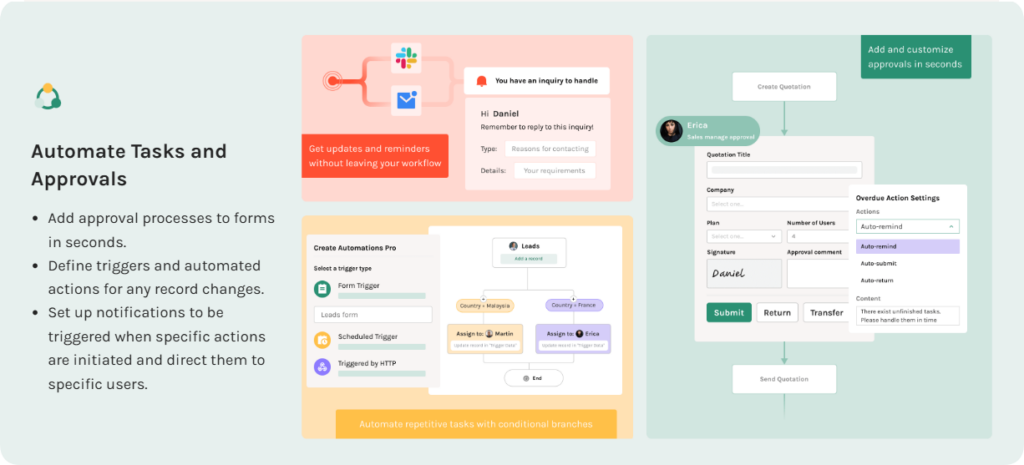
A no-code production app can route approvals automatically based on plant, department, product family, or request value. If a machine breakdown requires an urgent spare part under a pre-set USD threshold, the workflow can send it straight to the right approver and escalate if there is no response in 15 minutes. That is much more practical than chasing signatures across the shop floor.
Disconnected Systems Hide the Real Production Picture
Many factories use separate tools for inventory, production reporting, maintenance, quality, and continuous improvement. Each tool may work on its own, but the plant leadership team still has to piece together what happened. If scrap rises, was it caused by a tooling issue, a material batch problem, a training gap, or a rushed schedule change? Without connected data, root cause analysis is slower and less reliable.
A modern low-code manufacturing platform helps connect these processes without requiring a full custom software project. For example, a quality defect report can automatically link to the affected work order, machine, operator, and corrective action record. That gives managers a more complete picture and makes daily Gemba reviews more fact-based.
Slow Downtime Reporting Delays Corrective Action
Downtime data is often captured too late to support real-time recovery. In some plants, operators note machine stoppages on a whiteboard, then a supervisor re-enters the information into Excel at the end of the shift. By that point, maintenance cannot see the pattern early enough, and production leaders lose the chance to act during the same shift.
This matters because unplanned downtime is expensive. Depending on the industry and production process, even short stoppages can reduce OEE, create labor loss, and push orders into overtime. With no-code factory management, operators can log downtime reasons from a mobile device the moment a line stops, while supervisors view a live dashboard by machine, line, and shift. That makes it easier to spot repeated micro-stoppages before they become a major output problem.
Poor Visibility Across Shifts and Plants Leads to Inconsistent Execution
One of the most frustrating problems for operations directors is inconsistency. The day shift may follow the standard, but the night shift records issues differently. One plant closes improvement actions quickly, while another lets them sit open for weeks. When data is inconsistent, leadership cannot compare performance fairly or scale best practices across sites.
This is where teams often choose to build manufacturing app without coding rather than wait for a long IT roadmap. A no-code app can standardize forms, response fields, approval rules, and KPI definitions across every shift or facility. The result is better visibility into recurring defects, audit completion, action item aging, and response time by site.
Manual Lean Tracking Makes ROI Hard to Prove
Lean managers are under pressure to show measurable results, not just activity. But if A3 reports, 8D investigations, LPA findings, and Kaizen actions are managed in disconnected files, it becomes difficult to prove impact to senior management. You may know the team is working hard, but you cannot quickly show how many actions were closed, how long closure took, or how many repeat issues were prevented.
With no-code lean tools, you can create dashboards that track improvement performance in operational terms. For example, you can monitor audit completion rate, overdue corrective actions, top recurring findings, and closure cycle time by department. In a food manufacturing plant, that could mean seeing whether sanitation non-conformances are being closed within 24 hours before they turn into a customer or compliance issue.
Real-Time Dashboards Replace End-of-Month Firefighting
Many plants still rely on end-of-shift summaries or weekly spreadsheet reviews to understand what happened. That reporting rhythm is too slow for modern manufacturing, where schedule changes, material issues, and equipment problems can affect output within minutes. By the time managers review the report, the chance to prevent escalation has already passed.
A strong no-code manufacturing software setup combines mobile data capture, workflow automation, and live dashboards in one system. Instead of asking supervisors to compile updates manually, the platform updates KPIs automatically as records are submitted. For plant leaders, that means faster decisions on staffing, maintenance priority, containment actions, and production recovery.
In practical terms, the goal is not just to digitize forms. It is to create a responsive operating system for the factory, where data is captured once, routed automatically, and visible immediately. That is why more manufacturers are adopting no-code factory management and no-code production app approaches: they solve daily execution problems first, then create the foundation for better lean control, faster response, and more reliable plant performance.
What You Can Build With a No-Code Production App in Manufacturing
The biggest advantage of no-code manufacturing software is not that it helps you make “an app.” It helps you digitize the exact workflows your plant already runs every day. Instead of forcing production, quality, maintenance, and warehouse teams into generic forms, you can create a no-code production app that matches your line structure, approval rules, downtime codes, and KPI definitions.
For most factories, the highest-value use cases are internal operational workflows that are too specific for off-the-shelf software but too important to leave in Excel, paper checklists, or WhatsApp groups. That is where no-code factory management becomes practical. You can standardize data capture, trigger actions automatically, and give supervisors real-time visibility without waiting months for custom development.
Production Tracking and Output Reporting
A common first use case is production reporting by shift, line, machine, or SKU. For example, an automotive parts plant may need hourly output data from six stamping lines, along with scrap, changeover time, and unplanned stops. With a no-code production app, supervisors can enter results on tablets at line side, and the data can roll straight into a live dashboard for plan-versus-actual tracking.
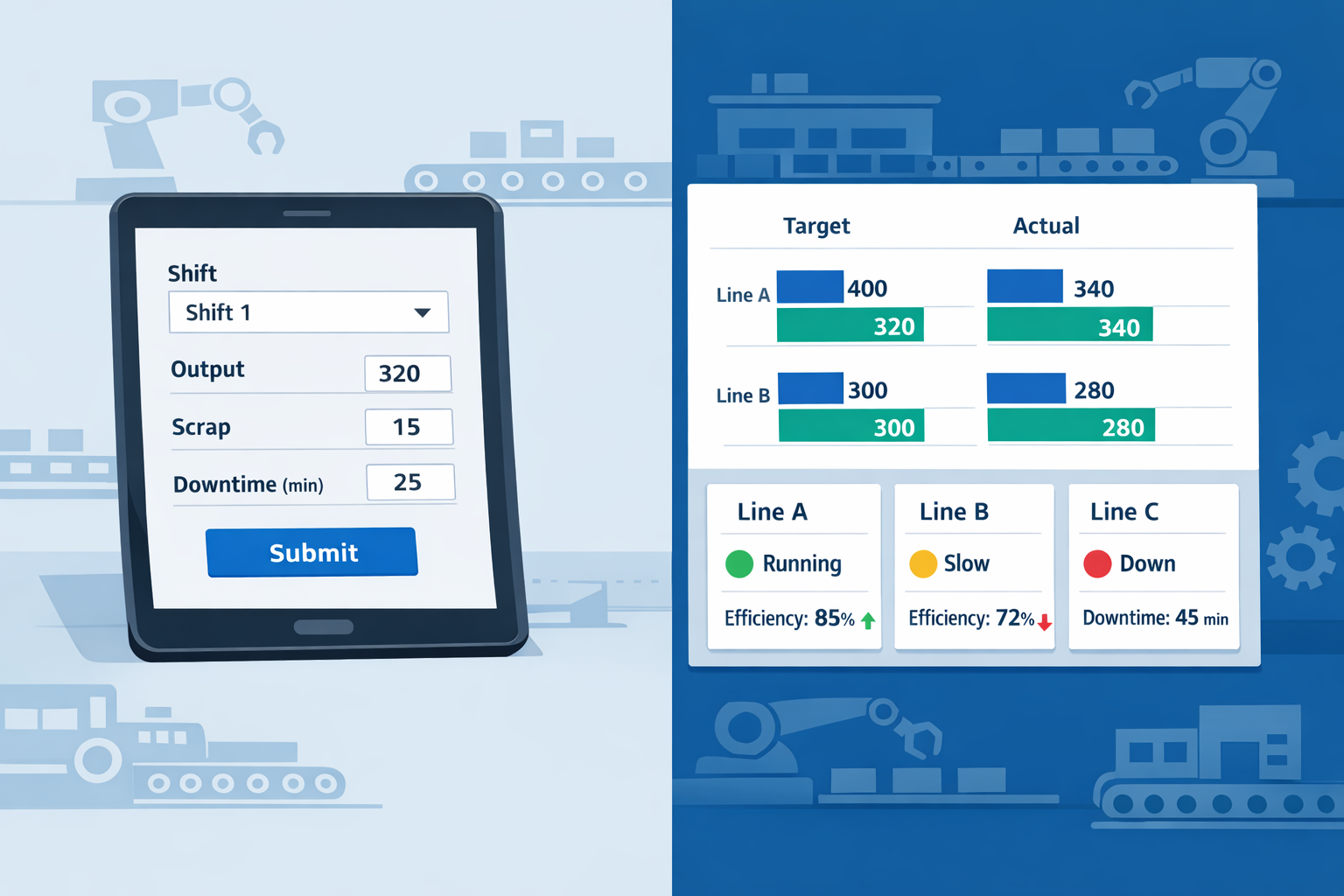
This matters because delayed reporting creates blind spots. If output issues are only discussed in the next morning’s meeting, the plant may lose an entire shift before anyone escalates the problem. With no-code manufacturing software, you can capture production counts in real time, flag shortfalls automatically, and notify the right supervisor when a line falls below target.
Quality Inspections and Layered Process Audits
Quality teams can also use no-code lean tools to replace paper inspection sheets and disconnected audit records. In an electronics assembly plant, for example, an incoming quality inspector may need to record defect types, attach photos, log supplier lots, and route failures for review. A digital inspection app makes that process consistent and traceable, which is critical for ISO 9001 environments.
Layered Process Audits are another high-impact area. Many plants still run LPAs on paper, then struggle to follow up on recurring nonconformities. With a low-code manufacturing platform like Jodoo, you can build an audit app that schedules audits, assigns findings, tracks due dates, and shows repeat issues by area, line, or owner.
Downtime Logging and Escalation
Downtime is one of the easiest places to show ROI fast. A food manufacturing plant may already record stoppages, but if operators write them on a whiteboard and someone later types them into a spreadsheet, the data is incomplete and late. A no-code downtime logging app lets operators select the machine, choose a downtime reason, record start and end times, and add photos or comments at the point of occurrence.
The value is not just data collection. The real benefit is workflow. If a stoppage exceeds 15 minutes, the app can alert maintenance, notify the shift leader, and create a follow-up record for root cause review. That turns downtime logging from passive reporting into active response, which is exactly where no-code factory management delivers value.
Maintenance Requests and Work Order Intake
Many plants have a CMMS for planned maintenance but still rely on informal channels for breakdown reporting. Operators tell a technician verbally, send a message in a chat group, or write the issue on paper. That creates delays, missing information, and no clear audit trail.
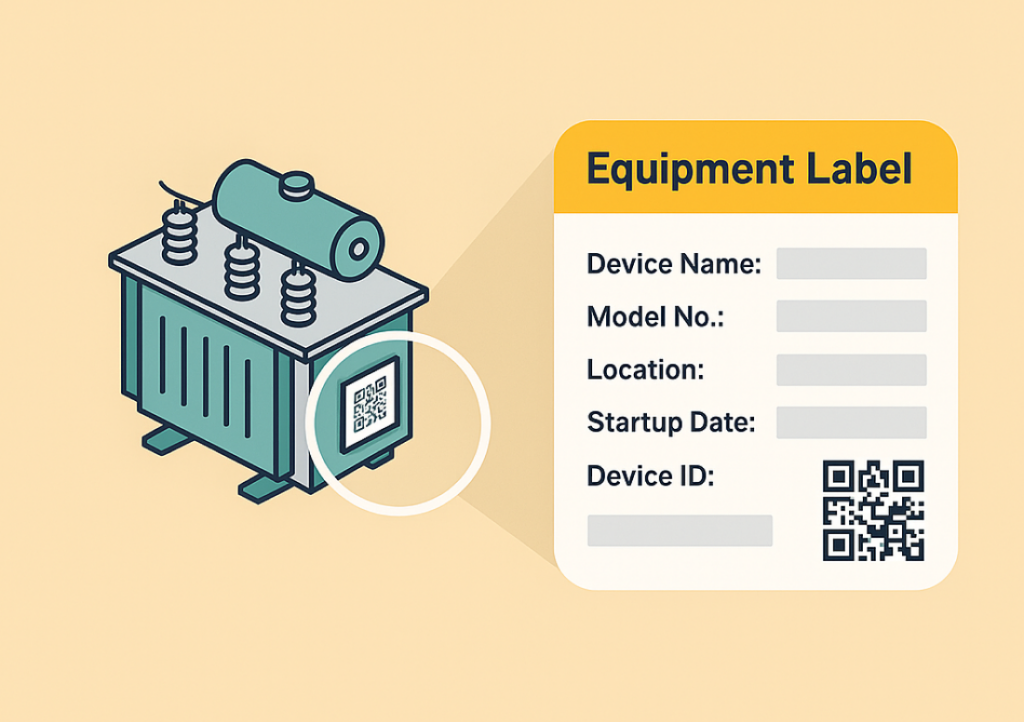
A simple maintenance request app can solve that quickly. Operators scan a machine QR code, select the fault category, describe the issue, and upload a photo or video. The request can then route automatically to the right technician or area engineer, making it easier to prioritize urgent equipment issues and analyze repeat failures later.
CAPA and Corrective Action Workflows
CAPA is where many factories lose momentum after identifying a problem. The nonconformance is recorded, but actions live in email threads or meeting minutes, and nobody has a reliable view of what is still open. With no-code manufacturing software, you can build a CAPA workflow that links the issue, root cause, action owner, due date, verification step, and closure approval in one place.
This is especially useful for plants managing customer complaints, audit findings, or recurring internal defects. A structured CAPA app helps prevent actions from disappearing after the initial meeting. For Lean Managers and CI leaders, it also makes it much easier to prove that improvement work is being closed on time and sustained.
Inventory Checks and Material Verification
Warehouse and production teams can use a no-code production app for cycle counts, line-side material checks, and lot verification. In an electronics plant, for example, a storekeeper may need to verify component inventory at multiple kitting points several times per shift. A mobile app can guide the count, capture variances, and escalate discrepancies before they affect production.
This use case is especially useful when ERP data is technically available but not easy for frontline teams to update quickly. A no-code app acts as the operational layer between formal systems and actual shop floor activity. That helps plants move faster without creating another spreadsheet-based side process.
Shift Handovers and Daily Management
Shift handovers are often more fragile than managers realize. If one supervisor leaves notes on paper and the next shift relies on verbal updates, key issues can easily be missed. Open breakdowns, quality holds, low material levels, and safety concerns may never be handed over clearly.
A digital shift handover app creates structure. Teams can log production status, unresolved abnormalities, manpower issues, machine conditions, and priority actions for the incoming shift. Because the data is stored centrally, managers can also spot patterns, such as repeated handover issues on a specific line or recurring unfinished actions across shifts.
Why Internal Workflow Apps Matter More Than Generic Tools
The point is not to replace every core enterprise system with a no-code app. The point is to close the operational gaps between ERP, MES, QMS, maintenance systems, and the daily reality of the factory floor. That is why manufacturers increasingly choose no-code manufacturing software over generic app builders that are not designed around traceability, approvals, mobile data capture, and role-based control.
If you want to build manufacturing app without coding, the most successful starting point is usually a narrow but painful workflow. Choose one process like downtime tracking, LPA follow-up, or shift handover, standardize it, and connect it to dashboards and alerts. Once teams see faster response times and cleaner data, it becomes much easier to expand into broader no-code factory management across production, quality, maintenance, and continuous improvement.
What to Look for in No-Code Manufacturing Software
Choosing no-code manufacturing software is not just about how fast you can build a form. For most manufacturers, the real question is whether the platform can handle daily factory complexity without creating a new IT burden. If you are an Operations Director, Plant Manager, IT Manager, or Lean Manager, you need a system that frontline teams can use easily while still giving management control, visibility, and scale.
A good platform should support both quick wins and long-term standardization. That means a supervisor can launch a simple downtime tracker in days, while IT can still manage permissions, integrations, and data governance across plants. In practice, the best fit is often a low-code manufacturing platform that combines no-code speed for business users with enough structure for enterprise oversight.
Ease of Use for Operations Teams
If operators, supervisors, and engineers cannot use the tool confidently on the shop floor, adoption will stall. The interface should be simple enough for non-technical users to create and update apps with drag-and-drop forms, clear workflows, and minimal training. This matters because many factory teams still rely on Excel, whiteboards, and paper logs, and any new system has to feel easier, not harder.
Workflow Automation That Matches Real Factory Processes
Manufacturing processes are rarely linear, so your software should support conditional workflows, approvals, escalations, and automatic notifications. For example, if a quality inspection fails, the system should automatically notify the line leader, create a containment task, and escalate unresolved issues after a set time. This reduces delays that often occur when action items sit in email threads or handwritten notebooks.
This is especially important for lean and quality programs. Many plants run layered process audits, 8D investigations, corrective actions, and maintenance requests in separate tools, which makes follow-up weak and accountability unclear. Strong no-code lean tools bring these workflows into one connected system so teams can track status, ownership, and closure dates in real time.
Role-Based Permissions and Governance
In manufacturing, not everyone should see or edit everything. Operators may need to submit downtime records, supervisors may approve rework, plant managers may review site-level KPIs, and corporate teams may need cross-site dashboards. The software should support role-based permissions down to app, form, record, and even field level.
This is where many lightweight tools fall short. A true no-code factory management platform must let business teams move quickly without compromising data security or compliance. For companies working under standards such as ISO 9001 or ISO 45001, audit trails, change history, and controlled access are not optional features; they are part of operational discipline.
Mobile Usability on the Shop Floor
Factory software must work where work actually happens: next to machines, at inspection stations, in warehouses, and during shift handovers. Mobile access should not be a reduced version of the desktop system. Teams need to capture photos, scan QR codes, attach documents, collect signatures, and submit forms quickly from phones or tablets.
A food manufacturing plant is a good example. A hygiene supervisor walking the line during a pre-operational inspection needs to record issues immediately, attach images, and trigger corrective action before production starts. If the mobile experience is slow or awkward, the team will revert to paper, and the digital system will lose credibility.
Dashboards That Turn Shop Floor Data Into Decisions
Collecting data is only half the job. Leaders also need dashboards that show what is happening now, where problems are building, and which actions are overdue. Real-time visibility into output, scrap, OEE drivers, audit findings, maintenance backlog, and open Kaizen items helps plants act faster and prioritize correctly.
For Lean Managers, dashboards are also essential for proving impact. According to industry studies, manufacturers that digitize frontline data collection and workflow follow-up can significantly reduce reporting delays and improve action closure rates. If you want to justify investment, your no-code manufacturing software should make it easy to show trends, exceptions, and ROI across lines or sites.
Integrations With Existing Systems
Very few manufacturers start with a blank slate. Most already use ERP, MES, CMMS, HR, or BI systems, along with many spreadsheets shared between departments. The right platform should connect with these systems through APIs, webhooks, or no-code connectors so that data flows automatically instead of being re-entered manually.
For example, an electronics manufacturer may want production orders from ERP, maintenance asset data from CMMS, and nonconformance records from a quality app to feed into one workflow. Without integration, teams end up duplicating work and creating conflicting versions of the truth. If your goal is to build manufacturing app without coding, integration is what turns a standalone app into part of a connected operation.
Scalability From One Line to Multiple Plants
Many digital projects start small, and that is the right approach. A team may begin with one inspection form, one downtime app, or one action tracker in a single plant. But if the pilot works, the platform must scale to more users, more workflows, more records, and more sites without forcing a rebuild.
This is where a low-code manufacturing platform has an advantage over disconnected point tools. It should let you duplicate proven apps, standardize templates, localize forms by plant, and still maintain central control over data structures and reporting. That is critical for regional manufacturers managing both single-site operations and multi-site rollouts across Southeast Asia or global production networks.
Support for Citizen Development With IT Oversight
The most effective manufacturing digitization efforts usually come from the people closest to the process. Lean teams know the audit checklist, production supervisors know the bottlenecks, and maintenance teams know the failure patterns. A strong platform lets those users configure solutions themselves while giving IT the tools to enforce standards, security, and integration policies.
In other words, you want a system where operations can launch a Kaizen tracker or deviation log quickly, but IT can still manage user access, master data, and platform governance. That balance is what separates a short-term app builder from a strategic no-code factory management environment. It allows the business to move fast without creating shadow IT.
What the Ideal Platform Looks Like
The ideal solution is not just a form builder or a simple workflow tool. It is a flexible platform that supports no-code production app development, cross-functional workflows, mobile execution, live dashboards, and enterprise governance in one environment. It should work equally well for a single plant trying to replace paper audits and for a multi-site manufacturer standardizing lean processes across regions.
If you are evaluating options, ask a simple question: can this platform help your team solve one real shop floor problem in weeks, then expand into a controlled digital operations system over time? If the answer is yes, you are looking at software that can support both citizen development and IT oversight. That is what modern no-code lean tools and manufacturing platforms need to deliver.
No-Code Manufacturing Software vs. MES, ERP Customization, and Custom Development
If you are evaluating no-code manufacturing software, the real question is not “Which tool is best?” It is “Which tool is best for this specific factory problem?” In most plants, MES, ERP, spreadsheets, paper forms, and email approvals already coexist, but they do not serve the same purpose. A practical decision starts by matching the type of process you need to digitize with the right level of flexibility, control, and implementation speed.
What Each Option Is Designed to Do
A Manufacturing Execution System, or MES, is typically built to control and monitor core production execution. It is the right fit when you need machine-level traceability, dispatching, production genealogy, quality enforcement at process steps, or tight integration with PLCs and shop-floor equipment. For example, an electronics factory running SMT lines may rely on MES to track every board, operator action, and test result in sequence to meet customer traceability requirements.
ERP customization serves a different purpose. ERP is strong for enterprise-wide transactions such as purchasing, finance, MRP, inventory valuation, order management, and standard master data control. If a food manufacturer wants to extend its ERP to handle a revised approval step in raw material release or a custom purchasing workflow, ERP customization may be appropriate, especially when the process must stay tightly tied to financial and supply chain records.
Fully custom development is usually the most expensive and the most flexible option, but also the slowest to deploy and hardest to maintain. It makes sense when your company needs highly specialized logic, proprietary workflows, or deep system integration that standard platforms cannot support. Imagine a Tier 1 automotive supplier building a unique production scheduling engine that combines customer releases, tool change constraints, and supplier ASN data in real time. That is usually beyond the scope of a simple business app builder.
Where No-Code Manufacturing Software Fits Best
No-code manufacturing software is strongest in the space between rigid enterprise systems and uncontrolled spreadsheets. It is ideal for operational workflows that change often, involve multiple departments, and need to be built or updated quickly without waiting months for IT development cycles. This is why many manufacturers use a no-code production app or no-code factory management platform for shift handovers, layered process audits, maintenance requests, deviation approvals, CAPA tracking, kaizen ideas, skill matrices, and nonconformance follow-up.
The key advantage is speed plus adaptability. According to multiple low-code and no-code market studies, business applications built on visual platforms can be delivered significantly faster than traditional development, often in weeks instead of months. For a plant manager, that matters when the process itself is still evolving, such as a new line startup, a temporary containment process, or a continuous improvement rollout across several plants.
This is also where no-code lean tools become especially valuable. Lean teams rarely need to control machines directly, but they do need to standardize audits, action tracking, escalation, and KPI visibility. A CI manager may need to launch an LPA app this month, add photo evidence next month, and then introduce automatic reminders for overdue corrective actions after the next management review. That is exactly the type of workflow where a low-code manufacturing platform creates value.
A Practical Factory Example
Take a welding area at an automotive parts plant as an example: recurring defects are already becoming difficult to control. Operators record issues on paper, supervisors track actions in Excel, and the quality team reports trends in PowerPoint at the end of the month. By the time management sees the data, the same defect has already repeated across several shifts.
In this case, an MES may already capture production counts and machine cycle information, but it may not be practical to modify it quickly for a new layered audit process or a cross-functional 8D follow-up workflow. ERP is even less suitable because the problem is not financial processing or material planning. A no-code manufacturing software platform can be used to build a manufacturing app without coding for defect logging, containment approval, action ownership, due-date escalation, and dashboard tracking in a matter of days or weeks.
That app can include mobile forms for line leaders, role-based approvals for quality engineers, photo uploads from the shop floor, and a dashboard showing open actions by line, defect type, and aging. If the plant later wants to add QR-based station selection or link the issue to operator training records, the workflow can be updated without rebuilding the whole system. This flexibility is why no-code is often the best fit for continuous improvement and operational discipline.
When MES Is the Better Choice
Choose MES first when the requirement is execution control, machine connectivity, or detailed traceability within the production process itself. If you must enforce work sequences, collect process parameters automatically, manage electronic work instructions at each station, or create a full genealogy record for every unit, MES is the more appropriate backbone. In regulated and high-traceability sectors, such as electronics, medical device assembly, or complex automotive manufacturing, this level of transactional control is often non-negotiable.
A useful rule is this: if the app must directly manage what happens at the machine or workstation in real time, MES should lead. A no-code production app can still complement MES by handling surrounding workflows, such as deviation approvals, audit findings, or escalation loops. In many factories, the best architecture is not MES versus no-code, but MES plus no-code.
When ERP Customization Makes More Sense
Choose ERP customization when the workflow is fundamentally part of enterprise planning, finance, procurement, or inventory control. For example, if a process change affects batch costing, supplier invoicing, stock valuation, or purchase approval policies, ERP is usually the right system of record. ERP customization is also appropriate when strong governance over transactional data is more important than rapid operational experimentation.
That said, many plants overload ERP with workflows it was never designed to handle. A simple example is a maintenance spare parts request that starts on paper, moves to email, and then gets partially entered into ERP by an admin clerk. In that case, a no-code factory management layer can capture the request, route approvals, and then pass only the finalized transaction into ERP through integration. This reduces ERP clutter while still preserving data integrity.
When Fully Custom Development Is Worth It
Custom development is justified when your workflow creates strategic advantage or requires deep technical behavior that no configurable platform can provide. That may include advanced optimization engines, custom operator interfaces tied to proprietary devices, or highly specific data models that must support unusual business rules at scale. The trade-off is cost, time, and long-term maintenance dependency.
For many manufacturers, custom development looks attractive at first because it promises a perfect fit. In practice, it often creates a backlog problem, where every small workflow change must go through scoping, testing, development, and release management. If your process changes every quarter, that is usually a sign to avoid heavy custom coding unless the process is mission-critical and technically unique.
A Simple Decision Framework
Use no-code manufacturing software when the process is operational, internal, and likely to evolve. Good examples include kaizen tracking, LPA, on-site inspections, shift reports, maintenance requests, skill certification tracking, rework approvals, and production meeting action lists. These are exactly the areas where teams want to build manufacturing app without coding and improve it continuously after go-live.
Use MES when the workflow must control production execution, collect machine or process data at the source, or maintain serialized traceability. Use ERP customization when the process belongs inside finance, procurement, inventory, or planning workflows and requires strict master-data and transaction governance. Use fully custom development when neither standard enterprise systems nor a low-code manufacturing platform can support the required complexity or integration depth.
A practical test is to ask four questions. Does the process change frequently? Does the business team need to make improvements directly? Is the workflow cross-functional but not machine-control-critical? Does waiting three to six months for IT create operational risk? If the answer to most of these is yes, no-code manufacturing software is often the right fit.
The Best Approach for Most Plants: Use No-Code Alongside Core Systems
Most factories do not need to replace MES or ERP to get value from no-code. They need a faster way to digitize the workflows that sit between formal systems and frontline execution. This is where platforms like Jodoo fit well, especially for manufacturers that want to deploy internal apps quickly, standardize lean processes, and connect data across departments without large development projects.
In practice, the winning model is often layered. ERP handles enterprise transactions, MES handles production control, and no-code lean tools handle the fast-changing operational workflows that drive daily management and continuous improvement. That approach gives operations teams speed, gives IT governance, and gives management better visibility into what is actually happening on the shop floor.
How Jodoo Supports No-Code Factory Management and Lean Operations
Jodoo is designed for manufacturers that need custom digital workflows but do not want every improvement project to become an IT project. As a no-code manufacturing software platform, it gives operations, quality, maintenance, warehouse, and lean teams one environment to build forms, workflows, dashboards, and connected apps around actual shop floor processes. That matters because many factories still run critical activities through paper checklists, shared spreadsheets, WhatsApp messages, and stand-alone systems that do not talk to each other.
For plant managers, the value is practical: you can standardize processes faster, reduce manual follow-up, and get better visibility without waiting months for software development. For IT managers, Jodoo provides governance through role-based permissions, audit trails, centralized data, and scalable app management. In other words, it supports no-code factory management without creating uncontrolled shadow systems across departments.
Build Apps Around Real Factory Workflows
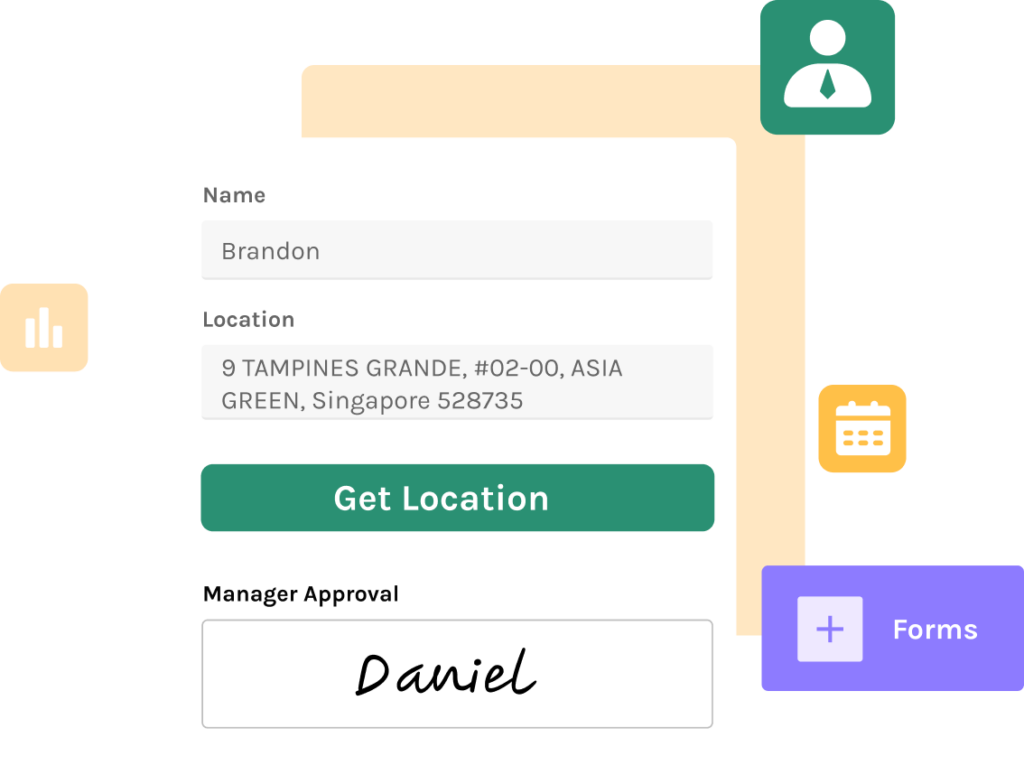
Most factories do not need a generic app builder. They need a way to digitize very specific workflows such as first-piece inspection, downtime logging, production reporting, layered process audits, line clearance checks, changeover approvals, maintenance requests, and warehouse exception handling. Jodoo lets teams build manufacturing app without coding by using drag-and-drop forms, workflow logic, data relationships, and mobile-ready interfaces.
This approach is especially useful in high-mix, fast-changing environments where standard software often forces teams to work around the system. In electronics assembly, for example, a quality engineer may need to revise an in-process inspection form when a customer introduces a new defect classification. Instead of raising a development ticket and waiting for IT, the team can update the form, rule, and approval path directly within the platform while still staying inside approved governance controls.
Digitize Forms, Approvals, and Shop Floor Data Capture
A major barrier to digital transformation in manufacturing is not strategy but data collection. Operators, technicians, and team leaders are still often writing down readings, signing paper sheets, and passing forms to the next person manually. Jodoo helps convert these steps into digital forms with calculations, validation rules, attachments, signatures, QR or barcode scanning, and mobile access.
That means one platform can support many factory scenarios. A food manufacturing site can digitize pre-operation hygiene inspection forms, CCP verification records, maintenance work requests, and pallet movement logs in the same system. An electronics plant can use it for incoming quality checks, rework tracking, ECN acknowledgment, and material shortage escalation without buying separate tools for each use case.
Approvals are also easier to standardize when they are built into the process. For example, a deviation record can trigger automatic review by quality, production, and engineering based on defect severity or customer impact. This is where Jodoo works not just as a form tool, but as a low-code manufacturing platform that links data capture to action, accountability, and response time.
Automate Lean Workflows and Action Tracking
Lean programs often fail to sustain gains because improvement ideas and action items are tracked in disconnected files. A Kaizen event may produce 25 actions, but after two weeks, half are buried in email threads and no one has a live status view. Jodoo addresses this gap with structured workflows for improvement submission, review, ownership, deadlines, escalation, and closure.
For Lean Managers, this turns scattered CI activity into a measurable operating system. You can build no-code lean tools for A3 tracking, 8D follow-up, LPA scheduling, red-tag management, and corrective action verification without depending on custom software developers. Each record can include owner, due date, before-and-after photos, root cause category, savings estimate, and verification sign-off, giving leaders a much stronger basis for sustaining improvements.
Consider a multi-line electronics manufacturer running weekly layered process audits. Instead of auditors carrying paper checklists and later retyping results into Excel, they complete audits on mobile devices, attach photos of issues, and trigger actions instantly for the responsible supervisor. A dashboard then shows repeat findings by line, department, and category, making it easier to prioritize systemic fixes rather than treating each issue as an isolated event.
Connect Production, Quality, Maintenance, and Warehouse Teams
One of the biggest operational losses in manufacturing comes from broken handoffs between functions. Production logs a machine issue, maintenance does not see the full context, quality is informed too late, and warehouse keeps issuing material to an affected line. Jodoo helps unify these cross-functional processes by linking apps and records across departments inside one platform.
A practical example is downtime management. An operator submits a downtime event with machine ID, reason code, and photo evidence; the system routes it to maintenance if the stop exceeds a set threshold; quality is notified if suspect product was made during the event; and production management sees the loss immediately on a dashboard. This kind of workflow is difficult to manage in spreadsheets, but straightforward in a connected no-code factory management platform.
Cross-functional visibility also supports better inventory and warehouse control. If a food plant identifies packaging defects during line startup, Jodoo can trigger a hold workflow for the affected lot, notify warehouse staff, and create a traceable review record for quality. That reduces the risk of incorrect material issuance and helps support ISO 9001-style traceability requirements without building a custom MES module from scratch.
Maintain Governance Without Slowing Down Operations
A common concern with no-code tools is loss of control. Manufacturing leaders want flexibility, but IT teams still need security, permissions, auditability, and consistency across plants. Jodoo is built to balance both sides by giving business teams speed while allowing centralized governance over who can view, edit, approve, and administer data.
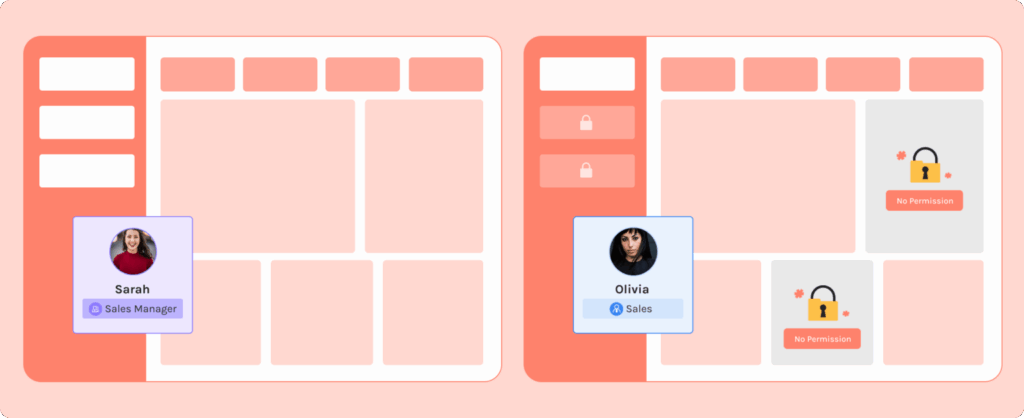
This matters in larger operations where not every user should see every record. A maintenance planner may need access to work order history, while a line operator only sees the forms required for their station. A plant manager may view all dashboards, but a supplier-facing quality app can restrict visibility to only the relevant nonconformance cases and attachments.
Scalability is equally important. A pilot app for one production line often becomes a multi-site workflow once it proves useful. Jodoo supports that expansion by letting teams duplicate, adapt, and govern apps across departments and plants, which is why it fits manufacturers looking for no-code manufacturing software that can start small and scale without a full redevelopment cycle.
Turn Factory Data Into Real-Time Decisions
Digitizing forms is only the first step. The bigger advantage comes when factory data becomes visible in real time and supports action at the right level. Jodoo dashboards allow operations leaders to track KPIs such as output attainment, downtime minutes, defect trends, audit completion rate, open corrective actions, and maintenance response time from one place.
In many plants, supervisors still spend 30 to 60 minutes per shift compiling reports manually from different files and messages. When reporting is automated, that time can shift back to line support, problem-solving, and coaching. More importantly, the factory moves from delayed reporting to live management, which is critical when unplanned downtime can cost manufacturers thousands of USD per hour depending on the process and product value.
For lean and CI leaders, dashboard visibility also makes it easier to prove ROI. Instead of saying a Kaizen event “improved communication,” you can show that open action items dropped by 70%, average closure time fell from 14 days to 4 days, and repeat audit findings declined over the next quarter. That level of evidence helps improvement teams secure management support and expand successful practices faster.
Why Jodoo Fits Manufacturers That Need Speed and Control
Jodoo stands out because it combines app building, workflow automation, data capture, dashboards, and integrations in one platform. Rather than buying one tool for inspections, another for approvals, another for dashboards, and another for action tracking, manufacturers can standardize these workflows in a single environment. That simplifies administration and reduces the fragmentation that often slows down plant-level digitization.
If you want to build manufacturing app without coding, but still need enterprise controls, Jodoo is a strong fit. It supports practical factory use cases, works across web and mobile, and gives operations teams the ability to adapt workflows as production realities change. For manufacturers looking for a scalable low-code manufacturing platform that also serves as a true no-code production app and lean operations backbone, Jodoo gives you a way to digitize fast without sacrificing control.
Real Example: How a Manufacturer Can Build a Factory App Without Coding
Imagine a production manager at an automotive parts plant running three stamping lines and two welding cells. Every shift, supervisors record downtime on paper, maintenance issues in WhatsApp, and action items in Excel. By the end of the week, nobody is fully confident which stoppages were microstops, which were tooling failures, and which corrective actions are still open. This is exactly where no-code manufacturing software becomes practical: instead of waiting months for a custom MES add-on, the plant team can build a focused app around the process that is already slowing them down.
Before: Downtime Reporting Is Scattered Across Paper, Excel, and Chat
In many factories, downtime tracking looks organized on the surface but breaks down in execution. Operators fill in a handwritten log sheet at the line, shift leaders retype totals into Excel, and maintenance technicians receive breakdown updates through calls or messages. That means the same event may be recorded three different ways, often with different timestamps and different root-cause descriptions.
For a lean manager, this creates a serious visibility problem. If a 22-minute press stoppage is logged as “material issue” on paper but “sensor alarm” in Excel, your Pareto chart becomes unreliable. According to industry studies, poor data quality can consume 20% to 30% of employees’ time in manual correction and reconciliation, which is a major hidden loss in high-volume production environments.
After: A Plant Team Builds a No-Code Production App in Days
Using Jodoo, the operations team can build manufacturing app without coding by turning the downtime process into a simple digital workflow. The team starts with a mobile form for operators and supervisors, adding fields such as machine ID, downtime start time, end time, loss minutes, fault category, photo attachment, and immediate action taken. Because Jodoo is a low-code manufacturing platform designed for operational teams, they can do this with drag-and-drop configuration rather than software development.
Next, they add workflow rules. For example, if downtime exceeds 10 minutes or the reason code is “critical tooling failure,” the app automatically notifies the maintenance supervisor and production manager. If the same issue happens three times in 24 hours, the record can trigger an escalation for root-cause analysis or an 8D follow-up, which makes the app useful not just for reporting but also for continuous improvement.
Step-by-Step Factory Scenario
Let’s say a welding robot at Station 4 stops at 10:18 p.m. during the night shift. The team leader opens the app on a tablet, selects the asset, records the fault code, uploads a photo of the alarm screen, and submits the incident in less than a minute. Maintenance receives the alert immediately, instead of discovering it later from a paper sheet at the end of the shift.
Once the technician completes the repair, he updates the same record with the actual root cause, parts used, and restart time. The production supervisor can then close the record only after verifying the corrective action and checking whether output recovery is needed. This creates a full traceable history of the event, which is difficult to achieve with spreadsheets and nearly impossible with paper-only systems.
What the Workflow Looks Like Inside the App
A practical no-code factory management workflow usually has four stages. First, the operator or team leader logs the event at the point of occurrence. Second, the system routes the issue automatically based on rules like line, severity, or loss time.
Third, responsible teams update progress directly in the same record rather than passing information across separate tools. Fourth, the dashboard aggregates all downtime by machine, line, shift, product family, and cause code. For a plant manager, this means the morning meeting is based on live records rather than yesterday’s manually consolidated spreadsheet.
Why This Matters for Lean and CI Teams
For lean teams, the biggest gain is not only speed but discipline. A digital workflow makes it easier to standardize reason codes, enforce mandatory fields, and ensure that every major stoppage has an owner and due date. This is where no-code lean tools become valuable: they help sustain improvement routines after kaizen events instead of letting action tracking fall back into disconnected Excel files.
If a CI manager at an electronics assembly plant is trying to reduce recurring feeder jams on an SMT line, a no-code app makes it much easier to filter downtime by feeder type, compare incidents by shift, and identify whether the real issue is setup variation, worn components, or operator handling. With a no-code app, she can filter downtime by feeder type, compare incidents by shift, and identify whether the real issue is setup variation, worn components, or operator handling. That kind of analysis is much faster when the data is captured in a structured format from the start.
The Visibility Improvement Is Immediate
Once the workflow is live, Jodoo dashboards can show metrics such as total downtime minutes, top five causes, mean time to response, and mean time to repair. If one packaging line in a food manufacturing plant is consistently losing 45 minutes per shift to label sensor faults, the pattern becomes visible within days, not after a month-end review. For operations directors, that means faster decisions on maintenance prioritization, spare parts planning, and line-level accountability.
The reporting layer also helps with compliance and audit readiness. If your site works under ISO 9001 or ISO 45001 requirements, having time-stamped records, user history, and documented corrective actions supports stronger process control. Instead of searching through binders or email chains, managers can review a clean digital trail.
This Approach Works Beyond Downtime Reporting
The same logic can be used to create a no-code production app for first-piece inspection, layered process audits, shift handoff, changeover checks, or near-miss reporting. In an automotive plant, a shift handoff app can require outgoing supervisors to confirm manpower, WIP status, machine abnormalities, and quality concerns before the next team starts. In a food factory, an inspection app can require photo evidence and digital sign-off before sanitation release.
That flexibility matters because most plants do not fail from lack of software. They fail because one rigid system cannot match the real workflow on the shop floor. A configurable no-code manufacturing software platform lets operations teams start small, prove value quickly, and expand process by process without waiting for a full IT project.
What Results Can a Manufacturer Expect?
A realistic first-stage result is faster response time and better data accuracy. If the previous process required supervisors to summarize stoppages manually at the end of each shift, digital entry alone can save several hours per week per line. Plants also typically see better closure discipline because open actions are visible, assigned, and time-stamped instead of buried in meeting notes.
Over time, the bigger impact is management visibility. When downtime, inspections, and corrective actions live in one connected system, plant leaders can spot repeat failures sooner and verify whether countermeasures are actually working. That is the core promise of no-code factory management: not replacing every enterprise system overnight, but giving manufacturing teams a practical way to digitize the workflows that matter most right now.
Conclusion: Choosing the Right No-Code Manufacturing Software for Your Factory
The right no-code manufacturing software should do more than replace paper forms or spreadsheets. It should help your operations team build and improve factory workflows quickly, while giving IT the control it needs over permissions, data structure, and system governance. In practice, that means one platform should support use cases such as layered process audits, maintenance requests, production reporting, quality checks, and Kaizen action tracking without forcing every change into an IT backlog.
If you are evaluating options, focus on three questions. Can supervisors and engineers configure apps themselves with minimal training? Can IT standardize data, security, and integrations across plants? And can the platform scale from a single pilot line to multiple factories without rebuilding everything from scratch? These are the factors that determine whether a no-code project delivers lasting operational value or becomes another short-term experiment.
Jodoo is a practical no-code lean manufacturing platform built for exactly this challenge. You can use it to create factory apps for inspections, approvals, CI tracking, dashboards, and more without heavy custom development. If you want to build factory apps without IT bottlenecks, start a free trial or book a demo to see how Jodoo fits your operation.